Using Your Custom External Data Adapter
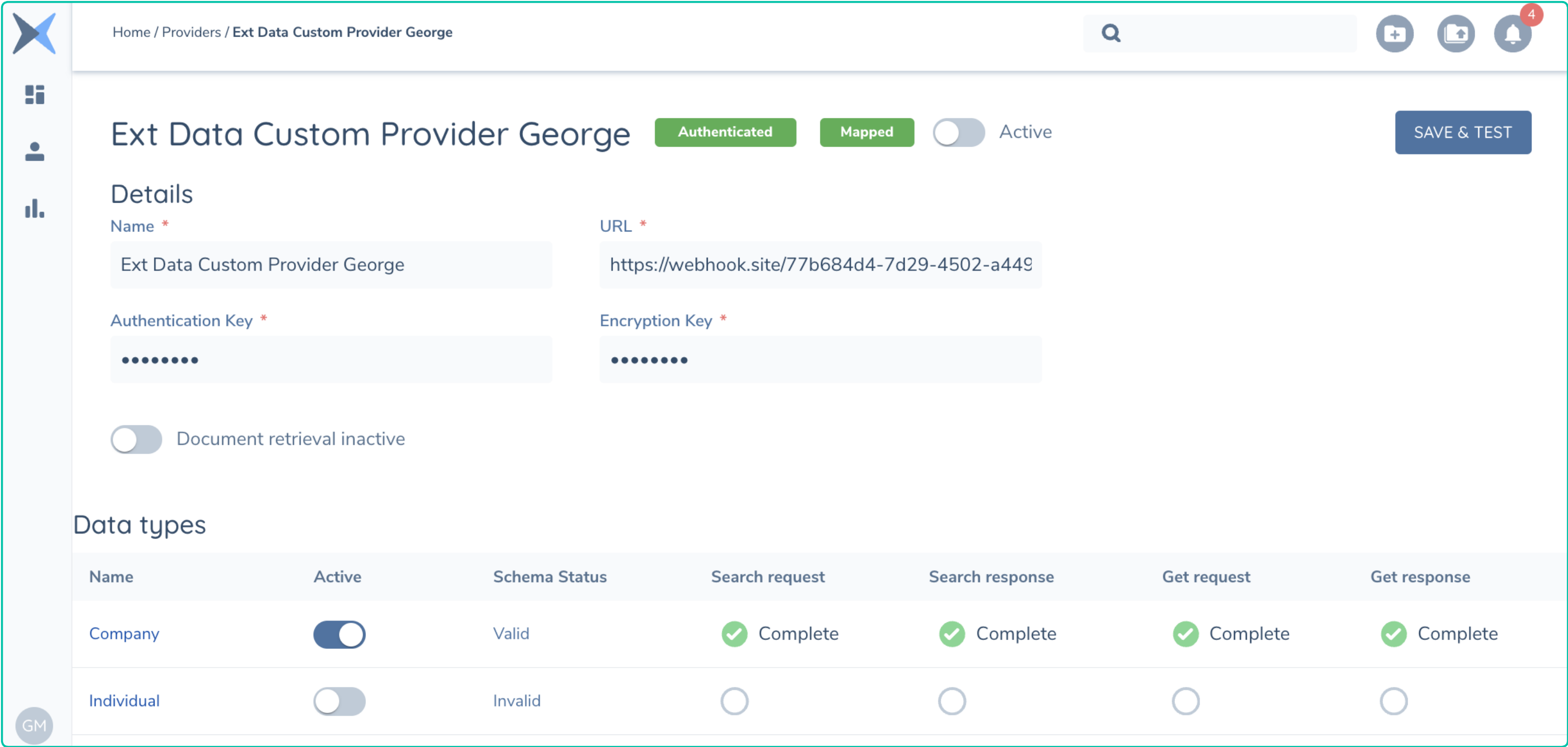
With configuration complete, the implementation and hosting of an adapter is the next step. This document assumes you have configured and tested your adapter. By Test it is assumed you have called the test method on your adapter and replied to Fenergo with the Schema and finalized the mapping. Your adapter should be configured in a Journey and available for users of the system.
Your hosted adapter will need to support all of the below methods, as these will be called by the Fenergo Platform during the normal use of the External Data provider as outlined in the External Data Adapter Contract.
https://yourSpecifiedURL/adapter/search- Called to search for a Legal Entity.https://yourSpecifiedURL/adapter/gethttps://yourSpecifiedURL/adapter/documenthttps://yourSpecifiedURL/adapter/testhttps://yourSpecifiedURL/adapter/oms- Ongoing Monitoring Subscribe (optional)https://yourSpecifiedURL/adapter/omu- Ongoing Monitoring Unsubscribe(optional)
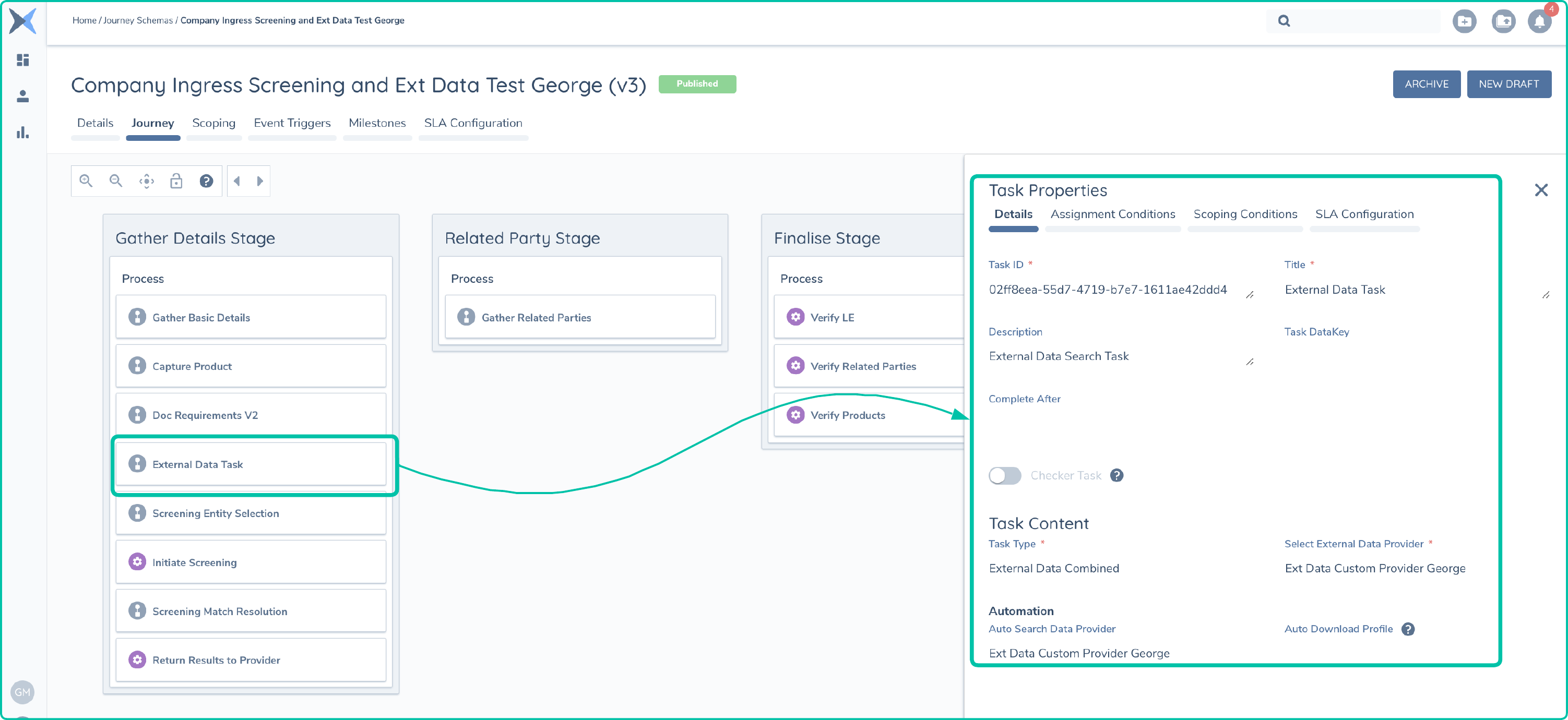
Mapping and Journey Configuration
External Data Provider Operations
When an External Data task in a Journey is loaded, it can be configured to Automatically send a search request or this can be done manually. This is the first step in the pattern which follows the following steps:
- Search Request - An Encrypted search request is send to yhe URL location with the criteria mapped from the configuration stage.
- Search Response - Your implementation can send back a collection of high level search results which will be displayed to the user.
- Get Request - When a user has selected a record, Fenergo will send a specific request for that full record.
- Get Response - This is the full record which is send from your implementation back to the Fenergo receptor.
External Data Search Request
Below is an example of the Encrypted message sent from Fenergo to your hosted External Data Adapter.
{HTTP HEADERS}
x-encryption-iv  F3Z8Dpq2V7WuPbz/u9PCXg==
x-authentication-mac  eQ0cohgLEE58pAfBUtJc5jv+eNMpGHNLeDU+jTVfaXc=
x-provider-id  1968a450-e906-4654-844a-75ab43d91f34
x-tenant-id  XXXXXxxxxXXXXXxxxxxXXXXXXXXXxxxxxXXXX

{HTTP BODY}
jlxuBNckG5H+sPDiIlSO2aU6G2l4S4ePNZw46KFq5GW4xzjnorcjdX7+zVI/73OtGwWnfkJPn4EP+qSlD4LGFhb4EMcqhohxeXsELpaHrNFGOraawlfm473PrF3K/CyIEztljfreNEOk6ozkfqXIrYHkgWH0212af2St2UuJ3xqHQ7DTCieOtnMZpG3eqSwFnpBfls9b2m3xEBJZdcyDkr4wny8uUrM9cPsWsPKuGKM4MD5KpI7OfLiLpaP9VBir4YPhq/EoMd9uv1bAs7OuS36zzp5ncjr7N+0VqrTmAtNRcXjVu8/cpXxEJ8G9HIgGsZHDO1F8Q9R5n2JzhRncy0zdBV+llRVwaDbDmusPttWC2+gWzCIbw1PDwkoDZvJ8Ph5YfQtuy4NTaMaBMW1LxL8L6JXnOBImn3Nq5sx7fFqLWAtyMMUOD6B4avB0lmL4iTEZTe4eqhze5QtEVvGi/dcpcCfM0MKQr++6KHjMZfnNK5SbABqh2VKZ/QqHD0kNleRvPujnS/87CT7oHFdFly+0U3HjijVsPVhZe5JvPPM=
Once the above is decrypted, the search request JSON body is as follows. Important fields to note below are :
"id"which is needed when sending back the Search Response to correlate the response back to this request."type"field which is set to Search. This will allow your implementation to identify the method the call is making."ProviderId"is the GUID assigned to your custom provider, you can have more then one and how clients choose to implement their adapters is entirely up to themselves. You could have two or more External Data Providers and this is how you can determine which one is being called.
{
    "IsCustomProvider": true,
    "IsInternalProvider": false,
    "UserId": "system",
    "Id": "6fc02412-e480-44d3-a7af-91cf55cd9eda",
    "Tenant": "XXXXXXXX-xxxx-xxxx-xxxx-XXXXXXXX",
    "ProviderId": "1968a450-e906-4654-844a-75ab43d91f34",
    "Type": "Search",
    "Request": {
        "SearchCriteria": {
            "LegalEntityName": "Davidson Mechanics Limited",
            "CountryOfIncorporation": "IRL",
            "ExternalDataIdentifier": "External ID 999"
        },
        "EntityType": "Company"
    }
}
Within the "Request" node, the "SearchCriteria" contains name value pairs of the data points configured in the mapping (provided the data has been captured when the search is called). These are the values you can use to find search results in your data provider. Lastly the "EntityType" field indicates that this is a request for a Company type.
External Data Search Response
Once you have found some matches from your data provider, the response data can be sent back to Fenergo. Again this will conform to the schema configured when the provider was set up. You will need to Encrypt and Sign the JSON body but the appropriate structure to send back a search response is as follows:
{
    "Id": "6fc02412-e480-44d3-a7af-91cf55cd9eda",
    "Tenant": "XXXXXXXX-xxxx-xxxx-xxxx-XXXXXXXX",
    "ProviderId": "1968a450-e906-4654-844a-75ab43d91f34",
    "type": "Search",
    "status": "Success",
    "errorDetails": null,
    "response": {
        "results": [
            {
                "Id": "External ID 999",
                "entityType": "Company",
                "fullName": "Davidson Mechanics Ireland Limited",
                "matchHint": "Exact",
                "matchScore": 99,
                "data": {
                    "ExternalDataIdentifier": "External ID 999",
                    "LegalEntityName": "Davidson Mechanics Ireland Limited",
                    "CountryOfIncorporation": "Ireland",
                    "Address": "99 East Wall Business Park, Dublin 1, Ireland"
                }
            },
            {
                "Id": "External ID 7767",
                "entityType": "Company",
                "fullName": "Ericson Mechanics Ireland Limited",
                "matchHint": "Partial",
                "matchScore": 77,
                "data": {
                    "ExternalDataIdentifier": "External ID 7767",
                    "LegalEntityName": "New Year Holdings Limited",
                    "CountryOfIncorporation": "Ireland",
                    "Address": "102 Hill Park Road, Dublin 1, Ireland"
                }
            }
        ]
    }
}
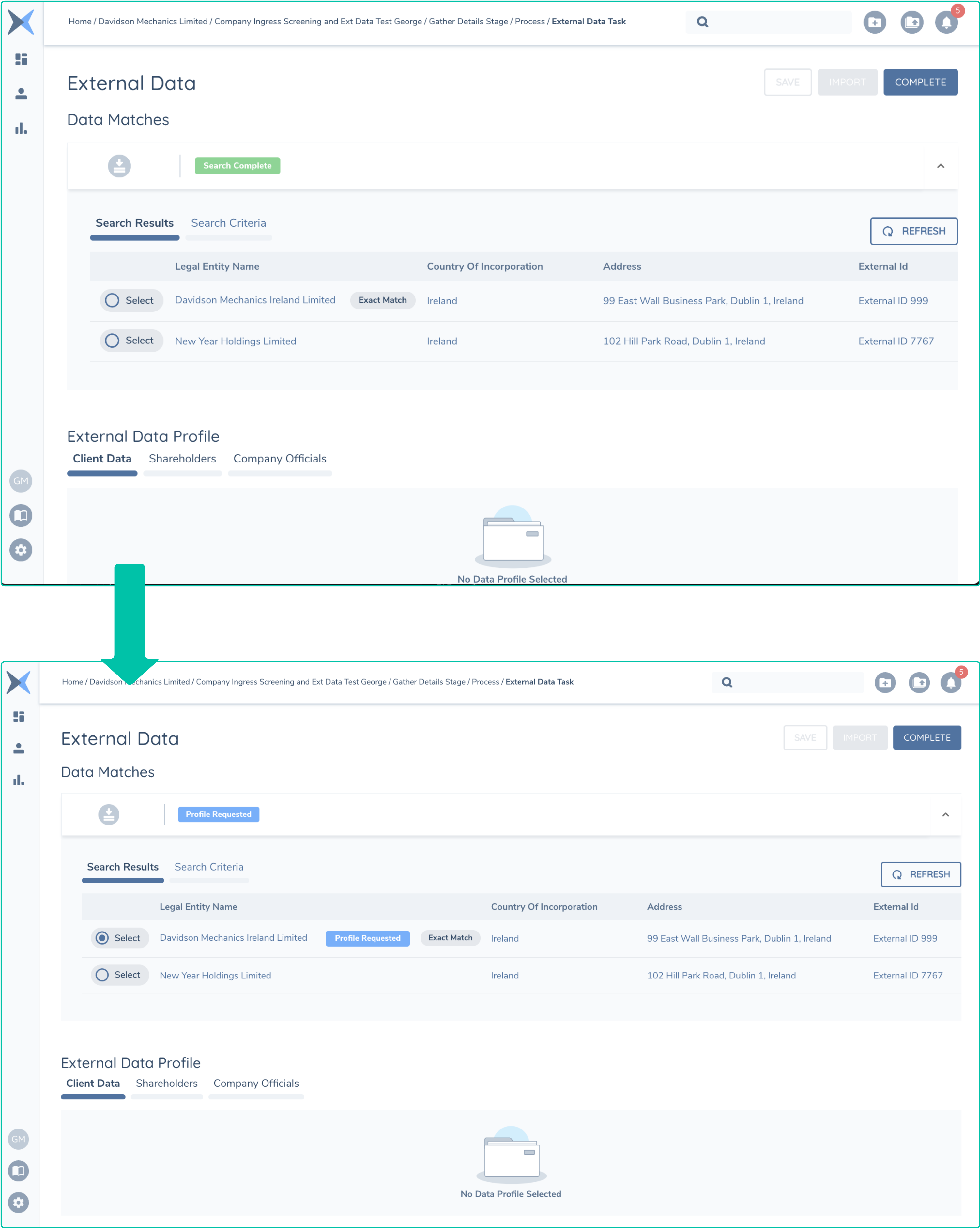
As can be seen from the above JSON, the "type" is set to Search and the "status" is success. With the above search result sent back to the Fenergo Receptor, the UI will render the results as below. The status on the UI has also been updated to indicate that the search is complete.
External Data Get Request (Specific Record)
Below is an example of the Encrypted message sent from Fenergo to your hosted External Data Adapter to request a specific record. This happens when the UI User selects one of the results.
{HTTP HEADERS}
x-encryption-iv  7iuDGwzhm0EYp9hkNE9Axw==
x-authentication-mac  r8NmvI7tb4bIsFDACJi8Tw3UJMRvC9XdjrRtO7Ue28Y=
x-provider-id  1968a450-e906-4654-844a-75ab43d91f34
x-tenant-id  XXXXXxxxxXXXXXxxxxxXXXXXXXXXxxxxxXXXX

{HTTP BODY}
lVw3OJezGHrhtnV2o2L/VzxNB1OrFi/axMX/DIMlk4PqmafuNzJPhb70BJ9/4XQPILcMDf/6qf6IUj3aLQBmvXy2VjUlGSoarFHoc2AAxlx77eLK8MPy8MzlzDOvAc6OGgjSo2Kwisno6Q60rhwY4enr3NaIbG7H+AGUuiqa/OGWrq3oOC64BTD4G7XKynf/6NRxJJA+yONUXzlfQpyuJ0IUzHqHdpxvqre833orE6eqpPfSzdqZKCmEJatrAJuFkeo71aEy1W2m2Oc+n/mjN8yHIlv302nDFsdLld/+sR2D0UOwM1Pfw6utWnxHdkt3RqW7Fztq9uy/nK90tkNsy1q2eWk2aBUqTPLE4p5cG7HCLyxqXHAsXdLXvg4mXlAT2MUQVjrE1chDtWKRnNBXGJxlzCPnSAamz5cFg4Zx9BGnL9smtZxoNNL6nMMDRSmFOKuJ2XUYycTka7RsXob8lg==
Once the above is decrypted, the search request JSON body is as follows. Important fields to note below are :
"id"which is needed when sending back the Search Response to correlate the response back to this request."type"field which is set to Search. This will allow your implementation to identify the method the call is making."ProviderId"is the GUID assigned to your custom provider, you can have more then one and how clients choose to implement their adapters is entirely up to themselves. You could have two or more External Data Providers and this is how you can determine which one is being called.
Currently The only data sent in the GET Request will be your specified Identifier returned as the "id" in the Search Response. This Key Identifier should be enough for your adapter to retrieve the correct record.
{
    "IsCustomProvider": true,
    "IsInternalProvider": false,
    "UserId": "9e70d877-f8fc-47d2-b7c2-9db999a2b1a3",
    "Id": "86b25ff9-ff2f-4ef5-863a-715504333923",
    "Tenant": "XXXXXXXX-xxxx-xxxx-xxxx-XXXXXXXX",
    "ProviderId": "1968a450-e906-4654-844a-75ab43d91f34",
    "Type": "Get",
    "Request": {
        "Data": null,
        "Id": "External ID 999",
        "EntityType": "Company"
    }
}
External Data Get Response
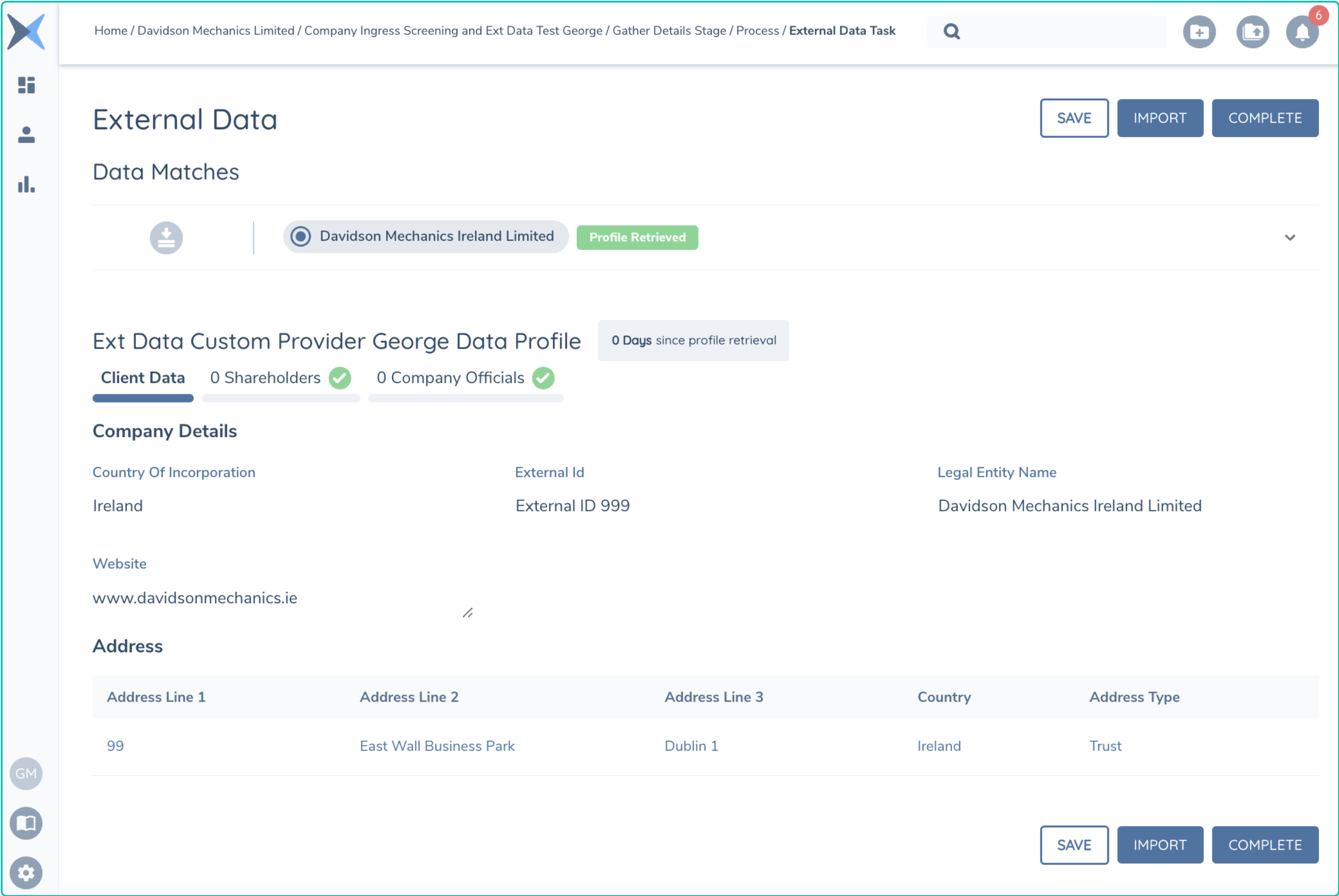
Sending back your full record is the last step in the external Data Process. For the purpose of this example, only a small response is returned. An example of the structure of this message is illustrated below as is the UI when a record has been returned.
{
    "Id": "86b25ff9-ff2f-4ef5-863a-715504333923",
    "Tenant": "XXXXXXXX-xxxx-xxxx-xxxx-XXXXXXXX",
    "ProviderId": "1968a450-e906-4654-844a-75ab43d91f34",
    "type": "Get",
    "status": "Success",
    "errorDetails": null,
    "response": {
        "documents": null,
        "client": {
            "Id": "External ID 999",
            "entityType": "Company",
            "fullName": "Davidson Mechanics Ireland Limited",
            "data": {
                "ExternalDataIdentifier": "External ID 999",
                "LegalEntityName": "Davidson Mechanics Ireland Limited",
                "CountryOfIncorporation": "IRL",
                "Website": "www.davidsonmechanics.ie",
                "Addresses": [
                    {
                        "Line1": "99 ",
                        "Line2": "East Wall Business Park",
                        "City": "Dublin 1",
                        "Country": "IRL",
                        "Type": "Registered"
                    },
                    {
                        "Line1": "102 ",
                        "Line2": "East Point Business Park",
                        "City": "Dublin 1",
                        "Country": "IRL",
                        "Type": "Registered"
                    }
                ]
            }
        },
        "hierarchy": {
            "associatedEntities": [
                {
                    "Id": "External ID 299",
                    "EntityType": "Individual",
                    "FullName": "Mike Thorn",
                    "Data": {
                        "Id": "External ID 299",
                        "LegalEntityName": "John Doe",
                        "FirstName": "John",
                        "LastName": "Doe",
                        "EntityType": "Individual",
                        "Birthdate": "1964-01-28T00:00:00",
                        "Nationality": "IRL",
                        "Function": "Director",
                        "Address": {
                            "Line1": "Hood St",
                            "Line2": "19 L2",
                            "City": "Coventry",
                            "Country": "IRL",
                            "Type": "Residential"
                        }
                    }
                }
            ],
            "associations": [
                {
                    "ParentId": "External ID 299",
                    "ChildId": "External ID 999",
                    "AssociationType": "CompanyOfficial",
                    "Data": {
                        "ParentId": "External ID 299",
                        "ChildId": "External ID 999",
                        "AssociationType": "Director",
                        "relationshipType": "Director"
                    }
                }
            ]
        }
    }
}