Single Field External Search API Walkthrough
Clients can configure a specific single field in their policy which will invoke a client hosted adapter when the user begins typing in the field. The call to that adapter will send whatever has been typed into the text box and your implementation can match that to a set of result data which will be displayed as a Real-Time prompt.
| APIs Referenced |
|---|
| External Policy Provider Query |
| External Policy Provider Command |
| Adapter Implementation Contract |
Use Case for External Policy Provider - Single Policy Field Suggestions
  AS: a Fenergo consumer:

      GIVEN: Our organization has functionality to support suggestions for a specific policy field

      AND: We want to present those suggestions to an API user as they are filling in the User Interface

      WHEN: a user starts typing in data to a configured policy field

  THEN: I want FenX to present those suggestions to the user as they fill in the field.
Create External Policy Provider - Single Policy Field Suggestions
You can create a new External Policy Provider by sending a POST to the External Policy Provider Command API here {{baseURL}}/policyproviderscommand/api/provider with the below body. In the below example, a Policy Field that searches for a Product Name is used and provides a list of suggestions.
{
    "data": {
        "name": "ProductNameSearch",
        "serviceUrl": "https://webhook.site/9589ac93-0713-4062-b6ea-ee83d68a69ca",
        "type": "Search",
        "encryptionKey": "{32 character Base64 Key}",
        "authenticationKey": "{32 character Base64 Key}"
    }
}
Understanding the Create Single Field Provider Requests
The above configuration request contains the details required to add a new custom adapter to your Tenant Configuration. Once Added you should receive a HTTP 202 Accepted response.
"name"of the single field Adapter."serviceUrl"is the URL where the adapter is located. This URL will be called by Fenergo when interacting with your policy field adapter."type"is the Type of adapter. This is search for this example."encryptionKey"and"authenticationKey"are the Encryption and Authentication Keys used to secure and sign the messages sent to your adapter.
Request and Response Example for Single Field Suggestions
A request to the Suggestions adapter (Adapter Implementation Contract) is sent when a user starts typing in the UI Field.
Remember the request body will be Encrypted and not sent in plaintext. These examples are the plaintext versions of encrypted exchange.
{
    "fieldName": "productName",
    "fieldValue": "test"
}
"fieldName"is the datakey from a configured policy that gets sent with the request. You can use this in your logic to match against the correct source data."fieldValue"is the value entered by the user into the policy field.
{
    "searchSuggestions": [
      {
        "value": "Test Product A",
        "order": 1
      },
      {
        "value": "Test Product C",
        "order": 2
      },
      {
        "value": "Test Product C",
        "order": 3
      }
    ],
    "status": "Ok"
  }
"searchSuggestions"is the suggestions array, the contents will be displayed in the UI as a a list of options for the field."value"is an individual value from the list of options.
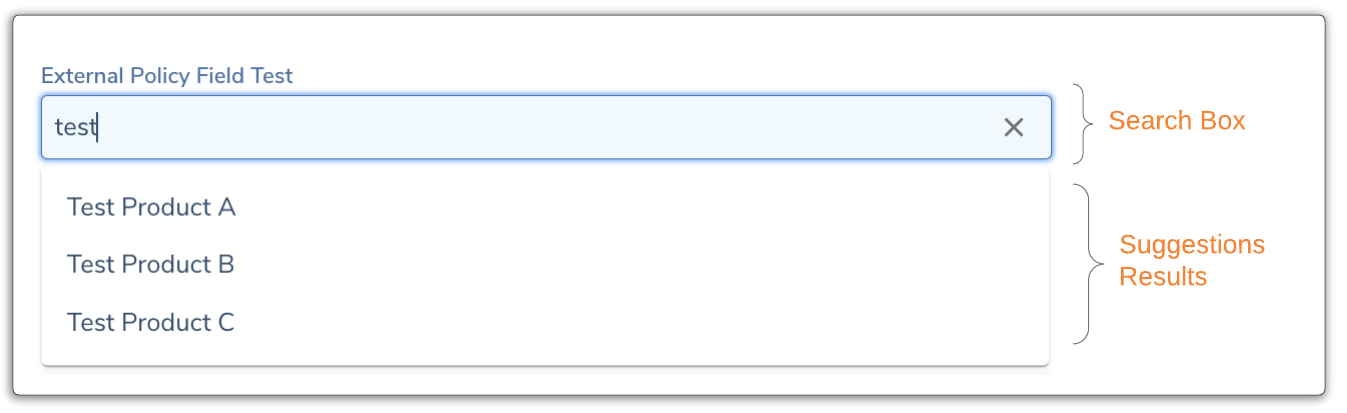
UI Result for Single Field Suggestions
Once the adapter is configured, the UI will display the suggestions result as below. The content typed in will be sent and then the results rendered as a list which can be selected from.