Advanced Reporting Overview
The Advanced Reporting Feature in the Fenergo SaaS Platform offers a User Interface and API Endpoints to execute standard SQL Queries against the Data Stores on the platform for the following specific domains.
- Legal Entity Data
- Journey Data
- Associations (Related Parties)
| APIs Referenced |
|---|
| Reports Command API |
| Reports Query API |
High level Architecture
The Fenergo SaaS platform is an Event Sourced CQRS platform. When new data is created, it is forwarded & relayed into specific domain stores in real time as it is processed. The techniques to achieve this is a called projection. One of the many benefits to this approach is that new projections can be added to replicate data in other data stores if required.
In line with this strategy and as illustrated below, Fenergo have added a reporting schema to our SaaS platform which is updated in real time as data is changed on the platform. The purpose of this schema is to offer advanced reporting functionality through a Reporting Domain where clients can execute SQL statements directly against their Data, with results returned as Excel fils which can be downloaded via Secure URLs
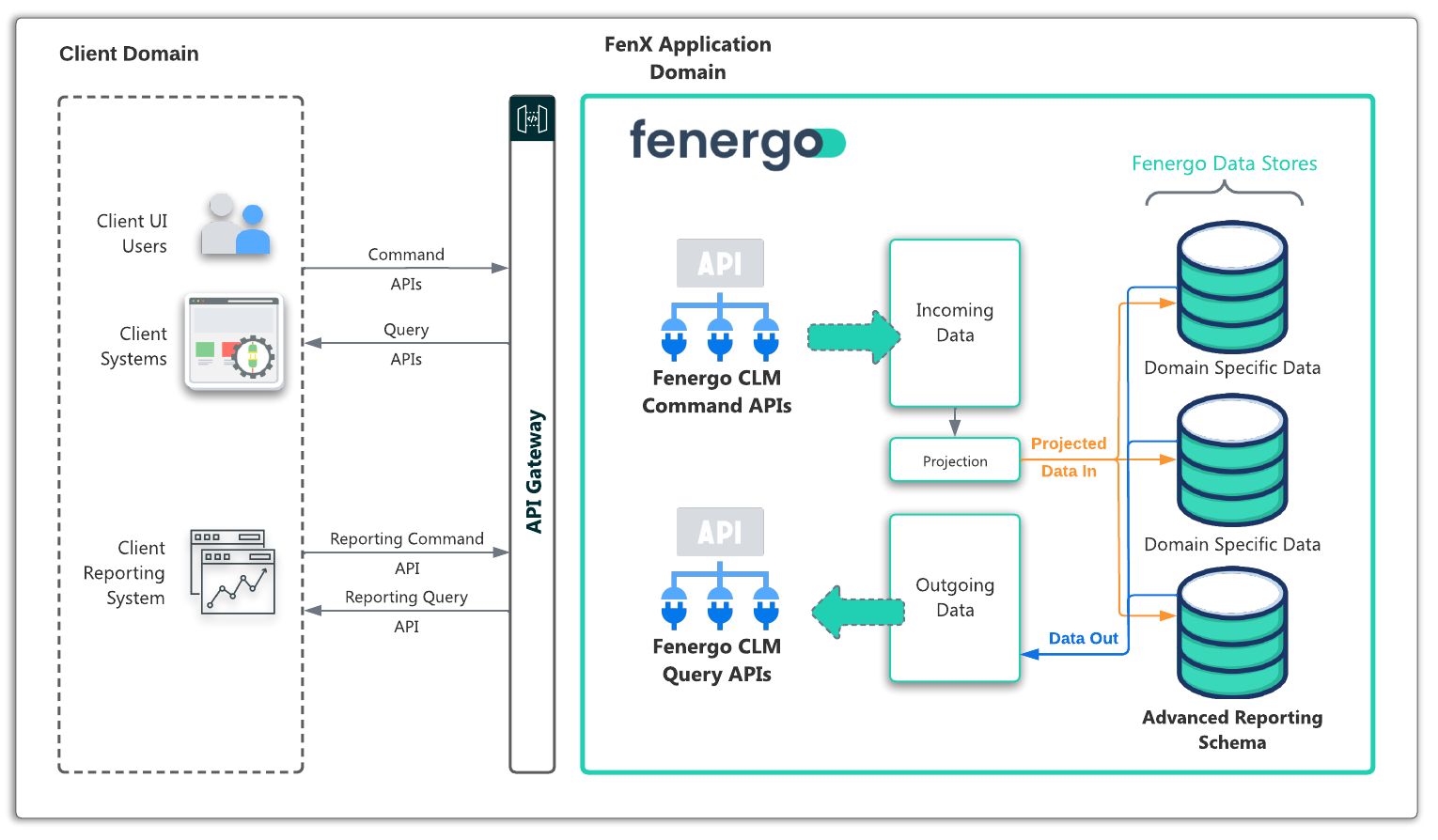
Advanced Reporting Capabilities
The user interface on the Fenergo SaaS application provides a visual way to browse the available data points across the supported domains of Entity Data, Journey and Associations as well as a dialog area to enter your SQL code. For more information on how to use this interface check out the User Guide Here.
As per our API First Strategy, this capability is facilitated via the Reports Command / Query APIs and the Fenergo User Interface uses those APIs to deliver its functionality. With the APIs you can:
- Retrieve the Schema The Reporting Data Store is where you SQL queries will execute. These are all the fields available across your configured Policy, Journey and Associations which you can target with your reports.
- Create a new Report Once you have your SQL written, you can create new report by submitting the SLQ and a name via an API call.
- Check the Status of your Report After you have submitted your report to execute, the Fenergo SaaS application will execute this against the reporting schema. It cant be known how long this will take, so an API call allows you to check the current status of your report. This will be In Progress or completed. Once completed the status call will also return a Secure URL from where the data can be downloaded.
- Retrieve the Report Data When your query has finished executing, the result is written to a CSV file which you can download.
Advanced Reporting API Pattern
Before using the APIs, its important to understand the pattern to follow when orchestrating your calls to create and download reports. Illustrated in the sequence diagram below:
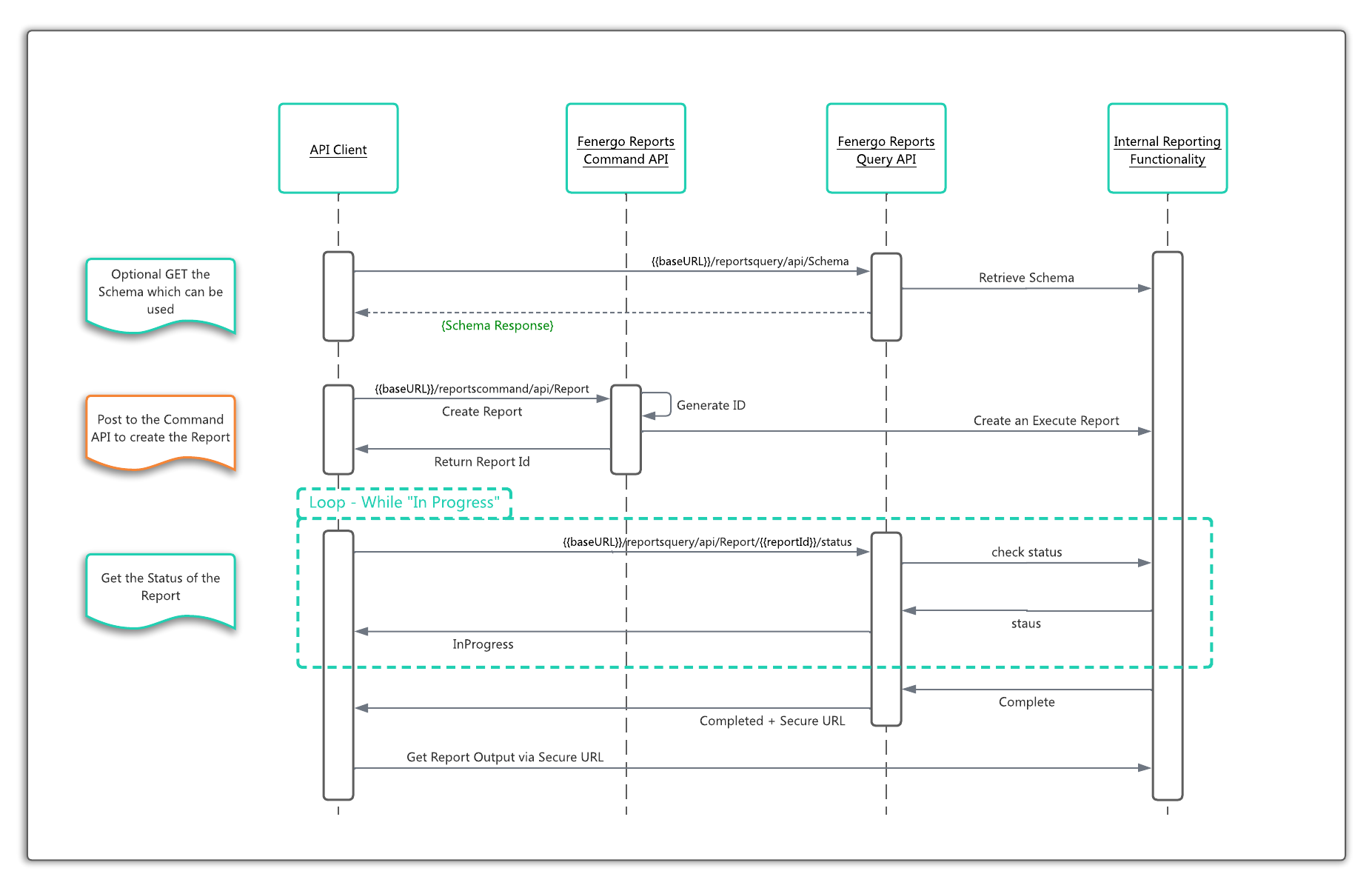
- Retrieve the Schema Not necessary to use for the reports. The Fenergo UI uses this to display the list of fields across the available domains. Could be used to sync with local reporting meta-data.
- Create a new Report This will process the submitted SQL statement, validate it, and return an identifier for the report request. Asynchronously the service will execute the report but this API will return before that is finished. This way your calling application can poll for the status of the report.
- Poll for Status Illustrated in the sequence diagram as a loop, the calling application will receive a message with the status of In Progress until the report execution is finished. At that point this method will return a CompletedStatus along with a URL where the report can be downloaded (The report is in CSV format).
Advanced Reporting Common Questions
Performance Impact
In a traditional application where the underlying database server is operationally supporting functionality, executing SQL Queries (or procedures) will typically contend with the same resources delivering the application. This can lead to scenarios where reporting is treated as follows:
- Out of Hours Execution: Complex reports can only be run outside the peak hours of operation to ensure the application performance is not impacted.
- Synced or T+1 Reporting : A full copy of a DB is taken (usually nightly), and that copy is available on its own infrastructure. This ensures complex queries do not affect the Application performance but are required to operate on stale data. Depending on the report this may not be an issue but there is the overhead of a sync / copy processes and extra infrastructure to manage.
- Poor Quality or Long Running Queries : A SQL query which begins life as complex but reasonably performant, can over time degrade as the target data size grows. Such Queries can eventually become pockets of degraded long running resource hogs on an even well appointed database and require constant maintenance or even SQL experts to analyze and continuously optimize underlying table and data structures.
With the Fenergo SaaS platforms Advanced Reporting Feature, these constraints do not exist.
- Execution at any Time: Even with complex queries, there is no contention with resources that support the application. A dedicated reporting schema, separate from the other Data Stores is provisioned and available with its own resources to service queries.
- Real Time Reporting : The Reporting Schema is kept up to date in real time along with the rest of the application, so reports are ALWAYS executed against the latest copy of data.
- Query Cut off Time - 15 Minutes : In Fenergo we have taken a pragmatic approach to the run time of complex queries. Any query process which does not return within 15 minutes is stopped. We expect this will not impact the vast majority of usage and will work with clients where they encounter any issue with timeouts on queries.
Security Considerations
The following approaches have been taken with regard to the Security of the underlying data available via Advanced Reporting.
-
Physical Data Access: Fenergo is providing an interface to the data via APIs. SQL Queries are passed as API arguments. This is NOT a Connection String allowing directly connected clients.
-
Query Only - No Updates: Whilst the service does accept SQL statements, the underlying data is a COPY of the production data, not the actual operational data itself. Updates are not accepted and will fail execution. SQL Injection is also invalid. All SQL queries are securely parsed and executed against views instead of direct table access.
-
Access Control: The Access Layers implemented in the configuration of the SaaS platform are enforced in the Reporting Schema. So API users must use an "Access Token" that contains a UserId. This ensures that users will continue to ONLY be able to access data to which they have been permissions.
-
Encryption: The data is encrypted at rest in the same way other Tenant Data is encrypted, using the clients own Key if they have selected to use BYOK.
-
Validity of the Secure URL: Once a report has been completed, the result is available as a downloadable CSV file. Access to this file is via a SecureURL, which is a Pre-Authenticated URL. Anyone with the URL can access the file. The URL must be treated as if it were the file itself. The URL Expires after 10 Minutes.