Searching for Legal Entities
As users navigate the UI, they choose to create new Legal Entities once they are satisfied that that the Legal Entity does not already exist. One way to be be sure the entity does not exist is by searching by Name or some other key identifier. This document will look at how to search for Legal Entity's on the Fenergo SaaS platform. We will use the Entity Data Query API.
| APIs Referenced |
|---|
| Entity Data Query |
Simple Name Search Use Case
Fenergo uses Index Technology to perform real-time text based searching. At the bottom of this document are details around Effective Searching on the Fenergo SaaS platform.
  AS: an API consumer:

     GIVEN: I need to find a legal entity or list of entities

     WHEN: I do not have the specific Legal Entity ID but I do have the name

     THEN: I want to call an API to pass in the name to retrieve Legal Entity Results.
Entity Data Query Search By Name API
A simple name search accepts just a single string parameter name. Internally this is used to query against LE Company Names, but also is broke up to search against First and Last Name of LE Individual types.
HTTP POST URL:
==============
{{baseURL}}/entitydataquery/api/entity/searchbyname

HTTP POST BODY:
===============

{
    "data": {
        "name": "Sony Incorporated",
        "pager": {
            "size": 100
        }
    }
}
HTTP PARTIAL RESPONSE:
======================
{
    "data": [
        {
            "id": "29d01dcd-330b-493d-8103-1c60f7d411fd",
            "type": "Company",
            "properties": {
                "companyType": {
                    "value": "Basic Trust",
                    "type": "Single",
                    "discriminator": "Single"
                },
                "legalEntityName": {
                    "value": "sony",
                    "type": "Single",
                    "discriminator": "Single"
                },
                "countryOfIncorporation": {
                    "value": "BELGIUM",
                    "type": "Single",
                    "discriminator": "Single"
                },
                "category": {
                    "value": "Trust",
                    "type": "Single",
                    "discriminator": "Single"
                },
                "dateOfIncorporationEstablishment": {
                    "value": "2022-02-02",
                    "type": "Single",
                    "discriminator": "Single"
                },
                "type": {
                    "value": "Company",
                    "type": "Single",
                    "discriminator": "Single"
                },
                .
                .
                .
                . . . . { OTHER PROPERTIES }.....
                .
                .
                .
                "score": {
                    "value": "2637.4094",
                    "type": "Single",
                    "discriminator": "Single"
                },
                .
                .
            },
            "risk": {
                "riskCategory": null,
                "riskLevel": null
            },
            "role": {
                "name": "Client"
            },
            "status": 0,
            "userId": "bc4363ef-3111-4b83-9cd6-808e6c2e22ac",
            "created": "2022-02-04T14:44:02.039+00:00",
            "alternateId": "",
            "journeys": ["Client Onboarding"],
            "accessLayers": {
                "geographic": [
                    "Global"
                ],
                "businessRelated": [
                    "Enterprise"
                ]
            },
            "version": 1
        },
        ...
        ...
        ...
        ... { Other Results } ...
Understanding the Search By Name Response
In the response above:
- The
"data"node in the response contains a collection of entities. - For each response there is an
"id"value. This is the Legal Entity Id. - Within the
"properties"collection are the data points returned by the Search. - One of the properties returned is the
"score"returned by the Search. This is the strength of the result against the search parameters which were sent in.
If the data points in this search are not sufficient, a better Immutable Data Point such as External ID, Tax ID can be used to determine the correct record. Using the Advanced Search facilitates more specific searching.
Configuring Advanced Search
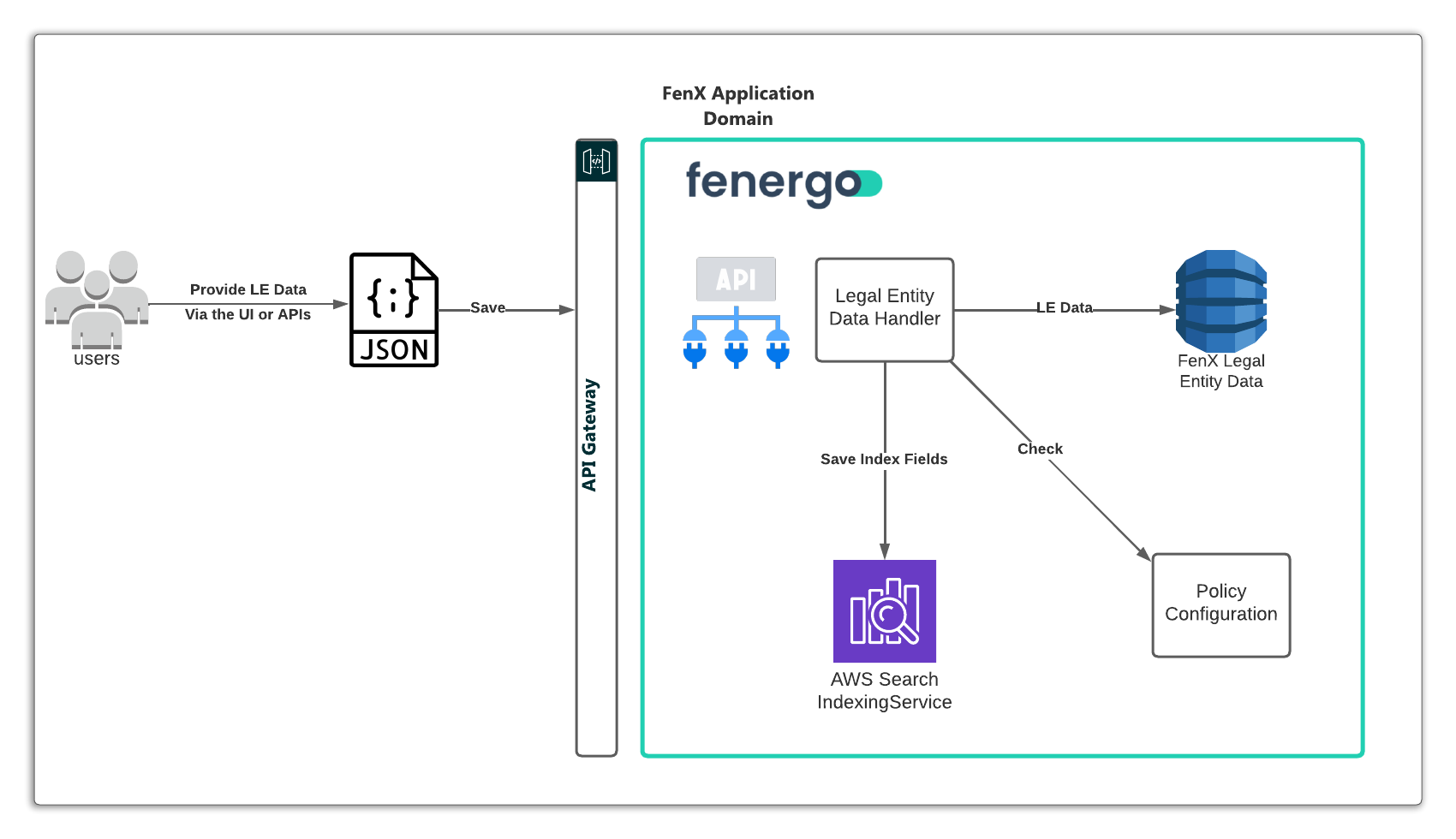
The Advanced Search Functionality can be configured by users against the Data Policy's. A user can specify up to 10 Policy fields to be "Indexable" and as such "Searchable" for each Entity Type (Individual / Company / Other).
If a field called Country of Incorporation is configured as "Indexable" inside the policy configuration, they that field becomes a "Search Parameter" in the Advanced Search Service.
When a User submits data into FenX, the system will save the Data into the Data Store but also check the policy for "Indexable" fields, if any of these fields are inside the submitted Data, then a new entry is made in an Index Data Store to enable fast retrieval of that entity.
Advanced Search Use Case
  AS: an API consumer:

     GIVEN: I need to find a legal entity or list of entities

     WHEN: I do not have the specific Legal Entity ID but I do have some other key data

     AND: this data type is configured as an "index" field in my Data Policy

     THEN: I want to call an API to pass in parameters that will allow me to retrieve Legal Entity Results.
Retrieve Indexed fields
The fields which have been configured as Indexable can be retrieved from FenX using the following API call. Some fields have already been configured per Entity Type and users can configure a further 10 per entity.
The below list returns the ID of the field in the policy, the name of the field, the entityType it belongs to and also the ReindexingStatus. Re-Indexing is a background process which ensures the index which is searched against contains the latest data from across the Legal Entity Population.
    HTTP GET URL:
    =============
    {{baseURL}}/entitydataquery/api/entity-index-configuration

    HTTP GET RESPONSE:
    =================
    {
        "data": [
            {
                "id": "1a81f1b9-7fbd-4fe9-892e-725ed5af3b74",
                "entityType": null,
                "propertyName": "category",
                "reindexingStatus": "Complete"
            },
            {
                "id": "1f4aca6c-e36f-47a8-a15c-53da12fbafbb",
                "entityType": null,
                "propertyName": "middleName",
                "reindexingStatus": "Complete"
            },
            ...
            ...
            ... {More Indexed Fields}
        }
    }
Advanced Search API
The advanced search is executed against one or more of the indexed fields. In the below example, an advanced search for an entity with a customId == 99911 and a countryOfIncorporation == USA is performed.
This functionality will return one or multiple results based on the search parameters. If the customId in this example was a "unique" field with no duplication it will return the only result which matches. A broader search on countryOfIncorporation would result in multiple matches. The results are inside an Items array in the response body.
    HTTP POST URL:
    ==============
    {{baseURL}}/entitydataquery/api/entity/entityadvancedsearch

    HTTP POST BODY:
    ===============
    {
        "data": {
            "type": "Company",
            "properties": {
                "customId": {
                    "value": "99911",
                    "propertyType": "text"
                },
                "countryOfIncorporation": {
                    "value": "USA",
                    "propertyType": "select"
                }
            },
            "pager": {
                "size": 10,
                "from": 0,
                "sortOrder": 1
            }
        }
    }

HTTP POST RESPONSE:
===================
{
    "data": {
        "items": [
            {
                "id": "5e325035-9c78-40c3-b022-6e3c365f3eca",
                "type": "Company",
                "properties": {
                    "companyType": {
                        "value": "Bank",
                        "type": "Single",
                        "discriminator": "Single"
                    },
                    "category": {
                        "value": "Corporation",
                        "type": "Single",
                        "discriminator": "Single"
                    },
                    "legalEntityName": {
                        "value": "GeorgeInc Test Feb 6th 2022",
                        "type": "Single",
                        "discriminator": "Single"
                    },
                      "countryOfIncorporation": {
                        "value": "USA",
                        "type": "Single",
                        "discriminator": "Single"
                    },
                      "customId": {
                        "value": "99911",
                        "type": "Single",
                        "discriminator": "Single"
                    },
                  .
                  .
                  .
                  .
                  . . . { Other Values } . . .
                  .
                  .

                },
                "risk": {
                    "riskCategory": null,
                    "riskLevel": null
                },
                "role": {
                    "name": ""
                },
                "status": 0,
                "userId": "",
                "created": "2022-02-06T08:00:30.5378023+00:00",
                "alternateId": "",
                "journeys": [],
                "accessLayers": {
                    "geographic": [
                        "Global"
                    ],
                    "businessRelated": [
                        "Enterprise"
                    ]
                },
                "version": 1
            }
        ],
        "totalItems": 1
    },
    "messages": null
}
Effective Searching on Fenergo
In general, users bring a strong SQL Bias when they use search functionality. If not as a technical user who expects the style of results which come from % Wildcard Tags, then as a functional user who has been using such systems for a long time.
Fenergo uses Indexing Technology to facilitate search and the results can be a little different than what users might expect, particularly with regard to that SQL Bias in terms of the style of results that are retrieved.
The key thing to remember is that BETTER SEARCH CRITERIA == BETTER SEARCH RESULTS. In the API responses for search, the SCORE is also returned. This is not visualized on the Fenergo User Interface but is used to order the results displayed (Highest Score being First). Lets look at an example below where a Search is performed for a company. On our tenant there are two companies that are the TARGET for our search, as in, these are the results we are looking for.
-
Target: Happy Ltd
-
Target: Happy Homes and Garden Ltd
Examine Name Search for LE
Below is the HTTP Post to the entitydataquery API passing in just the word "Happy". The response is listed with just the LE Name and the Score for each of the two target results.
HTTP POST URL:
==============
{{baseURL}}/entitydataquery/api/entity/searchbyname

HTTP POST BODY:
===============

{
    "data": {
        "name": "Happy"
    }
}

HTTP POST RESPONSE:
===============

{
    "data": [
        {
            "id": "f76d8b48-0686-4c0b-b927-c0f922bcc655",
            "type": "Company",
            "properties": {
                "legalEntityName": {
                    "value": "Happy Ltd",
                    "type": "Single",
                    "discriminator": "Single"
                },
                "score": {
                    "value": "42.72239",
                    "type": "Single",
                    "discriminator": "Single"
                },
                .
                .
                . . . { Other Properties }
                .
                .
            },
            .
            .
            .
            . . . {Other Response properties}
            .
            .
            .
        },
        {
            "id": "afead8ea-9b2b-4c9b-839d-a8ab1cf6d990",
            "type": "Company",
            "properties": {
                "legalEntityName": {
                    "value": "Happy Homes and Garden Ltd",
                    "type": "Single",
                    "discriminator": "Single"
                },
                "score": {
                    "value": "29.275139",
                    "type": "Single",
                    "discriminator": "Single"
                },
                .
                .
                . . . { Other Properties }
                .
                .
            },
            .
            .
            .
            . . . {Other Response properties}
            .
            .
            .
        }
    ],
    "messages": null
}
Examine the Search Response
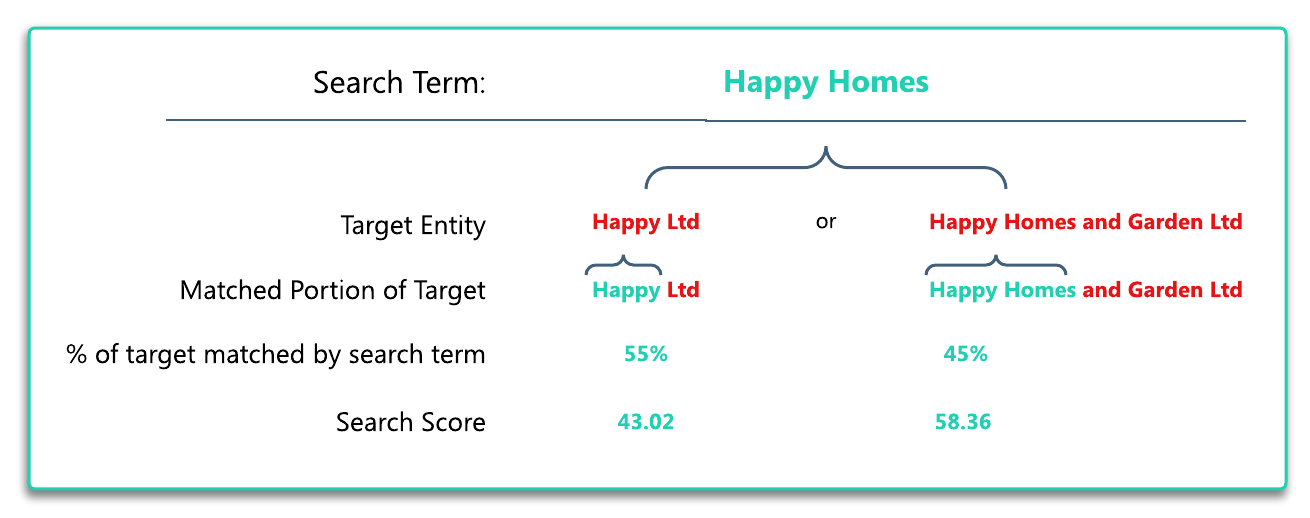
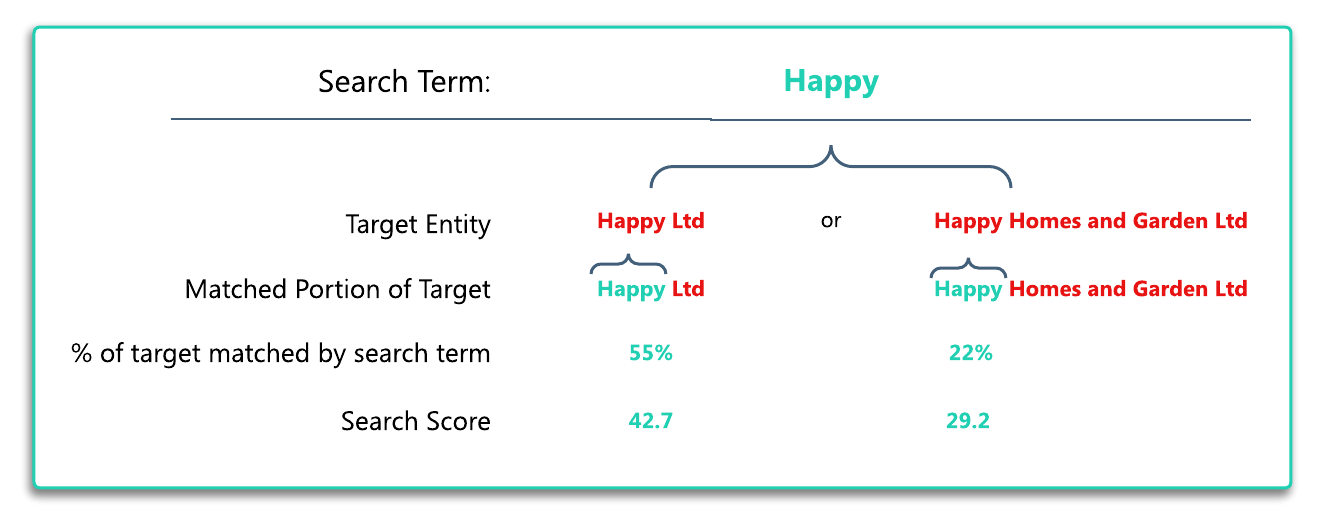
Just searching for the search term "name":"Happy" in this example yields two results. Your experience may be different as there may be a lot more data on your tenant, but remember - the two results we are looking for are called. Happy Ltd and Happy Homes and Garden Ltd. The below graphic explains why Happy Ltd scored higher than Happy Homes and Garden Ltd. Essentially the search term is a closer match to the first in terms of the proportion of the search term which makes up the search result.
If you do this search again but this time using "Happy Homes", you will get the same results but in the opposite order because. (details illustrated below). Happy Ltd is still a match, but now there is also the term Homes which does NOT match. Happy Homes and Garden Ltd now scores higher because more of the search term is matched against the result. It would be a good exercise to test this with some of your data to ensure you grasp how search results are surfaced.