OOTB Reports on the Fenergo SaaS Platform
The reports described on this page have been replaced by other functionality and are no longer receiving updates or changes. The reports are based on collecting event notifications sent when various actions occur and client can continue to monitor notifications or adopt Supergraph or Advanced Reports.
Users can navigate to the Reports section of the UI and Select one of the following reports. Through the user interface a user can provide a StartDate - EndDate. When the user selects the "Export" button, a CSV with the matching results is retrieved and can be saved to the users computer.
| APIs Referenced |
|---|
| Reporting Query API |
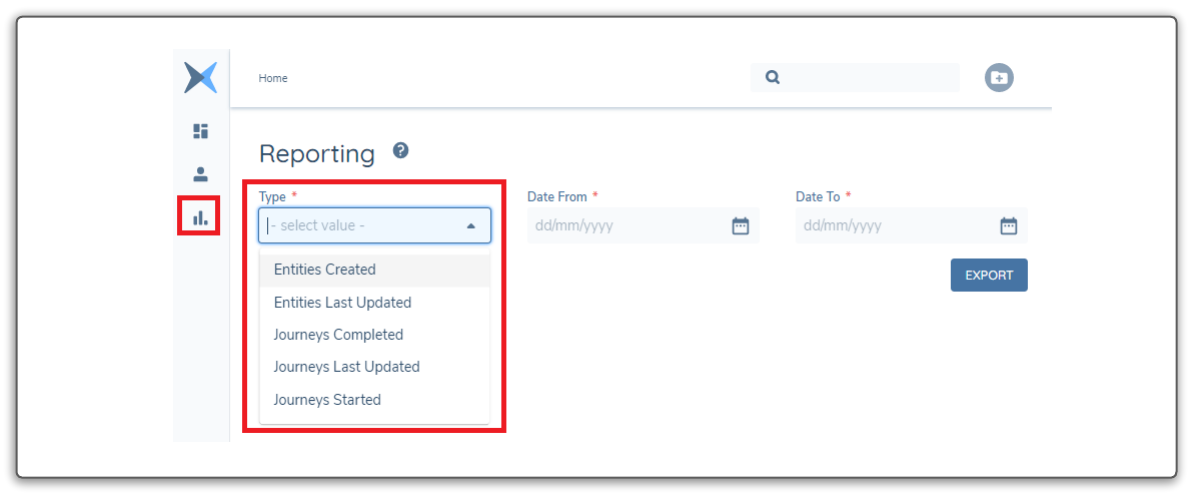
The APIs allows the same interaction as the UI but with some further flexibility.
- The StartDate and EndDate can be set with specific UTC timestamp which allows for a more granular time based search in hours and minutes, not just hours.
- Instead of just CSV file responses, the report can be returned in JSON format to allow for easier system to system interaction and data processing.
Report Endpoints
All the available endpoints to generate the various reports are listed below with either the CSV(file) or JSON response.
Entities Created
FILE URL:
=========
{{baseURL}}/reportingquery/api/entity-report/entity-created-report/file

JSON URL:
=========
{{baseURL}}/reportingquery/api/entity-report/entity-created-report
Entities Last Updated
FILE URL:
=========
{{baseURL}}/reportingquery/api/entity-report/entity-updated-report/file

JSON URL:
=========
{{baseURL}}/reportingquery/api/entity-report/entity-updated-report
Journeys Started
FILE URL:
=========
{{baseURL}}/reportingquery/api/journey-report/journey-started-report/file

JSON URL:
=========
{{baseURL}}/reportingquery/api/journey-report/journey-started-report
Journeys Last Updated
FILE URL:
=========
{{baseURL}}/reportingquery/api/journey-report/journey-updated-report/file

JSON URL:
=========
{{baseURL}}/reportingquery/api/journey-report/journey-updated-report
Journeys Completed
FILE URL:
=========
{{baseURL}}/reportingquery/api/journey-report/journey-completed-report/file

JSON URL:
=========
{{baseURL}}/reportingquery/api/journey-report/journey-completed-report
Report Parameters
There are two main types: "Entity and Journey". The parameters to all the reports are the same with a different URL depending on the report type.
As can be seen below, there is a fileFormat parameter which should be set to "csv". Currently this is optional.
The StartDate and EndDate UTC timestamps can be configured to any granularity. From the UI it defaults from 12am to 11.59.59pm (full 24 hours).
HTTP POST BODY:
===============
{
    "data": {
        "fileFormat": "csv",
        "startDate": "2021-12-01T00:00:00.000Z",
        "endDate": "2021-12-31T23:59:59.000Z"
    }
}
Handling File Response API
In the User Interface, the default is to generate a CSV and then download it to the users computer. This is actually a different URL and instead of returning data, the response contains a "SecureURL".
HTTP POST FILE RESPONSE:
=======================
{
    "data": {
        "reportFileUrl": "{AWS S3 Secure URL}",
        "count": 1236,
        "expirationDate": "2022-02-06T09:18:51.6301219Z"
    },
    "messages": null
}
JSON Report Contents
The CSVs contain the same data just in a CSV file. The JSON data points for each report are as listed below. There are only a small number of data points per result item. The intention behind the functionality of these reports is that they contain important data points that can then be filtered and the full data records for the Entity Record or the Journey Instance then separately retrieved via the Entity and Journey APIs.
Entities Created Contents (JSON)
HTTP POST PARTIAL RESPONSE:
===================
{
"data": {
       "count": 79,
       "datasetSizeAccepted": true,
       "items": [
           {
               "createdDate": "2021-12-01T12:45:49.167Z",
               "legalEntityId": "52bbdefd-60b3-4f48-9c1b-5ba2f51be661",
               "legalEntityName": "Facebook",
               "legalEntityType": "Company",
               "currentLegalEntityStatus": "ReviewInProgress",
               "businessRelatedAccessLayers": "Enterprise",
               "geographicAccessLayers": "Global"
           }
           .
           .
           . . . . {. . More Results . .}
           .
           .
        ]
    }
}
Entities Last Updated Contents (JSON)
HTTP POST PARTIAL RESPONSE:
===================

{
    "data": {
        "count": 4,
        "datasetSizeAccepted": true,
        "items": [
            {
                "updatedTime": "2022-01-26T09:48:15.258Z",
                "eventType": "EntityCreated",
                "entityCreatedDate": "2022-01-26T09:48:15.258Z",
                "legalEntityId": "5335e589-d2a9-43fd-b072-0737125499dd",
                "legalEntityName": "Test User",
                "legalEntityType": "Individual",
                "currentLegalEntityStatus": "OnboardingInProgress",
                "entityDraftId": null,
                "businessRelatedAccessLayers": "Enterprise",
                "geographicAccessLayers": "Global"
            },
            .
            .
            . . . . {. . More Results . .}
            .
            .
}
Journeys Started Contents (JSON)
HTTP POST PARTIAL RESPONSE:
===================

{
  "data": {
         "count": 1236,
         "datasetSizeAccepted": true,
         "items": [
             {
                 "startedTime": "2021-12-01T03:01:07.258+00:00",
                 "journeyId": "6045c14c-b789-43bb-be5f-f290ea7dd9f3",
                 "journeyType": "Ongoing Screening",
                 "currentJourneyStatus": "In Progress",
                 "journeySchemaId": "91bbd6c9-9b55-442d-a084-98a0bd1085b9",
                 "legalEntityId": "0d73bfb0-3e09-448a-b71d-cfce765acea2",
                 "businessRelatedAccessLayers": "",
                 "geographicAccessLayers": ""
             },
             .
             .
             . . . . {. . More Results . .}
             .
             .
}
Journeys Last Updated Contents (JSON)
HTTP POST PARTIAL RESPONSE:
===================

{
    "data": {
        "count": 7,
        "datasetSizeAccepted": true,
        "items": [
            {
                "updatedTime": "2022-01-26T09:48:18.319+00:00",
                "eventType": "JourneyInstanceStarted",
                "startedTime": "2022-01-26T09:48:18.319+00:00",
                "journeyId": "2b5c293a-f162-4108-ad6d-2c7db062d141",
                "journeyType": "Client Onboarding",
                "currentJourneyStatus": "In Progress",
                "journeySchemaId": "933213d8-ebec-46e9-ac70-36266b574569",
                "legalEntityId": "5335e589-d2a9-43fd-b072-0737125499dd",
                "businessRelatedAccessLayers": "Enterprise",
                "geographicAccessLayers": "Global"
            },
            .
            .
            . . . . {. . More Results . .}
            .
            .
}
Journeys Completed Contents (JSON)
HTTP POST PARTIAL RESPONSE:
===================

{
    "data": {
        "count": 43,
        "datasetSizeAccepted": true,
        "items": [
            {
                "completedTime": "2021-12-01T15:49:55.107+00:00",
                "startedTime": "2021-12-01T15:45:09.282+00:00",
                "duration": 285,
                "journeyId": "9bc3c4f1-e5fe-41e6-b682-14b097c9fb09",
                "journeyType": "Salesforce API Update",
                "journeySchemaId": "2a0c6121-ec91-406d-b4d1-5892816e3cbf",
                "legalEntityId": "05158d6a-3468-4755-987f-71651fe2d09d",
                "businessRelatedAccessLayers": "",
                "geographicAccessLayers": ""
            },
            .
            .
            . . . . {. . More Results . .}
            .
            .
}