Supergraph Query Overview
As an alternative to making individual REST API calls we now offer Supergraph Query API - A GraphQL-based alternative for fetching data. This will enable our Clients to perform declarative data fetching so they can specify exactly what data they are looking to retrieve from the API.
GraphQL is a query language for APIs and a runtime for fulfilling those queries with your existing data. GraphQL provides a complete and understandable description of the data in your API, gives clients the power to ask for exactly what they need and nothing more, makes it easier to evolve APIs over time, and enables powerful developer tools.
To Learn more about GraphQL check out the website : https://graphql.org
Simplifying Queries with GraphQL
Consider a scenario where at the end of a Journey a client has a requirement to publish the complete details for the Customer Entity and all Related Party Entities to an Internal / Downstream Data Warehouse.
Using Direct APIs would require calling each Domain Query API and aggregating the data from across multiple requests to build a complete view. Using the JourneyId received from a JourneyComplete Event Notification a client could fetch the JourneyInstance record from the JourneyQuery API.
Using "JourneyId" and "EntityId" from JourneyInstance a client can fetch all the related party Entity Ids using the Association Query API. With the list of Client Entity and Related Party Entity IDs the complete Entity Details can then be fetched, (one request per Entity Id) using the Entity Data Query API. In the end such a solution requires making a minimum of three requests (+1 for each related party). As illustrated below - getting to a single outcome can require the chaining together of multiple APIs
Chaining Queries using Multiple APIs
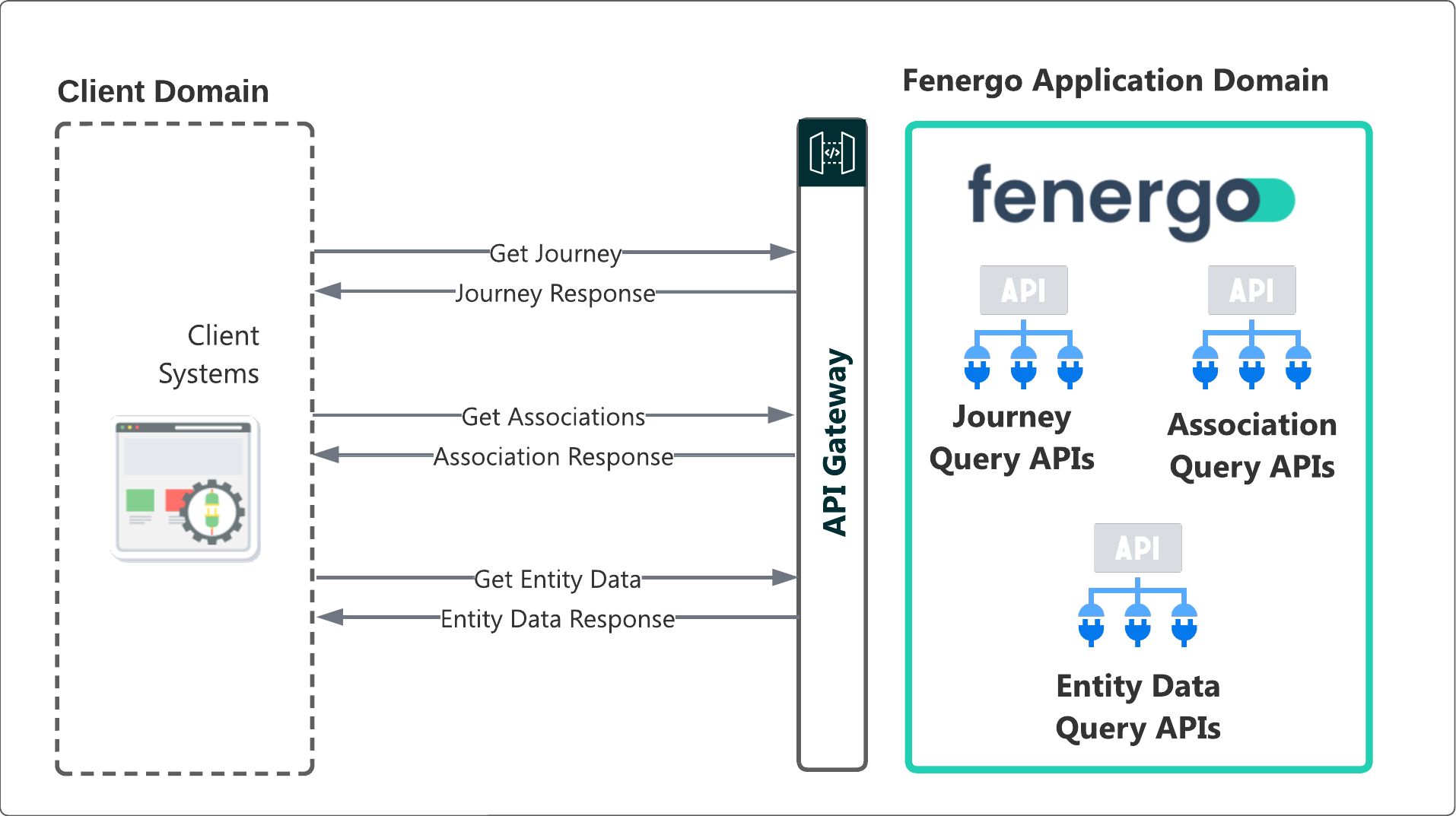
Fenergo Supergraph Implementation
With Supergraph clients can now access data all three domains in a single GraphQL schema that allows clients to fetch all the above data in a single query. Supergraph will inspect the incoming query and make the relevant REST calls to each domain before sending a single document back to the client.
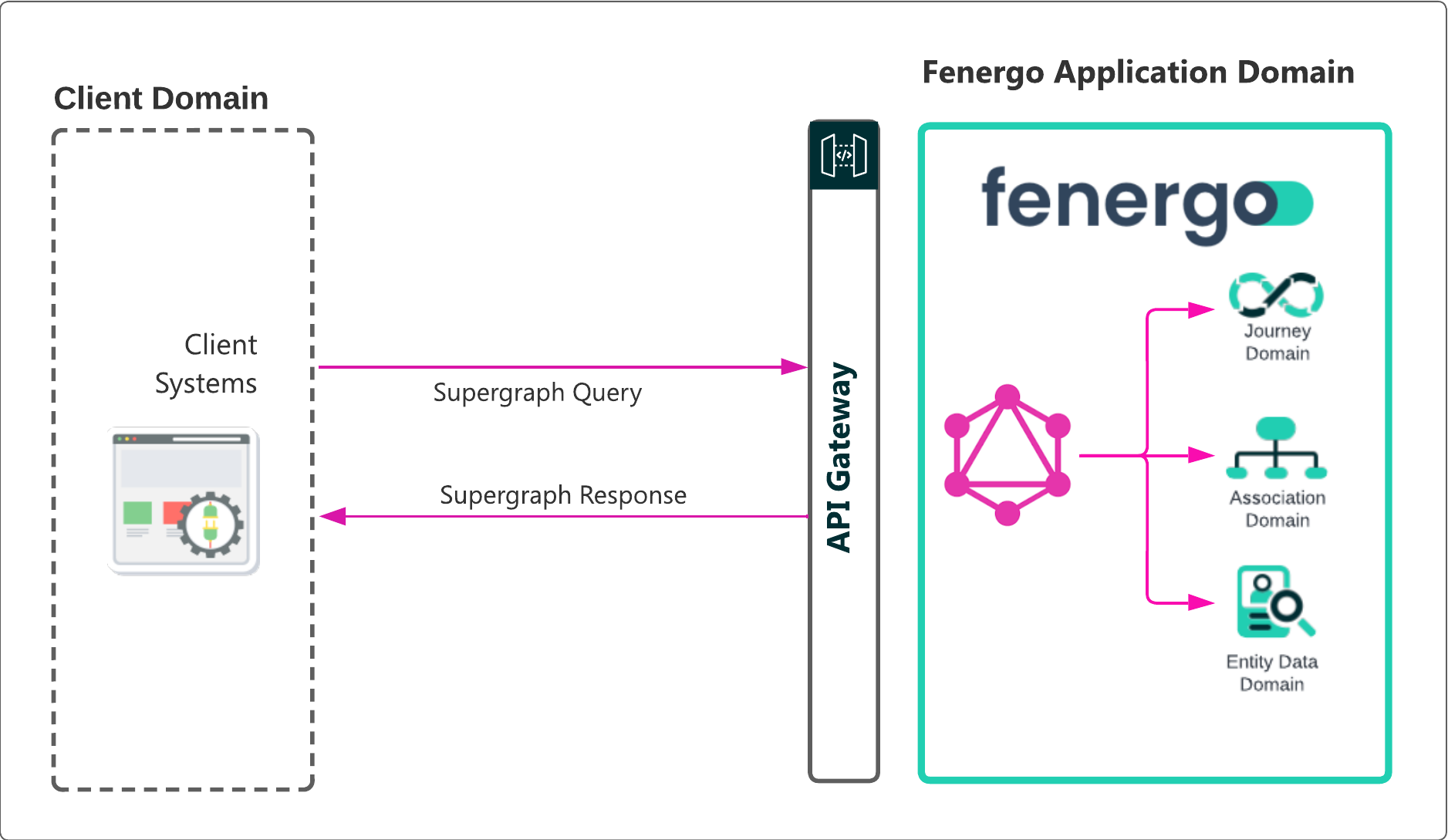
Supergraph Domain Support
Supergraph currently supports the EntityData, Journey, Associations and Product Domains. The diagram below illustrates the relationships between them. Fenergo will continue to work & bring support for additional domains such as Documents, Audit, Users & Teams in the future.
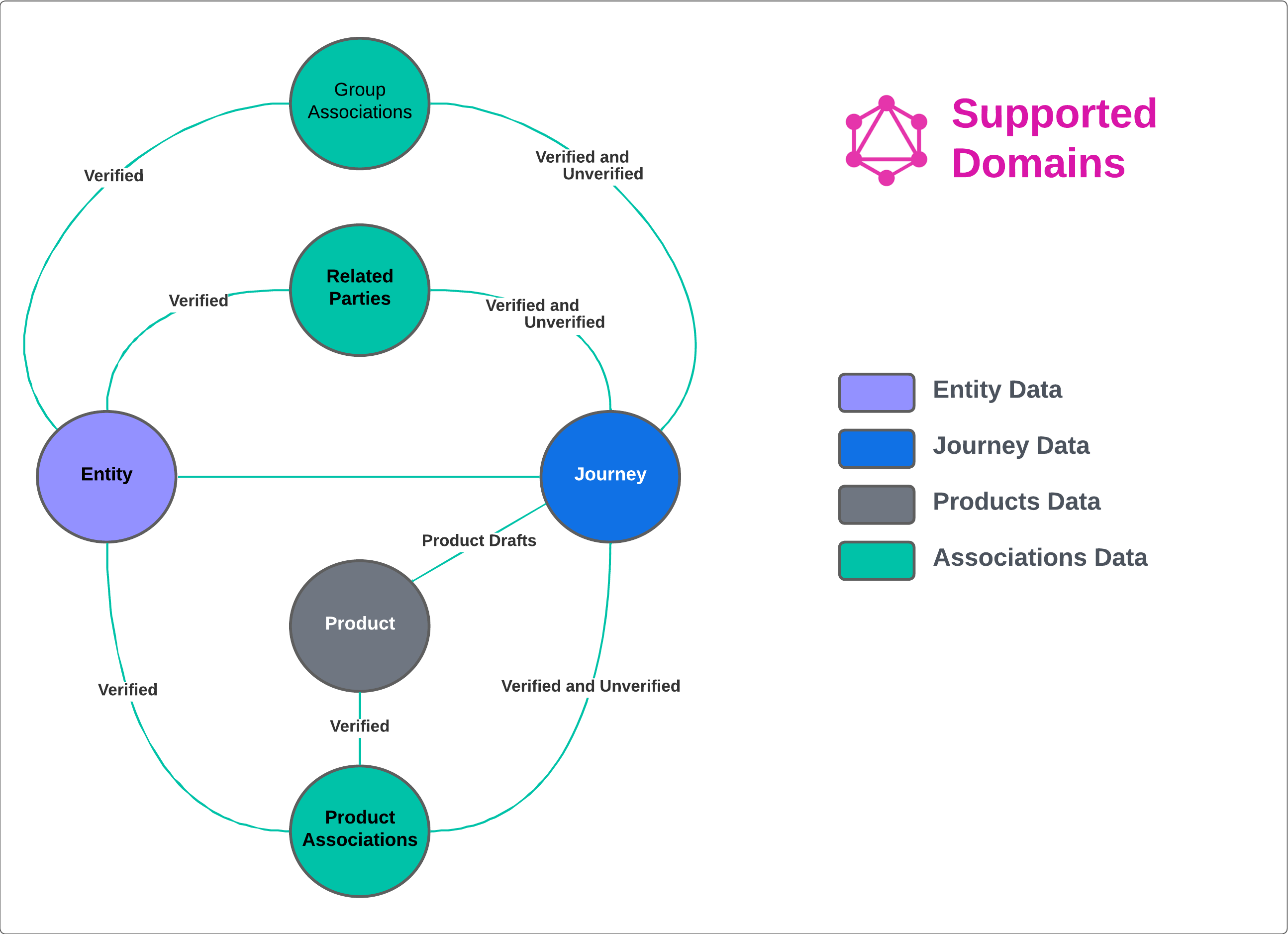
The schema is available at POST https://api.<environment>.fenergox.com/supergraph (e.g. https://api.nar1.fenergox.com/supergraph). This will return the schema in introspective json format. If you prefer there is 3rd party tooling that convert this to GraphQL Schema Definition Language (SDL).
The schema can also be browsed using out Supergraph Editor in the application https://api.<environment>.fenergox.com/supergraph.
Supergraph Schema
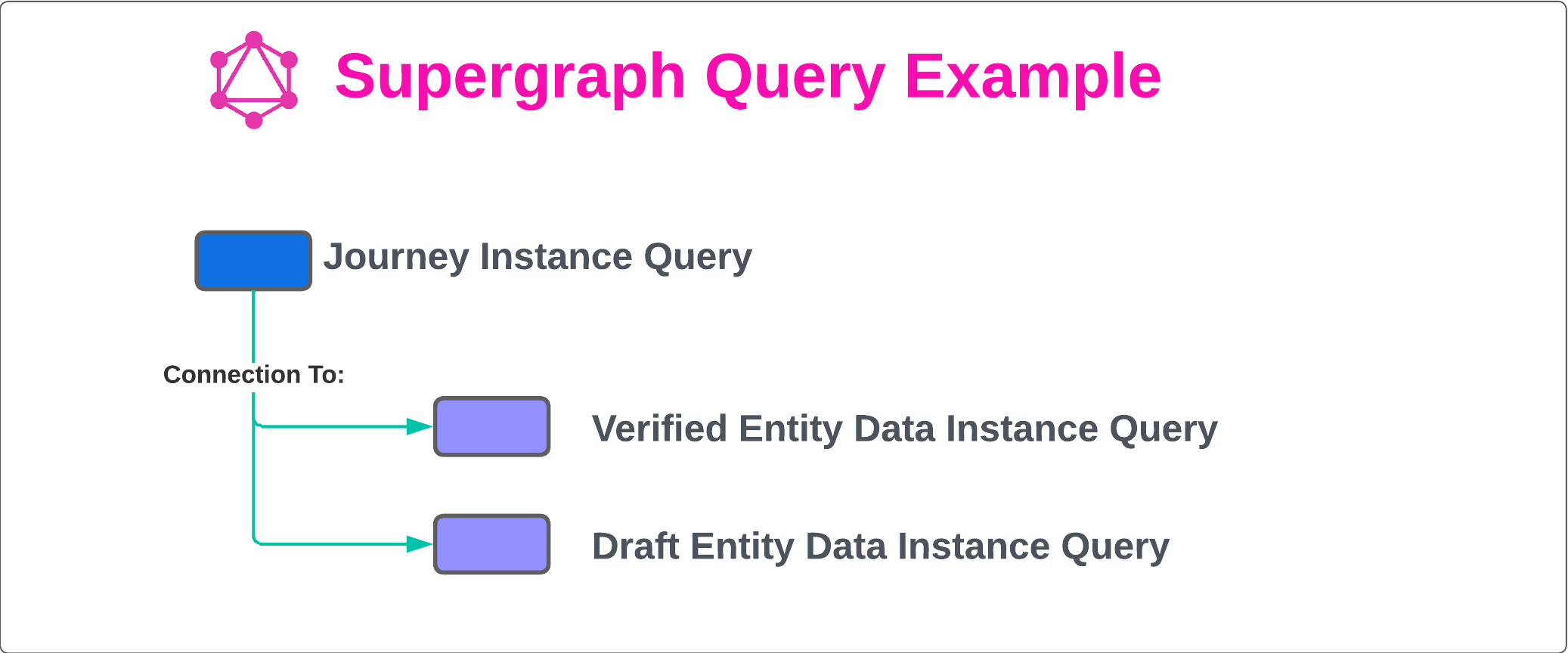
GraphQL uses a Schema to describe the available data. This Schema is essentially a Hierarchy of Types which contain fields of information. Fenergo provide the full schema in the GraphQL Test Harness which is available at https://your-tenant-root-url/supergraphand you can explore all the Types and Fields available. Using GraphQL a query which targets the Journey Instance would have a hierarchy that looks similar to below.
Understanding the Fenergo Supergraph Implementation
The schema will look familiar to anyone experienced working with Fenergo’s Query APIs as Supergraph is based on those same services. In the illustration below we see how the JourneyInstance Query is connected to both the Entity Query and the Entity Draft Query. Starting with a given JourneyInstance record Journey Instance id: db7e643e-a94d-4a0f-b9bc-c7bd29c8672f that includes both an EntityId and EntityDraftId references. GraphQL lets us embed connections between these objects within the schema so it becomes natural to traverse to the Entity and EntityDraft records in the Entity Data domain from the JourneyInstance and vice-versa.
In addition, Fenergo can also surface connections that aren’t immediately visible in the Query APIs. In the bellow illustration, the Entity object has been extended with connections to EntityDrafts [], lets keep it simple for now. One way to visualize how this looks is to think of the resultant Query as an Object Model (from Object Orientated Programming) where encapsulation or a pointer to another object is an attribute of an initial object. An even easier way to think of it is like a relational database, where a foreign key from one table lets you retrieve relevant records from another table.
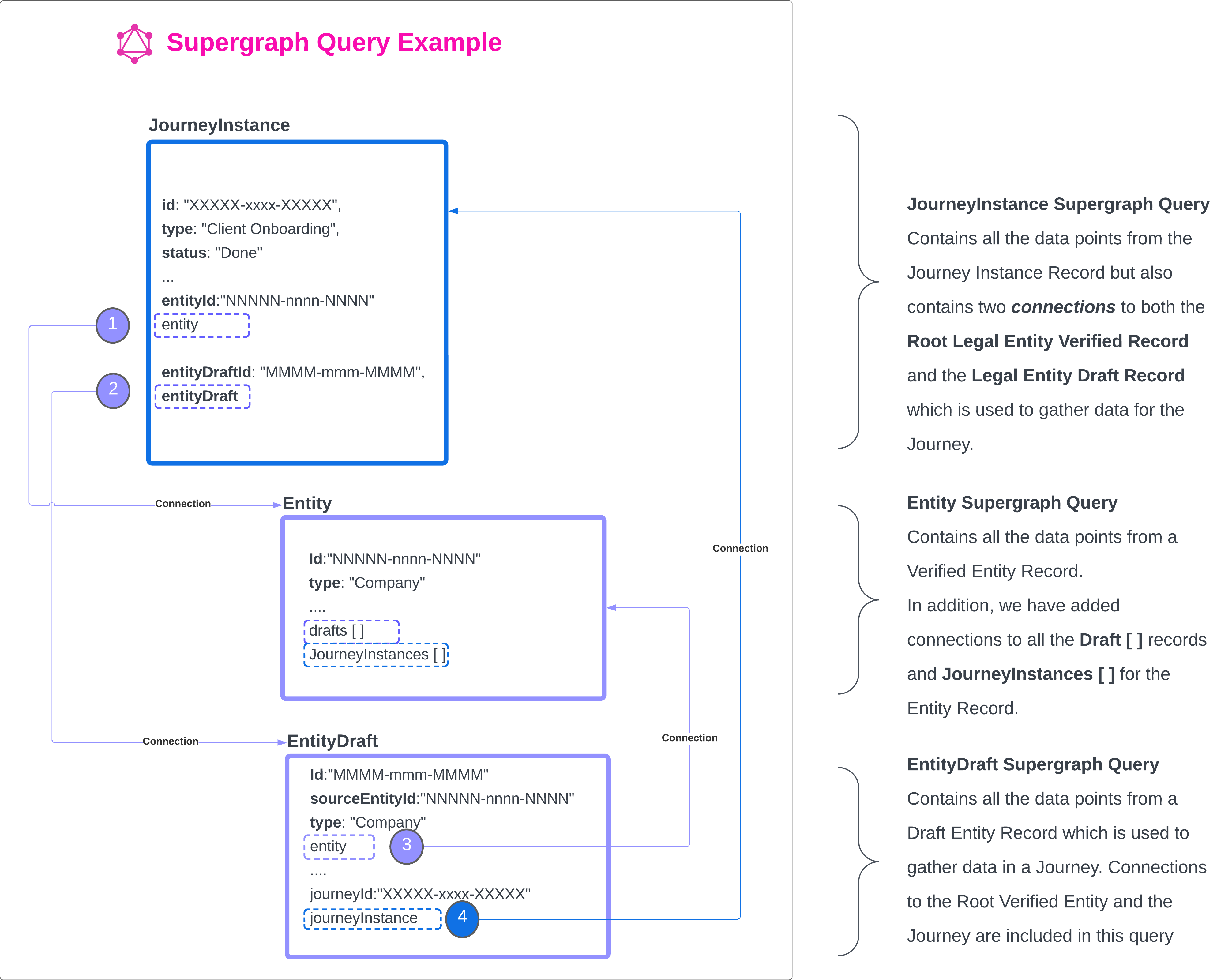
In the above illustrations we are starting with the JourneyInstance as the root level Query, but this could just as easily be any supported domain across the SuperGraph implementation.
Currently Fenergo only supports Querys using GraphQL and data cannot be updated using Mutations's for updating those records.
A Simple Supergraph Example
Just like all other Command / Query APIs available from Fenergo, to make a call to the Supergraph API you must include a valid Access Token in the request in the Authorization header and Tenant Id. The endpoint for all Supergraph queries is opposite.
https://{{baseURL}}/supergraph
query TESTQUERY {
  journeyInstance(id: "db7e643e-a94d-4a0f-b9bc-c7bd29c8672f") {
    id
    entityId
    entityDraftId
    name
    type
    identifier
    status
  }
}
Understanding the Supergraph Request
The above request format will be new to anyone who has NOT used GraphQL before, so lets look at the content.
The entire request is wrapped in a "query" and given a name. In this case "TESTQUERY".
The Query specified is called "journeyInstance" and this is defined in the Schema. It accepts a single parameter journeyInstanceId.
Within the JourneyInstance query, a number of data points have been requested. Remember one of the key benefits of GraphyQL is that you can specify what data you want to return from the query.
In this instance, anyone familiar with the existing Journey Query API will know that the full Journey Instance record contains a LOT of data, including all the stages and tasks. As that data is not always required, so with GraphyQL as in the above example, we can specify ONLY they data required. In this example the query is used to request only the following:
"id""entityId""entityDraftId""type""identifier""status"
{
    "data": {
        "journeyInstance": {
            "id": "db7e643e-a94d-4a0f-b9bc-c7bd29c8672f",
            "entityId": "2d506f95-b15b-4506-85f9-f4fc2b773e92",
            "entityDraftId": "72c88a7a-7e0d-40f6-8823-2f363d577129",
            "name": "Company Ingress Screening and Ext Data Test George",
            "type": "Client Onboarding",
            "identifier": "CompanyIngressExtDataScreeningTestJourneyGeorge",
            "status": "In Progress"
        }
    }
}
Understanding the Supergraph Response
The response object is based on the Journey Instance Response which is detailed in the schema Fenergo have exposed. As can be seen, only the data requested is returned, this allows developers and integrations to very explicitly target items that are required and eliminates the need to traverse large data responses looking for a specific data point. In our next document we will examine how to create cross domain queries which will demonstrate a next level of exciting capability driven by this powerful technology.