Creating a Migration Policy
When setting up a migration, a client may not have all the data points required for the policy they have designed for their Target Operating Model. There are two types of Policy on the Fenergo SaaS Platform:
- Global Policy: This will apply to all Legal Entities on the system and is intended to be the common baseline set of data that clients want to use when capturing data regardless where those Legal Entities reside or do business from.
- Jurisdictional Specific Policy: Clients can choose to extend the data gathered in the global policy by creating a policy which covers a specific Jurisdiction, then make that policy conditionally dependant on a field such as Country of Incorporation.
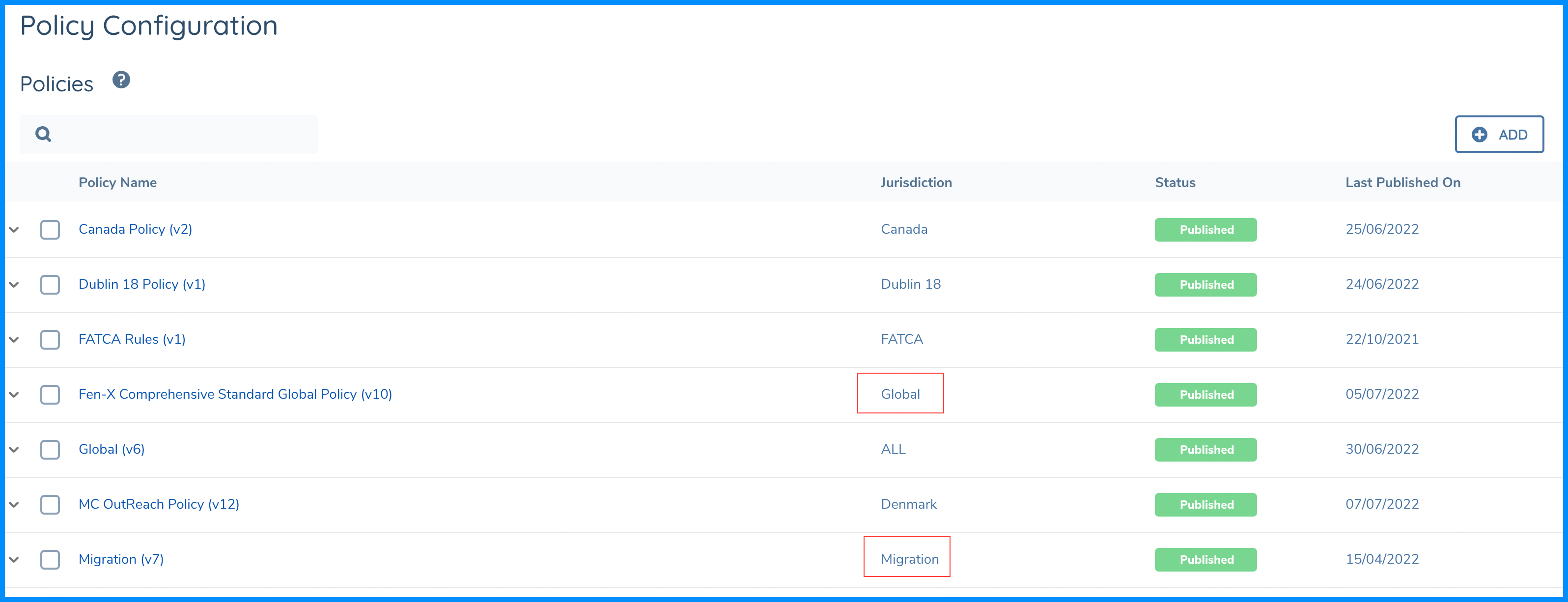
As can be seen from the above illustration, there is a policy labeled as Global under the Jurisdiction column and also a policy labelled as Migration. We know that there is no such Jurisdiction called migration, but we are using the standard Policy Configuration functionality to specifically create a Policy that can be used exclusively for Data Migration.
Benefits of a Migration Specific Policy
In Planning a Data Migration, there is a hard dependency on the Target Operating Model which is the Data Model that Business will configure on the SaaS platform. The activity of getting this designed, along with the analysis against the data which is available to the organization may not dovetail comfortably into one another.
In our experience, we have seen that clients spend a lot of time adjusting and tweaking their Policy Configurations during a SaaS project implementation and this can become a blocker to the data migration activity.
Instead, what clients can opt to do is take a pragmatic approach. Analyze the data at hand and establish a baseline policy for that data first. Then using that baseline as a Migration Policy, the Data Migration activity can proceed without a hard dependency on other project activities. The Migration Policy does not need to have strict mandatory field rules so clients can focus on migrating the data they have.
Data Migration now supports linkedSelectV2 and linkedMultiSelectV2 field types.
Please note that Journey Level Data requirements are not supported in Data Migration.