Migrating Documents against Legal Entities
Other than Data and Ownership details, another responsibility of managing a clients lifecycle is to gather specific documents that meet regulatory requirements. The process for gathering documents is via the "Document Requirements" tasks which are configured inside FenX Journeys, but a Document Requirement is not the same as the Document which is used to fulfil that requirement.
An example of a document requirement is "Proof of Address Required", where a document that can fulfil the requirement could be a bank account statement. Document requirements are defined inside policies, which are populated within a Journey, such as Client Onboarding or Legal Entity Maintenance. When performing a Data Migration the objective is to Import Data, so Journeys are not being created as standard, therefore Policy's which contain Document Requirements are not being fulfilled.
Ad-hoc documents can be added directly to Legal Entity via the Legal Entity Profile Page and via API calls and this is the way Documents can be uploaded to FenX to satisfy document migration.
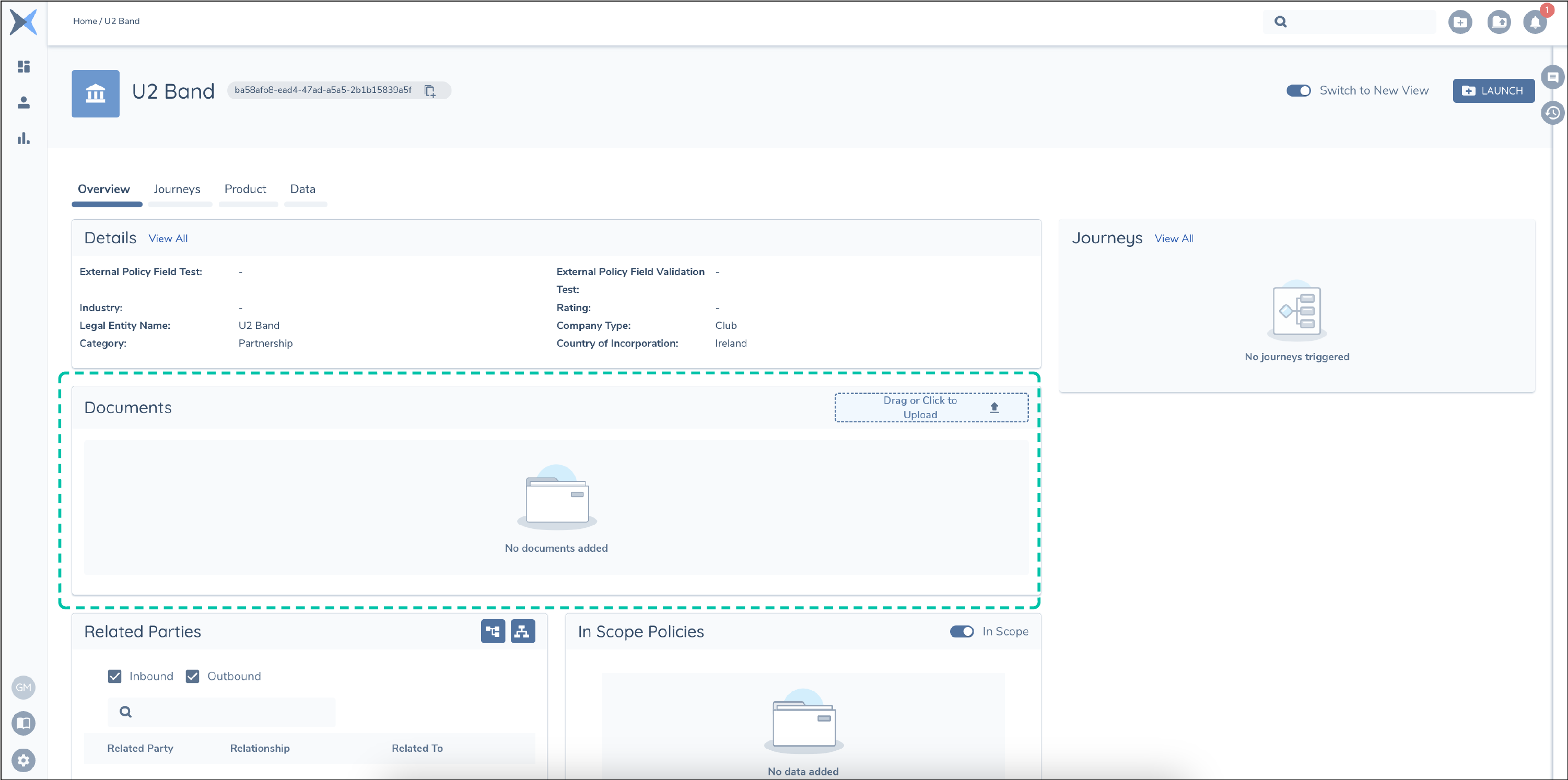
Unlike the data points or data groups in a policy, document requirements can be thought of as meta data relating to the document and a pointer to the physical document which is stored inside an S3 bucket. There is an association inside the FenX application which stores the relationship between the Legal Entity and the Document. This is transparent to clients but is how a document is displayed against Legal Entries and can be used to fulfil requirements within Journeys.
Document Migration Strategy
Document Migration has a hard dependency on Data Migration. The output from Data Migration is a file called the "Migrated Entities Report". This contains the FenX Legal Entity Id which corresponds to the "alternateId" used as an external reference value in the Migration. In order to upload a document against a FenX Legal Entity via the API, the FenX Id is required in the API call, hence the dependency.
Document Migration Use Case
  AS: an API consumer:

    GIVEN: I have a collection of Documents which I want to Migrate onto the Fenergo SaaS platform.

    AND: I have completed my Data Migration of Legal Entities

    AND: I know which Legal Entity Id I want to upload my documents against

 THEN: I want to upload my documents onto the platform.
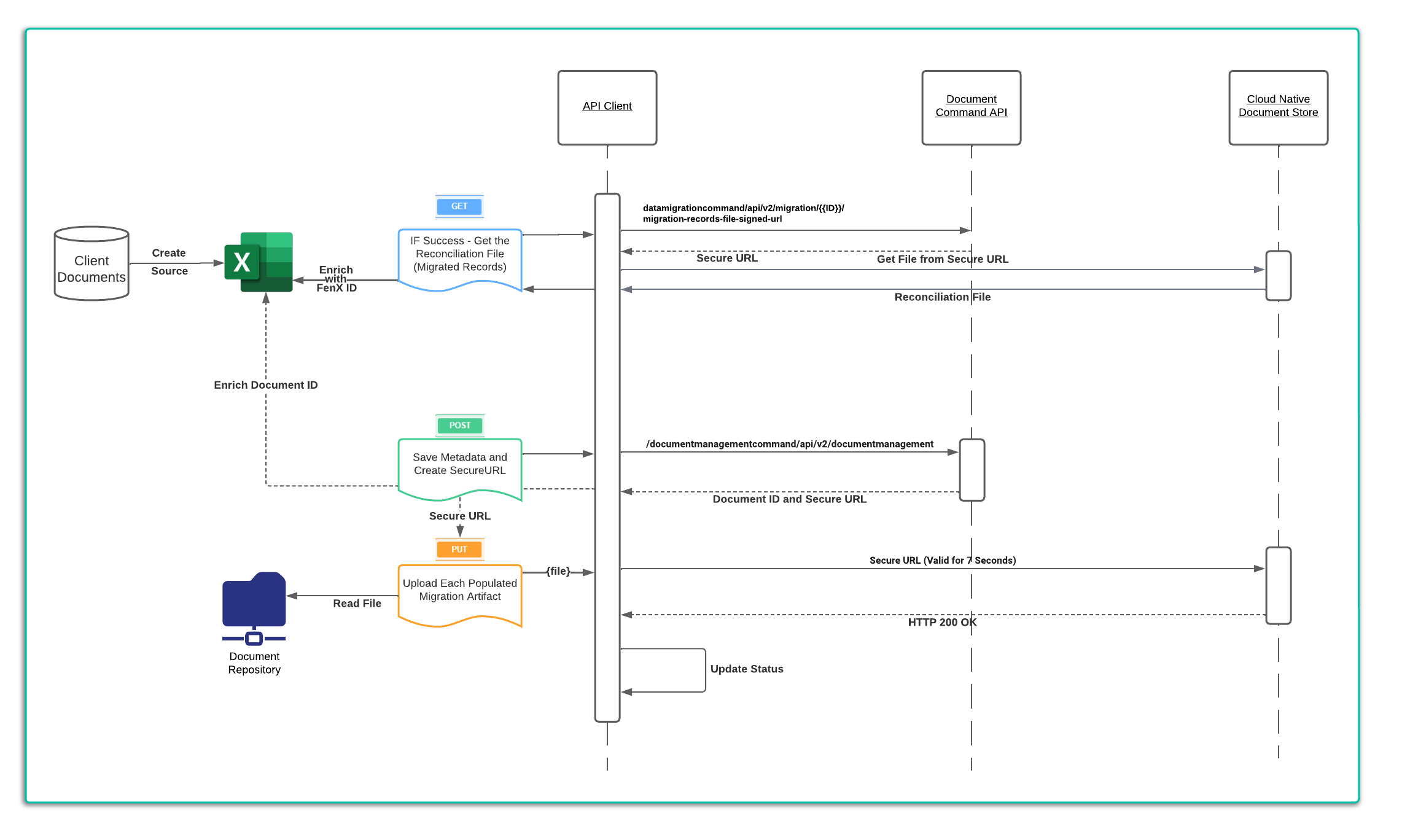
To satisfy this use case, a client will need to retrieve the "Migrated Entities" report from the Data Migration. Then using that data, enrich their source list of documents to be migrated. The sequence to execute the document migration is as below:
- Read the Meta Data from the Source List, including the FenX legal entity Id.
- Call the "Save document metadata and generate the URL to upload the file" API Method
- (Optional) Save the Document Id returned for downstream reconciliation.
- Use the SecureURL to upload the file. This is pre-signed and authenticated URL location. Whatever file is uploaded here will be associated to the ID created in the first step. The document will then be visible in the Legal Entity Profile page.
Create Metadata and Generate SecureURL
    HTTP POST URL :
    ================
    {{baseURL}}/documentmanagementcommand/api/v2/documentmanagement

    HTTP POST BODY:
    ================
    {
        "data": {
            "fileName": "Document Name to Be Uploaded",
            "entityId": "FenX LE ID to associate the document",
            "journeyId": "",
            "documentType": "Configured List of Document Types",
            "friendlyName": "Friendly Display Name for the Document",
            "documentRequirementIds": "",
            "properties": {},
            "accessLayers": {
                "businessRelated": [],
                "geographic": []
            },
            "policyEnforcedAccessLayers": {
                "businessRelated": [],
                "geographic": []
            },
            "isDocumentForESignature": false,
            "comesFromESignatureProvider": false
        }
    }

    HTTP RESPONSE:
    ================

    {
        "data": {
            "id": "523b053a-8543-4a31-a248-42ec9db64336",
            "documentRequirementIds": null,
            "documentDataKey": null,
            "documentType": "AML Report",
            "status": "Processing",
            "signedUrlToUpload": "xxxxxxxxx"
        },
        "messages": null
    }
Uploading Documents against the Secure URLs
The SecureURL returned in the HTTP Response above is NOT part of the FenX APIs. It is a pre-signed (pre-authenticated) AWS S3 URL that remains valid for only a few seconds to allow a document be uploaded against the above MetaData. Users can perform a "PUT" request with the document to the SecureURL.
None of the FenX Headers are Required but the "content-type" must be specified for the type of file being uploaded. Some examples of common content types are :
- word: application/vnd.openxmlformats-officedocument.wordprocessingml.document
- excel: application/vnd.openxmlformats-officedocument.spreadsheetml.sheet
- PNG: image/png
- TXT: text/plain
- PDF: application/pdf