Event Ingress Overview
In a similar way that Fenergo sends notifications out to clients via polling or webhooks to reflect activity from within our platform, Clients may have activity from within their technical landscape that affect Legal Entity Data and need to reflect that update on the Fenergo System. Clients of course have a range of options in how they push data onto Fenergo. They can use the Data Migration APIs or Direct Connect Entity Data / Journey APIs. Another way to inform Fenergo of external activity is to send a message to our Event Ingress API interface.
We currently support the following Business Processes for receiving data into the Fenergo SaaS platform:
- DataImport - Clients can send an event that contains multiple Entities and Association data. Fenergo will evaluate the incoming data against what exists already in the platform and trigger the appropriate journeys.
- VerifiedImport - Clients can send an event that contains multiple Entities to be directly verified (no journey required).
- Create Entity - Clients can send a message containing Entity Data and Fenergo will create that Entity and Initiate a configured journey to manage the new Entity.
- Update Entity - Clients can send a message containing Legal Entity Data and Fenergo will Initiate a configured journey to manage the update of that Entity.
- Create Alert - Clients can send a message containing Transaction Monitoring Alert and Fenergo will initiate a configured journey to manage the Alert lifecycle.
CreateEntity and UpdateEntity event subtypes are now legacy events and have been superceded by the new DataImport process which supports both create/update scenarios and more.
Event Ingress can support multiple entities per message but is not intended as a replacement for to Data Migration for large, bulk data.
Event Ingress is not an Enterprise Message Bus (ESB) interface. Messages are sent into Fenergo through a standard REST based HTTP API endpoint via the API Gateway using the same security and best practice implementation for all our other Command Query APIs.
Eventing Pattern
As covered in our Standard Integrations Patterns documentation, the Event Notification Pattern involves an Event Producer, a Queue and Event Consumer. For Event Ingress, the client systems are the Event Producer and Fenergo is the Event Consumer.

A benefit of the Eventing Pattern is to support Loose Coupled Interaction between systems. The producer (Clients) are not responsible for the implementation of the consumer(Fenergo) and the consumer is not dependant directly or indirectly on the producer. When the interaction (in this case the API Gateway) is a standards based, language independent implementation, the result is an integration style that offers true flexibility for clients to craft solutions that cater to a broad range of Use Cases.
For the configured Event Types, clients do not need to implement a sequence of API calls at their end to achieve the business process outcomes. Instead that orchestration is handled internally by Fenergo and clients need only to send a single message.
Event Ingress Architecture
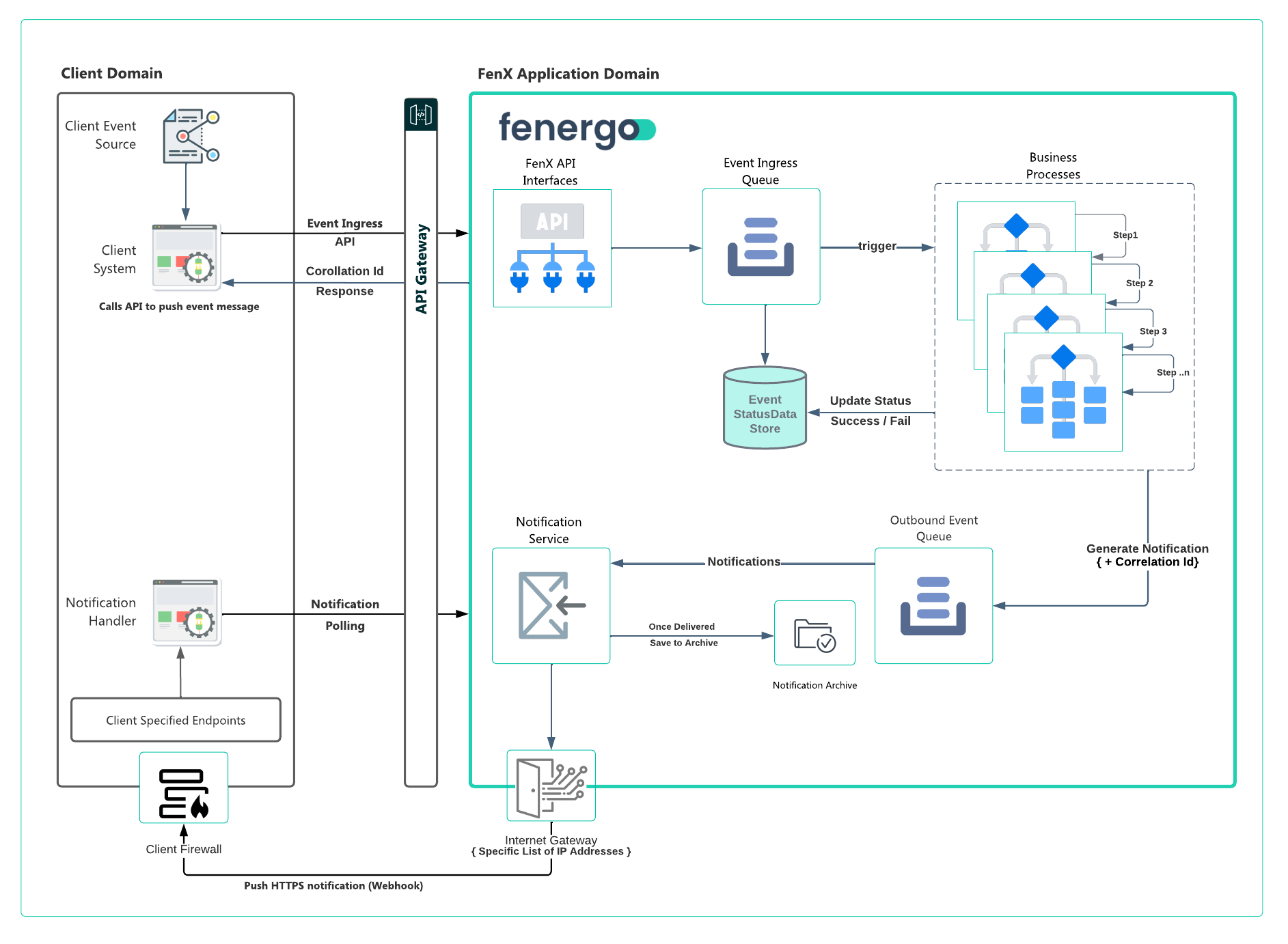
With Event Ingress, the Event Producers(Fenergo Client) use the Ingress APIs to send an event from within their technical landscape. Individual use cases will differ from client to client, but the outcome is to have a single point of contact with a single API call where Fenergo will handle the orchestration of a set of defined business processes without requiring any further consumer involvement beyond sending the initial message.
As illustrated above the flow of event ingress message is as follows:
- A client system takes an event source from within their domain and calls the Ingress API, passing in the event type and data related to the event.
- The response from Fenergo will be a correlation Id which the client can use to determine the outcome of the call.
- Fenergo durably stores the event in EventStatus Data Store and queues the event message for processing.
- The event queue is processed and depending on the event type, a set of business processes are triggered.
- The business process completes and then updates the status in the EventStatus Data Store and sends a Notification to the Notification Service with an update for the client to inform them of the outcome of the business process.
- The original Correlation Id initially returned to the client is referenced so the client can update any internal systems with the outcome of the eventType.
- Clients can receive the notification via a webhook or polling as they do for any other notification.
Orchestration on the Fenergo Side
With Event Ingress, Fenergo handle orchestration after the message in received. Fenergo will use the information in the message to trigger internal functionality in sequential order to perform a unit of work. Once the execution is completed the status / outcome of the process is sent as a notification to the client.
Event Ingress Best Practice
Like any other integration consumers need to consider how the Ingress Functionality operates and design their interactions to take advantage of the benefits offered by the functionality. Consider the following when planning to use Event Ingress.
- The interaction is Asynchronous: When a message is sent to the Ingress Endpoint, an immediate response is returned to the calling application. This simply means the message has been accepted and is by no means an indication of success. Internally all the steps described in the above business processes need to execute in sequence. Only when the final notification describing the outcome of the invoked business process has been sent, can the calling application assume the message has succeeded (or failed).
- Handle Failures: Clients may need to create their own Error / Exception handling routines if a business process fails to complete. If a failure does occur it will be communicated via the Event Notifications service with details of why the failure happened.
- Dependency on Config: The Ingress functionality will only work once the correct trigger conditions have been met. If Journeys, Policy etc... is changed this could impact the Ingress Functionality an it needs to be extensively tested.
- Adherence to Data Model: The data model configured in policy's on Fenergo is essentially a canonical structure accepted by the platform. Any changes in policy config (data fields etc...) can impact downstream systems which send messages to the Ingress API. Data structure changes need to be agreed with all consumers.
- Be aware of Throttling: The Ingress API is throttled to protect the platform against excessive misuse. The default limits are described in API Rate Limits. If your volumes are likely to exceed these limits please discuss with our Cloud Business Office.