Entity Data Conflict Resolution
Understanding Conflict Resolution
In the Fenergo SaaS platform Conflict Resolution is how the system ensures consistency of data when the same Legal Entity is being modified across multiple Journeys. A method in the Entity Data Command API allows a system calling the Fenergo APIs to test for and determine if a conflict exists between a draft record and the corresponding verified record.
| APIs Referenced | APIs Capabilities: |
|---|---|
| Entity Data Command | - Compare a Draft Record Against Current Verified Record - Resolve Conflicts on Draft by taking in Data from the Verified Record |
| - Resolve Conflicts on Draft by taking in Data from the Verified Record |
Conflict Resolution Overview
When a Legal Entity Record is created on the system, it is created as a Verified Record. There is only one time when a record can be written in this state and that is at the time of creation. The API for conflict resolution operates between a give Draft Record and Corresponding Verified Record, comparing the current version of the Verified Record against the referenced Source Version in the Draft.
If multiple client teams are working on multiple journeys, we cannot assume those teams have access to one another or are aware of each others actions. We also do not want a scenario where one journey is dependant on or blocked by another journey. So conflict resolution deals with only 2 pieces of data:
1 - The Draft Record of a Journey.
2 - How that Draft Record Relates to the CURRENT Verified Record for that Legal Entity.
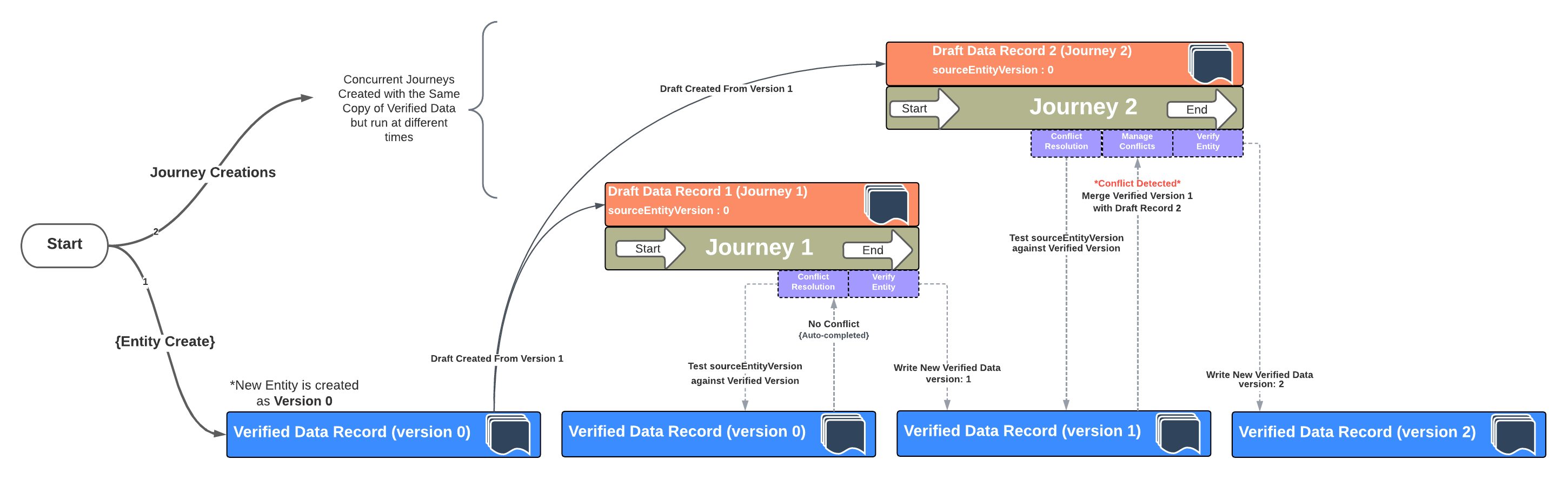
Click Here for a HQ PDF of the above diagram
Conflict Resolution Steps
Walking through the steps in the diagram above, the following is how conflicts are detected an resolved safely between multiple journeys on the Fenergo Platform.
-
Create the Entity and Journey 1
- A new Legal Entity Record is created in the Verified Store with a Version:0.
- A new Journey Journey:1 is created to gather data for Draft Record 1.
- A new Draft Entity Record is Created Draft Record:1 from the Verified Record Version:0
-
Create the the 2nd Journey 1
- A new Journey Journey:2 is created to gather data for Draft Record 2.
- A second Draft Entity Record is Created Draft Record:2 from the Verified Record Version:0
-
Complete First Journey (No Conflict)
- Journey:1 comes to completion and the Conflict Resolution Task is executed.
- This Task tests the current Version of the Verified Record which is Version:0 against the Source Entity Version on Draft Record:1 which is also 0
- This indicates there is no conflict & the task completes.
- Journey:1 Writes its data to the Verified Store creating a new version of the Verified Record called Version:1
-
Complete Second Journey (Manage Conflict)
- Some time later Journey:2 comes to completion and the Conflict Resolution Task is executed.
- The current version of the Verified Record which is Version:1 against the Source Entity Version on Draft Record:2 which is 0.
- This mismatch means there is Newer Data in the verified store which Journey:2 has not yet accommodated.
- This is a conflict.
- The Newer data is merged into the Draft Record:2 within Journey:2
- Journey:2 writes its data to the Verified Store creating a new version of the Verified Record called Version:2
Along all of these steps, Journey 1 was never aware of Journey 2 and their respective draft records never interacted. It comes down to which journey completes first, and it then becomes the responsibility of the subsequent Journeys to manage the conflict at the point in time where they complete.
Multiple Conflict Resolution Tasks in a Journeys
Some client processes are long running and could take weeks or months to complete. If a client faces situations where a long running journey runs the risk of operating on old data in such a long running Journey they can add multiple conflict resolution tasks to their Journey Design. The will allow for the above test to occur at multiple points along the Journey and not wait until a journey is almost completed before potentially large or impactful conflicts are detected.
Conflict Resolution API
The interesting thing about the Conflict Resolution API is that it does not require that a Conflict Resolution task is configured in place in a Journey to perform the same function of that task. This means that API consumers can test for conflicts and resolve them simply by using the API interface. This can be done for any journey and at any stage by sending a PUT request to the above URL along with the below JSON Body.
API call to Test for Conflicts
The API call to handle Conflict Resolution uses the Entity Data Command endpoint which has a method with the /conflicts name in the URL as opposite.
HTTP PUT URL FORMAT:
================
**{{baseURL}}**/entitydatacommand/api/v2/entity/{entityId}/draft/{draftEntityId}/conflicts
{
    "data": {
        "pushChanges": false
    }
}
{
    "data": {
        "entityVersion": 14,
        "dataConflicts": {
            "middleName": {
                "existingValue": {
                    "value": "Journey One Middle Name",
                    "type": "Single",
                    "isValid": null
                },
                "newValue": {
                    "value": "Ted",
                    "type": "Single",
                    "isValid": null
                }
            }
        }
    },
    "messages": null
}
Understanding the Test for Conflicts API Request and Response
Whilst this is a HTTP PUT REQUEST typically used to update data on an existing resource the call is not updating the draft record. The URL structure is the same as the Entity Data Update POST Request but as can be seen from the Request Body, we are only sending in a "pushChanges": false value. In the System, this is enough data to allow the values of the referenced draft record to be compared against the current verified record.
- As can be seen in the response the entityVersion": 14 is returned. This is the version of the current verified record against which the comparison was made.
- Then highlighted in greenthere is a collection object called dataConflicts which contains a list of Field Names where a conflict has been detected. In the above example only one item is in the list middleName
- Highlighted in Red is the existingValue. This is the current value inside the Verified Record. (Not what is in the Draft).
- Highlighted in Yellow is the newValue. This is the current value inside the Draft Record.
With this data, a downstream system has all the information required to display a list of conflicts for any Draft Entity Record against its corresponding Verified Record. That system may need to construct a UI for a user to select which fields are correct or it may also use the absence of data to confirm that NO conflicts exist.
Users should be aware that the response from the API call is a HTTP 409 which is an ERROR response. It is however an expected error to determine if conflicts exist.
API call to Resolve Conflicts
The API PUT call and URL to Resolve Conflicts is the same as the one to test for conflicts. The only difference will be in the Request Body.
HTTP PUT URL FORMAT:
================
{{baseURL}}/entitydatacommand/api/v2/entity/{entityId}/draft/{draftEntityId}/conflicts**
{
    "data": {
        "pushChanges": true,
        "entityVersion": 14,
        "dataConflictResolutions": {
            "middleName": {
                "type": "Single",
                "value": "Journey Two Middle Name"
            }
        }
    }
}

HTTP PUT URL RESPONSE:
======================
**HTTP 202 ACCEPTED**
Understanding the Resolve Conflicts API Request and Response
The same HTTP PUT REQUEST is used to resolve the conflicts as is used to test for them. Assuming the API consumer has a way to allow a user make the selections / update the data to be saved, this API will do two specific things.
-
1 - It saves the updated data properties to the Draft Record.
-
2 - It updates the sourceEntityVersion value of the Draft record to the latest Version of the Verified Record.
-
As can be seen in the JSON Request the pushChanges" is set to true. This tells the system that we want to update the Draft Record.
-
Then highlighted in Orange the "entityVersion":14 is sent in to indicate that we are resolving conflicts between the referenced draft record against version 14 of the corresponding Verified Record.
-
Highlighted in Blue is the collection of data points being updated.
-
Highlighted in Purple are the actual values which are to be updated.
Provided version 14 is still the current version of the Verified Record the changes will be accepted and a HTTP 202 Accepted response is returned.
Users should be aware that no data is updated in the Verified Store by this API, data is only updated in the Draft Record. The sourceEntityVersion value in the draft is updated as well and this process can be performed numerous times throughout a journey to ensure conflicts do not exist.