Updating Entity Data and Advancing Journeys
Using the APIs to create and then read back a new Journey Instance
With a Journey in place, users of the platform can follow the steps to gather all the required data and documents needed to follow a defined Client Lifecycle Management flow. Whilst the entire activity can be done through the User Interface, business scenarios will arise where steps in the process will need to be completed programmatically. This means using the APIs to identify the Journey, retrieve all the detail, update data on the forms and then advance the journey forward.
| APIs Referenced |
|---|
| Entity Data Command |
| Entity Data Query |
| Journey Command |
| Journey Query |
| Journey Logic Engine |
Sample Use Case for Creating a Journey
  AS an API consumer:

      GIVEN: I have created a new Client Legal Entity

      AND: I have initiated a new Client Onboarding Journey for that Legal Entity

      AND: I have created a Draft Legal Entity Id

      WHEN: The first task on the Journey has been Generated

  THEN: I want to update the Data associated with that task and progress the journey to the next task.
Steps to satisfy the Use Case
To satisfy this use case we will follow 6 steps that you as an API consumer will need to chain together. The pattern being suggested here can easily be adapted to suit different requirements and will be dependant on the underlying business requirements, but the APIs being called are flexible and it will be clear where they can be used elsewhere.
- Step 1 Get the Draft Entity Record.
- Step 2 Get the Journey Instance.
- Step 3 Get the Requirements In Scope for the Task being completed. This will be the data points to be gathered.
- Step 4 Get any lookups required..
- Step 5 Save new Entity Data into the Draft Record.
- Step 6 Complete a task on the Journey Instance.
These steps are illustrated in the sequence diagram below.
In the previous documents, we have demonstrated how to create a new Legal Entity, create a new Journey and also create a Draft Record which can be used to gather data along that Journey. These are prerequisites to the steps illustrated below and we the assumption is that the following information is available:
- Legal Entity Id
- Journey Instance Id
- Draft Legal Entity Id
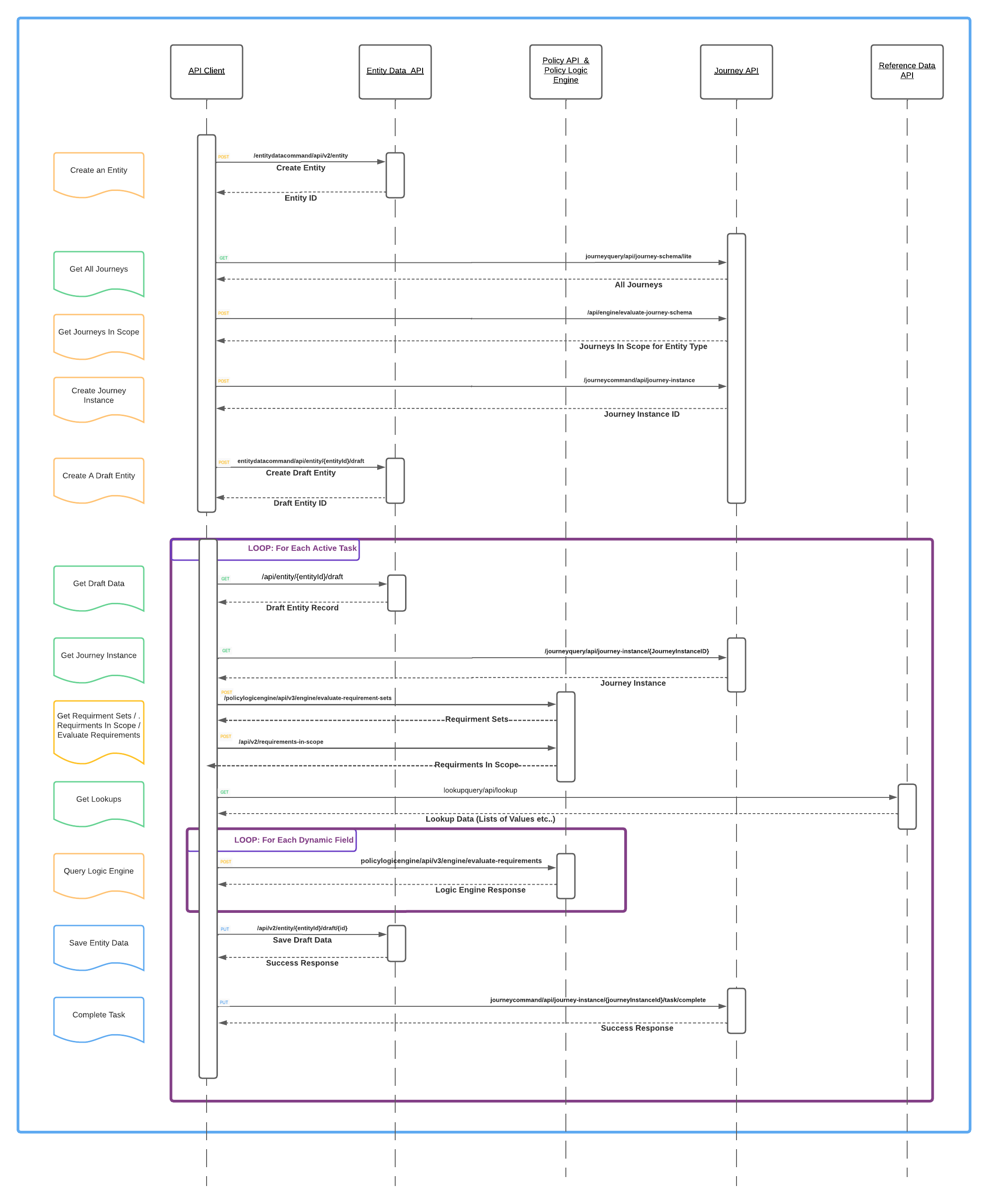 Click here for HQ PDF of the above image.
Step 1 - Get the Draft Entity Record
The first step we need to take is to get the draft legal entity record. As per the use cases >Given / And statements, the assumption is that the Entity Id, Journey Instance Id and Entity Draft Id are available. These may have been created by your integration previously or potentially received via event notifications. The Legal Entity Draft Id will let us retrieve the legal entity draft record, which is a full copy (at a specific point in time) of the verified legal entity record. This is used for updating and capturing data and then merged into the verified data store at the end of a Journey, as it is not possible to directly update the verified record.
This pattern keeps the data in Fenergo safe from unapproved or unauthorized changes, and the draft record can be thought of as a sandbox where data can be safely updated without changing the official verified record. Other consumers of the system will always see the verified data when they request a record using the Legal Entity Id.
You can retrieve a Legal Entity Draft Record from the Entity Data Query API using both the Legal Entity Id and the Draft Id in the URL. Send a GET Request to the endpoint below. The response will return the current state of the Draft Legal Entity Record.
If the "draftentityid" is not supplied in the URL, the system will return a collection of all draft records for that entity. The only difference is an array response instead of a single record response.
HTTP GET URL FORMAT:
================
{{baseURL}}/entitydataquery/api/entity/{entityId}/draft/{draftentityid}

HTTP GET URL:
================
{{baseURL}}/entitydataquery/api/entity/2ed9f965-342a-4dc8-afb8-58b8de41cd5f/draft/0b588152-85ef-4223-908b-684214144541
{
    "data": {
        "id": "a6ee110a-2d4c-499e-b633-73f320632dde",
        "sourceEntityId": "2ed9f965-342a-4dc8-afb8-58b8de41cd5f",
        "sourceEntityVersion": 0,
        "journeyId": "44761197-f1b3-4d24-b549-026257ba3cae",
        "type": "Company",
        "properties": {
            "legalEntityName": {
                "value": "Acme Finance Group",
                "type": "Single",
                "discriminator": "Single"
            },
            "country": {
                "value": "Ireland",
                "type": "Single",
                "discriminator": "Single"
            },
            "dateOfIncorporation": {
                "value": "2021-12-31",
                "type": "Single",
                "discriminator": "Single"
            },
            "category": {
                "value": "Corporation",
                "type": "Single",
                "discriminator": "Single"
            },
            "companyType": {
                "value": "Bank",
                "type": "Single",
                "discriminator": "Single"
            }
        },
        "risk": {
            "riskCategory": null,
            "riskLevel": null
        },
        "role": {
            "name": null
        },
        "status": "InProgress",
        "created": "2022-07-16T10:44:21.955+00:00",
        "jurisdictions": [
            {
                "jurisdiction": "Global",
                "versionId": "d8319029-0a83-43cc-b104-8f7f8526e94a"
            }
        ],
        "riskVersion": {
            "riskModel": [],
            "riskConfigurationModel": [],
            "thresholdModel": []
        },
        "accessLayers": {
            "geographic": [
                "Global"
            ],
            "businessRelated": [
                "Enterprise"
            ]
        },
        "version": 0
    },
    "messages": null
}
Understanding the Get Draft Entity Response
The Draft Entity Record response is very similar to a verified entity record with a few key differences specifically in how the draft was created and the journey it is related to.
"id"at the root is the Draft Entity Id, in the standard GUID format."sourceEntityId"is the Legal Entity Id which the draft was created format."journeyId"is the main Journey Instance Id which the draft was created to work with."properties"collection contains all the properties of the Draft Record. These are the values which will be presented in the UI of the Journey and they will be updated as a journey progresses."jurisdictions"collection is all the current Jurisdictions which apply to this Legal Entity. As can be seen in this example, the Global Jurisdiction apply's at the moment. This is needed for determining the Requirements to be gathered for the Entity later in this Use Case.
You will also notice "sourceEntityVersion" entry which is the version number of Verified Legal Entity. Every time the verified record is updated, this version is incremented and this is used in the conflict resolution functionality to ensure consistency of data when overwriting a verified record with a draft record.
Step 2 - Get the Journey Instance
Before looking at the Journey Instance Response it is important to understand the structure of a Journey Instance. The record contains a lot of details including:
- The Type of Journey
- The entity target for the Journey and the Draft Entity Id being used to gather data
- The current state of a journey
- Users who have interacted with that Journey
- The Date / Time when tasks were completed
- The Id of Journey and Tasks
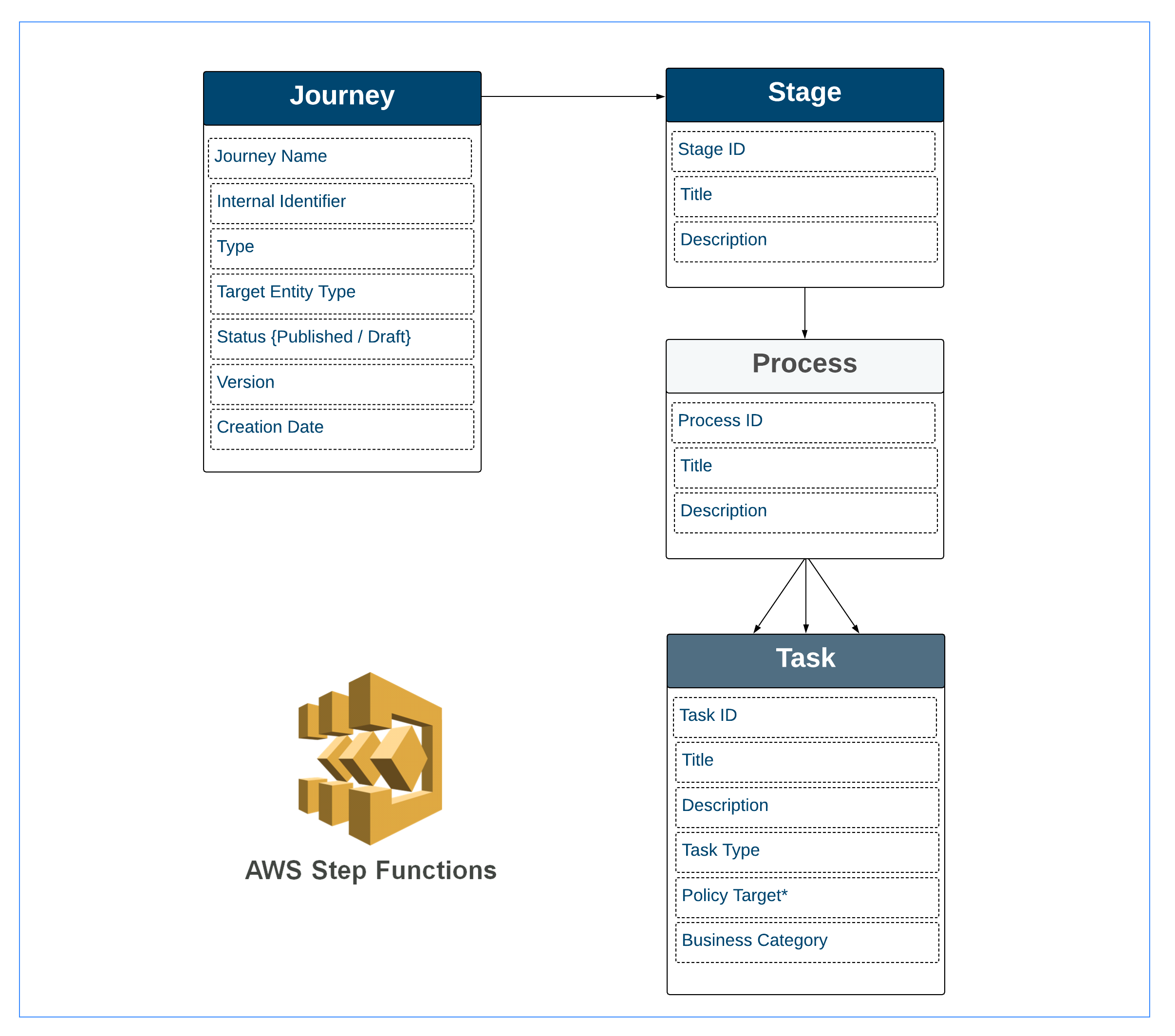
Where all the data points sit in the structure of the JSON response can be seen in the diagram here:
- A Journey Contains a Stage
- A Stage contains a Process
- Then a Process can contain Multiple Tasks
All of these elements have their own identifiers and we will refer to them throughout this document.
A Journey Instance can be retrieved from the Journey Query API using the Journey Instance Id in the URL. Send a GET Request to the following opposite. The response will return the Journey Instance Record.
HTTP GET URL FORMAT:
================
{{baseURL}}/journeyquery/api/journey-instance/{journeyInstanceId}
</br>
HTTP GET URL:
================
{{baseURL}}/journeyquery/api/journey-instance/5a516f2b-3a83-4c4f-a7bb-0a50763a19c6
In the example response below, only one Stage, Process and Task have been displayed, along with the root level fields (towards the bottom of the request). Depending on the configuration of a Journey the response can get very large but the basic pattern is as illustrated.
{
    "data": {
        "stages": [
            {
                "id": "378d7ac3-3162-4435-848a-8423d8fb3029",
                "schemaStageId": "687e74e2-5967-451c-bf1d-32b9207885ff",
                "name": "New Request",
                "description": null,
                "status": "In Progress",
                "order": 0,
                "processesCompletionOrder": "Sequential",
                "inParallelWithStages": [],
                "stageChannel": null,
                "started": "2022-07-16T10:44:21.573Z",
                "completed": null,
                "processes": [
                    {
                        "id": "3af73881-e154-4588-9d74-d95227b7c339",
                        "schemaProcessId": "12b4e514-f628-4e9e-9d87-6b861637a52c",
                        "name": "Journey Initiation",
                        "description": null,
                        "status": "In Progress",
                        "order": 0,
                        "tasksCompletionOrder": "Sequential",
                        "tasks": [
                            {
                                "policyTarget": "Client",
                                "policyCategory": null,
                                "policyRequirementType": "Data",
                                "businessCategory": [
                                    "Basic Details",
                                    "Booking Details"
                                ],
                                "businessSubCategory": null,
                                "documentPersistence": null,
                                "relatedPartyCategory": null,
                                "id": "6a36726b-65f8-4053-9ae5-69d97c94372b",
                                "schemaTaskId": "6b04eae4-7e83-484e-abad-5e10644ebc7f",
                                "name": "Basic Details",
                                "description": null,
                                "status": "In Progress",
                                "order": 0,
                                "taskType": "PolicyTask",
                                "discriminator": "PolicyTask",
                                "assignedTo": null,
                                "reassignComment": null,
                                "reopenComment": null,
                                "reopened": null,
                                "started": "2022-07-16T10:44:21.696Z",
                                "completed": "0001-01-01T00:00:00Z",
                                "cancelled": "0001-01-01T00:00:00Z",
                                "completedBy": null,
                                "teamId": "5fb9b603-c01a-4db7-aca0-52cefd7f5aba",
                                "conditions": [],
                                "completeAfter": [],
                                "isBranchedTask": false,
                                "isHidden": false,
                                "isCompleted": false,
                                "isSkipped": false,
                                "isInEvaluation": false,
                                "isConditional": false
                            }
                        ],
                        .
                        .
                        .
                        . . . { More Tasks }...
                        .
                        .
                        .
                        "started": "2022-07-16T10:44:21.573Z",
                        "completed": null,
                        "conditions": [],
                        "isConditional": false,
                        "isCompleted": false,
                        "isSkipped": false,
                        "isHidden": false
                    },
                    .
                    .
                    .
                    . . . { More Processes }...
                    .
                    .
                    .
                ],
                "conditions": [],
                "isConditional": false,
                "isHidden": false,
                "stats": {
                    "completed": 0,
                    "total": 6,
                    "progress": 0
                }
            },
            {
            .
            .
            . . . { More Stages }...
            .
            .
            .
            }
        ],
        "milestones": [],
        "stats": {
            "completed": 0,
            "total": 20,
            "progress": 0
        },
        "preEvaluationEnabled": false,
        "version": 6,
        "metadata": {
            "sourceEventId": null
        },
        "id": "44761197-f1b3-4d24-b549-026257ba3cae",
        "entityDraftId": "0b588152-85ef-4223-908b-684214144541",
        "entityId": "2ed9f965-342a-4dc8-afb8-58b8de41cd5f",
        "journeySchemaId": "d56bac8b-9cfb-4075-be9e-fbcbf579d206",
        "journeySchemaVersionNumber": 19,
        "applicationId": null,
        "applicationStatus": null,
        "applicationType": null,
        "started": "2022-07-16T10:44:21.573Z",
        "cancelled": null,
        "lastUpdatedBy": null,
        "cancelledBy": null,
        "completed": null,
        "identifier": "COB1",
        "type": "Client Onboarding",
        "status": "In Progress",
        "name": "Company Onboarding New",
        "accessLayers": {
            "geographic": [
                "Global"
            ],
            "businessRelated": [
                "Enterprise"
            ]
        },
        "hasRequiredAccessLayers": true,
        "jurisdictions": null,
        "cancellationReason": null,
        "cancelationComment": null
    },
    "messages": null
}
Understanding the Journey Instance Response
The Draft Entity Record response is very similar to a verified entity record with a few key differences specifically in how the draft was created and the journey it is related to.
"id": "378d7ac3-3162-4435-848a-8423d8fb3029"is the Stage Id. A Journey can contain multiple stages- Inside the
"processes"element is another id, but in this context the following"id": "3af73881-e154-4588-9d74-d95227b7c339"is the Process Id which is a container for tasks. - Inside
"processes"the"tasks"array element contains a collection of tasks. (whatever has been configured in the Journey). Another id element here"id": "6a36726b-65f8-4053-9ae5-69d97c94372b", the context inside one of the tasks in the task array represents the Task Id. - At the Root level of the JSON record is the Journey Instance Id (simply labelled as
"id"), but also useful data points such as"entityId","entityDraftId","journeySchemaId"and"version".
These are data points to use as parameters for other API calls in this walkthrough.
Step 3 - Get the Requirements that need to be filled (for the task)
The journey instance does not contain the details which are displayed on screen throughout the journey. It has all the metadata about the journey which can be used to determine what data should be collected in what task. Following on with the use case where we want to complete the first task in the Journey via the APIs, we know from the above response the following details:
- Journey Instance Id is:
"id": "44761197-f1b3-4d24-b549-026257ba3cae" - The Task Id for the first task which is:
"id":"6a36726b-65f8-4053-9ae5-69d97c94372b"and it is called Basic Details - The
"businessCategory"array contains two entries Basic Details & Booking Details
One of the most powerful features of the Fenergo SaaS platform is the dynamic / conditional nature in which you can determine what data to capture. The PolicyQuery API allows us to retrieve back the Requirements specified in the Policy Configuration, but that configuration can have conditional logic applied to it. Essentially, based on the VALUES selected for certain data fields, the system will prompt the user to gather additional data. To make this determination, there is a sequence of API calls which need to be made.
There are three API calls which need to be made to determine the Requirements and these are detailed below. They appear at first very similar but each has distinct functionality to inform what data or documents or
- Evaluate Requirements Sets
- Get Requirements In Scope
- Evaluate Requirements
Step 3.1 - Evaluate Requirement Sets
Evaluate Requirement Sets. A Requirement Set is what we can think of as a group of policies. Based on the data already saved for the Legal Entity Record, this API will return a list of the Policies that are in scope. That list is a Requirement Set. The Global Policy is always in scope but other policies may also be now in scope based on conditional requirements set in their scoping rules.
 HTTP POST URL:
 ================
{{baseURL}}/policylogicengine/api/v3/engine/evaluate-requirement-sets
 {
    "data": {
        "properties": {
            "legalEntityName": {
                "type": "Single",
                "value": "Acme Finance Limited"
            },
            "dateOfIncorporation": {
                "type": "Single",
                "value": "2022-07-01"
            },
            "country": {
                "type": "Single",
                "value": "Ireland"
            },
            "category": {
                "type": "Single",
                "value": "Corporation"
            },
            "companyType": {
                "type": "Single",
                "value": "Private Company"
            }
        }
    }
}
{
    "data": [
        {
            "requirementSetId":"c47d185d-12df-4595-a9f7-c763972277f6",
            "name":"Ireland Standard KYC Policy",
            "jurisdiction": "Ireland"
        }
    ],
    "messages": null
}
From the Draft Entity Record we know that the jurisdiction of Global applies. We also have the Id. From the above call we can also see that a new requirement set applies to this legal entity, the Ireland Standard KYC Policy. This Jurisdiction along with global needs to be passed into the next API call when retrieving the Requirements in Scope.
Step 32 - Get Requirements In Scope
Get Requirements In Scope. Once the Requirement Sets have been determined the requirements for the current Task can be established. The Key Parameters in this POST are :
- The category collection from the Task
- The Entity Type (in this case Company)
- Jurisdictions which will be the requirements sets from the previous call.
- The Target Entity
- The Type (which means Requirement Type: Data or Document).
 HTTP POST URL:
 ================
{{baseURL}}policyquery/api/v2/requirements-in-scope
 {
     "data": {
        "category": [
             "Basic Details",
             "Booking Details"
         ],
         "entityType": "Company",
         "jurisdictions": [
             {
                 "jurisdiction": "Global", //Optional to provide the name
                 "versionId": "d8319029-0a83-43cc-b104-8f7f8526e94a"
             },
             {
                 "jurisdiction": "Ireland",//Optional to provide the name
                 "versionId": "c47d185d-12df-4595-a9f7-c763972277f6"
             }
         ],
         "targetEntity": "Client",
         "type": "Data"
     }
 }
In the below response we have listed just TWO data fields, there will be multiple depending on what needs to be displayed in the task and which task in the Journey.
{
    "data": [
        {
            "dataField": {
                "propertyName": "legalEntityName",
                "propertyType": "text",
                "propertyTypeId": null,
                "propertyTypeVersion": null,
                "linkChildFieldPropertyName": null
            },
            "validationRule": {
                "id": "29df0ded-351a-4c60-a3f6-60fe6afb7654",
                "setId": "88e65871-51ca-4c4c-8df0-dee47abe5b5b",
                "propertyId": "f6bef7ae-7f04-497b-b29b-bd6d4fb5fe68",
                "propertyName": "legalEntityName",
                "friendlyName": "Legal Entity Name",
                "validationType": "text",
                "isDataGroup": false,
                "dataGroupId": null,
                "validationData": {
                    "isMandatory": null,
                    "specialCharacters": null,
                    "noNumbers": null,
                    "onlyInteger": null,
                    "noNegative": null,
                    "onlyDecimal": null,
                    "regex": null,
                    "characterLimit": null,
                    "numberLimit": null,
                    "noFutureDates": null,
                    "noPastDates": null,
                    "dateLimit": null,
                    "multiSelectLimit": null,
                    "collectionMinimumCount": null,
                    "collectionMaximumCount": null
                }
            },
            "order": 2,
            "defaultValue": null,
            "isReadOnly": false,
            "isIndexable": true,
            "isMandatoryIndexable": true,
            "conditionalValues": null,
            "rootVersionId": "904f7166-3e78-4991-bb83-715464508816",
            "versionNumber": 45,
            "id": "adf10258-fffc-4c36-bb1e-26bf6c3d2cde",
            "tenant": null,
            "category": "Basic Details",
            "description": "The legal name of the company",
            "template": null,
            "entityType": "Company",
            "name": "Legal Entity Name",
            "isSensitiveData": false,
            "isMaterialData": false,
            "isCoreDefinition": false,
            "jurisdiction": "Global",
            "dataProtectionJurisdiction": null,
            "references": [],
            "targetEntity": "Client",
            "classification": null,
            "type": "Data",
            "conditions": [],
            "RequirementSetId": "d8319029-0a83-43cc-b104-8f7f8526e94a",
            "discriminator": "Data",
            "version": -1,
            "isLocked": false
        },
        .
        .
        . . .  { . . .Other Data Fields . . .}
        .
        .
        {
            "dataField": {
                "propertyName": "country",
                "propertyType": "select",
                "propertyTypeId": "3f8c573c-ff7e-461d-a1d7-3080ae67b916",
                "propertyTypeVersion": null,
                "linkChildFieldPropertyName": null
            },
            "validationRule": {
                "id": "0f97c6d2-70cd-4624-86a5-5d46e7eb2be7",
                "setId": "88e65871-51ca-4c4c-8df0-dee47abe5b5b",
                "propertyId": "601d402c-cd44-435b-8d3b-1db9c8cd32f7",
                "propertyName": "country",
                "friendlyName": "Country",
                "validationType": "select",
                "isDataGroup": false,
                "dataGroupId": null,
                "validationData": {
                    "isMandatory": null,
                    "specialCharacters": null,
                    "noNumbers": null,
                    "onlyInteger": null,
                    "noNegative": null,
                    "onlyDecimal": null,
                    "regex": null,
                    "characterLimit": null,
                    "numberLimit": null,
                    "noFutureDates": null,
                    "noPastDates": null,
                    "dateLimit": null,
                    "multiSelectLimit": null,
                    "collectionMinimumCount": null,
                    "collectionMaximumCount": null
                }
            },
            "order": 9,
            "defaultValue": null,
            "isReadOnly": false,
            "isIndexable": true,
            "isMandatoryIndexable": false,
            "conditionalValues": null,
            "rootVersionId": "904f7166-3e78-4991-bb83-715464508816",
            "versionNumber": 45,
            "id": "31080ac7-43b3-4be1-99b9-7bfa8537f77f",
            "tenant": null,
            "category": "Basic Details",
            "description": null,
            "template": null,
            "entityType": "Company",
            "name": "Country",
            "isSensitiveData": false,
            "isMaterialData": false,
            "isCoreDefinition": false,
            "jurisdiction": "Global",
            "dataProtectionJurisdiction": null,
            "references": [],
            "targetEntity": "Client",
            "classification": null,
            "type": "Data",
            "conditions": [],
            "RequirementSetId": "d8319029-0a83-43cc-b104-8f7f8526e94a",
            "discriminator": "Data",
            "version": -1,
            "isLocked": false
        },
        .
        .
        . . . . { . . . Other Data Fields . . . }
        .
        .
        .
    ],
    "messages": null
}
Understanding the Requirements In Scope Response
The response lists all the requirements which are associated with the Task. That association is formed based on the "category" collection which is passed in. These are the data points which need to be saved into the Draft Legal Entity and all the data points (within the "data" collection) contain all the detail a downstream client needs to populate the requirement.
Step 3.3 - Evaluate Requirements
Evaluate Requirements (Dynamic). The last step to identify what data needs to be gathered is Evaluating Requirements. This call accepts all the Legal Entity Data which has been gathered so far, and looks for any conditionality based on the values supplied.
  HTTP POST URL:
  ================
 {{baseURL}}policylogicengine/api/v3/engine/evaluate-requirements
  {
      "data": {
          "requirementTypes": [
              "Data"
          ],
          "jurisdictions": [
              {
                  "jurisdiction": "Global",
                  "versionId": "d8319029-0a83-43cc-b104-8f7f8526e94a"
              },
              {
                  "jurisdiction": "Ireland",
                  "versionId": "c47d185d-12df-4595-a9f7-c763972277f6"
              }
          ],
          "targetEntity": "Client",
          "categories": [
              "Basic Details",
              "Booking Details"
          ],
          "properties": {
              "legalEntityName": {
                  "type": "Single",
                  "value": "Acme Finance Group"
              },
              "country": {
                  "type": "Single",
                  "value": "Ireland"
              },
              "dateOfIncorporation": {
                  "type": "Single",
                  "value": "2021-12-31"
              },
              "category": {
                  "type": "Single",
                  "value": "Corporation"
              },
              "companyType": {
                  "type": "Single",
                  "value": "Bank"
              },
              "entityType": {
                  "type": "Single",
                  "value": "Company"
              }
          }
      }
  }
 {
     "data": [
         {
             "rootVersionId": "904f7166-3e78-4991-bb83-715464508816",
             "versionNumber": 45,
             "id": "d84fc2ad-2d27-4230-a74c-242a4f698ed8",
             "tenant": null,
             "category": "Basic Details",
             "description": null,
             "template": null,
             "entityType": "Company",
             "name": "County In Ireland",
             "isSensitiveData": false,
             "isMaterialData": false,
             "isCoreDefinition": false,
             "jurisdiction": "Global",
             "references": [],
             "targetEntity": "Client",
             "classification": null,
             "type": "Data",
             "conditions": [
                 {
                     "id": "c2a8f40c-924b-4945-98f6-9399b9cc90f4",
                     "name": "Ireland County Condition",
                     "description": null,
                     "logicalOperation": "AND",
                     "operands": [
                         {
                             "fieldName": "country",
                             "value": [
                                 "Ireland"
                             ],
                             "valueType": "select",
                             "dataSource": null,
                             "operation": "equal",
                             "logicalOperation": null,
                             "operands": []
                         }
                     ]
                 }
             ],
             "RequirementSetId": "d8319029-0a83-43cc-b104-8f7f8526e94a",
             "versionId": "00000000-0000-0000-0000-000000000000",
             "dataField": {
                 "propertyName": "countyInIreland",
                 "propertyType": "select",
                 "propertyTypeId": "69b06a0b-bfa8-4235-bc49-26647886d664",
                 "linkChildFieldPropertyName": null
             },
             "order": null,
             "defaultValue": null,
             "isReadOnly": false,
             "isIndexable": false,
             "isMandatoryIndexable": false,
             "isMandatory": false,
             "documentDescription": null,
             "documentDataKey": null,
             "documentAccessLayers": null,
             "ownershipDataKey": null,
             "partyTypes": null,
             "uboThreshold": null,
             "relatedPartyEntityTypes": null,
             "directAssociationsOnly": false,
             "idvOn": false,
             "idvName": null,
             "idvTooltip": null,
             "ownershipValidationRule": null,
             "validationRule": {
                 "id": "8d30d532-489b-479b-bc53-1efb3645f8d0",
                 "setId": "904f7166-3e78-4991-bb83-715464508816",
                 "propertyId": "d84fc2ad-2d27-4230-a74c-242a4f698ed8",
                 "dataGroupId": null,
                 "isDataGroup": false,
                 "propertyName": "countyInIreland",
                 "friendlyName": "County In Ireland",
                 "validationType": "select",
                 "validationData": {
                     "isMandatory": null,
                     "specialCharacters": null,
                     "noNumbers": null,
                     "onlyInteger": null,
                     "noNegative": null,
                     "onlyDecimal": null,
                     "regex": null,
                     "characterLimit": null,
                     "numberLimit": null,
                     "noFutureDates": null,
                     "noPastDates": null,
                     "dateLimit": null,
                     "multiSelectLimit": null,
                     "collectionMinimumCount": null,
                     "collectionMaximumCount": null
                 }
             },
             "conditionalValues": null,
             "hasEvaluatedConditionalValue": false,
             "evaluatedConditionalValue": null
         },
         .
         .
         .
         . . . {  . . . Other Dynamic Requirements . . }
         .
         .
         .
     ],
     "messages": null
 }
Understanding the Evaluate Requirements Response
Because of how the policy has been configured, there is conditionality applied to the "country" field. As can be seen in the response a new field called "countyInIreland" is now in scope because Ireland was selected as Country. If you change the Country to something different this will not be required.
Step 4 - Get any lookups required
Getting Lookups (Dynamic). Clients define their "List Of Values" (known as reference data). Any of the data fields which are returned with a type of Select is a lookup field. The validation applied when this data is being saved is that the selected type must be in that lookup list. This step of "retrieving lookups" could be cached by downstream systems and would not be necessary for all interactions. Clients can retrieve ALL lookups using the opposite GET request.
You retrieve a specific Lookup by passing the PropertyTypeId from the Requirements in Scope or Evaluate Requirements call.
 HTTP GET URL FORMAT:
 ================
{{baseURL}}/lookupquery/api/lookup/{lookupId}

HTTP GET URL FORMAT:
================
{{baseURL}}/lookupquery/api/lookup/69b06a0b-bfa8-4235-bc49-26647886d664
  {
    "data": {
        "values": [
            "Wicklow",
            "Galway",
            "Cork",
            "Kildare",
            "Dublin"
        ],
        "signees": [
            {
                "subject": "9e70d877-f8fc-47d2-b7c2-9db999a2b1a3",
                "successor": null,
                "action": {
                    "comment": null,
                    "decision": "Approve",
                    "created": "2022-07-17T06:36:41.644+00:00"
                },
                "hasProcessedRequest": true
            }
        ],
        "columns": [],
        "id": "ab4b4fef-67ad-44c5-96d7-ba5b9e2cdb75",
        "lookupId": "69b06a0b-bfa8-4235-bc49-26647886d664",
        "lookupName": "Ireland County",
        "versionNumber": 1,
        "effectiveFrom": "2022-07-17T00:00:00+00:00",
        "effectiveUntil": null,
        "publicationDate": null,
        "status": "Published",
        "created": "2022-07-17T06:36:31.196+00:00",
        "isActive": true,
        "isSystemLookup": false
    },
    "messages": null
}
Understanding the Get Lookup Response
The "values" collection contains the lookup values which are the only values that can be saved against the data point.
The "lookupId" is the Id (which we passed to retrieve the details) and the "lookupName" can be used as a label to a data point (this is what the Fenergo UI uses on the forms).
Step 5 - Save Entity Data into a Draft Record
Updating the data for a legal entity is done by sending a PUT message to the entitydataCommand API. You reference the Legal Entity Id along with the Draft Id in the URL and send a JSON message with all the data points and values you want to update. This message can be constructed from the responses in the previous steps.
HTTP PUT URL FORMAT:
================
{{baseURL}}/entitydatacommand/api/v2/entity/{entityId}/draft/{entityDraftId}
</br>
 HTTP PUT URL:
 ================
{{baseURL}}/entitydatacommand/api/v2/entity/2ed9f965-342a-4dc8-afb8-58b8de41cd5f/draft/0b588152-85ef-4223-908b-684214144541
  {
      "data": {
          "entityType": "Company",
          "properties": {
              "legalEntityName": {
                  "type": "Single",
                  "value": "Acme Finance Group"
              },
              "country": {
                  "type": "Single",
                  "value": "Ireland"
              },
              "dateOfIncorporation": {
                  "type": "Single",
                  "value": "2021-12-31"
              },
              "category": {
                  "type": "Single",
                  "value": "Corporation"
              },
              "companyType": {
                  "type": "Single",
                  "value": "Bank"
              },
              "countyInIreland": {
                  "type": "Single",
                  "value": "Galway"
              }
          },
          "jurisdictions": [
              {
                  "jurisdiction": "Global",
                  "versionId": "d8319029-0a83-43cc-b104-8f7f8526e94a"
              }
          ],
          <span class="purpleHL">"category": [
              "Basic Details",
              "Booking Details"
          ],
          "version": 0,
          "targetEntity": "Client"
      }
  }
The "properties" collection is the list of properties being updated. These properties must be part of the "category" collection (as configured in the Policy config). If not, the fields sent which are not part of the category will be rejected. The same goes for the "jurisdictions" specified. Once this message is sent, the response returned as below is a HTTP 202 ACCEPTED and the version of the Legal Entity Draft is incremented every time data is updated.
  {
      "data": {
          "version": 3
      },
      "messages": null
  }
Just updating the data does not affect the Journey Instance. The tasks in a journey and their status are separate to the Data Gathered. The last step in this document will explain the completion of a task.
Step 6 - Complete a task on the Journey Instance
When completing a task, a PUT message is sent to the Journey Command API which specifies the Journey Instance in the URL and passes the taskId in the URL as a parameter.
There is no message body with this call and it returns a HTTP 202 Accepted. If you try to complete a task which has already been completed you get a HTTP 400 error message explaining that the task cannot be completed as it is not in progress.
HTTP PUT URL FORMAT:
================
{{baseURL}}/journeycommand/api/journey-instance/{journeyInstanceId}/task/complete?taskId={taskId}
</br>
 HTTP PUT URL:
 ================
{{baseURL}}/journeycommand/api/journey-instance/44761197-f1b3-4d24-b549-026257ba3cae/task/complete?taskId=6a36726b-65f8-4053-9ae5-69d97c94372b
</br>
 HTTP Response:
 ================
 202 ACCEPTED
Entity Data Limits
The maximum size of an entity's properties object is 400 KB, enforced by the underlying storage layer. Attempts to create or update an entity draft that exceeds this limit will be rejected with the error: "Properties size exceeds the maximum allowed size."
Entity properties are intended to store entity data only. Storing unrelated data such as event payloads in entity properties is not a supported pattern and will contribute to hitting this limit. If you are approaching the size limit, review the entity's properties for unnecessary or unrelated fields and reduce the payload accordingly. Contact Fenergo Support if you need guidance.
Final Thoughts
The use case originally proposed was to update the data and advance a journey. As can be seen from the various API calls available, a lot of flexibility is on offer to clients for solving such a use case.
Clients can build solutions which are predesignated to simply Create an Entity, Initiate a Journey and Populate some initial data, or they can build more complex custom User Interfaces which interact seamlessly with the SaaS Application.
It would be recommended to Cache calls such as Policy Query, and Lookup Queries which would result in a simpler implementation but this is a trade off decisions integrators have to make depending on how dynamic they want their client code to be.