Working with Products
Understanding The Product Data Type
The Product Domain allows users to create and add products via Journeys. The APIs used to work with product are listed opposite amd follows the standard CQRS pattern as used across other domains.
| APIs Referenced |
|---|
| Product Command |
| Product Query |
Within the Fenergo Platform it is possible to capture products when managing Legal Entities. A product is exactly what it sounds like, something the Legal Entity has availing of from the Financial Institution such as a Loan an Account or any other kind of service offering the Financial Institution offers to its clients. Products as a data type are more complex that a simple sub-property (like an address). Products themselves can have multiple associations with multiple Legal Entities, have their own lifecycle but most importantly can contain their own data and document requirements specific to the product.
If we visualize a Product and how it relates (compares) to a Legal Entity structure we can think of it as illustrated below.
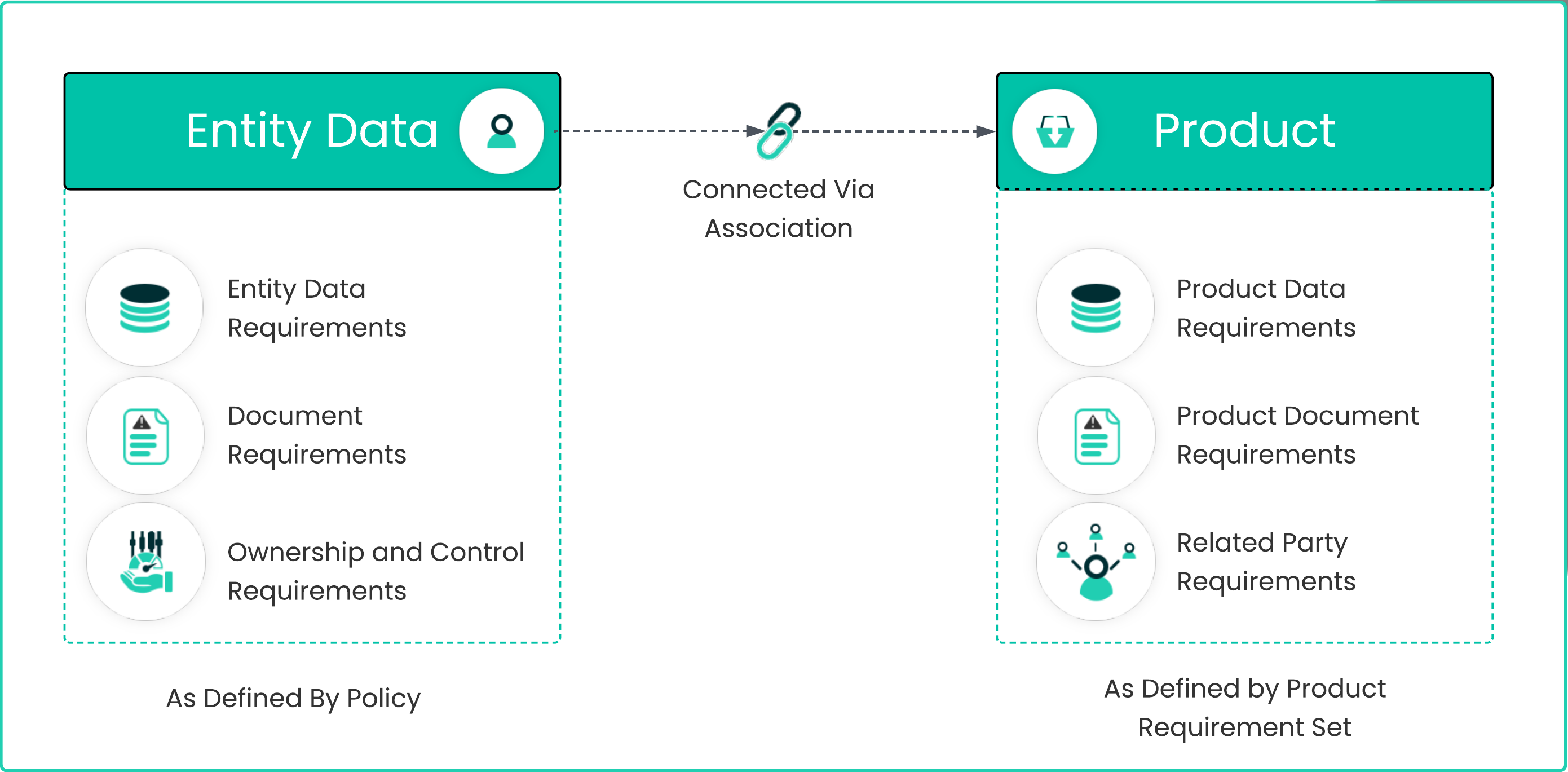
The key point to note about the Product structure is that it is a First Class Citizen in terms of being an independent root data type. In the same way the structure a legal entity is comprised of Data, Document and Ownership requirements as created inside the Policy Configuration UI Functionality, a Product has its own Data, Document and Related Party requirements which are created in the Product Requirement Set UI Functionality. Some points to note about the Product Data Type:
- Only Created inside a Journey - Products are created using specific task types which can be added to a Journey Configuration. Once invoked, these tasks will read the Product Requirement Set configurations and allow the user to Add Products within the context of a Journey.
- Same Draft and Verified Pattern as LE Data - When a new Product Instance is added inside a Journey, a skinny verified record is created and then the details captured in the task are saved within a Draft version of that record. This pattern mirrors how Legal Entity Data is handled and Product Draft Records are merged back to their verified record using a Verify Products task which must be added to a Journey Configuration.
- Loosely Coupled - There are NO product identifiers saved in a LE Record or vice versa. Instead Products are associated with Legal Entities by way of creating an Association between the two records.
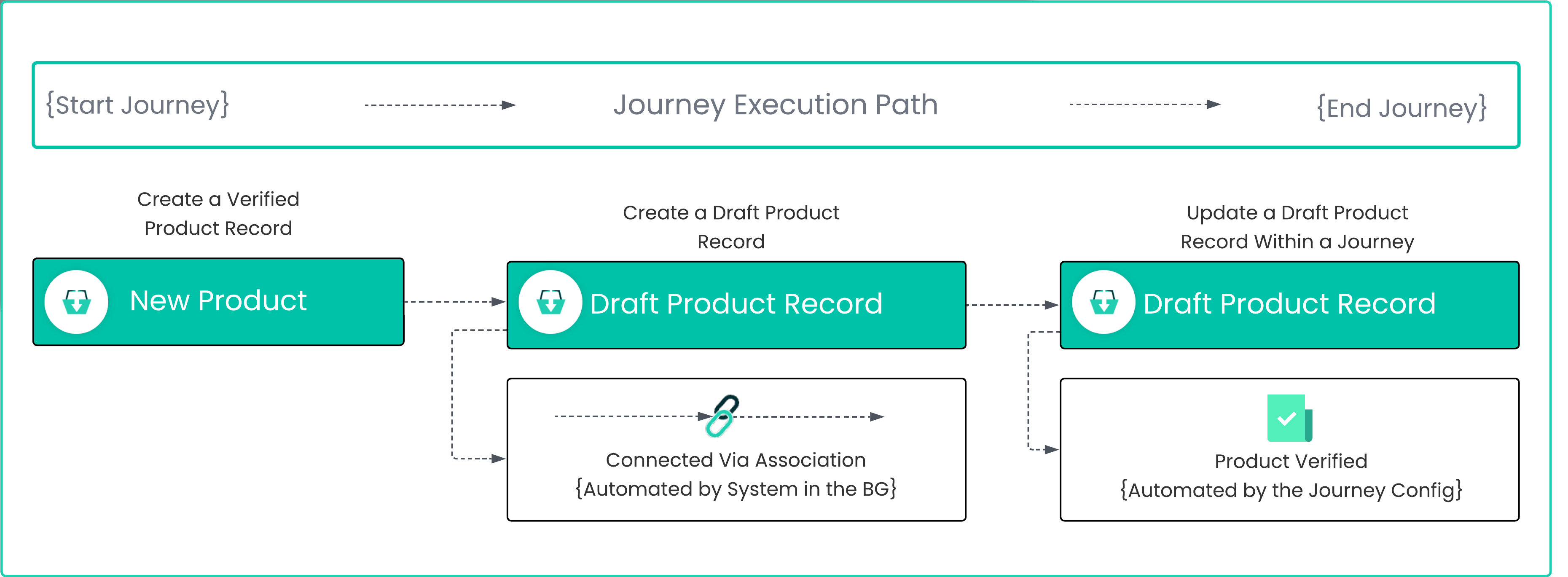
The below illustration shows the product lifecycle as it aligns to a Journey within the Fenergo SaaS platform. Within this document we will look at the APIs that allow a product to be created, and updated via the APIs and also explore the linkage (association).
Using the Product APIs
Of course products can be added in the UI within the Add Products Task, but we want to demonstrate that the same can be achieved using the Direct APIs. The three steps above will be demonstrated in detail which are:
- Creating a Verified Product Record.
- Creating a Draft Product Record.
- Updating an existing Draft Product.
Create a new Verified Product
Using the PUT API endpoint {{baseURL}}</span>/productcommand/api/product, a new Verified product can be added. The Message Request and Response body's are illustrated below.
{
    "data": {
        "type": "New Product",
        "family": "default",
        "properties": {},
        "entityId": "2a649967-03c7-4222-8cfa-3d7dd6cda48e",
        "journeyId": "05852025-c5d2-48c9-ae60-ee93d764c890"
    }
}
Regardless of the data sent, provided the request is valid, the return type will be an identifier for the Entity which has just been created. This can then be used to retrieve back the record which has been created. Using this API call writes the created entity into what we call the Verified Store. A Verified Record is just a status on the underlying JSON document set by the system.
- The
"type"is always New Product - The
"family"is always default - The
"entityId"The Verified Legal Entity Id for the target of the Journey. - The
"journeyId"Is the Journey inside who's scope, the product is being added.
The Entity Id and the Journey Id passed in are used for two things.
- The Journey Id is saved to the product draft record as it is being captured and updated in a specific Journey.
- The Entity Id is used to automatically create an association between the Product and the Legal Entity. This is not something the API client needs to do.
{
    "data": {
        "id": "91926f03-0b9d-454e-94a9-5753f3a83c10",
        "type": "New Product",
        "family": "default",
        "alternateId": null,
        "properties": {},
        "entityId": "2a649967-03c7-4222-8cfa-3d7dd6cda48e",
        "journeyId": "05852025-c5d2-48c9-ae60-ee93d764c890",
        "lifecycleStatus": null
    },
    "messages": null
}
The above response is returned from the Create Verified Product call. It is a skinny record without much detail. The "id" in the response is the Verified Product Id which is required to create a draft Record in the next step.
Create a new Draft Product Record
Using the PUT API endpoint {{baseURL}}/productcommand/api/product/{{verifiedProductId}}/draft/journey/{{journeyInstanceId}}, a new Draft Product can be created from the verified Product. There is no Request Body as all parameters are passed in the URL as illustrated. The "verifiedProductId" and the "journeyInstanceId" should be replaced with the details from above.
{
    "data": {
        "id": "83e8d0f9-2d20-492e-818d-31088a949500",
        "type": null,
        "family": null,
        "properties": null,
        "status": null,
        "sourceProductVersion": 0,
        "sourceProductId": "91926f03-0b9d-454e-94a9-5753f3a83c10",
        "journeyId": "05852025-c5d2-48c9-ae60-ee93d764c890",
        "version": 0,
        "createdDate": null
    },
    "messages": null
}
The response contains the detail of the Draft Product Record. The "id" in the response is the Draft Product Id.
Updating an existing Draft Product Record
When using the UI, the Verified and Draft Product Records are created in quick succession after a user clicks on Add Product. The above two API calls represent the pattern an API client must follow to add products to an existing LE via an existing Journey. The product draft can then be updated by sending a HTTP PUT to the below API Endpoint. The Request and response bodies are listed further below.
{{baseURL}}/productcommand/api/product/{{verifiedProductId}}/draft/{{currentProductDraftId}}
{
    "data": {
        "id": "83e8d0f9-2d20-492e-818d-31088a949500",
        "type": "Simple Product Type",
        "family": "Company Products",
        "status": "InProgress",
        "properties": {
            "productRequirementCategory": {
                "type": "Single",
                "value": "Basic Products"
            },
            "productName": {
                "type": "Single",
                "value": "Test API Product 14"
            },
            "productValue": {
                "type": "Single",
                "value": "7000"
            },
            "system_fenx_createdDate": {
                "type": "Single",
                "value": "2023-09-06T09:18:11.835+00:00"
            }
        }
    }
}
{
    "data": {
        "version": 2
    },
    "messages": null
}
The response from the draft update returns the "version" of the Draft Product Record.
If you inspect the API interaction from the Fenergo UI when adding and updating Product Details, you will observe a lot of calls to the Product Logic Engine which evaluates the requirements dynamically in real time to determine if any conditionality exists based on selections made. Such is the capability of the Fenergo UI to handle event the most complex product configurations.
Products can be enriched with Related Parties and their details as part of the Draft Update process and the scope of such enhancements is beyond this document. Both the Fenergo UI and the Swagger Specification for the Product Command API can be used to generate and create more complex update scenarios.
Retrieve the Association between Product and Legal Entity
As described earlier, the system will create an association between a product and a legal entity automatically when a draft product record is created. The Association Query API can be used to retrieved this association. Using the HTTP GET below, the association details can be retrieved.
{{baseURL}}/associationquery/api/association/root/74ed5427-8987-4ad7-9975-d29ddc14f87b/product
{
    "data": [
        {
            "id": "51932854-44dc-45ec-8ee7-16617cb2e0b6",
            "sourceId": "74ed5427-8987-4ad7-9975-d29ddc14f87b",
            "targetId": "0b875e01-d826-4193-8682-be0bb2477f6c",
            "type": "product",
            "journeyId": "54883d6b-e697-4743-ab8a-90e97fdd441c",
            "isVerified": false,
            "ownershipPercentage": null,
            "controlPercentage": null,
            "markedForDeletion": null,
            "properties": {
                "sourceid": "74ed5427-8987-4ad7-9975-d29ddc14f87b",
                "targetid": "0b875e01-d826-4193-8682-be0bb2477f6c",
                "type": "product",
                "version": "0",
                "key": "51932854-44dc-45ec-8ee7-16617cb2e0b6",
                "tenant": "45BF62AC-E4B1-4C16-AE32-D774CD18DB6D"
            },
            "subtype": "Owner"
        }
        .
        .
        . . . . {Other Products associated with the root legal entity}
}
Notable items in the association response are:
"id"- is the Association Id."sourceId"- in this case this Id is the Legal Entity Id from where the association is coming (source). This is the Verified LE Id."targetId"- is the Product Id, where the association is destined. This is the Verified Product Id."type"- Associations can exist between different entities and in this case it is between a LE and a Product. So this is Product Association."subtype"- This association was between the Legal Entity and the Product (not a related party) so the subtype here is Owner
Delete an Un-Verified Product
Lastly, before a product is verified it can be deleted from a Journey once its status is still InProgress. Make a HTTP DELETE API call to the below endpoint replacing the "verifiedProductId" with the verified product Id returned when it was created.
{{baseURL}}/productcommand/api/product/{{verifiedProductId}}
The system will return a HTTP 200 OK.