Standard Integration Patterns
Clients typically have a requirement to integrate some of their systems into the Fenergo SaaS platform. This will be to automate processes, optimize efficiency's or maintain strict governance over the governance of data. the Fenergo SaaS platform, built to an API First Principal natively supports integration through its Catalogue of APIs, each of which conform to OpenAPI standards and implemented with the strictest adherence to security and best practice. This document will cover the Standard Integration Options which exist to support clients in building their own integrations against our platform.
API Catalogue - What to use and How
The CQRS (Command Query Responsibility Segregation) pattern is used throughout our application. You will see that in a lot of cases, our APIs are separated into Command and Query variants. Such as:
- Entity Data Command - Command APIs are used to update and change data.
- Entity Data Query - Query APIs are used to read and query data.
Exploring the Catalogue of APIs is a good starting point for any integration. Here you will get a high level description of the purpose of the APIs along with direct links to the Swagger Specifications where the individual methods can be examined and if you have access to a the Fenergo SaaS platform Tenant, Tested using Swaggers Try It Out feature. Here is a link to a document that describes working with Swagger and Postman against our APIs.
One of the key messages we give to clients is Whatever you can do through the Fenergo User Interface, you can do through the APIs. This is true because the APIs are a First Class Citizen of the Fenergo platform and are principally responsible for delivering the applications functionality. Our UI itself for the most part contains logic around how to orchestrate calls to the APIs and then display that data. So when clients are considering the integrations they want to build, looking at what the UI can do or display, is often a good place to start.
If you inspect the network traffic behind the user interface, all the API calls and their sequences can be seen. Of course for major topic areas the documentation in this Developer Hub walks through which APIs to call and how, but for interested users, the UI can be a great source of insight.
Open Standards
Each of our APIs are published using the OpenAPI Specification which means they can be imported by developers in a machine readable format. The Swagger User Interface allows users to explore the methods available along with schemas for the Request and Responses of those methods along with sample request and response bodies. We follow an industry standard for API versioning and where an update would require a breaking change (such as a new mandatory field) a new version is created whilst the old version will remain supported for two major releases. If an API is being retired, Fenergo will communicate this well in advance to clients and users.
As updates and enhancements are added to the platform, we update our RSS Feeds which you can select from the menu on the top right of all our pages We recommend that users refer to those frequently to stay on top of updates and changes.
API Breaking Changes Principles
Safe (Non-Breaking) Changes
The following changes are non-breaking and can be deployed without impacting existing clients, provided integrations are built to be forward-compatible:
✅ Adding new API resources
✅ Adding new optional request parameters to existing methods
✅ Adding new properties to existing API responses
✅ Changing the order of properties in existing responses
✅ Changing the length or format of opaque strings (e.g., object IDs, error messages)
-
Example: adding or removing prefixes like ch_ on charge IDs
-
Integrations must not assume a fixed ID pattern and should support up to 255 characters
-
For databases like MySQL, use VARCHAR(255) COLLATE utf8_bin for case-sensitive lookups
✅ Adding new event types
- Webhook listeners must gracefully ignore unknown event types
Breaking Changes
The following are considered breaking changes and must be announced, versioned, and coordinated before release:
❌ Removing or renaming existing API resources or endpoints ❌ Making an optional parameter required ❌ Removing or renaming properties in existing responses ❌ Changing data formats (e.g., switching from string → number or timestamp → ISO string) ❌ Modifying default values or business logic in ways that change API behavior ❌ Altering authentication or authorization flows ❌ Modifying pagination or filtering logic that affects result sets
Security and Best Practice
We have covered areas of Security and best practice extensively across the following documents and they contain valuable guidelines for how to interact with our APIs.
Caching Access Tokens Caching the Access Token means that client integrations can use and re-use the same token for the full 15 minute time frame. If a client was performing a batch operation with 1000's of API calls they could find that their call to authenticate gets throttled which would slow down their batch or potentially cause errors in execution.
The Event Notification Pattern
The most basic Architectural Pattern which is well supported on the Fenergo SaaS platform and can solve for many use cases is the Event Driven pattern. The easiest way to understand this as illustrated below is as follows:
- Event Created: Activity or usage of a system generates an event and the system pushes the details onto a queue.
- Event Queue: Is a FIFO (First in First out) based message queue which is a collection of messages. The sit on the queue until a consumer picks them off.
- Event Consumer: An up or downstream system which is interested in the messages. It reads from the queue and then performs appropriate actions based on the content of the messages. Those messages might be pushed in real-time or pulled on-demand based on how the consumer is configured.

It appears pretty simple as described but this pattern, when used correctly, fulfills a lot of integration requirements. Each participant in the diagram has their own responsibilities but before looking at those in detail, this pattern comes with many advantages.
- Loose Coupling: As there is no direct integration between the producer and consumer, there is no Hard Dependency to be programmatically cater for.
- Separation of Concerns: The producer of the event does not need to worry about how the consumer handles the event and vice versa. Enhancements and changes can be made to either system independently without havening any impact on the other.
- Contract First: There does not need to be liner development dependencies on either side provided the message contract is agreed up front. Once the producer and consumer agree on the format of the message, those systems can then be built independently of each other.
There are some requirements that must be implemented to ensure the durability and dependability of this pattern. Fenergo as the the Event Producer has taken all necessary steps to implement those requirements.
- Message Durability: When Fenergo sends a message to the Queue, we have taken every precaution to guarantee delivery to the consumer.
- Push Notification - Webhooks: Fenergo takes the message from the Queue and sends it to a specified client endpoint in real-time. Fenergo will consider a message delivered ONLY if we get a HTTP response of < 400.
- Push Notification - Back off and Retry: If we get a HTTP Response of 400 or greater, the real-time push waits and retries later. The retry time climbs from 2 - 4 - 8 - 16 minutes and then the webhook is disabled. Clients can re-enable it and the messages which have continued to be queued will begin delivering again.
- Polling Notifications - Notify message is Handled: Where clients poll for messages, we do not remove them from a queue until we are notified that the client has handled the message. This does create a two step process, but it also ensures that messages are not unrecoverable if a client system encounters a failure whilst processing.
- Responsible Message Handling by Client Systems: When clients receive a message, the should durably store / persist that message before indicating that it has been handled. That way even if an error occurs, the client system can process the message later. Once Fenergo has been notified that a message is handled / received it is removed to an archive.
- Be aware of Idempotent Events: Different use cases have different requirements, depending on the event being monitored, clients should be aware that retrieving data as a reaction to an event COULD in certain circumstances not be the correct strategy. If there is a chance that data may have changed between the time the event was generated and when it is being handled, the data driving the event may be stale. Ensure you are familiar with the events and how they work and this can easily be accommodated.
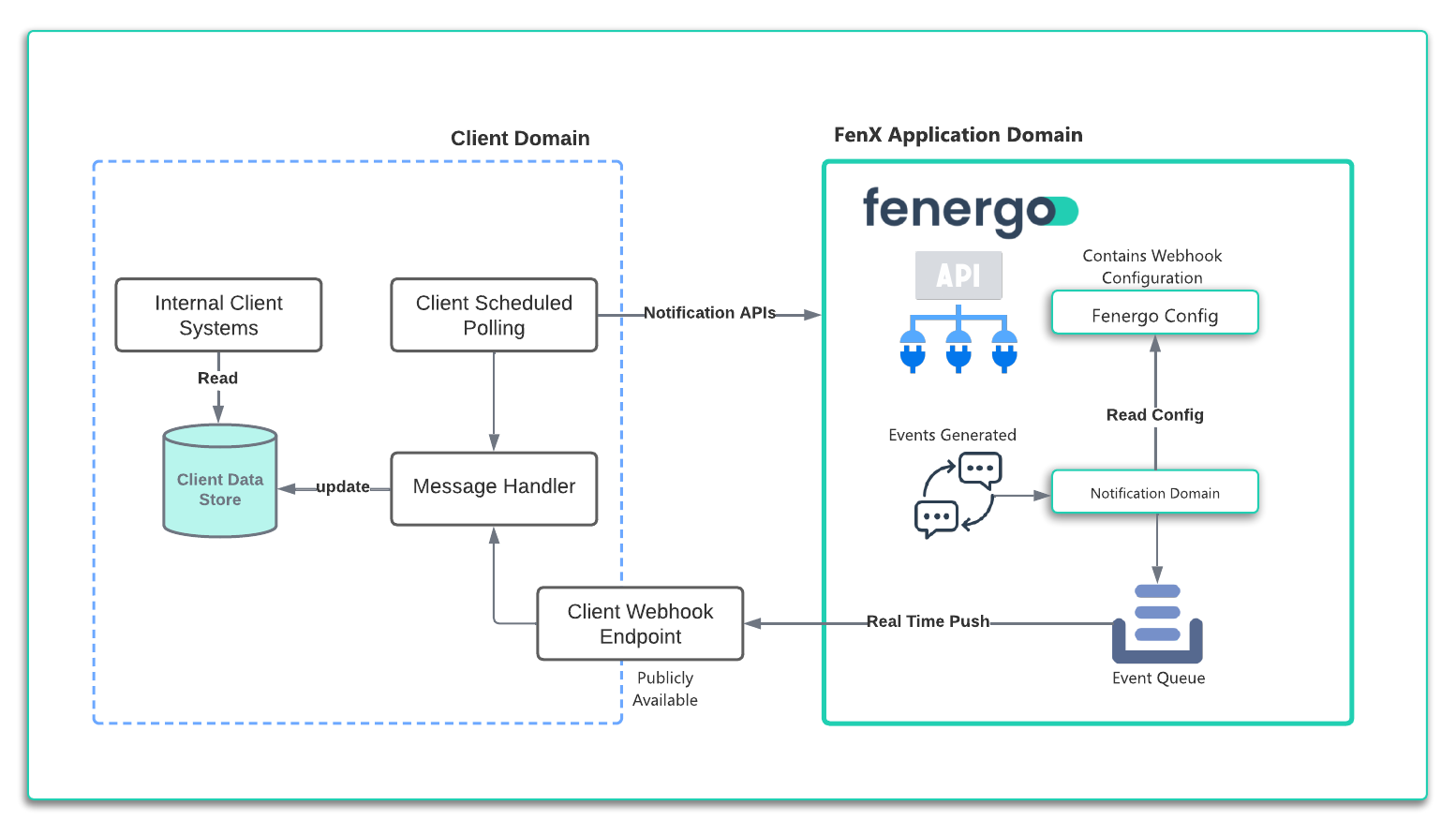
Looking at the above illustration, which highlights the pattern in more detail, it can be seen that the Fenergo application manages the queue where event messages are sent. Clients can configure webhooks for real time notification or poll for notifications. Event Registry to explore the Event Registry. Every event type
Event notification messages generated by Fenergo have a TTL (Time to Live) of 30 days. After this time our internal cleanup operation will delete these notifications.
Data Sync Pattern
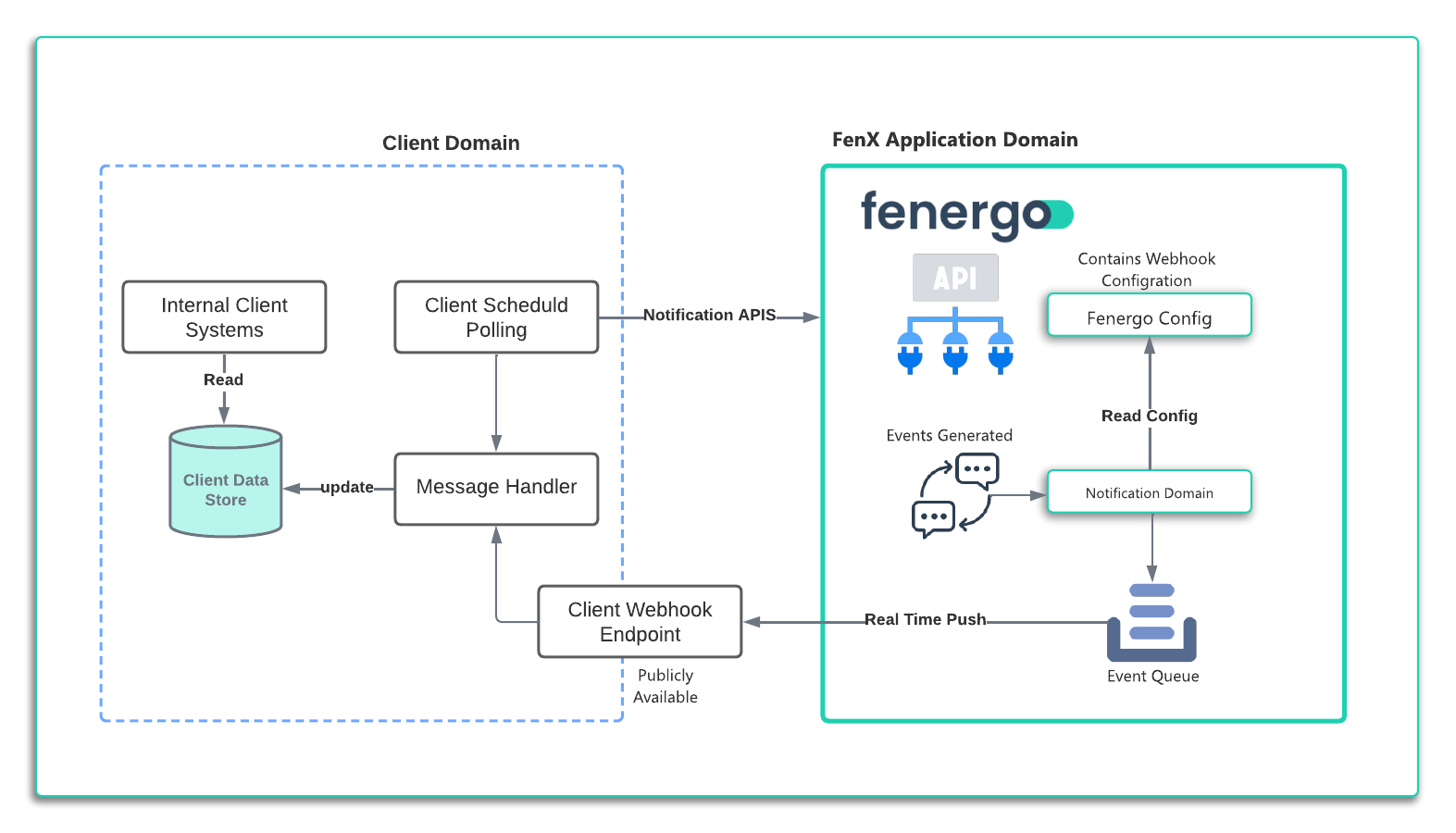
Building on the Event Pattern above, it can be seen how a client could create an maintain a local copy of data using just the Event Notifications. Depending on the data a client is interested in saving, Verified Entity Data, Draft Data, Journey Information or Screening Activity, clients just need to subscribe to an appropriate event and then use that as a trigger to pull information to store in their Data Store. Consider the below use case and the illustration to describe how this can be implemented.
AS: an API consumer:

    GIVEN: I want to update an internal data store every time a Legal Entity record is verified

    WHEN:  I receive an **entitydata:draftverified** notification

THEN: I want to make an API call to retrieve the updated data and persist it to my data store for MI and Reporting Purposes.
A client can follow the below steps to achieve the desired outcome.
- Create a Webhook: Specifying the EventType a client could listen to the entitydata:draftverified events in real-time.
- Save the Messages: Upon receiving the notification, save the message to a durable store then respond to the webhook call with a HTTP 200 OK.
- Handle the Message: Use the relativeURL from the notification to make an API call to the Entity Query API and retrieve the updated record.
- Use the Data Internal Systems and then read and query an offline store which is in sync with the Data on the Fenergo SaaS platform.
Be aware of Eventual Consistency As described elsewhere in this documentation, Fenergo is using the same messaging mechanics when communicating internally between the various application domains. Clients should be aware that eventual consistency can sometimes delay the immediate availability of records being read back in real time. Appropriate compensation methods should be put in place to accommodate.
The External Adapter Pattern
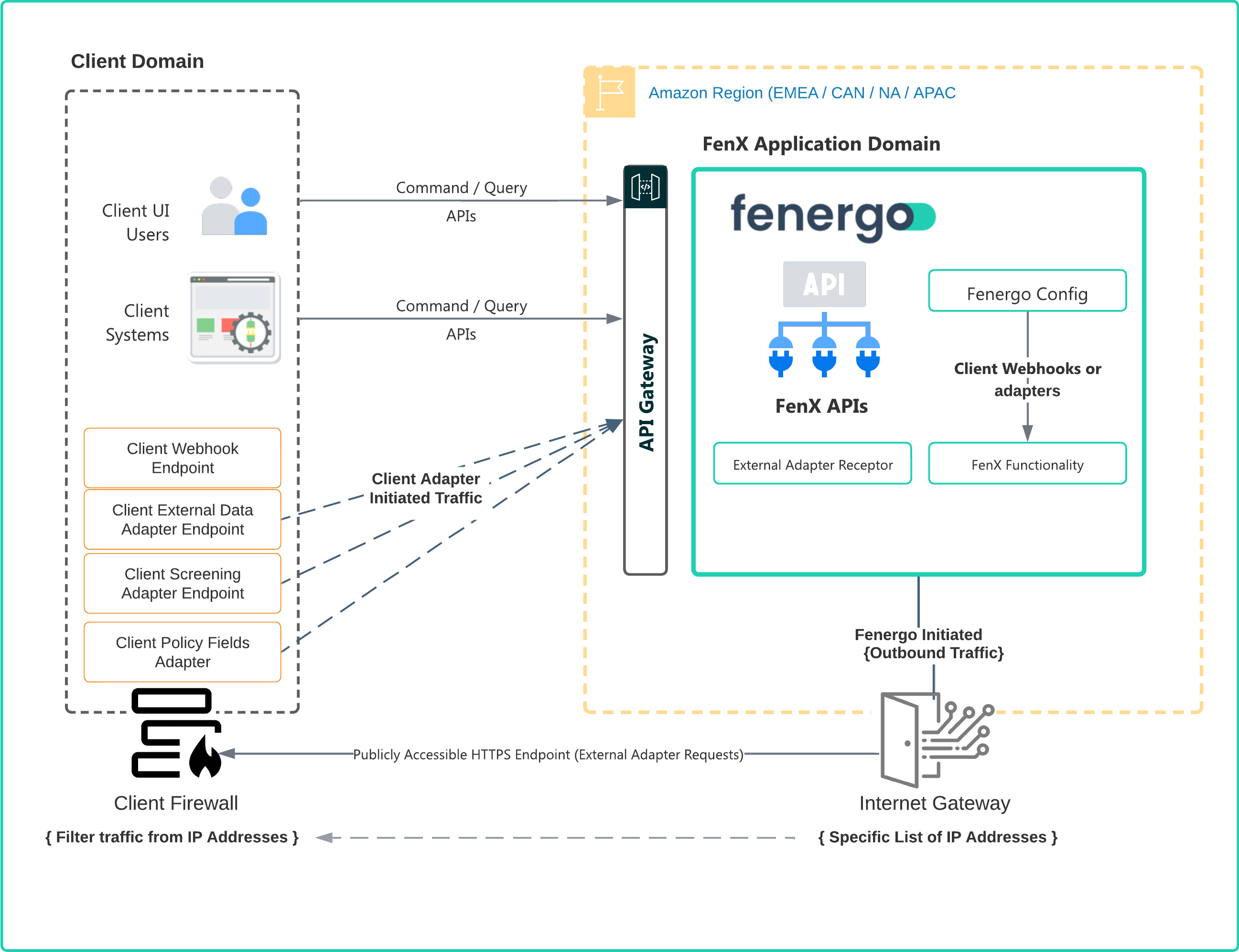
For clients who select to use external providers on Screening, External Data & Policy Data Fields, Fenergo supports client implemented custom adapters. Clients can register their Adapters through configuration on the the Fenergo SaaS platform UI or via APIs and then have our system call those adapters at run time to integrate with existing platforms. At a high level the architecture is illustrated below.
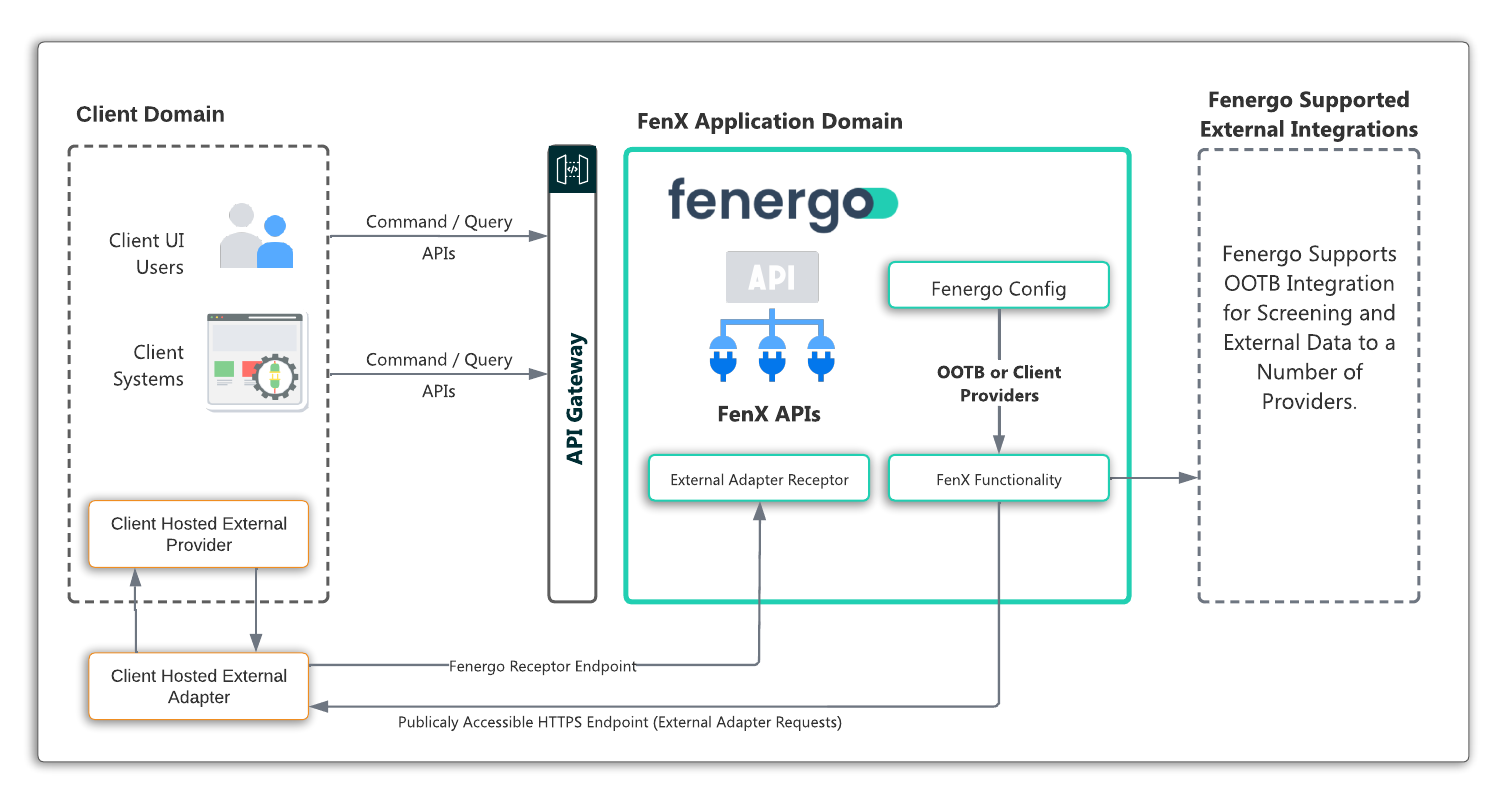
These client controlled implementations compliment the functionality of the Fenergo SaaS platform by utilizing established integration channels that connect to client specific systems, brining them into scope for delivering on the functionality of the application. For more information please refer to the following:
IP Whitelisting for External Adapters and Webhooks
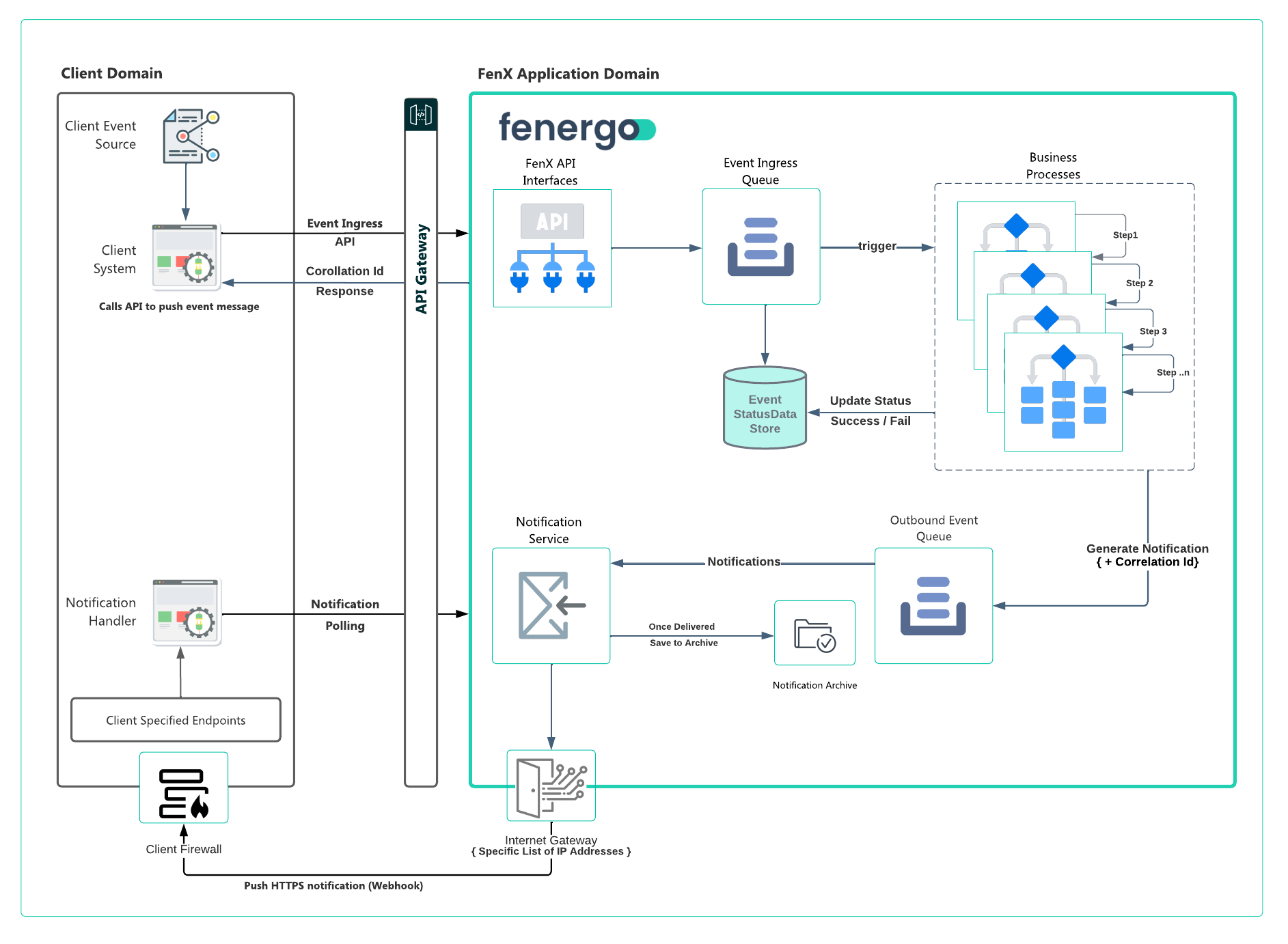
When the Fenergo SaaS platform initiates communication to a client specified endpoint, it sends HTTPS only traffic from a specific list of IP Addresses. As Illustrated below, this means that clients can add those IP Addresses to their firewalls / whitelists and explicitly allow HTTPS traffic coming from the Fenergo SaaS platform into their network (or whatever location endpoints are hosted). The IP Addresses differ from Region to Region and the list of IP Addresses can be requested from Fenergo via your project team, CSM representative or our Cloud Business Office.
Event Ingress Pattern
In the Event Ingress pattern as illustrated below, the Event Producers (the Fenergo SaaS platform Consumers) use our Ingress APIs to send an event from within their technical landscape. Individual use cases will differ from client to client, but the outcome is to have a single point of contact with a single API call that will handle the orchestration of a set of defined business processes without requiring any further consumer involvement beyond sending the initial message. You can read more on Event Ingress.