Configuring the Logic Engine
Data Group Logic Engine Operators
Within Data Group configuration in Policy, there are additional Operators available to control validation at the Data Group level. These Operators are unique, and only available when the selected "Field" is of a "Data Group" Field Type. These Operators are:
| Operator | Description |
|---|---|
| Count Equals | The count of records of the data group equals the number value configured. |
| Count not Equals | The count of records of the data group does not equal the number value configured. |
| Count less than | The count of records of the data group is less than the number value configured. |
| Count less than or equal to | The count of records of the data group is less than or equal to the number value configured. |
| Count greater than | The count of records of the data group is greater than the number value configured. |
| Count greater than or equal to | The count of records of the data group is greater than or equal to the number value configured. |
| Count Between | The count of records of the data group is between the "To" and "From" number values configured. |
| Count not Between | The count of records of the data group is not between the "To" and "From" number values configured. |
| Any | At least one record of the the data group must satisfy all of the configured Rules. |
| All | All of the records of the the data group must satisfy all of the configured Rules. |
| None | None of the records of the data group can satisfy all of the configured Rules. |
When selecting any of the "Count" Operators, the final configuration required is to populate the "Number" value that must be met for the Condition to be true. For example, a Trigger Condition for a Data Requirement could be a Condition of Field Name "Address", Operator of "Count less than" and Number of "2". This would mean that the Condition would be true if there were less than two recorded Addresses in the Data Group.
For the "Any", "All" and "None" Operators, they relate to at least one, all of or none of the records within the Data Group satisfying the configured rules. When any of these three Operators are selected, a second "Field" Condition in the Logic Engine will be presented. This indented row represents the rule[s] attached to the "Any", "All" or "None" Operators that must be met in order for the Condition to be true. When any of these three Operators are selected, the only available "Fields" in the indented row will be the fields belonging to the Data Group selected in the original "Field" parameter.
In the below example, the top row has a "Field" selection of Address, which is a Data Group field type. As the User has selected the "Any" Operator, the indented "Field" parameter has been displayed. The available options in this lookup would be the fields configured within the "Address" Data Group.
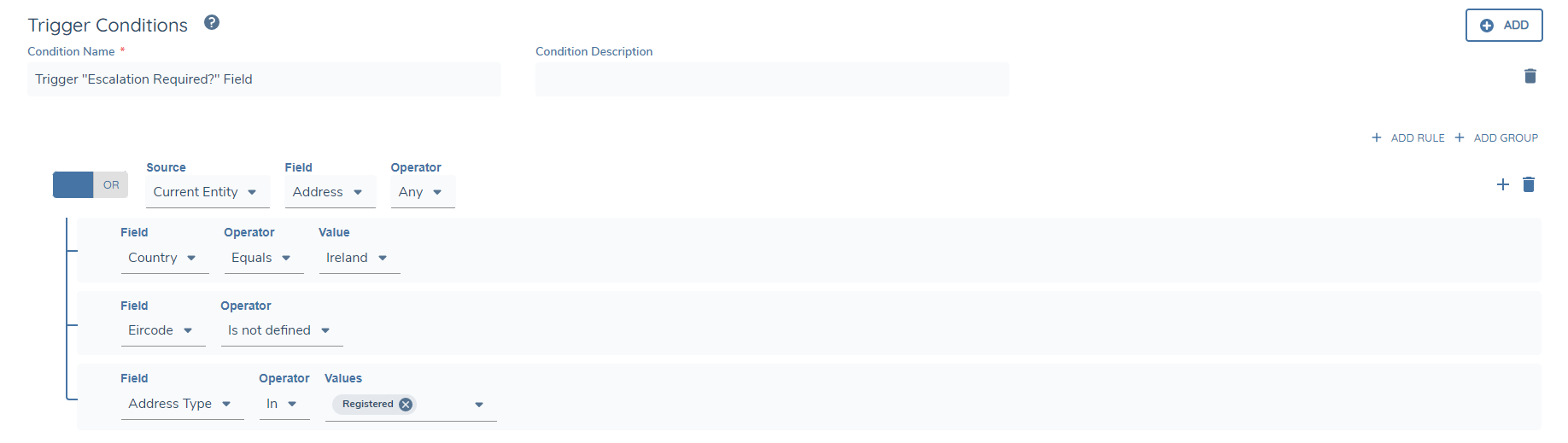
So for this Trigger Condition to be true, at least one record within the Data Group must have a "Country" of Ireland and an undefined "Eircode" value and an "Address Type" of "Registered".