Using the Product Risk Assessment Task
The products a customer holds offer valuable insight into their activities and the depth of their relationship with an institution. Each of those products also carries its own risk, and understanding that risk is essential to evaluating the overall exposure of both the client and the institution.
The Product Risk Assessment task evaluates the products for which an entity is an owner. It calculates a risk score for each product and, where configured, combines those scores into an overall product risk that is written back to the entity, where it can feed the wider entity risk calculation.
For instructions on setting the task up, see Configuring the Product Risk Assessment Task.
Task Overview
The Product Risk Assessment task gives a single view of an entity's products and their risk assessment results.
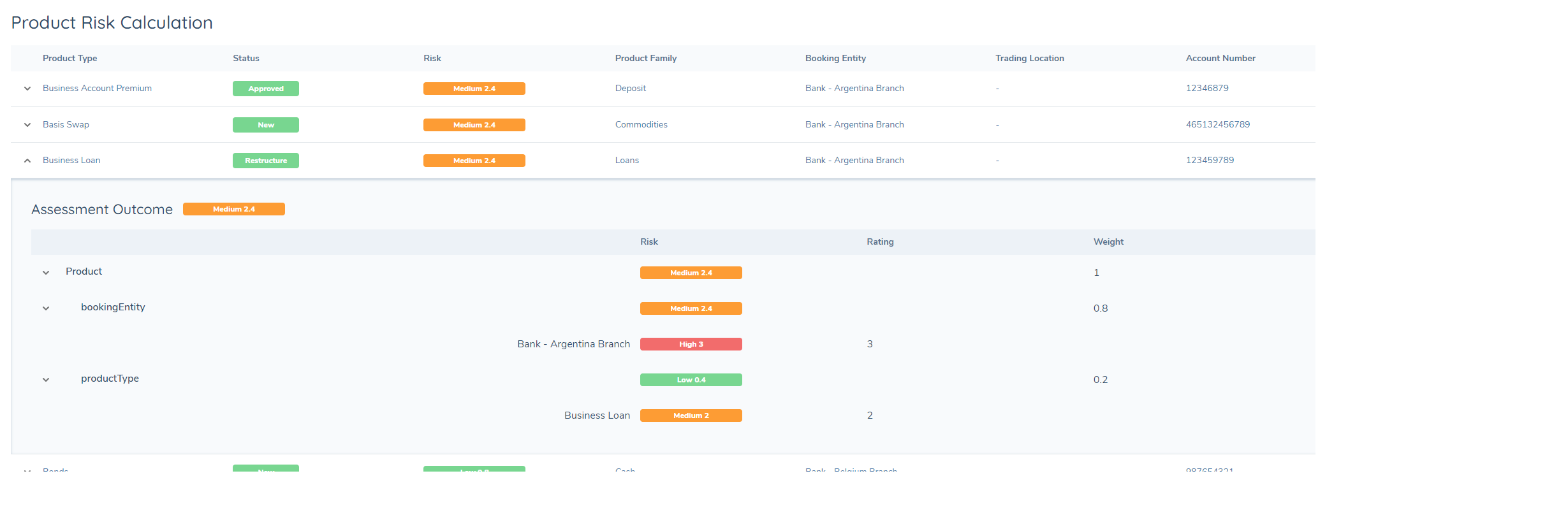
The task is a system task. It runs its calculations automatically once started and, on success, completes itself. Once complete, a user can open the task to review the results.
Each product appears as a row, with its risk score and rating shown in the Risk column. Expanding a row reveals the assessment outcome for that product:
- Risk Factor Group — in the example above, this is Product.
- Risk factors and their values — shown by database field name. Here,
bookingEntityandproductTypeare both risk factors: the product Business Account Premium has a booking entity of Bank – Argentina Branch and a product type of Business Account Premium. - Assessment outcome columns — the rating of each value, the weight of the risk factor, and the total algorithm calculation for the risk factor group.
The product illustrated has a risk score of 2.4, which translates to a rating of Medium. That translation comes from the threshold model, which places any score between 2 and 2.99 in the Medium band.
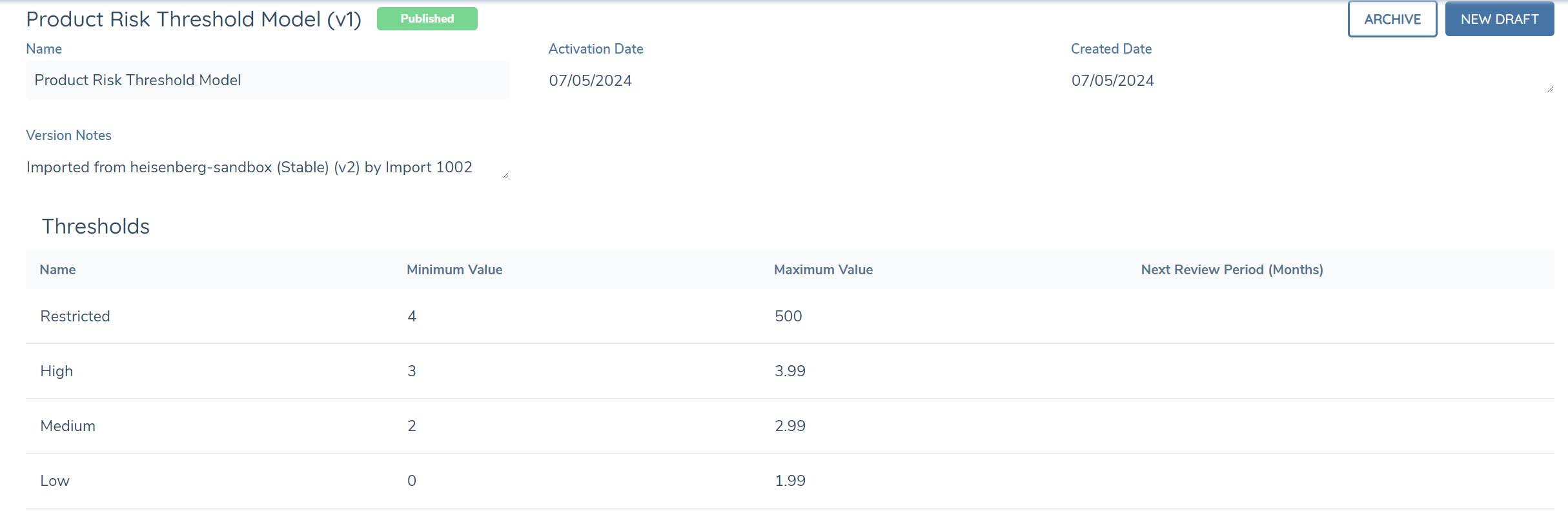
Assessment Outcomes
What the task calculates, aggregates and displays depends on two configuration options set at task level in the journey scheme: Save to Entity and Only Assess Products Created/Updated Within Journey.
| Save to Entity | Only Assess Products Created/Updated Within Journey | Assessment Outcomes |
|---|---|---|
| Disabled | Enabled | • Onboarding and In Review products have their individual risk scores calculated and stored at product level.• Offboarding products are not displayed in the UI and are excluded from individual product risk calculation. They are visible in the Product Risk Assessment record under excludedAggregateAssessments. |
| Enabled | Enabled | • Onboarding and In Review products have their individual risk scores calculated and stored at product level.• Newly calculated scores from Onboarding and In Review products are aggregated using the configured algorithm.• The aggregate score and resulting rating are stored on the entity. • Offboarding products are not displayed in the UI and are excluded from individual product risk calculation and from aggregation to the entity. They are visible in the Product Risk Assessment record under excludedAggregateAssessments. |
| Enabled | Disabled | • Onboarding and In Review products have their individual risk scores calculated and stored at product level.• Newly calculated scores from Onboarding and In Review products and previously calculated scores from Onboarded products are aggregated using the configured algorithm.• The aggregate score and resulting rating are stored on the entity. • Offboarding and Offboarded products are not displayed in the UI. Offboarding products are excluded from individual product risk calculation, and both Offboarding and Offboarded products are excluded from aggregation to the entity. They are visible in the Product Risk Assessment record under excludedAggregateAssessments. |
Verified products are never recalculated by this task — their existing score is only refreshed if the product is edited within the journey. To force reassessment of verified products, use the Create Onboarded Product Drafts task, which creates product drafts that the Product Risk Assessment will then pick up.
Excluded Products
A product that is being offboarded, or has already been offboarded, no longer represents live exposure for the entity, so these are automatically excluded to avoid distorting the entity's product risk position.
Any risk score or rating already stored against an excluded product remains unchanged — it is simply not refreshed.
Excluded products are recorded on the assessment result under excludedAggregateAssessments, visible when retrieving the assessment via the API or using your browser's developer tools. Each entry carries the product's aggregateId and lifecycleStatus.
Where every product in an assessment is excluded, the task may report that no products were assessed while the entity's aggregate product risk still changes, because the excluded products no longer contribute to it.
Product Risk Calculation
1. Products are selected. The task identifies the products for which the entity is an owner, in line with the task configuration described above. Products in an excluded lifecycle status are removed at this point and recorded under excludedAggregateAssessments.
2. Each remaining product is scored. The risk assessment model defined in the task configuration is applied. That model set comprises:
- A risk model — the risk factors to be evaluated.
- A configuration collection — the values and scores assigned to every possible input of those risk factors.
- A threshold model — a model that translates a numerical score into a descriptive value, for example High, Medium or Low.
3. The scores are combined. If Save to Entity is enabled, the individual scores are combined into a single value using the configured calculation algorithm — max (the highest), min (the lowest), sum (all added together), or avg (the average).
4. The result is written to the entity. The aggregate score is saved to the database field defined in the task configuration, and the threshold model is applied once more to translate it into a rating such as High, Medium or Low.
If the task is configured to assess only products created or edited within the journey and no qualifying products remain after exclusions are applied, a risk score of 0 is calculated.