Behavioural Risk
Overview
Fenergo Behavioural Risk extends entity Risk Assessment to include dynamic risk factors which capture how observed transactional activity compares to an expected activity profile. Expected activity profiles are created at onboarding and can be updated in a periodic or event-driven review. As an entity transacts, Behavioural Risk identifies changes in the entity’s actual behaviour compared to the current understanding of expected activity. Material deviations trigger an update to the entity’s risk rating. A financial institution can then mitigate any increased risk, for example by updating the entity record to reflect a revised understanding of expected behaviour and/or carrying out additional due diligence.
Behavioural Risk operates as a scheduled, automated process comparing expected activity held on the verified entity record against actual transactional data observed over a rolling 12-month period across the complete book of entities.
Behavioural Risk is designed to:
- Detect behaviour that falls outside declared expectations.
- Distinguish between acceptable and unacceptable deviations.
- Capture previously undeclared activity, such as unexpected countries.
- Ensure entity risk remains accurate and up to date without manual intervention.
Key Concepts
Expected Activity
Expected Activity is the documented baseline of how an entity is anticipated to behave, defined in terms of transaction types, volumes and geographic interactions. This information is captured as part of the entity’s onboarding journey and stored on the verified entity profile. This data may be updated in subsequent maintenance or review journey.
Actual Activity
Actual Activity represents what the entity is observed to do in practice, based on transaction data processed by the Fenergo risk engine. This information is also stored on the entity profile.
Allowed Deviation
Allowed Deviation defines the tolerance between expected and actual activity. Differences within this tolerance are considered acceptable and do not automatically result in a risk increase. When differences fall outside the allowed deviation, it may result in a change to the entity’s risk rating as defined in the risk model configuration.
Risk Calculation Process Flow
- Entity defines Expected Activity during onboarding.
- Expected Activity is verified and written to the verified entity profile.
- The entity performs transactions.
- Transaction data is captured as actual activity.
- Scheduled risk process executes, comparing actual activity to expected activity across the book of entities.
- Deviations are evaluated for each entity to determine a behaviour evaluation outcome.
Behaviour Evaluation Outcomes
Actual Activity Within Expected Activity
If actual activity falls within the declared expected activity:
- No action is triggered against the entity.
- No risk recalculation occurs.
- The entity risk rating remains unchanged.
- Actual activity view is updated on the entity profile.
Actual Activity Outside Expected Activity
If actual activity does not align with expected activity:
- The system evaluates the difference.
- If the difference is within the allowed deviation, then the deviation is considered acceptable and no further action is taken and the entity risk rating remains unchanged.
- If the difference is outside of the allowed deviation, then the deviation is considered material, and Risk Assessment is executed to determine if the entity’s risk rating should increase. Updated risk rating is then written o the verified entity profile.
- Actual activiy view is updated on the entity profile.
Undeclared Activity Detection
Behavioural Risk also caters for the scenario where the entity transacts with a country that was not included in their expected activity declaration.
In this scenario:
- Behavioural Risk is run against the unexpected country risk factor.
- The system determines whether the activity introduces additional risk.
- If no risk change is required, no further action is triggered.
- If risk increases, updated risk rating is written to the verified entity profile.
- Actual activity view is updated on the entity profile.
Risk Evaluation and Profile Update
When Behavioural Risk process is executed the complete risk model is applied, not just the behavioural risk factors. The configuration of the risk factors and the thresholds determines whether the overall entity risk changes. If the risk increases, the updated risk score and risk rating are written to the verified entity profile. A journey is automatically launched only when the risk increase crosses the next configured risk threshold. This journey that is launched can be chosen from any configured journey type to allow for full flexibility of risk mitigation actions.
Configuring Behavioural Risk
The Behavioural Risk process is configured in these steps which are explained in detail below.
- Configure Reference Data.
- Configure Policy to capture expected and actual entity profiles.
- Configure Risk Model with factors and weights.
- Configure Behaviour Deviation Thresholds.
Reference Data Configuration
To support Behavioural Risk evaluation, the following reference data lists must be configured.
Country Reference Data
A country reference list must be available that:
- Contains the full list of countries used within the platform.
- Includes a dedicated column storing the ISO Alpha-2 (two-letter) country code.
- The ISO column must be named exactly as ‘ISO Code (Alpha-2)’.
- This column is used by the system to consistently identify countries during behavioural comparisons and risk evaluation.
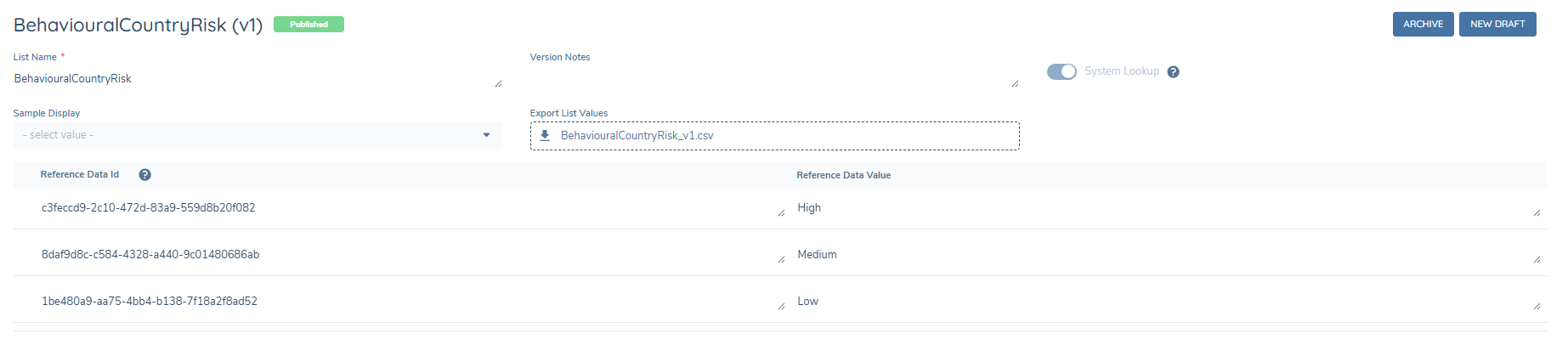
Behavioural Country Risk Reference List
- Reference List Name: BehaviouralCountryRisk.
- This list must contain the risk levels associated with country risk (for example: High, Medium, Low).
- The risk levels defined in this reference list are applied during Behavioural Risk evaluation. They are also displayed when configuring Expected Activity deviation thresholds.
Cash Payment Methods
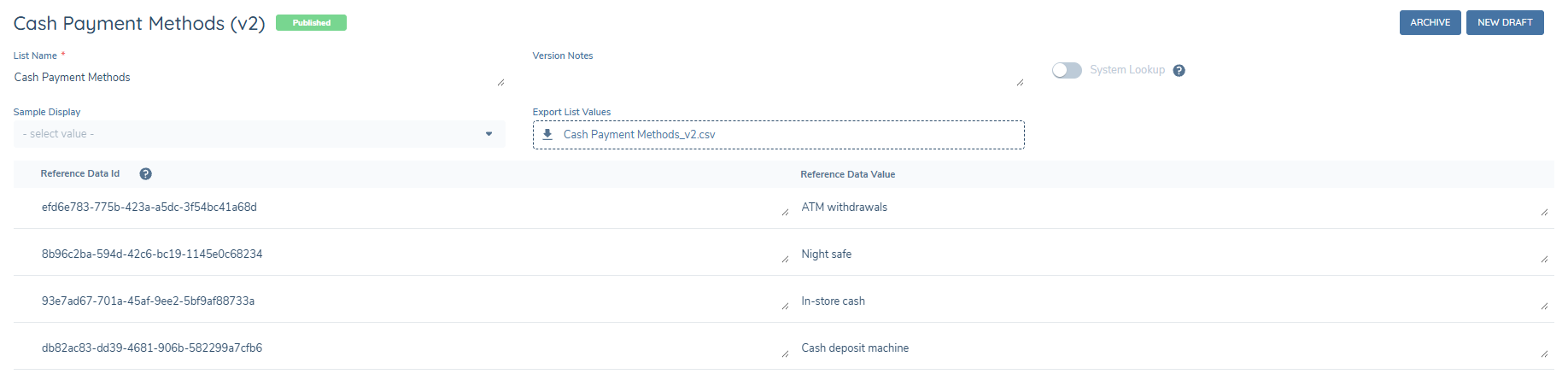
The payment methods that contribute to the cash incoming and cash outgoing totals can be defined using a reference list ‘Cash Payment Methods’. Any other payment methods will contribute to the total incoming and total outgoing amounts.
Policy Configuration
To enable Behavioural Risk, two policy data groups must be configured: one for the expected activity and the other for the actual activity. These data groups are used by the system to compare declared behaviour against observed behaviour.
Expected Activity Data Group
Current functionality supports an expected activity profile containing parameters for total annual incoming volume across all transaction types, total annual outgoing volume across all transaction types, total annual incoming cash volume, and total annual outgoing cash volume all defined on a per-country basis. The Expected Activity data group must include the following fields, with data keys configured exactly as shown:
- Fenx_ExpectedCountryActivity
- Fenx_ExpectedTotalIncoming
- Fenx_ExpectedTotalOutgoing
- Fenx_ExpectedCashIncoming
- Fenx_ExpectedCashOutgoing
The first field Fenx_ExpectedCountryActivity can be configured as a single or multi-select dropdown with the Country list as the lookup list. If this field is configured to be a multiselect, users can enter multiple countries against the same expected activity amounts. The user may also enter countries individually over multiple entries while using the multiselect or single select field.
These two inputs are equivalent:


All remaining fields must be configured as Number data field types. The data group should look like this
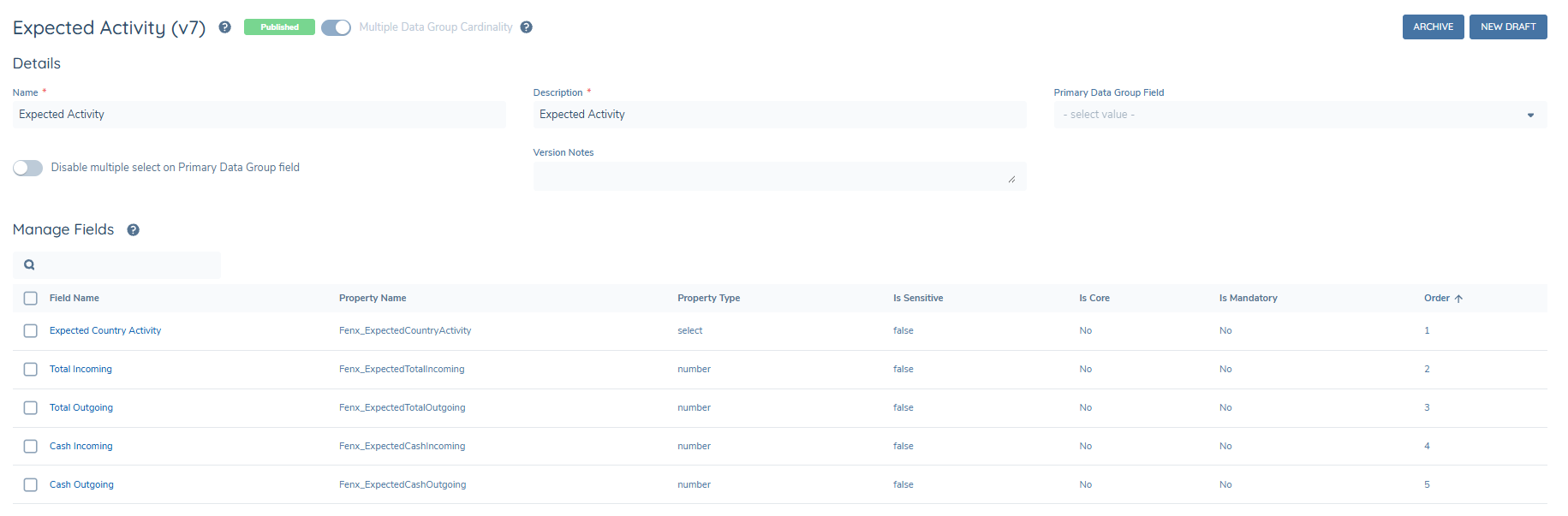
This data group must be configured as a Policy Field with the Database Field Name ‘Fenx_CaptureExpectedActivity’. This data group is expected to be completed as part of onboarding or review journeys.
Actual Activity Data Group
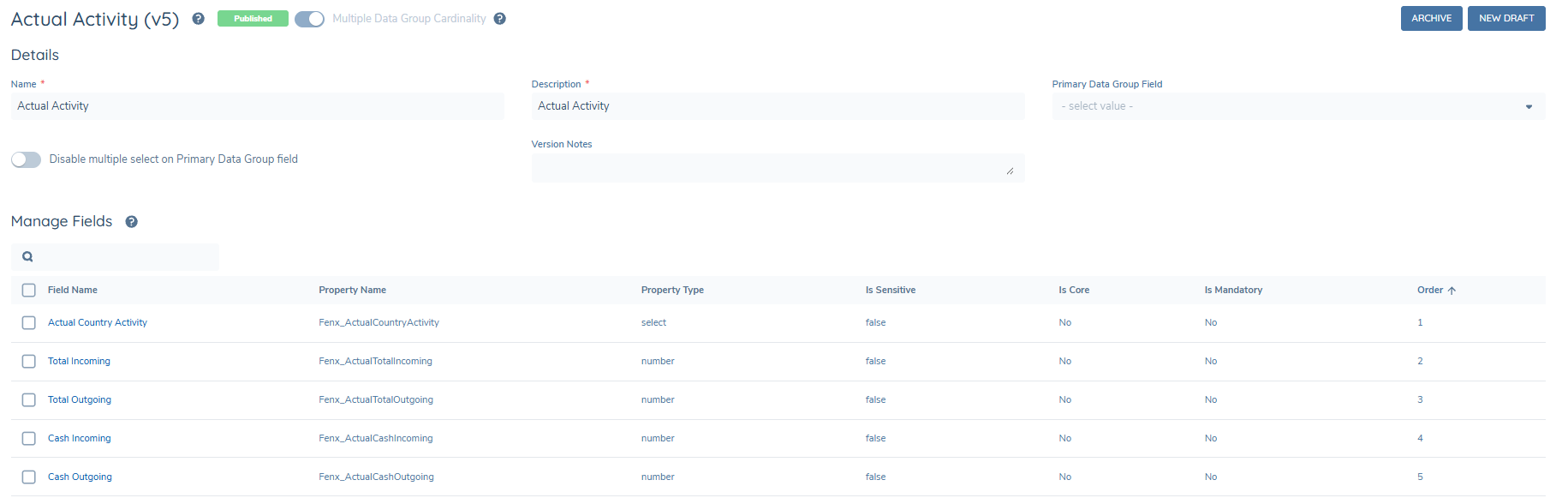
The Actual Activity data group mirrors the Expected Activity structure and must include the following fields, with data keys configured exactly as shown:
- Fenx_ActualCountryActivity
- Fenx_ActualTotalIncoming
- Fenx_ActualTotalOutgoing
- Fenx_ActualCashIncoming
- Fenx_ActualCashOutgoing
Field configuration requirements:
- All fields must be configured as Read-only
- These fields are populated automatically by the system and must not require any user input
This data group must be configured as a Policy Field with the Database Field Name of ‘Fenx_CapturedActualActivity’ and must be configured to be read-only. The Actual Activity data group does not need to be presented in any journey as the system updates the transaction data directly to the verified record of this actual activity data group. The data group should look like this
Risk Rating and Risk Score Data Keys
The policy configuration must also ensure that the following data keys are used for risk evaluation:
- riskRating
- riskScore
These data keys must be configured exactly as shown and used consistently across policy, risk models, and risk evaluation logic. Incorrect casing or alternative data keys will prevent Behavioural Risk from functioning correctly.
Risk Configuration
Behavioural Risk must be configured within the overall entity risk model. A new risk factor group should be created for the dynamic risk factors. The name of the group can be chosen by the user. The following risk factors should be added to the group using the exact casing shown:
- Fenx_TotalActivityIncoming
- Fenx_TotalActivityOutgoing
- Fenx_CashWithdrawalsIncoming
- Fenx_CashWithdrawalsOutgoing
- Fenx_UnexpectedCountries
The first four risk factors should be configured to use the same risk levels as the ‘BehaviouralCountryRisk’ reference list e.g. High, Medium, Low along with the risk scores for these levels. In this way, for example, if an entity sends cash with an amount outside of their expected activity to a High-Risk country, then Fenx_CashWithdrawalsOutgoing is set to High. This will contribute to the risk according to the configuration of thresholds and calculation algorithms.
The last risk factor Fenx_UnexpectedCountries is configured to account for the scenario where an entity transacts with a country that they did not declare in their expected activity. This risk factor must include the full list of countries, their associated risk levels, and thresholds, configured in the same way as standard country-based risk factors.
Configuration users must ensure the overall entity threshold model is configured to determine whether a risk increase of these five additional risk factors crosses a threshold.
Expected Activity Configuration
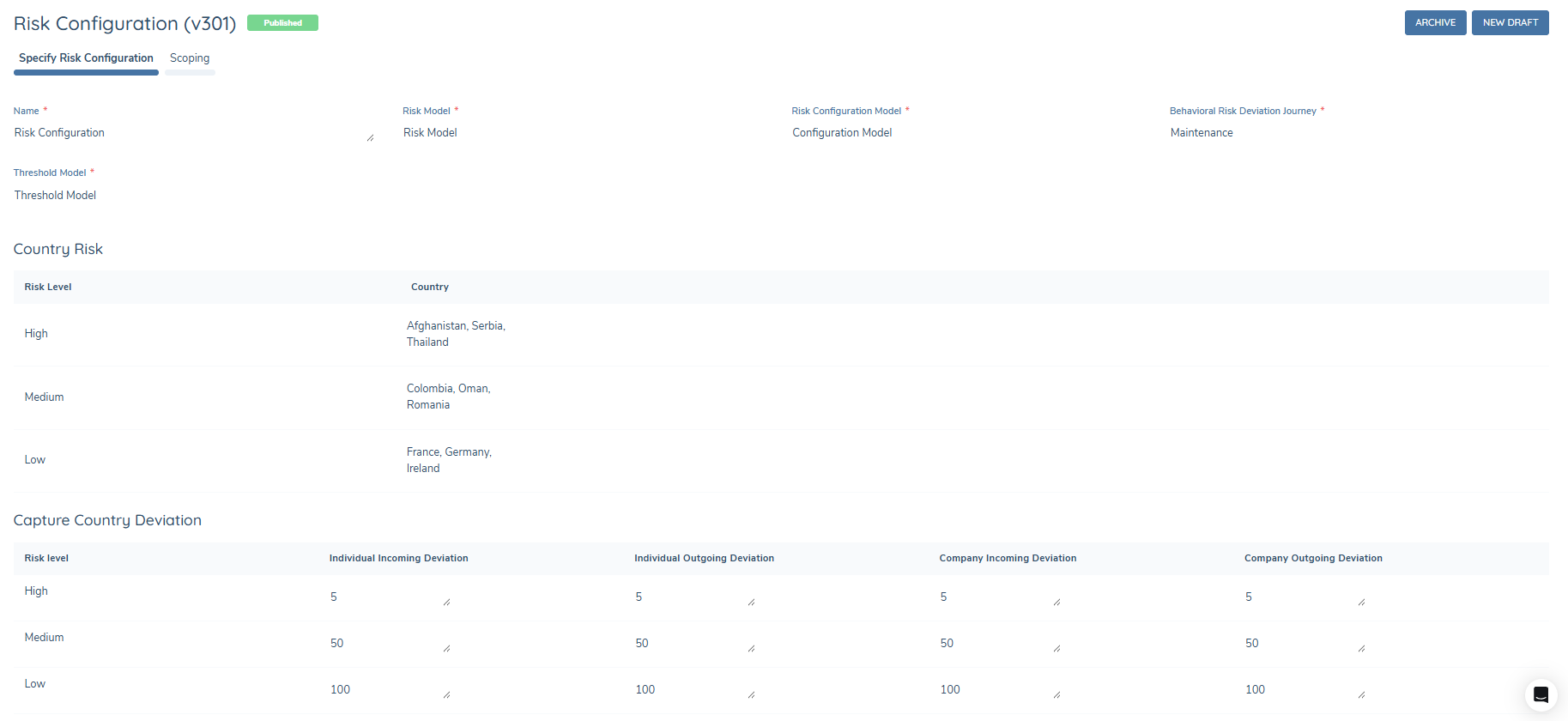
To configure Behavioural Risk deviation handling:
- Navigate to the Transaction Monitoring configuration menu.
- Select Configuration and open a new draft of Risk Configuration.
- Select the risk models that contain the Behavioural Risk risk factors.
- Select the desired Behavioural Risk Deviation Journey from the list of preconfigured journey types. Any journey type may be chosen here.
- Assign each country to the appropriate risk level.
- Configure the percentage deviation thresholds for each risk level. These thresholds determine whether observed differences between expected and actual activity are considered within or outside allowed deviation.
The configuration should look like this
Display on Entity Profile
Expected and actual activity are stored as entity data and are displayed as standard data groups on the data tab of the entity profile. The information is also visualised on the Transaction tab of the entity profile so that analysts can quickly understand activity patterns.
Each of the four behavioural categories are displayed: Cash Withdrawals, Cash Deposits, Total Activity Payin and Total Activity Payout. Within these categories there are 5 columns:
- Country: the country declared in the expected or actual activity.
- Expected amount: the amount declared by the entity that they would transact with said country.
- Actual Amount: the actual amount that the entity transacted with said country.
- Expected Deviation: the allowed deviation of this country, defined in the TM Risk Configuration.
- Actual Deviation: The actual difference between the expected and actual amounts.
If the Actual Deviation is greater than the Expected Deviation, then this row will be highlighted in red to inform the analyst that the entity has exceeded their expected activity.
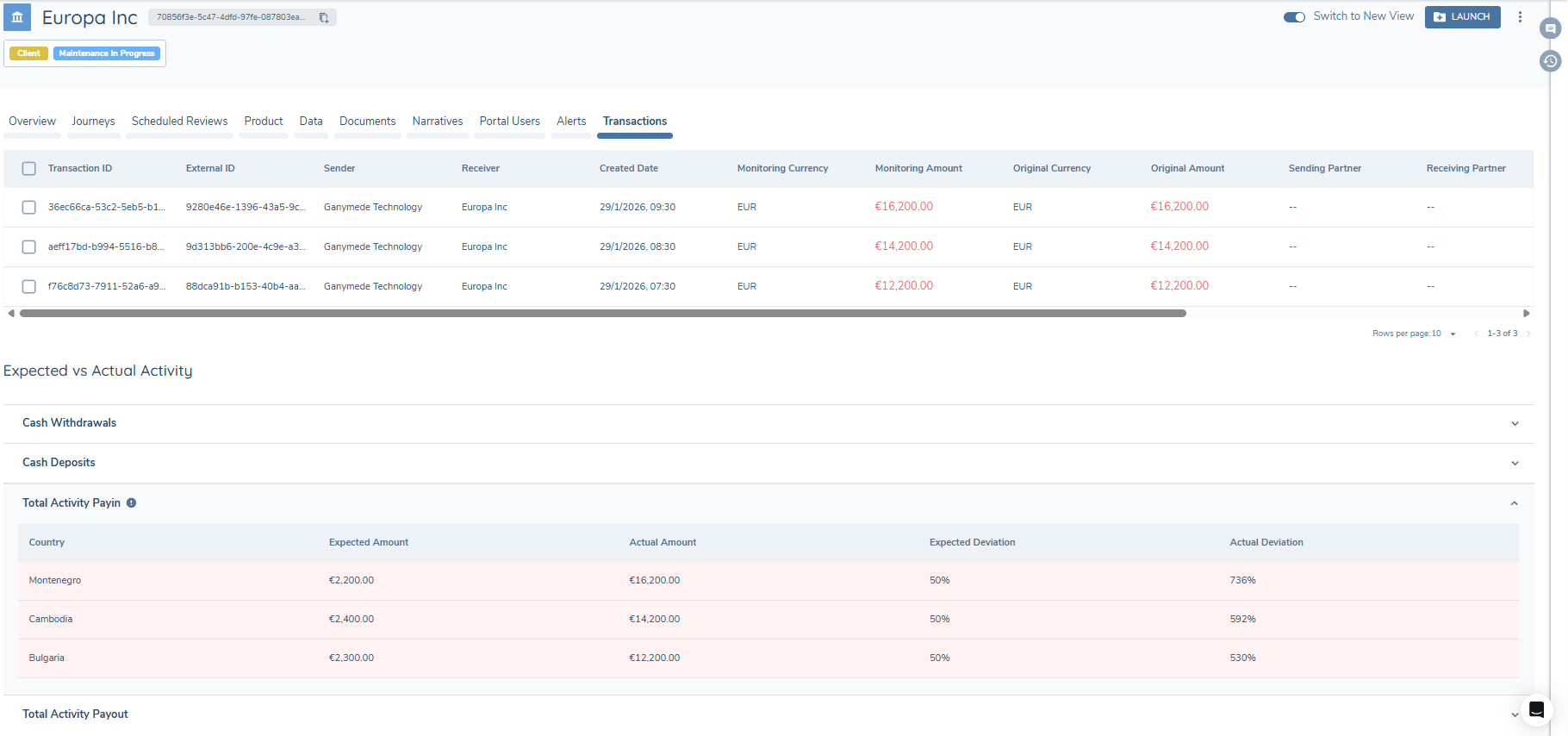
Blanks against the columns correspond to the following behaviour:
- Country blank: no country was declared.
- Expected Amount blank: no expected amount declared.
- Actual Amount blank: the entity has not transacted om the last 12 months.
- Expected deviation blank: the deviation has not been configured in the TM Risk Configuration.
- Actual Deviation blank: there is no expected and actual amounts to compare.
Transactional activity with unexpected countries is also shown in this table presented with the country and actual amount. Other columns are blank as there is no stated expected behaviour to display.
Operational Notes and Constraints
- The actual and expected summary data in Entity Profile transactions tab is updated on a scheduled basis, and not throughout the day as the entity transacts.
- The actual and expected summary data in Entity Profile transactions tab is updated when an entity transacts. The submitted expected activity will only appear in this table when:
- The entity makes a transaction.
- The scheduled process has executed.
- If a maintenance or periodic review journey is launched to update the expected activity, the old values are used in the risk calculation in that journey. It is only during the nightly calculation that the full comparison is done and the updated expected activity is compared to the actual actvity.
- When the system is evaluating the scoping conditions of the Transaction Monitoring Risk Configuration, if there are no suitable conditions for a particular entity then the Behavioural Risk process will not run against that entity.
- When the system is evaluating the scoping conditions of the Transaction Monitoring Risk Configuration, if there are multiple suitable conditions for a particular entity then this system will apply the first one that is satisfied.
- The journey triggering is conditional on overall risk threshold changes only.
- This process checks an entity’s true transactions and compares them to the expected activity over a 12-month period. If a transaction is more than 12 months old, it will no longer be considered part of the actual activity.
- This process requires transaction batch processing infrastructure to be provisioned.
- The expected activity must be submitted in the same currency as the monitoring currency for the totals to be evaluated correctly.
- The process will run at 4am CET.
Availability: Behavioural Risk is available for customers on eligible platform configurations. If you are interested in enabling this capability, please contact your Customer Success Partner to confirm eligibility and discuss next steps.
Summary
Behavioural Risk ensures that entity risk reflects actual transactional behaviour rather than static declarations. By continuously comparing expected and actual activity, the system detects emerging risk, updates entity risk profiles, and triggers journeys only when meaningful risk changes occur.