Agency Offboarding
Agency Offboarding ends agency relationships in a controlled and auditable way. Starting from an Investment Manager or an Underlying Principal (Fund), users choose which Managed Relationships to end. The system then offboards those Managed Relationships and their Managed Products, and offboards the Underlying Principal when no active agency relationship remains. Data Deletion Processes are created for the offboarded records so that data is retained and deleted in line with the configured Data Protection Regimes.
Agency Offboarding is designed for scale. A single journey can offboard one fund's relationship or every relationship an Investment Manager holds, for example when an Investment Manager exits. It is the agency counterpart to the Client Offboarding journey and uses the same Data Protection framework.
What happens when a Managed Relationship is offboarded
| Record | Outcome |
|---|---|
| Managed Relationship | Status changes to Agency Offboarded. Its policies are offboarded and Data Deletion Processes are created. |
| Managed Products linked to the Managed Relationship | All onboarded Managed Products move to Offboarded. The product offboarding is verified as part of the journey, and each product's Journey tab links to the Agency Offboarding journey that offboarded it. |
| Underlying Principal | Offboarded only when a non-client with no other active Managed Relationship. Its status changes to Agency Offboarded, its policies are offboarded and Data Deletion Processes are created. If the fund still has an active Managed Relationship with another Investment Manager, it is left unchanged. |
| Agency associations | Left unchanged. The Managed Relationship's Agency Offboarded status is the record that the relationship has ended. |
Funds that are also Clients (self-managed funds): where an Underlying Principal also holds an active Client role, only its agency elements are offboarded: the Managed Relationship and its Managed Products. The fund is marked Agency Offboarded, but it remains a Client. Its policies stay in scope, its principal (non-managed) products are unaffected, and no Data Deletion Process is created for it.
Configuring Agency Offboarding
Prerequisites
Agency Offboarding relies on Data Protection being configured. Data Protection is managed under Management > Policy > Data Protection. For details, see Configure Data Protection.
- Global Data Protection Regime (mandatory): a Data Protection Regime must be configured for the Global jurisdiction. Without one, no retention period can be set, so Agency Offboarding blocks the affected rows at the review stage (see Approve and confirm offboarding). For how to set one up, see Create or edit a Data Protection Regime.
- Jurisdictional Data Protection Regimes (recommended): where a jurisdictional policy has a Data Protection Regime, a Data Deletion Process is created for it on offboarding. Where it doesn't, no Data Deletion Process is created for that policy and its data is retained until the entity is deleted.
- Policy Data Protection Jurisdictions: the Data Protection Jurisdiction tagged on each policy requirement determines which data is deleted for each jurisdiction. See Policy Data Protection Jurisdictions (tagging).
- Data Deletion journey: a journey schema for the Data Deletion journey type must be configured so that data can be deleted when retention periods end. It's important that scoping conditions allow it to be triggered for the "Managed Relationship" entity type. See Configuring Data Deletion.
Journey type
Agency Offboarding is a system-controlled journey type, available in the Journey Types reference data.
Agency Offboarding appears in the Launch New Journey list only for entities that have at least one verified and active Managed Relationship. It doesn't appear for other entities, or once all of an entity's Managed Relationships have been offboarded.
Only one Agency Offboarding journey can be in progress for an entity at a time. If a user tries to launch another, the launch is blocked with the message: "Parallel 'Agency Offboarding' journeys are not allowed. Please complete or cancel the in-progress Agency Offboarding journey."
Journey schema
An Agency Offboarding journey schema must contain exactly one of each of the following tasks, in this order:
| Order | Task | Purpose |
|---|---|---|
| 1 | Agency Offboarding Scope | Select the Managed Relationships to offboard and capture the offboarding reason. |
| 2 | Agency Offboarding Review & Execution | Review readiness, confirm offboarding and monitor progress. |
The schema can't be saved if:
- either task is missing
- either task appears more than once
- Agency Offboarding Review & Execution is placed before Agency Offboarding Scope.
Other tasks, such as approvals, can be configured around these two tasks as required.
A Verify Entity task must not follow the Agency Offboarding Review & Execution task in an Agency Offboarding journey schema.
Agency Offboarding verifies the records it offboards itself, as part of Review & Execution. A Verify Entity task placed after Review & Execution will unwind the offboarded state of those entities.
If your journey includes data changes to the root entity, you can use the Publish to Entity task (with a mandatory Conflict Resolution task) to capture those changes before the Agency Offboarding Scoping task is triggered.
Using Agency Offboarding
Select Managed Relationships to offboard
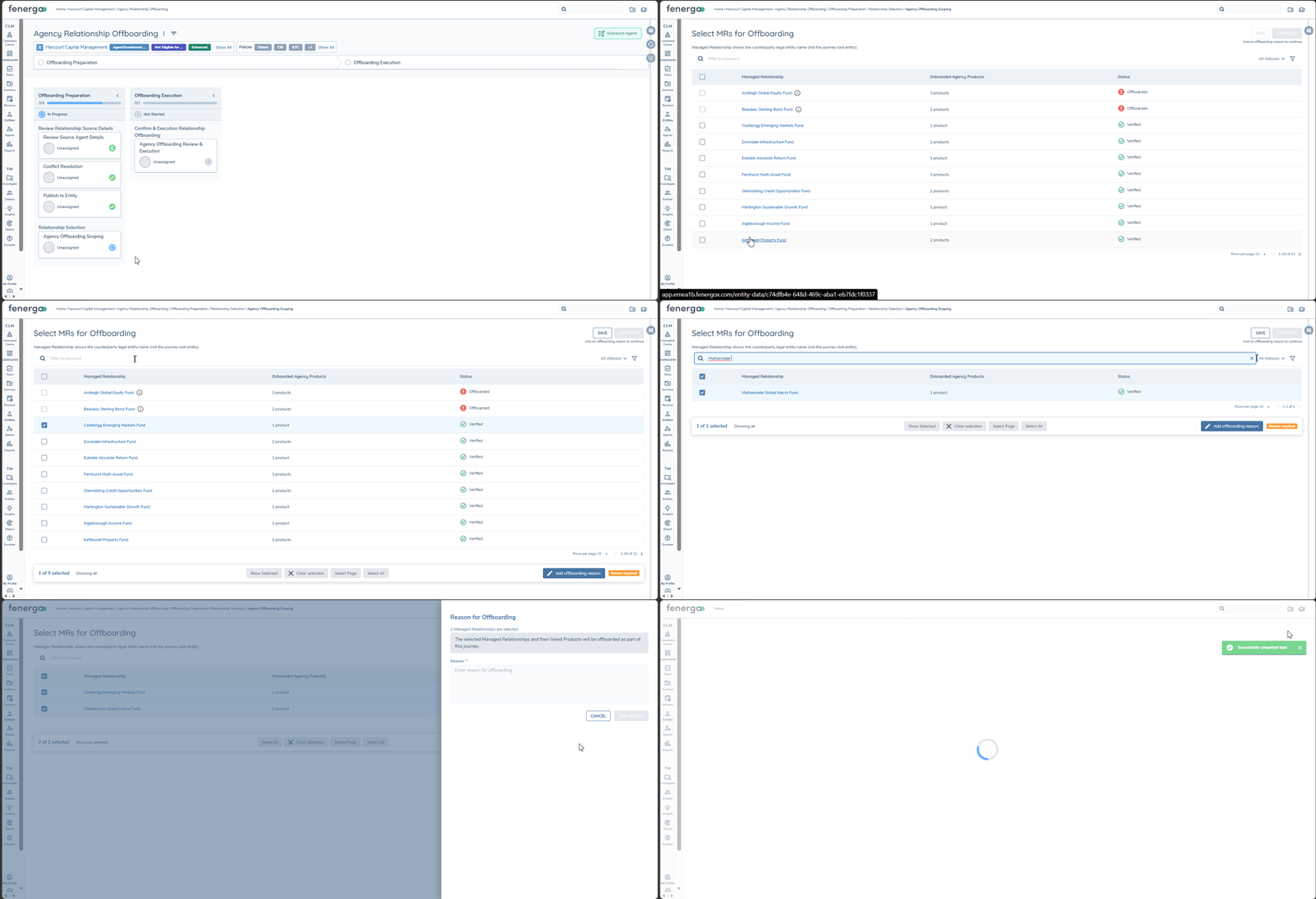
The Agency Offboarding Scope task (Select MRs for Offboarding) lists the Managed Relationships available for offboarding.
Grid columns:
- Managed Relationship: Navigates to the MR, but displays the name of the non-root entity side of the bilateral relationship. When the journey is launched from an Investment Manager, this shows the Underlying Principal's name. When it is launched from an Underlying Principal, it shows the Investment Manager's name.
- Onboarded Agency Products: the number of onboarded Managed Products under the relationship.
- Status: Managed Relationships that are already offboarded are shown as Offboarded and can't be selected.
Selecting Managed Relationships:
- Users can select individual rows, use Select Page to select every eligible row on the current page, or use the Select All checkbox in the table header to select every eligible row across all pages.
- Selection always applies within the current keyword and status filters. Offboarded rows are never selected.
- The floating bar at the bottom of the page shows n of x Selected, and provides Show Selected (filters the grid to the selected rows) and Clear Selection (clears the selection without changing the filters).
Offboarding reason:
- An offboarding reason is mandatory. Users select Add offboarding reason to enter it in the side drawer. Once saved, the reason is shown at the top of the task with the name of the user who added it and the date and time, and the action changes to Edit reason.
- Save is available as soon as at least one Managed Relationship is selected, so users can save their selection and return to it later.
- Complete stays disabled, with the message "Add an offboarding reason to continue", until a reason has been added.
- A Managed Relationship is listed only if the user has access to the Managed Relationship and to both its Investment Manager and its Underlying Principal. Where some relationships are hidden, the task shows "Some Managed Relationships may not be shown because of your access layers." The message doesn't say how many are hidden.
- Product access layers don't affect the list. Because the whole relationship is being offboarded, the product count always reflects every onboarded Managed Product, and all of them are offboarded, including any the user can't access directly.
Approve and confirm offboarding
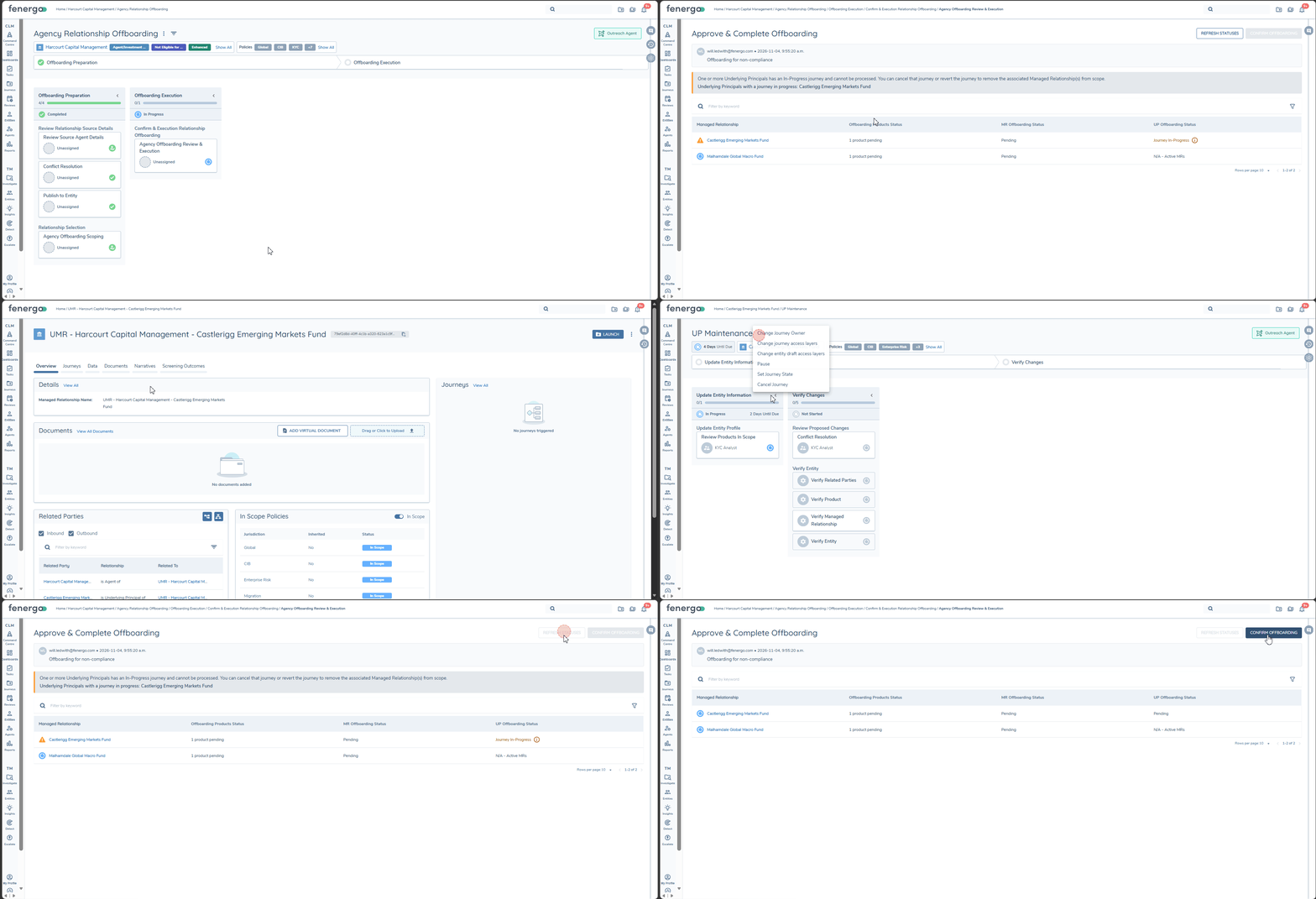
The Agency Offboarding Review & Execution task (Approve & Complete Offboarding) shows the selected Managed Relationships and the offboarding reason, both read-only. To change the selection, users return to the Scope task.
Table columns:
- Managed Relationship: Navigates to the MR, but displays the name of the non-root entity side of the bilateral relationship. When the journey is launched from an Investment Manager, this shows the Underlying Principal's name. When it is launched from an Underlying Principal, it shows the Investment Manager's name.
- Offboarding Products Status: the number of Managed Products to offboard.
- MR Offboarding Status: shows Pending
- UP Offboarding Status: shows Pending when the fund will be offboarded, or N/A – Active MRs when the fund still has an active Managed Relationship with another Investment Manager and will be left unchanged.
Readiness checks:
Before offboarding starts, the task checks each row. A row is Blocked, and moved to the top of the table, when:
- the Underlying Principal will be offboarded and has another journey in progress. The UP Offboarding Status shows Journey In-Progress. This is a risk mitigation in-case the in-progress journey may also affect this relationship.
- no Global Data Protection Regime is configured. A banner explains that a Global Data Protection Regime must be configured, and the UP Offboarding Status shows Global Data Protection Regime missing.
While any row is blocked, Confirm Offboarding is disabled. Once the cause has been resolved, for example by completing or cancelling the other journey, users select Refresh Statuses to recheck the rows.
When Confirm Offboarding is selected, the in-progress journey check runs again. If a journey has started on an in-scope fund in the meantime, offboarding doesn't start and a message explains why.
Monitor progress
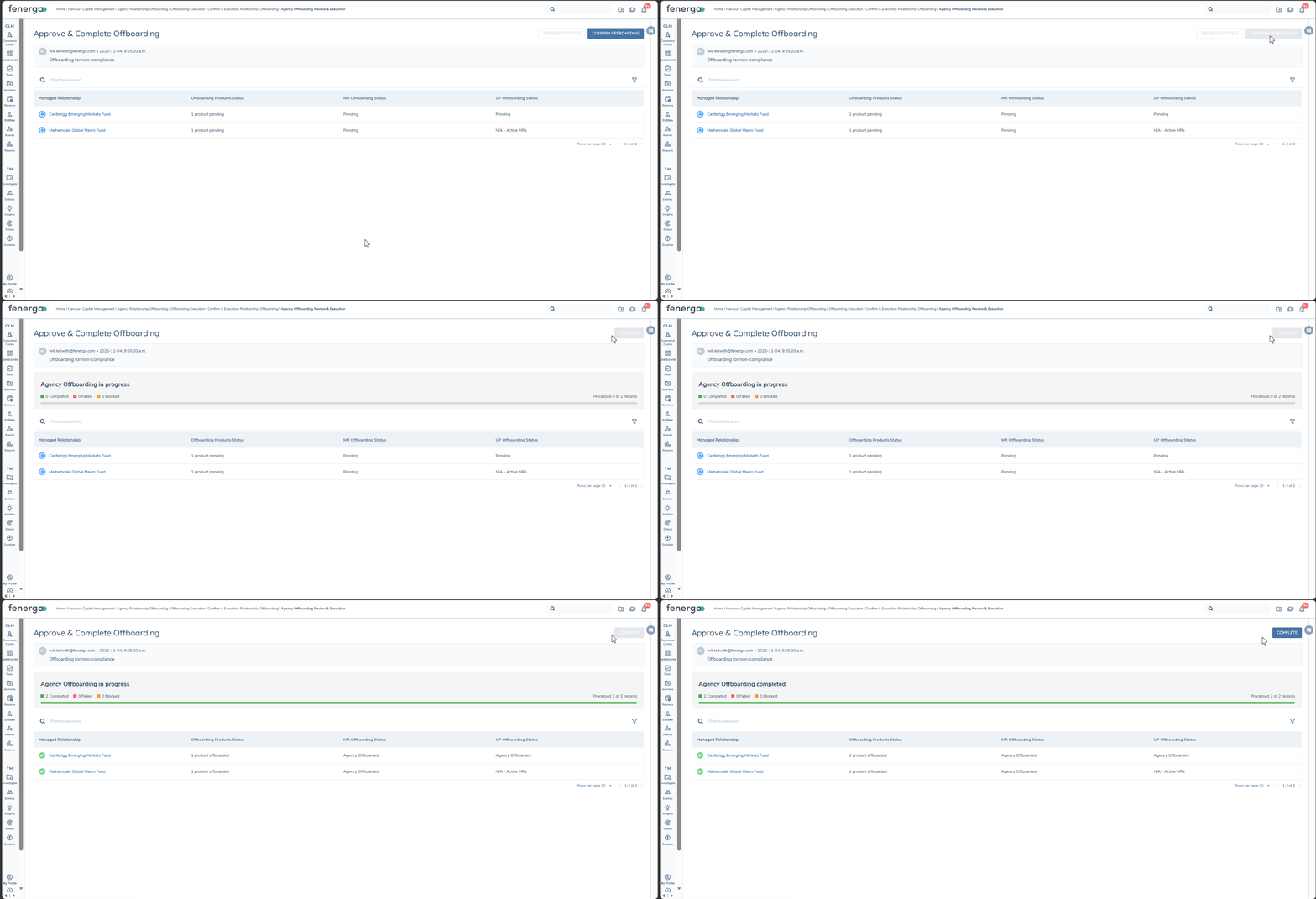
Once offboarding is confirmed, it runs in the background and the task becomes a progress dashboard. It shows:
- counts of rows that are Completed, Failed and Blocked
- a Processed n of x records counter
- each row's status as it is processed.
Row outcomes:
- Completed: the Managed Products show Offboarded, the Managed Relationship shows Agency Offboarded, and the Underlying Principal shows Agency Offboarded or N/A – Active MRs.
- Blocked: a journey was started on the in-scope fund while offboarding was running. That row isn't processed.
- Failed: a technical error occurred. Items already completed in that row aren't rolled back.
Complete becomes available once every row has finished processing. A snapshot of the dashboard is kept with the completed task.
Offboarding can't be undone once it is confirmed. Earlier tasks in the journey can be reopened, but they are read-only and the selection can't be changed.
Data retention and deletion
Agency Offboarding creates Data Deletion Processes in the same way as Client Offboarding:
- One Data Deletion Process for each offboarded policy that has a Data Protection Regime, for both the Managed Relationship and the Underlying Principal
- Each Data Deletion Process records the offboarding date and the retention period from the applicable Data Protection Regime
- The originating Agency Offboarding journey is recorded on each Data Deletion Process for traceability.
No Data Deletion Process is created for a fund that is also a Client, because its policies aren't offboarded.
From retention to deletion:
The Data Deletion Scheduler runs daily. When a Data Deletion Process reaches the end of its retention period, the scheduler launches a Data Deletion journey for that jurisdiction:
- a journey for the Global jurisdiction performs a full deletion of the offboarded Managed Relationship or Underlying Principal
- a journey for any other jurisdiction performs a partial deletion of the data aligned to that jurisdiction.
For details, see Data Deletion Execution and Data Deletion Journeys and Jurisdictions.
If an offboarded entity has an active Legal Hold, the scheduler skips it and no Data Deletion journey is launched until the Legal Hold expires or is removed.
Data Deletion Processes created by Agency Offboarding can be viewed through the Data Protection Query APIs and the Advanced Reporting Data Protection table. See Tracking data retention dates.
Agency Offboarded status chips
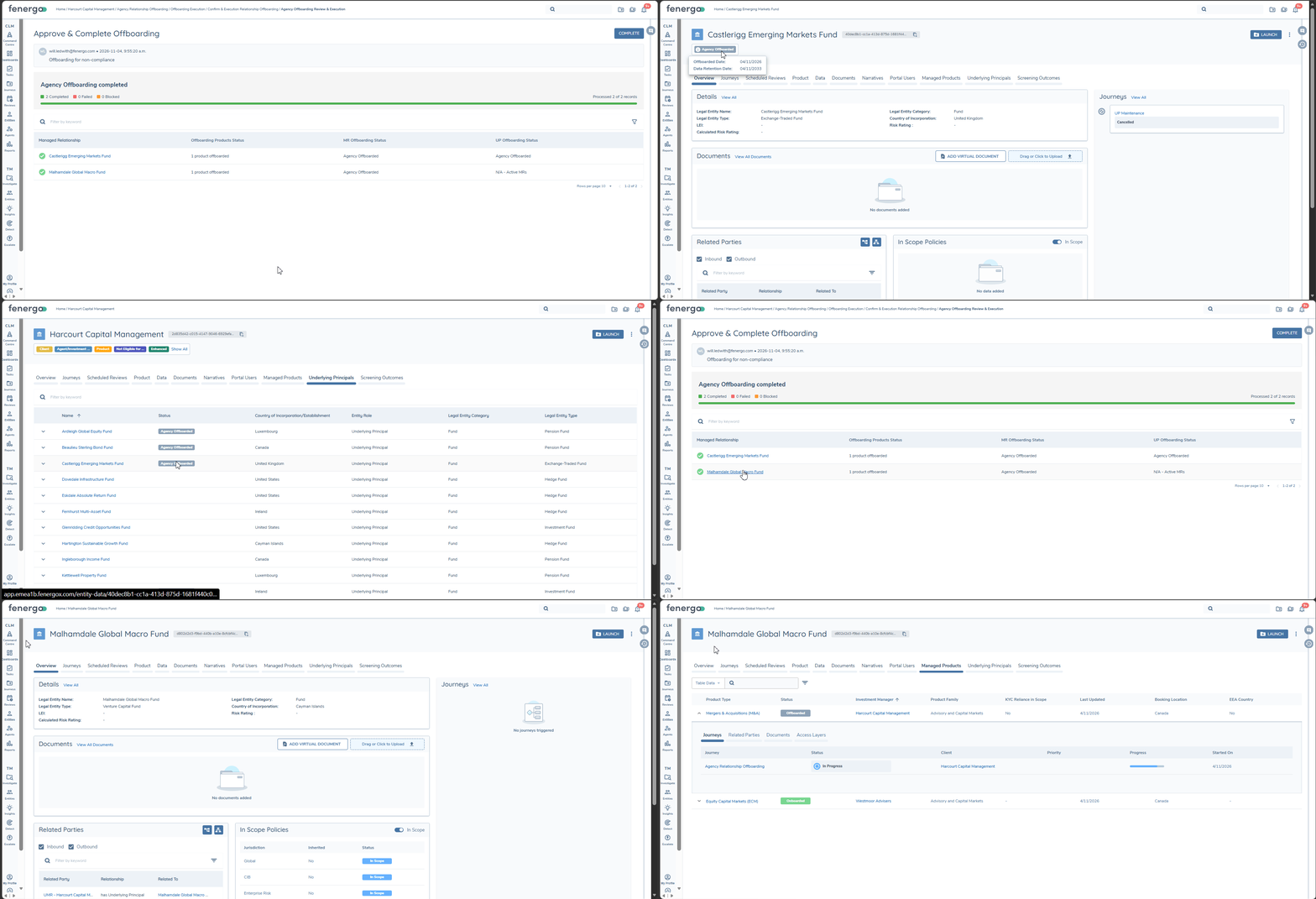
Offboarded records show an Agency Offboarded chip on their Entity Profile Page. There are two variants:
| Chip | When it appears | Mouse-over |
|---|---|---|
| Grey | The record's policies were offboarded and a Global Data Deletion Process exists. | Shows the Offboarded Date and the Data Retention Date. |
| Blue | The fund is Agency Offboarded but remains a Client, so its policies weren't offboarded. | None |
The dates shown on the grey chip come from the record's Global Data Deletion Process, in the same way as the Client Offboarded chip.
Agency Offboarded is distinct from Client Offboarded. A self-managed fund can show the blue Agency Offboarded chip while remaining an active Client.
Offboarded funds continue to appear on the Investment Manager's Underlying Principals tab, with an Agency Offboarded indicator in the table. This indicator has no mouse-over.
FAQ
-
How do I remediate any Managed Relationships that should have been offboarded previously? You can use Agency Offboarding to Offboard them now, but the Data Deletion processes would need to have their dates ammended via API to ensure data is retained for the correct period.
-
Data Deletion Journeys won't trigger against my Manage Relationships, why is that? Check the scoping conditions to ensure that the Managed Relationship Entity Type isn't excluded - for example if you include Entity Types "Company" and "Individual", then you're excluding "Managed Relationship".