Advanced Reporting in Fenergo
Introduction
Inside every Fenergo SaaS tenant is an endless stream of information provided by the continuous addition of new entities and journeys. This data supplies insights that can help users understand what types of clients are being processed, how they relate to one another, and how journeys are being managed in their tenant.
The Advanced Reporting feature allows users to access the data in their tenant via SQL queries or via KYRA:Report, please see KYRA:Report user guide for more information on Fenergo’s Automation agent reporting capabilities. Each query produces two things:
- A CSV file which is downloaded directly to the user's machine
- A link that can be used as a "Get Data From Web" connector when using external applications (like PowerBI, Tableau, Google Data Studio, etc)
Users can design their own queries to include whatever data points they find the most useful. The extracted data can be used for a variety of needs - including (but not limited to) basic historic filing, continuous status updates, or conducting further advanced analysis.
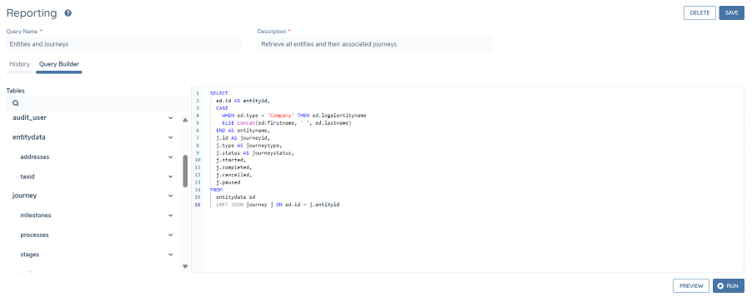
Users can query the following domains:
- Entity Data (including draft and histroic data)
- Journey
- Associations (Related Parties)
- Product (including draft and histroic data)
- Access Layers
- Users
- Teams
- Audit (for each domain above)
- Deals
- Screening
- Data Protection
The data inside of these reports is controlled by access layers, meaning that users will not see entities or journeys when they do not have the correct security permissions. Access to product data is limited by the owner parent entity(s) access layers.
Running A Report
This section details how to run a report using the in-app UI. For API documentation, refer to Fenergo APIs.
To see the Advanced Reporting screen, ensure you have the "Reporting Access" permission.
Click the Reports icon on the left navigation bar.
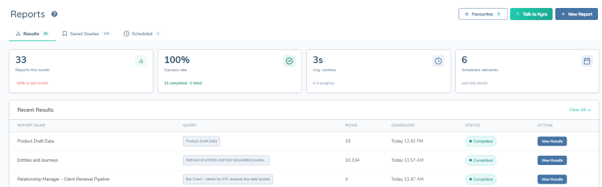
On this screen you can
- View reporting metrics
- View recent reports - including description, number of rows, timestamp and status
- Navigate into your saved queries
- Navigate into your scheduled reports
- View your favourites
- Talk to KYRA:Reports
- Create a new report
Creating a New Report
To create a new query, click the New Report Button, which brings you to the new query screen. In the SQL Editor tab, give your query a name and description.

Type or paste your query into the query builder. The Table Schema on the left can be used to get the table and field names. Parameters can also be set.
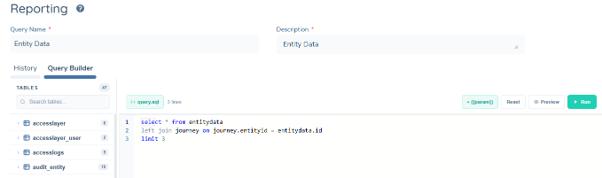
If you want to preview the output before running a full report, you can do so with the Preview button. This shows 5 rows of the report.
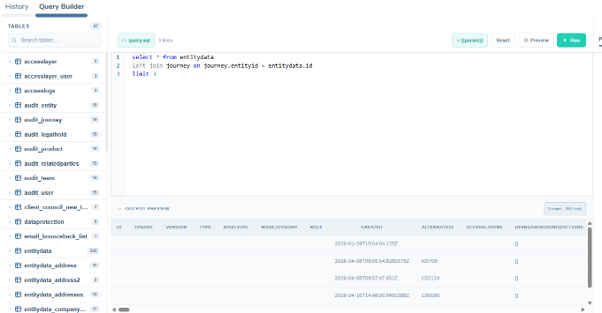
When you are happy with the results, click Save and Run. You may leave the page while the report is generating if you wish.
History
In the History tab you can:
- View results in the tenant
- Download the report as a CSV (link will expire after 10 minutes)
- Rerun the report
To ensure users do not get access to files that have sensitive data, their access layers are checked. If their access layers do not match those in the file history details, they will not be permitted to download the file.

Click the download icon within 10 minutes to download the CSV

Some browsers block downloads. If your download fails, click Copy to Clipboard and paste the link into your browser.

This option is also useful for those who wish to skip downloading a CSV and want to instead load the data into an external application.

Example of a Get Data From Web connector in an external appliation like PowerBI, Tableau, etc
To ensure users do not get access to files that have sensitive data, their access layers are checked. If their access layers do not match those in the file history details, they will not be permitted to download the file.
Favourites
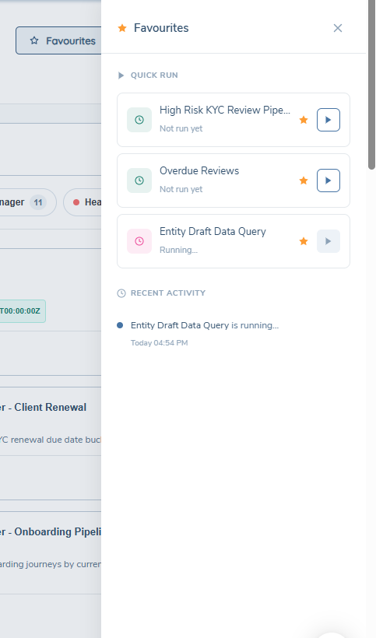
Users can have up to 5, specific to them, favourited reports that be ran directly from the favourites panel.
Saved Queries
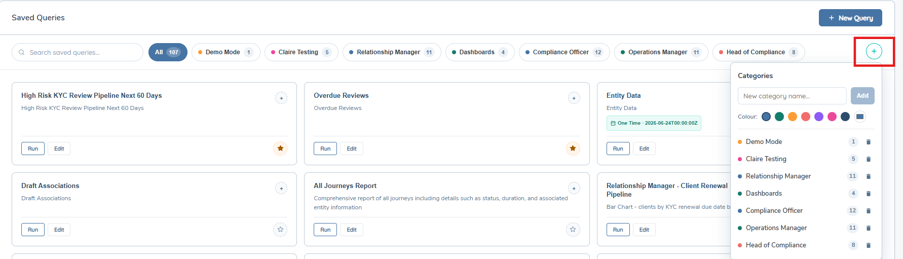
To run a report that is not in your favourites without having to search through results, the user can navigate into their saved queries.

Users can create categories and organise their queries within. Categories can be created by selecting the ‘+’ icon which opens a dropdown where users can customise their categories. Reports can be searched, favourited, ran, edited and added to categories from here.
Scheduled
Within the Scheduled tab, users can schedule a report to be ran to be received in their email inbox from noreply@fenergo.com. Please see Report Branding section below for how to add branding to this email. Users can tailor how and when the receive the report. Users will select the frequency, time including time zone and delivery format, this report can be in Excel, PDF or CSV format as well as add recipient list.
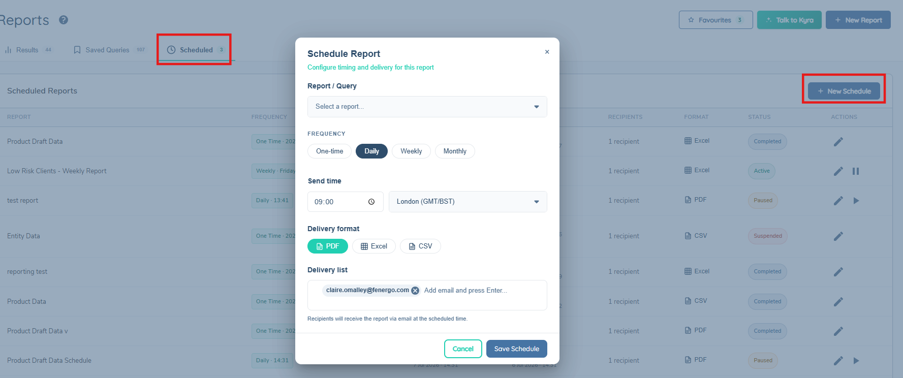
Within the Scheduled tab, users can view all the details of the schedule in the table, edit the scheduling using the pencil icon, pause and restart.

A tenant can have a maximum of 50 active schedules.
Send as Link Only
Each schedule has a Send as link only toggle. When it is on, the email contains a download link to the report instead of the report as an attachment.
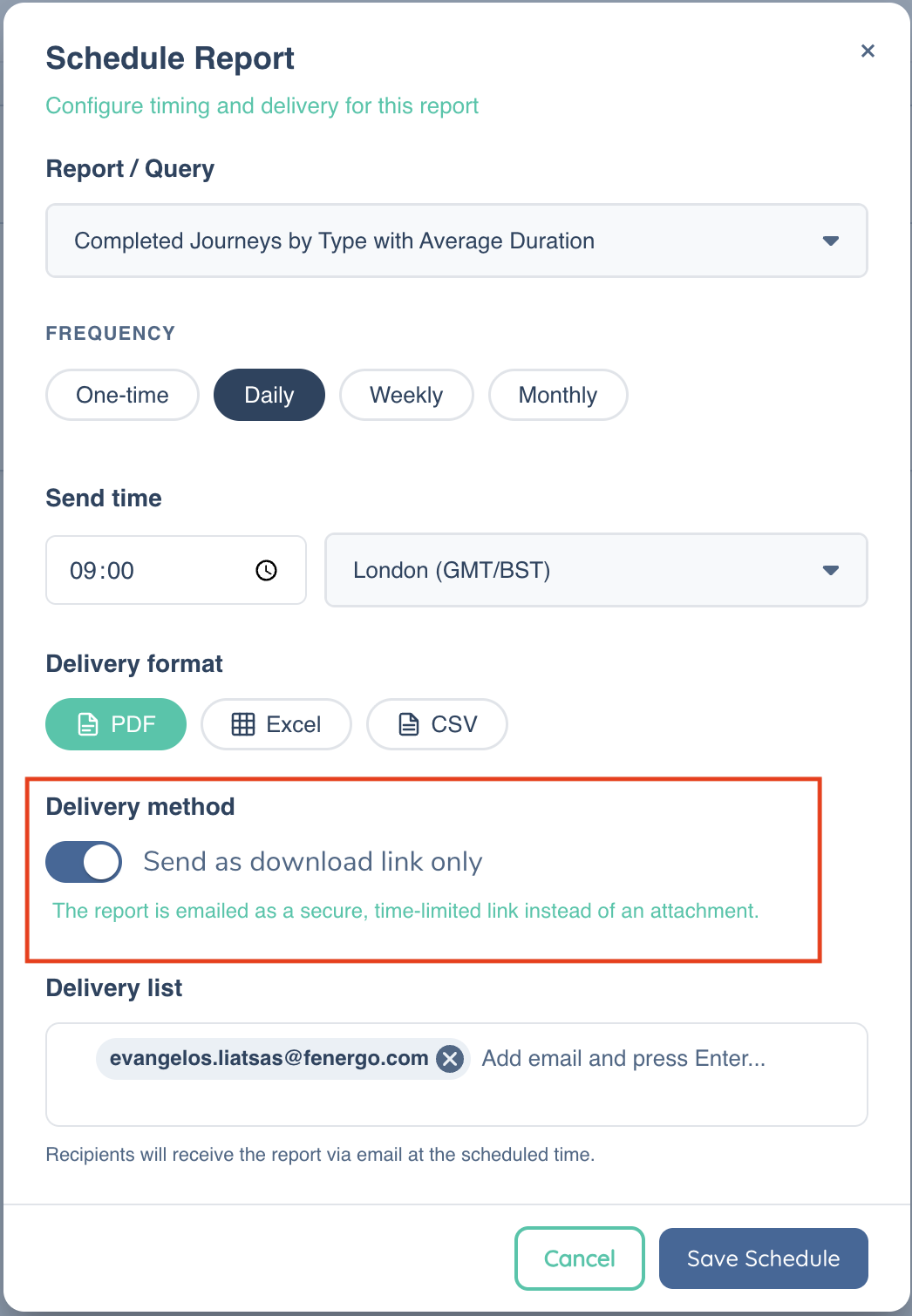
- The download link expires after 24 hours.
- When a schedule is delivered in PDF or Excel format, the converted file is retained so that it can be downloaded through the link.
- If access to storage is restricted for your tenant, the toggle is switched on and cannot be changed. This is enforced by the API as well as the UI, so schedules for these tenants are always delivered as a link.
Deleting a Schedule
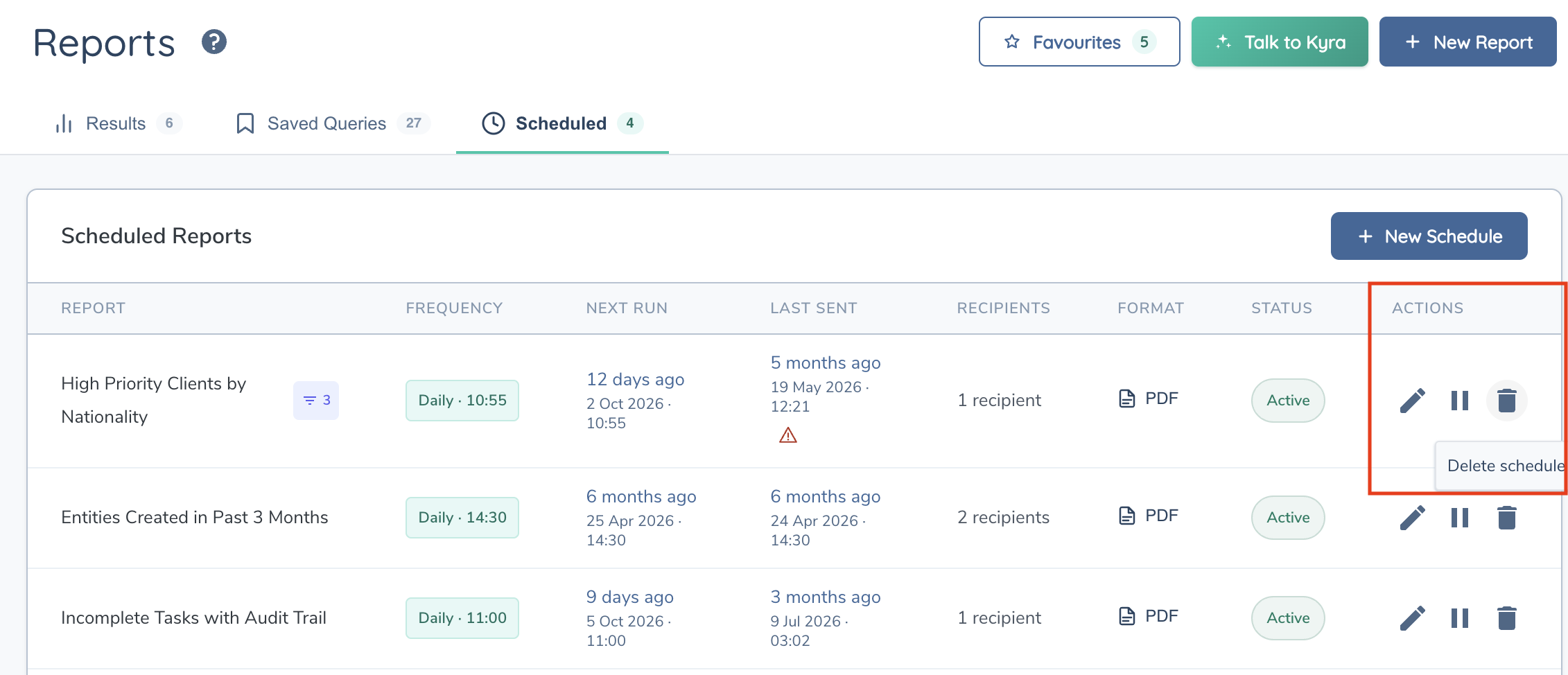
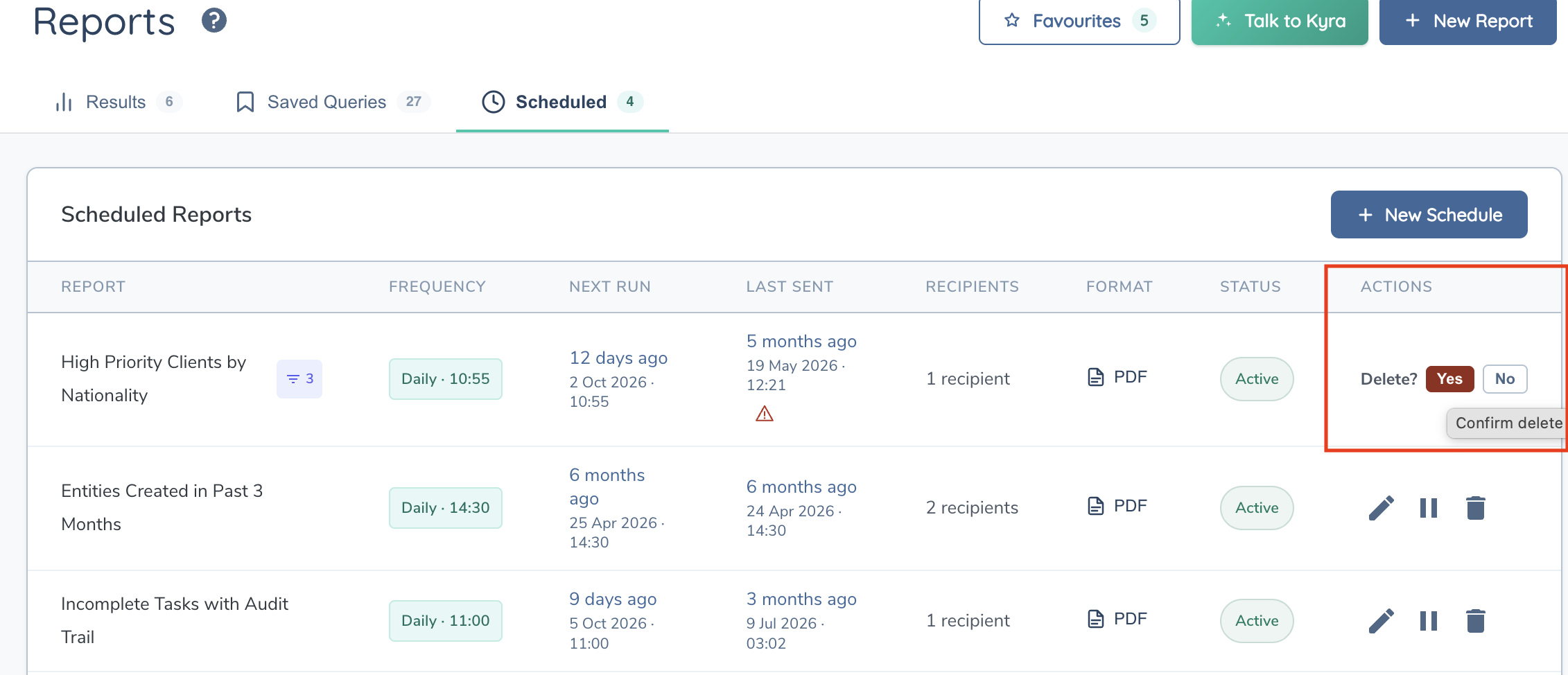
To remove a schedule that is no longer needed, select the Delete action for the schedule on the Scheduled Reports section of the Reports dashboard, then confirm in the confirmation dialog. Deleting a schedule is permanent. Deleted schedules no longer count towards the maximum of 50 active schedules.
Suspended Schedules
A schedule is suspended automatically when it fails:
- A recurring schedule is suspended after 3 consecutive failures.
- A one-time schedule is suspended after its first failure.
A suspended schedule has a Suspended status. Hover over the status to see the reason and message for the last failure.

To fix the cause of the failure, navigate back to Saved Queries and edit the report. Then use the Reset action to put the schedule back into service. Resetting a schedule:
- Returns it to Active status.
- Clears the failure count.
- Recalculates the next run time.
For a one-time schedule, you must enter a new run time that is at least 1 hour in the future.
While a schedule is suspended it cannot be paused or resumed, and it cannot be set to Active by editing it. Use Reset instead.
Troubleshooting Scheduled Reports
| Symptom | What to do |
|---|---|
| Schedule shows Suspended | Hover over the status to read the last failure reason, fix the underlying query or recipients, then use Reset. |
| Cannot reset a one-time schedule | Enter a run time at least 1 hour in the future. |
| Cannot pause, resume or activate a suspended item | Use Reset. Suspended schedules cannot be changed through edit. |
| Download link no longer works | Links expire after 24 hours. Run the report again from History, or reset the schedule to generate a new one. |
| Cannot turn off Send as link only | Your tenant has restricted storage access, so schedules are always delivered as a link. |
| Cannot create a new schedule | A tenant can have a maximum of 50 active schedules. Delete schedules that are no longer needed. |
Report Branding
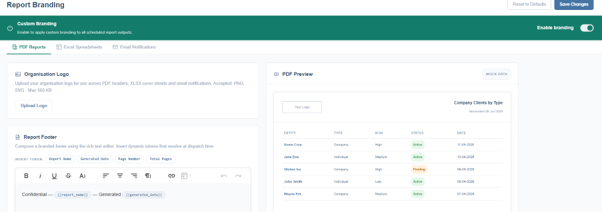
Within tenant configuration, users can navigate to Branding Configuration add their own customer branding to their reports. Once the Enable Branding toggle is on, users can add customer branding to the PDF and Excel outputs of their scheduled report.
PDF Reports Custom Branding
Users can upload a logo which will be used in the report and the email notification. Accepted file types are PNG and SVG to a max size of 500 KB. The report footer can be edited using the text box and both free text and dynamic tokens, as well as that standard text editing is also available. A PDF preview is visible on the left with mock data so users can see what the report will look like.
Excel Spreadsheets Custom Branding
Users can add an optional cover page with their logo and the timestamp. A background colour and text colour can be edited, colours can be selected by hex code, RGB or HSL, selected on the colour grid or matched to another colour on the page. Freezer header rows and auto-fill column widths can be toggled on or off. A footer style disclaimer row can be included and edited using the text box and both free text and dynamic tokens, as well as that standard text editing is also available. A XLSX preview is visible on the left with mock data so users can see what the report will look like.
Email Notifications
Users are able to edit the email received with a scheduled report. The email comes from noreply@fenergo.com which is not editable. Users can edit the Sender Display Name in the text box and Subject Line using edited using the text box and both free text and dynamic tokens. The email body can be edited using the text box and both free text and dynamic tokens, as well as that standard text editing is also available with a character limit of 10,000. An optional email footer and logo can be included. Am email preview is visible on the left with mock data so users can see what the report will look like.
Custom Tables
Custom Tables allow users to create their own tables inside Fenergo SaaS to hold data that does not originate in Fenergo. Custom Tables are found in the Tenant section of the Management menu. The purpose of Custom Tables is to bring data from outside of Fenergo into the platform so that it can be reported on alongside native Fenergo data. Once a Custom Table has been created and populated, it appears in the reporting schema and can be queried in the same way as any other reporting table, including being joined to Fenergo tables using SQL. This removes the need to export Fenergo data to an external reporting tool purely to blend it with data held in another system: the external data can instead be loaded into Fenergo and combined there. Data can continue to be extracted from Fenergo and reported on in external tools where required, Custom Tables do not change that capability. They provide an additional option for use cases where users would prefer to consolidate reporting inside Fenergo.
Table Types
When creating a Custom Table, users select one of two table types. The type determines how the table is intended to be used:
| Table Type | Description |
|---|---|
| Reference | Holds relatively static information, such as a reference or lookup list that changes infrequently. |
| Operational | Holds information that changes regularly, where records are expected to be added and updated on an ongoing basis. |
Defining the Schema
A Custom Table is defined by its columns. When creating a table, the user selects New Table.

In the pop up, the user defines a unique name, gives a description, chooses a table type from the above list and an option to define the columns that make up its schema. As the schema is user-defined, the columns can be tailored to whatever data the use case requires.
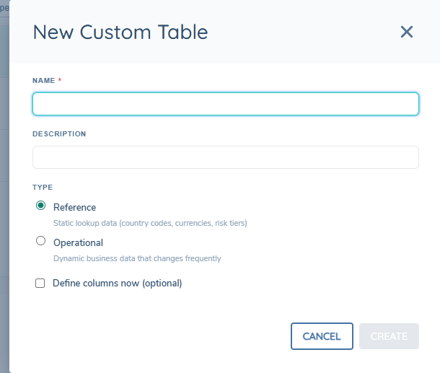
These details can be changed in the right-side panel. The table name can only be edited before data is imported. The table can also be copied or deleted form these options.

Loading Data
Data is loaded into a Custom Table by uploading a CSV file of up to 10,000 rows or 10 MB. The columns in the CSV are mapped to the columns defined in the table schema, and the records are loaded into the table ready to be queried. A Custom Table can be created and made ready to receive data in a short space of time. A table can be defined, have its columns created and have data loaded from a CSV within a few minutes. Columns can be manually added in the Schema tab, and rows can be edited or removed using the edit or delete icons. The data can be previewed in the Data Preview tab where rows can be added manually and searched. The DDL tab contains the SQL defintion in read only format which can be copied.
Querying and Reporting
Once populated, a Custom Table behaves like any other table in the reporting schema. It can be queried directly, and it can be combined with Fenergo tables using SQL JOIN statements or using KYRA:Report so that external data is reported on alongside native Fenergo data. Dashboards can also be built from this data. Please see Custom Dashboards user guide for information on building dashboards from Saved Queries.
Permissions
A comprehensive guide on how to configure permissions can be found in the permissions catalogue The reporting domain has 4 permissions that are enforced at an API level, meaning users without them who try to perform certain actions will get a 403 error.
| Permission Name | Description |
|---|---|
| Reporting Access | Allows users to access Advanced Reporting and Legacy Reporting. For advanced reporting, they can see saved queries and the SQL behind them. For legacy reporting, they can run all OOTB reports |
| Reporting Edit | Allows users to create, edit, preview, and save queries |
| Reporting Execute | Allows users to run queries and download reports |
| Reporting Delete | Allows users to delete saved queries and scheduled reports |
For scheduled reports, the Reset action for a suspended schedule requires Reporting Edit, and the Delete action requires Reporting Delete.
Schema
The reporting table schema describes how all the data in the tenant is organized and how each domain connects to one another. Each tenant has its own unique policies and journey schemas that dictate what data is captured and saved. Because of this, the reporting schema differs per tenant. The table structure can be seen to the left of the query editor.
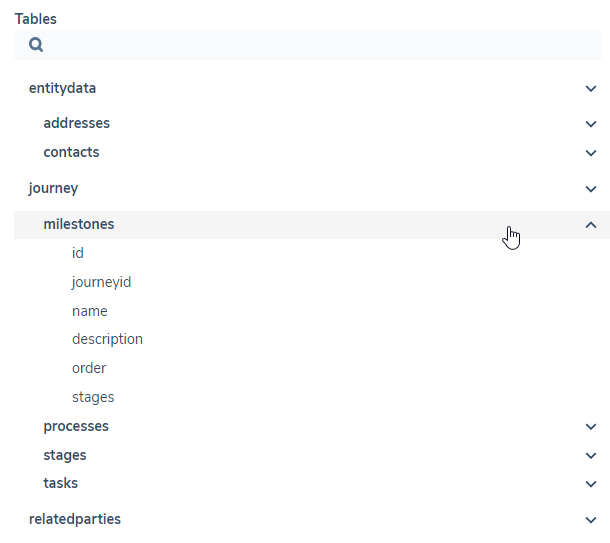
Mappings
These domains share common elements (entity IDs, journey IDs) meaning JOIN statements can be used to combine them. The diagram below shows how the tables connect to one another.
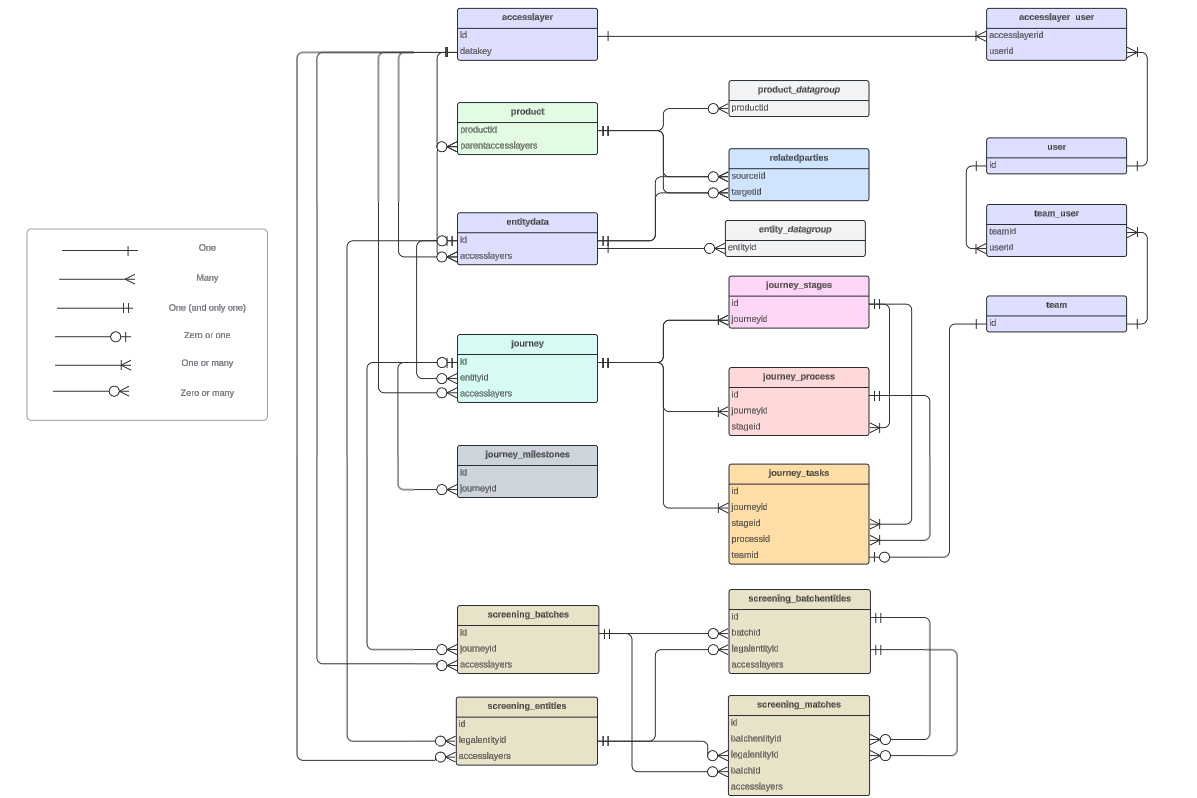
An example of a JOIN statement that combines entitydata and journey is
SELECT * FROM entitydata LEFT JOIN journey ON entitydata.id = journey.entityid
What do these mappings represent?
The diagram explains where JOIN statements can be used, and what data points you need to use in your query to connect them. Some examples that are in this diagram:
- A journey ID will map to one or many stages in the journey_stages table
- A stage will map back to one and only one journey ID in the journeys table
- A relatedparties sourceid and targetid will each map to an entity id in the entitydata table
- An ID on the entitydata table may map to zero or many IDs on the related parties table.
What does this mean?
- A "one and only one" mapping means that you are guaranteed to find one match when joing the tables
- Any mapping that has "zero" means you are not guaranteed to find a match
- Any mapping that has "many" means that you might get multiple matches, so the join won't neatly fit on one row, and will instead be split across multiple.
Going back to this example:
SELECT * FROM entitydata LEFT JOIN journey ON entitydata.id = journey.entityid
Using the diagram, we can see that the mapping entitydata.id to journey.entityid is zero or many. This means that for every entityid, we will find zero or many journeys - meaning some entities will have no matches, and other entities will appear many times.
For more information on JOIN, see this resource. For more examples on how to use these JOIN statements, see the Example Queries section in this guide.
Entity Data Tables
The entitydata tables contain information about the verified entities in a tenant. This consists mostly of any data requirements that were captured during a journey, along with some sytem metadata (like entity ID, and the date it was created). Each entity has an entry on the main entitydata table, while any datagroups saved to them are stored in separate tables that can be linked back with an entityid.

The schema is updated any time a new policy is published. An entity is added to the reporting datastore upon creation, and updated when it is verified in the "Verify Entity" or "Verify Related Parties" task.
Entity Data
SELECT * FROM entitydata
| Field | Description | Data Type |
|---|---|---|
| id | The entity ID | string (GUID) |
| type | Company, Individual, Other | string |
| tenant | The tenant ID | string (GUID) |
| version | The number of times this entity has been verified | integer |
| created | The date and time this entity was created | string (timestamp) |
| accesslayers | The access layers are applied to the entity | row (JSON-like object) |
| role | The role of the entity - if it's a client or not | string |
| offboardedjurisdictions | The jurisdictions associated to the entity that have been offboarded | array |
| associatedjurisdictionsfromparents | The jurisdictions inherited by the entity from it's related party connection to another entity | array |
| evaluatedjurisdictions | All the jurisdictions applicable to the entity | array |
| inscopejurisdictions | The jurisdictions that the entity is in scope for | array |
| shareddatatemplate | The shared data template used for this entity | string (GUID) |
| Any datakeys from the latest published policies | Every tenant will have its own set of datakeys that it captures for new entities. Every time a new policy is published (for all jurisdictions), any datakeys that are configured to capture entity data will appear here. Examples include firstname, countryofincorporation, risk. | these will be strings but can be cast to numbers, dates, etc depending on what they have been captured as. |
The following attributes may also be included in the results:
- risklevel, riskcategory: Legacy risk values from the old risk task. Some older entities may have a value saved to these data points. This represents the outcome of the last risk assessment to be run on that entity.
- alternateid: ID used internally for migrations
Special Formatting For Policy Datakeys
A tenant may have a policy field that shares the same name as a system field. For example,
- id
- tenant
In this case the policy field will be preceded by an underscore, for example
- _id
- _tenant
A policy may have multiple fields that have the same text, but different cases, making them different datakeys. For example:
- KYCLevel
- kycLevel
- kYcLevel
The Advanced Reporting solution is case insensitive, meaning these are interpreted as the same field - which can cause problems if different data has been saved to them. To solve this, every instance of a matching datafield will have a "_1", "_2", etc suffix and they must be queried as so:
- kyclevel
- kyclevel_1
- kyclevel_2
In an instance where a field fulfils both of the above criteria, it will have both special formatting solutions applied:
- tenant
- _tenant_1
Entity Data – Data Groups
Each datagroup saved to an entity has multiple data points. To make it easier to query, each published data group that is contained in the published policy has its own table. These tables can be accessed using the format
SELECT * FROM entitydata_datagroupdatakey
Each datagroup can be joined back to its entity using the entityid property.

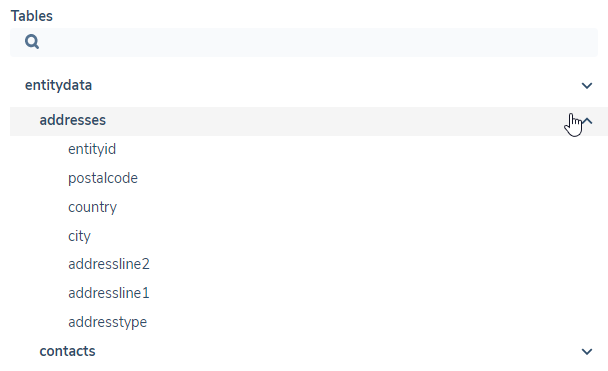
| Field | Description | Data Type |
|---|---|---|
| entityid | The entity this data belongs to | string (GUID) |
| Datakeys | Any datakeys in the latest published policy that belong to this data group | strings, but can be cast to other data types depending on how they've been captured |
Journey Tables
A journey appears in the reporting datastore as soon as it is initiated. The journey tables provide information about the different journey types, their metadata, and their progress. It can be joined with the entity data table to provide more information about the main client entity that the journey has been initiated for.
In Fenergo SaaS, each journey has stages, which have processes, which have tasks. The overall journey can also have milestones to track progress. For ease of access, each of these components have been split into their own tables. The IDs in each table can be used to join it back to its parent journey.
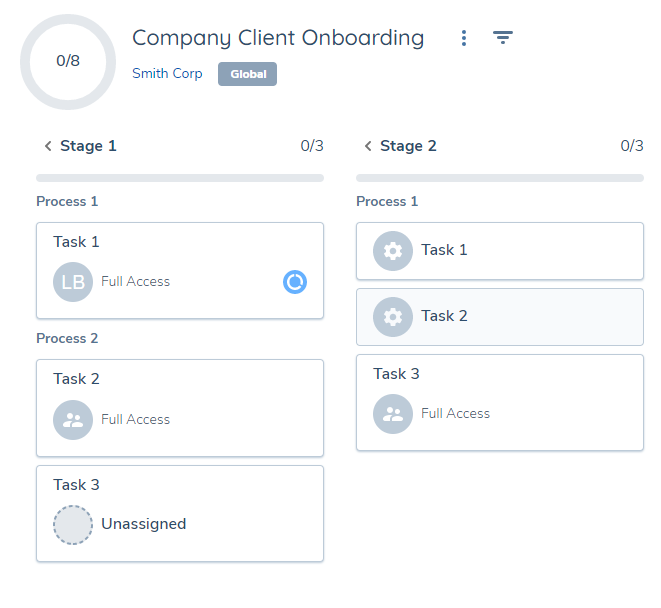
Journey
SELECT * FROM journey
| Field | Description | Data Type |
|---|---|---|
| id | The journey ID | string (GUID) |
| tenant | The tenant ID | string (GUID) |
| type | The type of journey - taken from the "Journey Type" selection dropdown. | string |
| name | The name of the journey | string |
| servicelevelagreement | SLA details. Contains committed hours, due date, approachingduehours, approachingduedate properties | row (JSON-like object) |
| status | Done, Cancelled, In Progress | string |
| cancelledby | The user that cancelled the journey | string (GUID) |
| cancellationcomment | The comment that came with the cancellation | string |
| entityid | The entity id that is the subject of this journey | string (GUID) |
| entitydraftid | The id used to trace the draft of the entity record as this journey progresses | string (GUID) |
| started | The date and time this journey was started | string (timestamp) |
| cancelled | The date and time this journey was cancelled | string (timestamp) |
| completed | The date and time this journey was completed | string (timestamp) |
| identifier | The identifier of the journey that was configured in the journey builder | string |
| journeyschemaid | The id of the journey schema | string (GUID) |
| journeyschemaversionnumber | Version number of the journey schema that was used | integer |
| jurisdictions | The jurisdictions in scope for this journey | row (JSON-like object) |
| accesslayers | The access layers are applied to the journey | row (JSON-like object) |
| metadata | Any metadata relevant to the journey - for example the event that triggered it | row (JSON-like object) |
Milestones
SELECT * FROM journey_milestones
| Field | Description | Data Type |
|---|---|---|
| id | The ID of the milestone | string (GUID) |
| journeyid | The journey the milestone belongs to | string (GUID) |
| name | The name of the milestone | string (GUID) |
| description | Description of milestone | string (GUID) |
| order | The order this milestone needs to be completed in | integer |
| stages | List of stage ids used to track progression of the milestone | array |
Stages
SELECT * FROM journey_stages
| Field | Description | Data Type |
|---|---|---|
| id | ID of the stage | string (GUID) |
| journeyid | Journey ID that this stage belongs to | string (GUID) |
| schemastageid | The ID of the journey schema stage | string (GUID) |
| name | The name of the stage | string |
| servicelevelagreement | SLA details. Contains committed hours, due date, approachingduehours, approachingduedate properties | row (JSON-like object) |
| status | In Progress, Not Started, Skipped, Done | string |
| processescompletionorder | Any Order, Sequential | string |
| started | The date and time this stage was started | string (timestamp) |
| conditions | What conditions trigger this stage | string (JSON-like object) |
| completed | The date and time this stage was completed | string (timestamp) |
Processes
SELECT * FROM journey_processes
| Field | Description | Data Type |
|---|---|---|
| id | ID of the process | string (GUID) |
| journeyid | Journey ID that this process belongs to | string (GUID) |
| stageid | Stage ID that this process belongs to | string (GUID) |
| schemaprocessid | The ID of the journey schema process | string (GUID) |
| name | The name of the process | string |
| status | In Progress, Not Started, Skipped, Done | string |
| order | If this process is part of a sequential set, what order does it have to be completed in | integer |
| taskcompletionorder | Any Order, Sequential | string |
| started | The date and time this process was started | string (timestamp) |
| conditions | What conditions trigger this process | string (JSON-like object) |
| completed | The date and time this process was completed | string (timestamp) |
Tasks
SELECT * FROM journey_tasks
| Field | Description | Data Type |
|---|---|---|
| id | ID of the task | string (GUID) |
| journeyid | ID of the journey that this task belongs to | string (GUID) |
| stageid | ID of the stage that this task belongs to | string (GUID) |
| processid | ID of the process that this stage belongs to | string (GUID) |
| schemataskid | ID of the journey schema task | string (GUID) |
| name | Name of the task | string |
| servicelevelagreement | SLA details. Contains committed hours, due date, approachingduehours, approachingduedate properties | row (JSON-like object) |
| status | Not started, Descoped, In Progress, Done, Skipped | string |
| tasktype | Type of task (data, documents, related parties..) | string |
| discriminator | Additional description of the task type | string |
| order | If the process must be completed sequentially, the order this task has to be completed in | integer |
| reopencomment | The comment received when the task was reopened | string |
| reopened | The date and time this task was reopened | string (timestamp) |
| started | The date and time this task was started | string (timestamp) |
| completed | The date and time this task was completed | string (timestamp) |
| completedby | User that completed this task | string (GUID) |
| teamid | Team that this task belongs to | string (GUID) |
| conditions | The conditions trigger this task | string (JSON-like object) |
| teamassignmentconditions | The conditions that assign this task to a particular team | array<rows> (array of JSON-like objects) |
| completeafter | List of tasks that must be completed before this task is completed. | array |
| iscompleted | Is the task completed? True, False | boolean |
| policytarget | Policy Target of the task (Client, Related Party) | string |
| policyrequirementtype | The type of requirements the task is capturing (Data, Documents, Ownership and Control, eSignature) | string |
| businesscategory | The policy categories that this task uses (Basic Details, Enrich Details..) | array |
| relatedpartycategory | If this is a related parties task, the O&C requirements in the policy it is targeting | array |
| servicename | Used in service tasks (like Calculate Risk, Verify Entity). The name of the service that runs in this task. | string |
Comments Table
The comments table contains the comments captured against entities and journeys. This allows business users to report on the operational context recorded in comments; the comment text, who added it, when, whether any users are mentioned and how many replies. Both entity-level and journey-level comments are included in a single table, distinguished by the commenttype field, and can be joined to the entity data and journey tables.
Key Behaviours
- Each comment and each reply appears as its own row. A reply is linked to its parent comment through threadid and parentcommentid, so a comment and all of its replies can be grouped together.
- The commenttype field indicates whether a comment was made against an entity or a journey.
- When a comment or reply is deleted, its row is retained with isdeleted set to true and its text replaced by the standard "comment deleted" message. Deleting a comment does not remove its replies.
- Row visibility follows the same access layers as the parent entity or journey, so users only see comments for records they are permitted to access.
- The user ID is displayed for the author ID and mentioned users, to see the username, join with the user table.
Comments
SELECT * FROM comments
| Field | Description | Data Type |
|---|---|---|
| commentid | Unique identifier for the comment or reply | string (GUID) |
| threadid | Groups a comment with its replies. For a comment this is its own ID; for a reply it is the parent comment's ID | string (GUID) |
| parentcommentid | The parent comment ID for a reply. Empty for a top-level comment | string (GUID) |
| isreply | Indicates whether the row is a reply (true) or a top-level comment (false) | boolean |
| commenttype | Whether the comment was made against an entity or a journey (Entity or Journey) | string |
| entityid | The entity the comment relates to. Populated for entity comments | string (GUID) |
| journeyid | The journey the comment relates to. Populated for journey comments | string (GUID) |
| content | The comment or reply text. Replaced with the standard "comment deleted" message when deleted | string |
| authorid | The user ID who added the comment or reply | string (GUID) |
| authortype | The type of author (for example, User or System) | string |
| mentionedusers | The ID of users mentioned in the comment or reply | array |
| createddate | The date and time the comment was added, or the reply date for a reply | string (timestamp) |
| isdeleted | Indicates whether the comment or reply has been deleted | boolean |
| deleteddate | The date and time the comment or reply was deleted. Empty if not deleted | string (timestamp) |
| numberofreplies | The number of replies on a top-level comment. 0 on replies | integer |
| accesslayers | The access layers applied to the comment, inherited from the parent entity or journey | row (JSON-like object) |
The comments table can be joined to the entity data and journey tables using entityid and journeyid. For example, to combine comments with their entity:
SELECT * FROM comments LEFT JOIN entitydata ON comments.entityid = entitydata.id
WHERE comments.entityid = '<entityID>'
Product Tables
The product tables contain information about the verified products in a tenant. This consists mostly of any product data requirements that were captured during a journey, along with some system metadata (like product ID, product family and Type, lifecycle status etc).
Products are connected to entities via associations, which means that a query to get products associated with one or more entities will need to join with the relatedparties table with the type 'Product' (entityid = 'sourceid' and productid = 'targetid') - please refer to SQL User Guide for examples.
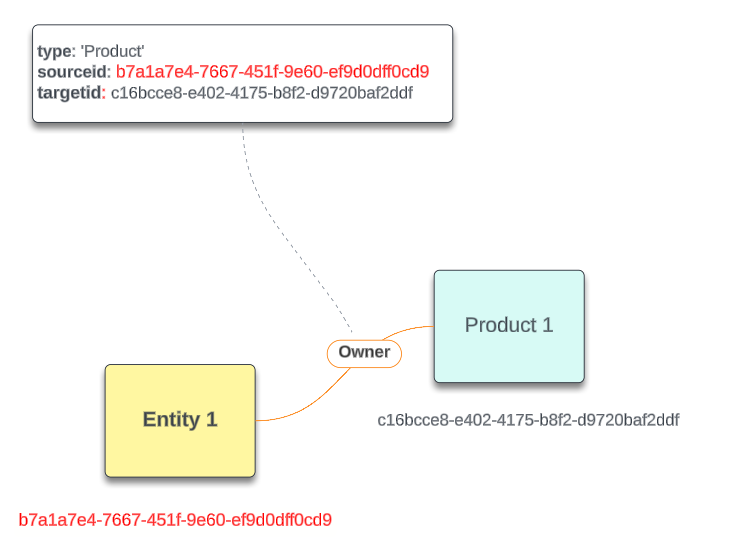
Each Product has an entry on the main product table, while any datagroups saved to them are stored in separate tables that can be linked back with an productid.
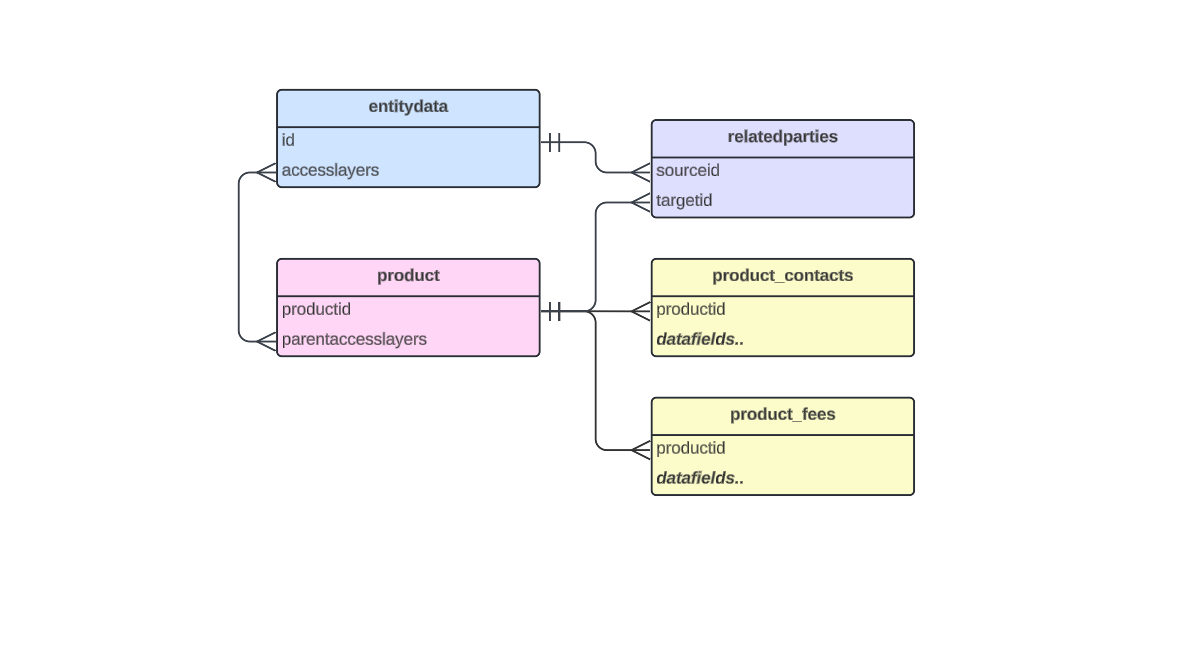
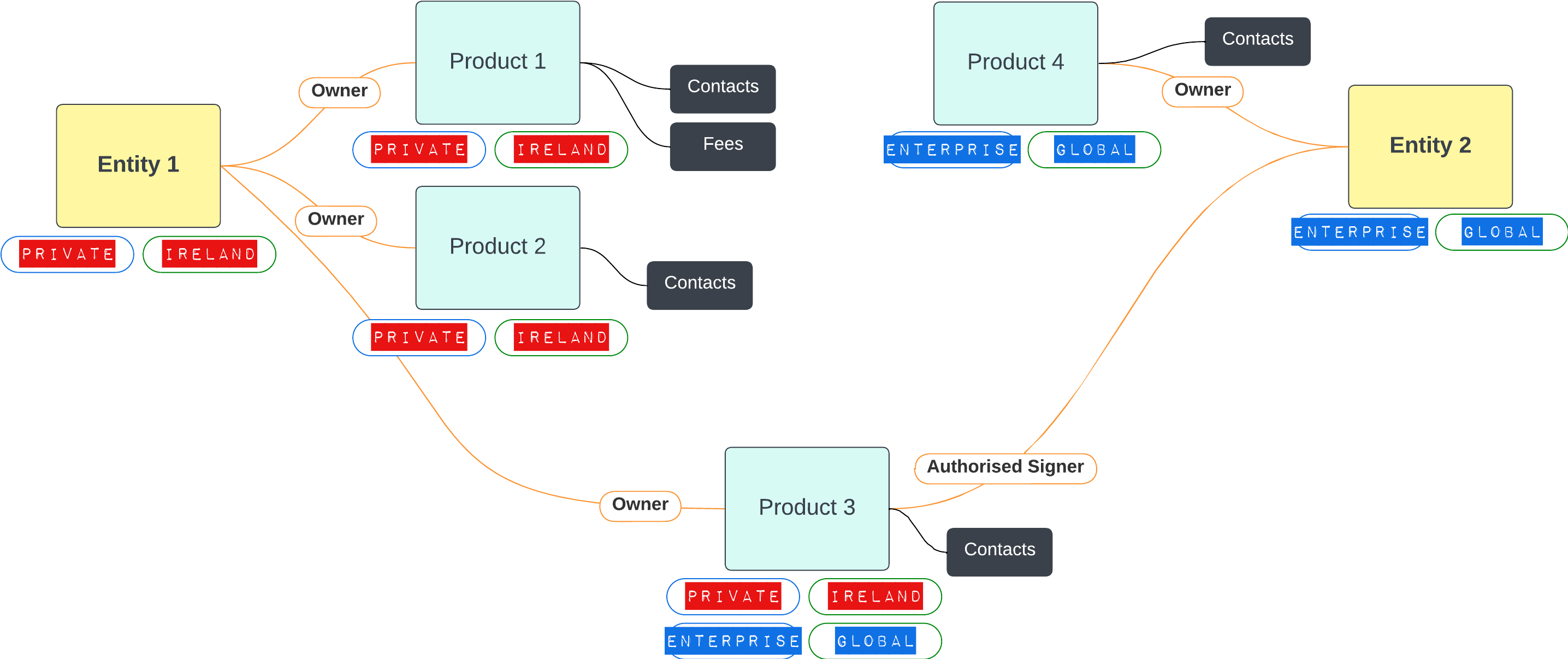
Users can only access product data in Advanced Reporting that they would be able to acces via the UI. Each product has 'Parent Access Layers' property which contains Entity access layers from its owner entity(s). Products will be hidden from users lacking the required 'Entity' type Access Layers.
The schema is updated any time a new product requirement set is published. A product is added to the reporting datastore upon verification in the "Verify Products" or “Verify Products (V2)” task.
Product Data
SELECT * FROM product
| Field | Description | Data Type |
|---|---|---|
| productid | The Product ID | string (GUID) |
| family | Product Family | string |
| type | Product Type | string (GUID) |
| version | The number of times this product has been verified | integer |
| parentaccesslayers | The access layers are applied to the entity owner(s) of the product (required to access the product data) | row (JSON-like object) |
| jurisdictions | In-scope product requirement set jurisdictions applied to product data | row (JSON-like object) |
| lifecyclestatus | Onboarded, In Review, Offboarded etc | string |
| tenant | Tenant where product data is stored | string (GUID) |
| Any datakeys from the latest published product requirement sets | Every tenant will have its own set of datakeys that it captures for new products. Every time a new product requirement set is published (for all jurisdictions), datakeys that are configured to capture product data will appear here. | these will be strings but can be cast to numbers, dates, etc depending on what they have been captured as. |
The following attributes may also be included in the results:
- alternateid: ID used internally for migrations
Special Formatting For Product Requirement Set Datakeys
A tenant may have a product requirement set field that shares the same name as a system field. For example,
- type
- tenant
In this case the product requirement set field will be preceded by an underscore, for example
- _type
- _tenant
A product requirement set may have multiple fields that have the same text, but different cases, making them different datakeys. For example:
- FeeSchedule
- feeSchedule
- feeschedule
The Advanced Reporting solution is case insensitive, meaning these are interpreted as the same field - which can cause problems if different data has been saved to them. To solve this, every instance of a matching datafield will have a "_1", "_2", etc suffix and they must be queried as so:
- feeschedule
- feeschedule
- feeschedule
In an instance where a field fulfils both of the above criteria, it will have both special formatting solutions applied:
- tenant
- _tenant_1
Product – Data Groups
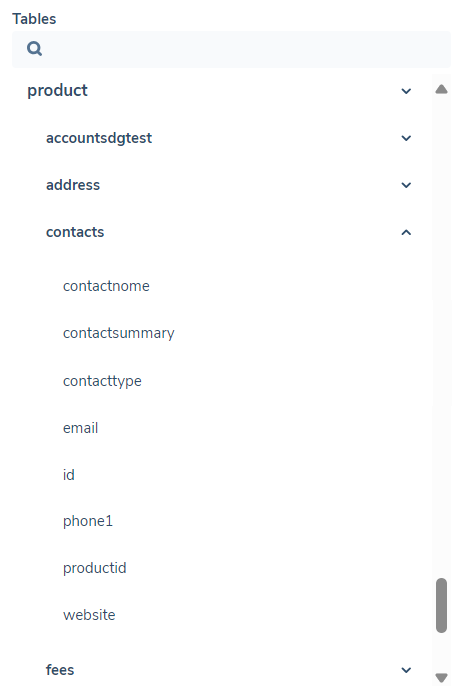
Each datagroup saved to an entity has multiple data points. To make it easier to query, each published data group that is contained in the published policy has its own table. These tables can be accessed using the format
SELECT * FROM product_datagroupdatakey
Each datagroup can be joined back to its product using the 'productid' property.

| Field | Description | Data Type |
|---|---|---|
| productid | The product this datagroup belongs to | string (GUID) |
| Datakeys | Any datakeys in the latest published datagroup version | strings, but can be cast to other data types depending on how they've been captured |
Related Party Associations Table
The Related Parties table describes how entities relate to one another – for example directors, shareholders, and UBOs. These associations are created and managed in the External Data and Related Parties tasks.
Fenergo SaaS stores all associations in a tenant in a graph database. To make the information accessible through SQL, the graph nodes and edges have been flattened into a table where each entry describes one relationship.
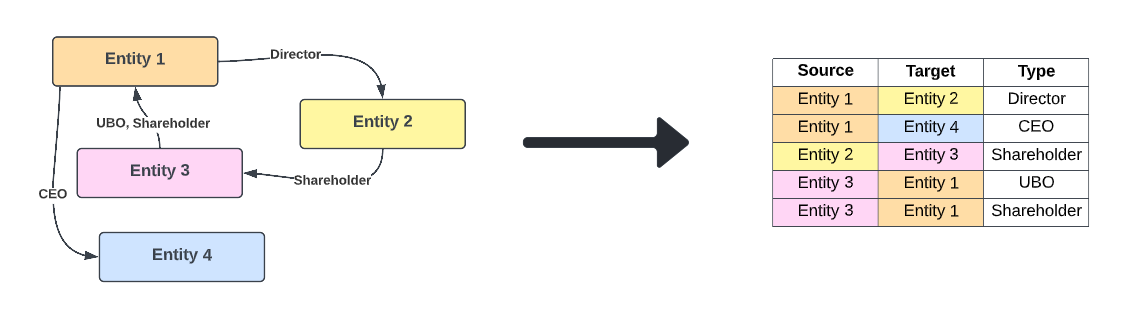
The related parties table can be joined with the entity data table to present more information about the entities, rather than just the associations themselves.
Related Parties
SELECT * FROM relatedparties
| Field | Description | Data Type |
|---|---|---|
| type | The relationship type between the two entities. For standard related party associations this holds the business relationship (for example Director or Shareholder). For Product and Agency associations this is a fixed discriminator (product or agencyRequest) and the business relationship is held in subtype. | string |
| subtype | The specific business relationship for Product and Agency associations. For Product associations (type = product) this is the entity's relationship to the product, for example Owner, Guarantor or Co-signer. For Agency associations (type = agencyRequest) this is the agency relationship, for example Underlying Principal. Empty for standard related party associations. | string |
| source | the source entity (For example, if "Entity 1 is a director of Entity 2", "Entity 1" is the source) | string (GUID) |
| target | the target entity (For example, if "Entity 1 is a director of Entity 2", "Entity 2" is the target) | string (GUID) |
| ownershippercentage | Percentage ownership that the source owns of the target | string (number/double) |
| Datakeys | Any other datakeys from a published policy that have a target entity of "related party" and a category of "relationship details". Examples include date of appointment, control percentage. | these will be strings, but can be cast to numbers, dates, etc depending on how they have been captured |
Security Data
Security Data in a tenant can be used to extract information about users, teams, and their access layers. This domain uses join tables, which connects these tables to one another and help make more powerful queries.
Security data will appear in your results as soon as you create a user, team or access layer.
Access Layers
SELECT * FROM accesslayers
| Field | Description | Data Type |
|---|---|---|
| id | Unique ID of the access layer | string (GUID) |
| datakey | Datakey assigned to the access layer | string |
| datatype | What is this access layer applied to - entity, journey, field, etc. | string |
| description | Description of the access layer | string |
| label | Label assigned to the access layer | string |
| name | Name assigned to the access layer | string |
| type | Business Related or Geographic | string |
| version | Version of access layer | string (number) |
Access Layers - User
SELECT * FROM accesslayer_user
This is a join table. The primary purpose is to use this table to help join the "accesslayer" table to the "user" table (as it is a many-to-many relationship)
| Field | Description | Data Type |
|---|---|---|
| accesslayerid | ID of the access layer | string (GUID) |
| userid | ID of the user | string (GUID) |
Teams
SELECT * FROM team
| Field | Description | Data Type |
|---|---|---|
| id | ID of the team | string (GUID) |
| description | Description given to the team | string |
| name | Name of the team | string |
| scopes | What permissions does this team have - for example 'AssociationsAccess', 'DocumentDelete', etc. | array |
| version | Version of the team | string (number) |
Teams - Users
SELECT * FROM team_user
This is a join table. The primary purpose is to use this table to help join the "team" table to the "user" table (as it is a many-to-many relationship)
| Field | Description | Data Type |
|---|---|---|
| teamid | ID of the team | string (GUID) |
| userid | ID of the user | string (GUID) |
Users
SELECT * FROM user
| Field | Description | Data Type |
|---|---|---|
| id | ID of the user | string (GUID) |
| E-mail of the user | string | |
| username | Username of the user | string |
| isenabled | False if the User is disabled | boolean |
| isdeleted | True if the user is deleted | boolean |
Screening Tables
The Screening tables provide detailed visibility into screening results captured within Fenergo. These include metadata related to batch runs, screened entities, associated matches, and decisions made during the screening process. With this release, users can now query, analyse, and generate custom reports using screening data in Advanced Reporting, supporting enhanced risk and compliance workflows.
Screening data is divided across four interrelated tables.
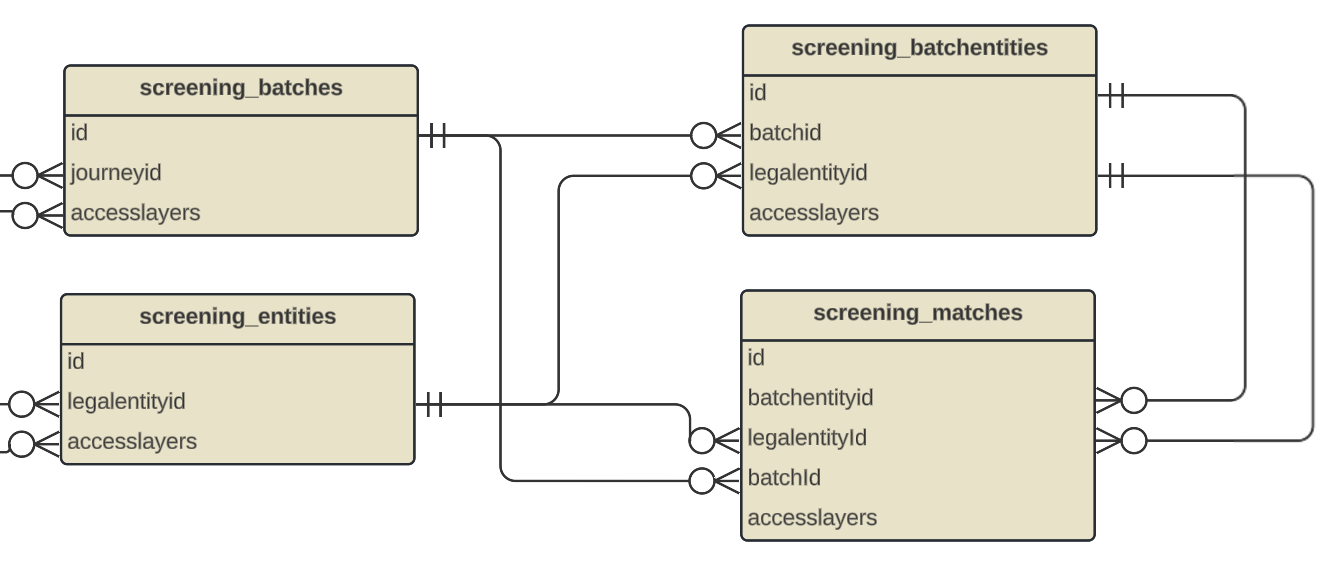
- screening_batches – information about each screening request sent to the provider
- screening_entities – generic information related to the Legal Entity in screening
- screening_batchentities – linking table representing which entities were screened in which batch
- screening_matches – detailed match-level information (e.g. hit data, match decisions)
These tables appear collapsed by default under the Screening domain in Advanced Reporting and follow the same conventions as other domains (e.g. entitydata, relatedparties etc.). Users can expand the tables as needed and use the ellipsis menu to insert fields directly into SQL queries.
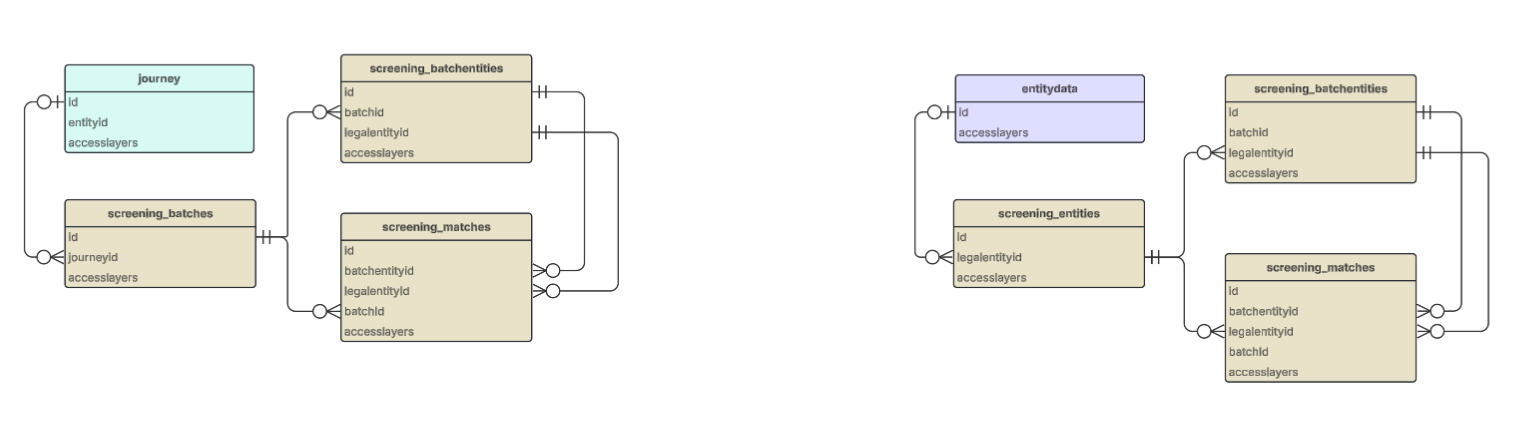
Screening data can be queried as a standalone, but also in the context of other tables such as journey or entity, in which case it is possible to join screening data with journey and entity data tables.
Batches
SELECT * FROM screening_batches
| Field | Description | Data Type |
|---|---|---|
| id | Unique identifier for the batch | string (GUID) |
| journeyid | Journey identifier associated with the batch | string (GUID) |
| processid | Process identifier associated with the batch | string (GUID) |
| status | Current status of the batch | string |
| externalids | External identifiers for the batch | array<string> (JSON-like object)* |
| batchtype | Type of the batch | string |
| createddate | Date and time when the batch was created | string (timestamp) |
| closeddate | Date and time when the batch was closed | string (timestamp) |
| totalentities | Total number of entities in the batch | integer |
| truematchescount | Count of true matches in the batch | integer |
| overriddenbatchids | List of batch IDs that were overridden by this batch | array<string> |
| transactionid | Transaction identifier for the batch | string (GUID) |
| accesslayers | Lists of geographic and business related access layers | string (JSON-like object)* |
| providers | List of providers used in the batch with their configurations and status | array<string> (JSON-like object)* |
Entities
SELECT * FROM screening_entities
| Field | Description | Data Type |
|---|---|---|
| id | Unique identifier for the screening entity | string (GUID) |
| legalentityid | Legal entity identifier associated with this screening entity | string (GUID) |
| searchcriteria | Search criteria used for screening this entity | string (JSON-like object)* |
| entityaliases | List of alias information for the entity that will be used to perform screening requests if not empty | array<string>(JSON-like object)* |
| ongoingscreeningproviders | List of providers with ongoing screening configuration (configurationsetid can be null) | array<string>(JSON-like object)* |
| issoftdeleted | Indicates whether this entity has been soft-deleted | boolean |
| accesslayers | Lists of geographic and business related access layers | string (JSON-like object)* |
Batch Entities
SELECT * FROM screening_batchentities
| Field | Description | Data Type |
|---|---|---|
| id | Unique identifier for the batch entity | string (GUID) |
| batchid | ID of the batch this entity belongs to | string (GUID) |
| legalentityid | Legal entity identifier associated with this batch entity | string (GUID) |
| entityname | Name of the entity associated with this batch entity | string |
| truematchescount | Number of confirmed true matches found for this entity during screening | integer |
| searchcriteria | Search criteria used for screening this entity | string (JSON-like object)* |
| entityaliases | List of alias information for the entity that will be used to perform screening requests if not empty | array<string>(JSON-like object)* |
| externalids | External identifiers for this entity | array<string>(JSON-like object)* |
| materialityassessment | Materiality assessment properties mapped by related party entity ID (excludes custom properties) | map<> (JSON-like object)* |
| accesslayers | Lists of geographic and business related access layers | string (JSON-like object)* |
Matches
SELECT * FROM screening_matches
| Field | Description | Data Type |
|---|---|---|
| id | Unique identifier for the match | string (GUID) |
| batchentityid | ID of the batch entity this match belongs to | string (GUID) |
| legalentityid | ID of the legal entity | string (GUID) |
| batchid | ID of the batch this match belongs to | string (GUID) |
| status | Match resolution status | string |
| reason | Reason for the match status decision | string |
| comments | User comments on the match resolution | string |
| entityuniqueid | Unique identifier from the screening provider | string (GUID) |
| entityaliasids | List of the Entity AliasIds that this match is associated with. When it's associated with the primary name of the entity, one of them will be "PrimaryName". If the array is null or empty, it means that the match only belongs to the primary name of the entity. | array<string> |
| accesslayers | Lists of geographic and business related access layers | string (JSON-like object)* |
| externalids | The unique identifiers of the match outside of Fenergo | array<string> (JSON-like object)* |
| providerid | The ID of the provider that returned the match | string |
| name | The name of the matching entity | string |
| aliaseslist | Any aliases associated with the matching entity | array<string> (JSON-like object)* |
| gender | The individual's gender | string |
| dateofbirth | The individual's date of birth | string |
| country | The country of the entity | string |
| entitytype | The type of entity | string |
| matchscore | Confidence score generated by the screening provider to indicate how closely the result record matched the searched entity data | decimal |
| providersourcename | The name of the screening provider | string |
| providersourceurl | URL of the match on the provider side | string |
| addresses | List of addresses of the individual or the company | array<string> (JSON-like object)* |
| citizenship | The individual's citizenship | string |
| nationality | The individual's nationality | string |
| placeofbirth | The individual's place of birth | string |
| countryofresidence | The individual's country of residence | string |
| additionalinfo | Dynamic list to provide additional information about the matching entity | array<string> (JSON-like object)* |
| sourcesinfo | Dynamic list to provide details about the source of the information returned by the provider | array<string> (JSON-like object)* |
| categories | List of screening categories that the result relates to | array<string> |
| sources | Dynamic list to provide details about the source of the information returned by the provider | array<string> |
| registeredcountry | The country the company is registered in | string |
| ids | List of ids returned by the underlying provider | map<string, string> |
| associations | Associations | array<string> (JSON-like object)* |
| subsidiaryfields | An optional dictionary used to add custom fields required by some adapters or providers | map<string, string> |
| richtextadditionaldetails | optional property to store additional details about the match in rich text format | string |
| matchdata | Comprehensive match data from screening provider including scores, addresses, and metadata | string (JSON-like object)* |
*For details on the structures of JSON-like object strings, please refer to the section below on JSON Object String Structures.
JSON Object String Structures
externalids (array structure): Used in screening_batches, screening_batchentities, screening_matches
[
  {
    source: string,     // Source system or provider
    name: string,       // Name/type of the external ID
    value: string       // The actual ID value
  }
]
accesslayers (object structure): Used in screening_batches, screening_entities, screening_batchentities, screening_matches
{
  geographic: [string],      // Array of geographic access layer names
  businessrelated: [string]  // Array of business-related access layer names
}
providers (array structure): Used in screening_batches
[
  {
    id: string,                    // Provider ID
    status: string,                // Provider status
    configurationset: {
      id: string,                  // Configuration set GUID
      name: string,                // Configuration set name
      description: string,         // Configuration set description
      additionalsettings: [
        {
          fieldid: string,         // Field identifier
          value: string            // Field value
        }
      ]
    },
    errordetails: {
      source: string,              // Error source
      errorcode: string,           // Error code
      message: string              // Error message
    }
  }
]
searchcriteria (object structure): Used in screening_entities, screening_batchentities
{
  fullname: string,
  firstname: string,
  middlename: string,
  lastname: string,
  dateofbirth: string,
  gender: string,
  legalentityname: string,
  type: string,
  idnumber: string,
  phonenumber: string,
  emailaddress: string,
  nationality: string,
  countryofresidence: string,
  placeofbirth: string,
  placeofbirthiso2: string,
  placeofbirthiso3: string,
  citizenship: string,
  citizenshipiso2: string,
  citizenshipiso3: string,
  registeredcountry: string,
  registeredcountryiso2: string,
  registeredcountryiso3: string,
  subtype: string,
  uniqueid: string,
  otherinformation: string,
  passportnumber: string,
  address: {
    addressline1: string,
    addressline2: string,
    city: string,
    postalcode: string,
    country: string,
    countryiso2: string,
    countryiso3: string,
    stateprovince: string,
    type: string
  }
}
entityaliases (array structure): Used in screening_entities, screening_batchentities
[
  {
    id: string,           // Alias ID
    aliastype: string,    // Type of alias (e.g., "AKA", "FKA")
    firstname: string,    // First name in alias
    middlename: string,   // Middle name in alias
    lastname: string,     // Last name in alias
    fullname: string,     // Full name in alias
    legalentityname: string // Legal entity name in alias
  }
]
ongoingscreeningproviders (array structure): Used in screening_entities
[
  {
    providerid: string,              // Provider ID
    ongoingscreeningenabled: boolean,  // Whether ongoing screening is enabled
    configurationsetid: string      // Configuration set ID (can be null)
  }
]
materialityassessment (map structure): Used in screening_batchentities
{
  related-party-entity-id: {
    singleproperties: {
      property-name: {
        type: string,                // Property type
        value: string,               // Property value
        isaggregatedvalue: boolean     // Whether value is aggregated
      }
    },
    collectionproperties: {
      property-name: {
        type: string,                // Property type
        datagroupid: string,         // Data group GUID
        collections: {
          collection-name: {
            properties: {
              key: value             // Key-value pairs
            }
          }
        }
      }
    }
  }
}
aliaseslist (array structure): Used in screening_matches
[
  {
    value: string,    // Alias value
    type: string      // Alias type
  }
]
addresses (array structure): Used in screening_matches
[
  {
    addressline1: string,
    addressline2: string,
    city: string,
    postalcode: string,
    country: string,
    countryiso2: string,
    countryiso3: string,
    stateprovince: string,
    type: string
  }
]
additionalinfo / sourcesinfo (array structure): Used in screening_matches
[
  {
    title: string,        // Information title
    content: [string]     // Array of content strings
  }
]
associations (array structure): Used in screening_matches
[
  {
    externalid: string,    // External ID of associated entity
    category: string,      // Category of association
    fullname: string,      // Full name of associated entity
    relationship: string   // Type of relationship
  }
]
matchdata (object structure): Used in screening_matches (for backward compatibility)
{
    externalid: string,
    externalids: [
        {
            entityaliasid: string,
            value: string
        }
    ],
    providerid: string,
    name: string,
    aliases: [string],
    aliaseslist: [
        {
            value: string,
            type: string
        }
    ],
     gender: string,
    dateofbirth: string,
    country: string,
    entitytype: string,
    matchscore: decimal,
    providersourcename: string,
    providersourceurl: string,
    addresses: [/* see addresses structure above */],
    citizenship: string,
    nationality: string,
    placeofbirth: string,
    countryofresidence: string,
    additionalinfo: [/* see additionalinfo structure above */],
    sourcesinfo: [/* see sourcesinfo structure above */],
    categories: [string],
    sources: [string],
    registeredcountry: string,
    ids: { key: value },
    associations: [/* see associations structure above */],
    status: string,
    reason: string,
    comments: string,
    subsidiaryfields: { key: value },
    richtextadditionaldetails: string
}
Screening Tables: Additional Information
- The four screening tables are displayed alphabetically in the Query Builder pane of the Reporting feature in Fenergo. The properties of each table are also listed alphabetically.
- You can join screening results with other tables to enrich reports with contextual information.
- Entities and matches that do not fall under a user’s access layer will be automatically excluded from results.
Data Protection Table
The Data Protection table in Advanced Reporting exposes retention metadata generated when an Entity is offboarded or partially offboarded, enabling compliance, audit, and operational reporting on data scheduled for deletion and its associated retention periods.
Data Protection data will appear in your results as soon as a data deletion process has beenn initiated.
Data Protection
SELECT * FROM dataprotection
| Field | Description | Data Type |
|---|---|---|
| dataretentionperiodmonths | The number of months the data will be retained for (applied at offboarding) | integer |
| entityid | The entity ID | string (GUID) |
| id | The unique ID for the Data Deletion Process | string (GUID) |
| initiatedon | The date and time this process was initiated | string (timestamp) |
| relatedjurisdiction | The jurisdictions associated with the entity being offboarded | string |
| dataProtectionRegimeId | The identifier of the applied Data Protection Regime | string (GUID) |
| conditionalRetentionDescription | Description of the conditional retention duration applied (if applicable) | string |
| appliedConditions | The applied conditional logic captured as a JSON string (if applicable) | string |
Access Logs Table
Access Logs for Alerts, Alerted Transactions, SARs is being released as a Beta (MVP).
The access logs table provides a consolidated audit trail of user access to data within the system. It enables monitoring of who accessed specific records, what type of data was accessed, and when the access occurred.
An access log entry is generated each time a user retrieves data from supported domains. This functionality supports audit, compliance, and security monitoring use cases.
Access logs are captured for:
- Entity records
- Alerts
- Alerted Transactions (transactions contributing to an alert)
- Suspicious Activity Reports (SARs)
Each access event is recorded as a unique entry and can be queried using Advanced Reporting.
Access Logs
SELECT * FROM accesslogs
| Field | Description | Data Type |
|---|---|---|
| id | Unique identifier for the access log evaluatedjurisdictions | string (GUID) |
| tenantid | The tenant ID associated with the access event | string (GUID) |
| userid | The user who accessed the record | string (GUID) |
| action | The action performed (e.g. DataRead) | string |
| recordid | The ID of the record that was accessed | string (GUID) |
| recordtype | The type of record accessed (e.g. Entity, Alert, Transaction, SAR) | string |
| created | The date and time the access occurred | string (timestamp) |
Transaction Monitoring Tables
Whitelist Table
The whitelist table contains information about entities and counterparties that have been whitelisted in Transaction Monitoring. Each row represents a single whitelist entry, including who created and reviewed it, its current status, and which rule it is associated with.
SELECT * FROM whitelist
| Field | Description | Data Type |
|---|---|---|
| id | The unique identifier for the whitelist entry | string (GUID) |
| tenant | The tenant ID | string (GUID) |
| name | The name given to the whitelist entry | string |
| status | The current status of the whitelist entry (e.g. Active, Terminated, Expired) | string |
| source | The source that triggered or originated the whitelist entry | string |
| whitelistedentityid | The ID of the entity that has been whitelisted | string (GUID) |
| counterpartyid | The ID of the counterparty associated with the whitelist entry | string (GUID) |
| ruleid | The ID of the Transaction Monitoring rule associated with the whitelist entry | string (GUID) |
| rulename | The name of the Transaction Monitoring rule associated with the whitelist entry | string |
| accesslayers | The access layers applied to the whitelist entry | row (JSON-like object) |
| comment | The comment provided when the whitelist entry was created | string |
| createdby | The user who created the whitelist entry | string |
| createddate | The date the whitelist entry was created | string (timestamp) |
| lastmodified | The date and time the whitelist entry was last modified | string (timestamp) |
| expirydate | The date on which the whitelist entry is set to expire | string (timestamp) |
| reviewedat | The date and time the whitelist entry was reviewed | string (timestamp) |
| reviewedby | The user who reviewed the whitelist entry | string |
| reviewercomment | The comment provided by the reviewer during the review of the whitelist entry | string |
| terminatedat | The date and time the whitelist entry was terminated | string (timestamp) |
| terminatedby | The user who terminated the whitelist entry | string |
Alerts Table
The alerts table contains information about Transaction Monitoring alerts generated by rule evaluations. Each row represents a single alert, including the rule that triggered it, the entity and transactions involved the alert's assessment outcome.
SELECT * FROM alerts
| Field | Description | Data Type |
|---|---|---|
| id | The unique identifier for the alert | string (GUID) |
| tenant | The tenant ID | string (GUID) |
| name | The name of the alert | string |
| status | The current status of the alert (e.g. Open, Closed, Escalated) | string |
| type | The type of alert | string |
| source | The source that triggered or originated the alert | string |
| journeyid | The ID of the journey associated with the alert | string (GUID) |
| mainentityid | The ID of the main entity associated with the alert | string (GUID) |
| assignedto | The user the alert is currently assigned to | string |
| assessmentoutcome | The outcome of the alert assessment | string |
| ruleid | The ID of the Transaction Monitoring rule that triggered the alert | string (GUID) |
| rulename | The name of the Transaction Monitoring rule that triggered the alert | string |
| ruledescription | The description of the Transaction Monitoring rule that triggered the alert | string |
| ruleversion | The version of the rule at the time the alert was generated | string |
| score | The risk score assigned to the alert | number |
| alertscounter | The number of times this alert has been triggered | number |
| transactionids | The IDs of the transactions associated with the alert | string (array) |
| transactionscount | The total number of transactions associated with the alert | decimal |
| transactionstotaldeposit | The total deposit amount across transactions associated with the alert | decimal |
| transactionstotalwithdrawal | The total withdrawal amount across transactions associated with the alert | decimal |
| transactionsmonitoringamount | The total monitored transaction amount that triggered the alert | decimal |
| transactionsmonitoringcurrency | The currency of the monitored transaction amount | string |
| transactiondaterangestart | The start date of the transaction date range evaluated by the rule | string (timestamp) |
| transactiondaterangeend | The end date of the transaction date range evaluated by the rule | string (timestamp) |
| accesslayers | The access layers applied to the alert | row (JSON-like object) |
| version | The version of the alert record | number |
| createdby | The user or process that created the alert | string |
| createddate | The date the alert was created | string (timestamp) |
Alert Assessments Table
The alert_assessments table contains information about the assessment workflow for Transaction Monitoring alerts. Each row represents a single assessment record, including the task assigned, its outcome, any comments added, and the event history associated with the assessment.
SELECT * FROM alert_assessments
| Field | Description | Data Type |
|---|---|---|
| assessmentid | The unique identifier for the assessment | string (GUID) |
| alertid | The ID of the alert this assessment is associated with | string (GUID) |
| tenant | The tenant ID | string (GUID) |
| status | The current status of the assessment | string |
| outcome | The outcome recorded for the assessment | string |
| alerttype | The type of the associated alert | string |
| alertsource | The source of the associated alert | string |
| alertcreateddate | The date the associated alert was created | string (timestamp) |
| journeyid | The ID of the journey associated with the assessment | string (GUID) |
| mainentityid | The ID of the main entity associated with the assessment | string (GUID) |
| ruleid | The ID of the Transaction Monitoring rule associated with the assessment | string (GUID) |
| rulename | The name of the Transaction Monitoring rule associated with the assessment | string |
| ruleversion | The version of the rule at the time of the assessment | integar |
| taskid | The ID of the task assigned as part of the assessment workflow | string (GUID) |
| taskname | The name of the task assigned as part of the assessment workflow | string |
| assignedto | The user the assessment task is assigned to | string |
| order | The order of this assessment step within the workflow | integer |
| isactive | Indicates whether the assessment record is currently active | boolean |
| eventtype | The type of event that occurred on the assessment | string |
| eventtimestamp | The date and time the event occurred | string (timestamp) |
| comment | The comment provided on the assessment | string |
| commentcreatedby | The user who created the comment | string |
| commentcreateddate | The date the comment was created | string (timestamp) |
| commentlastupdatedby | The user who last updated the comment | string |
| commentlastupdateddate | The date the comment was last updated | string (timestamp) |
| completedby | The user who completed the assessment task | string |
| completeddate | The date the assessment task was completed | string (timestamp) |
| transactionassessmentscount | The number of transaction assessments recorded during the assessment | integer |
| accesslayers | The access layers applied to the assessment record | row (JSON-like object) |
| version | The version of the assessment record | integer |
| createddate | The date the assessment record was created | string (timestamp) |
Transaction Assessments Table
The transaction_assessments table contains information about individual transaction-level assessments performed as part of the alert assessment workflow. Each row represents a single transaction assessment, linking a specific transaction to its alert, task, and recorded outcome.
SELECT * FROM transaction_assessments
| Field | Description | Data Type |
|---|---|---|
| transactionassessmentid | The unique identifier for the transaction assessment | string (GUID) |
| transactionid | The ID of the transaction being assessed | string (GUID) |
| alertid | The ID of the alert this transaction assessment is associated with | string (GUID) |
| alertassessmentid | The ID of the alert assessment this transaction assessment belongs to | string (GUID) |
| tenant | The tenant ID | string (GUID) |
| alertstatus | The status of the associated alert at the time of assessment | string |
| alerttype | The type of the associated alert | string |
| alertsource | The source of the associated alert | string |
| alertcreateddate | The date the associated alert was created | string (timestamp) |
| mainentityid | The ID of the main entity associated with the assessment | string (GUID) |
| ruleid | The ID of the Transaction Monitoring rule associated with the assessment | string (GUID) |
| rulename | The name of the Transaction Monitoring rule associated with the assessment | string |
| taskid | The ID of the task under which this transaction was assessed | string (GUID) |
| taskname | The name of the task under which this transaction was assessed | string |
| assessedby | The user who assessed the transaction | string |
| outcomevalue | The outcome value recorded for the transaction assessment | string |
| outcomecategoryvalue | The outcome category recorded for the transaction assessment | string |
| eventtimestamp | The date and time the assessment event occurred | string (timestamp) |
| completeddate | The date the transaction assessment was completed | string (timestamp) |
| accesslayers | The access layers applied to the transaction assessment record | row (JSON-like object) |
| version | The version of the transaction assessment record | integer |
| createddate | The date the transaction assessment record was created | string (timestamp) |
Alerted Transactions Table
The alerted_transactions table contains information about individual transactions associated with Transaction Monitoring alerts. Each row represents a single transaction, including payment details, sender and receiver information, the rule that flagged it, and its monitoring context.
SELECT * FROM alerted_transactions
| Field | Description | Data Type |
|---|---|---|
| transactionid | The unique identifier for the transaction | string (GUID) |
| alertid | The ID of the alert this transaction is associated with | string (GUID) |
| tenant | The tenant ID | string (GUID) |
| name | The name of the transaction | string |
| description | The description of the transaction | string |
| externalid | The external identifier for the transaction | string |
| status | The current status of the transaction | string |
| type | The type of transaction | string |
| source | The source of the transaction | string |
| assessmentoutcome | The outcome of the assessment for this transaction | string |
| assignedto | The user the transaction alert is assigned to | string |
| alertscounter | The number of times this transaction has triggered an alert | integer |
| alertcreateddate | The date the associated alert was created | string (timestamp) |
| journeyid | The ID of the journey associated with the transaction | string (GUID) |
| mainentityid | The ID of the main entity associated with the transaction | string (GUID) |
| ruleid | The ID of the Transaction Monitoring rule that flagged the transaction | string (GUID) |
| rulename | The name of the Transaction Monitoring rule that flagged the transaction | string |
| ruledescription | The description of the Transaction Monitoring rule that flagged the transaction | string |
| ruleversion | The version of the rule at the time the transaction was flagged | integer |
| paymentamount | The amount of the payment | number |
| paymentcurrency | The currency of the payment | string |
| paymentmethod | The method used to make the payment | string |
| paymenttype | The type of payment | string |
| paymentoriginalamount | The original amount of the payment before any conversion | decimal |
| paymentoriginalcurrency | The original currency of the payment before any conversion | string |
| paymentmonitoringamount | The payment amount used for monitoring purposes | decimal |
| paymentmonitoringcurrency | The currency used for monitoring purposes | string |
| paymentsourcecountry | The country from which the payment originated | string |
| paymenttargetcountry | The country to which the payment was sent | string |
| transactionsmonitoringamount | The total monitored transaction amount for the associated alert | decimal |
| transactionsmonitoringcurrency | The currency of the total monitored transaction amount | string |
| transactionstotaldeposit | The total deposit amount across transactions associated with the alert | decimal |
| transactionstotalwithdrawal | The total withdrawal amount across transactions associated with the alert | decimal |
| transactionscount | The total number of transactions associated with the alert | integer |
| transactionstatus | The status of the transaction | string |
| transactioncreateddate | The date the transaction was created | string (timestamp) |
| transactiondaterangestart | The start date of the transaction date range evaluated by the rule | string (timestamp) |
| transactiondaterangeend | The end date of the transaction date range evaluated by the rule | string (timestamp) |
| senderid | The ID of the transaction sender | string (GUID) |
| sendername | The name of the transaction sender | string |
| unknownsendername | The name of the sender when the sender could not be identified | string |
| senderaccountnumber | The account number of the sender | string |
| senderaccesslayers | The access layers applied to the sender | row (JSON-like object) |
| sendingpartnerid | The ID of the sending partner | string (GUID) |
| sendingpartnername | The name of the sending partner | string |
| sendingpartneraccesslayers | The access layers applied to the sending partner | row (JSON-like object) |
| receiverid | The ID of the transaction receiver | string (GUID) |
| receivername | The name of the transaction receiver | string |
| unknownreceivername | The name of the receiver when the receiver could not be identified | string |
| receiveracountnumber | The account number of the receiver | string |
| receiveraccesslayers | The access layers applied to the receiver | row (JSON-like object) |
| receivingpartnerid | The ID of the receiving partner | string (GUID) |
| receivingpartnername | The name of the receiving partner | string |
| receivingpartneraccesslayers | The access layers applied to the receiving partner | row (JSON-like object) |
| version | The version of the transaction record | integer |
| createddate | The date the transaction record was created | string (timestamp) |
Aggregated Alert Reporting
Transaction Monitoring supports two alert scopes: individual alerts, triggered by a single business rule, and aggregated alerts, triggered when multiple rules within a rule group fire together across a time window. The tables below extend the above Transaction Monitoring schema so both scopes can be reported on together or filtered independently.
Every alert row carries an aggregate scope value of aggregated or standard. When generating reports through KYRA using natural language, KYRA automatically determines which scope(s) to include based on how the request is phrased — for example, a request that does not mention scope returns both alerts by default.
Alerts Table — Additional Field for Aggregated Alerts
The following field has been added to the alerts table to support aggregated alert reporting.
SELECT * FROM alerts
| Field | Description | Data Type |
|---|---|---|
| aggregatescope | Identifies if the alert is aggregated or standard | string |
| rulegroupname | The name of the rule group the triggering rule belongs to (aggregated alerts only) | string |
Alert Rules Table
The alert_rules table contains information about the rules which contributed to an aggregated alert.
SELECT * FROM alert_rules
| Field | Description | Data Type |
|---|---|---|
| alertid | The ID of the alert this rule contributed to | string (GUID) |
| alertcreateddate | The date the parent alert was created | string (timestamp) |
| ruleid | The ID of the contributing rule | string (GUID) |
| rulename | The name of the contributing rule | string |
| tenant | The tenant ID | string (GUID) |
| version | The version of the alert_rules record | number |
| createddate | The date this record was created | string (timestamp) |
Because alert_rules only contains rows for aggregated alerts, queries that report on both alert scopes together should JOIN alerts to alert_rules on alertid, rather than using an inner join. This ensures individual alerts which have no matching row in alert_rules are still returned, with the rule fields simply blank. Here is an example SQL query for alerts generated from January 1st 2026.
SELECT
a.id,
a.rulegroupname,
a.assessmentoutcome,
ar.rulename,
a.createddate,
a.aggregatescope
FROM alerts a
JOIN alert_rules ar
ON ar.alertid = a.id
AND ar.tenant = a.tenant
AND ar.createddate = a.createddate
WHERE a.createddate >= '2026-01-01'
ORDER BY a.createddate DESC, a.id
Alert Rule Transaction Links Table
The alert_rule_transaction_links table contains the per-rule transaction breakdown for aggregated alerts.
SELECT * FROM alert_rule_transaction_links
| Field | Description | Data Type |
|---|---|---|
| alertid | The ID of the aggregated alert this row belongs to | string (GUID) |
| alertcreateddate | The date the parent alert was created | string (timestamp) |
| ruleid | The ID of the contributing rule | string (GUID) |
| rulename | The name of the contributing rule | string |
| tenant | The tenant ID | string (GUID) |
| transactionid | The ID of the transaction linked to this rule | string (GUID) |
| version | The version of the alert_rule_transaction_links record | number |
| createddate | The date this record was created | string (timestamp) |
As with alert_rules, use a JOIN from alert_rules to alert_rule_transaction_links on alertid and ruleid (and, where transaction detail is needed, a further left join to alerted_transactions on transactionid) so that rules with no linked transactions are not dropped from the results.
SELECT
r.alertid,
r.ruleid,
r.rulename,
t.transactionid,
at.paymentmonitoringamount,
at.paymentmonitoringcurrency,
at.paymenttype
FROM alert_rules r
JOIN alert_rule_transaction_links t
ON r.alertid = t.alertid AND r.ruleid = t.ruleid
JOIN alerted_transactions at
ON at.alertid = t.alertid
AND at.transactionid = t.transactionid
AND at.tenant = t.tenant
AND at.createddate = t.createddate
Financial Crime Report Table
The financialcrimereport table contains information about Financial Crime Reports (FCRs) raised against entities in the Fenergo platform. Each row represents a single FCR instance. FCRs use Policy V2.
The single fields from the Financial Crime Report V2 policy are surfaced directly within this table. Data groups within the Financial Crime Report policy are exposed as separate tables, following the same pattern as entity data, with financialcrimereport as a prefix — for example, financialcrimereport_addresses.
SELECT * FROM financialcrimereport
| Field | Description | Data Type |
|---|---|---|
| id | The unique identifier for the financial crime report | string (GUID) |
| tenant | The tenant ID | string (GUID) |
| entityid | The ID of the entity the financial crime report is raised against | string (GUID) |
| fiuexternalid | The external identifier assigned by the Financial Intelligence Unit | string |
| status | The current status of the financial crime report | string |
| source | The source that originated the financial crime report | string |
| assignedto | The user the financial crime report is currently assigned to | string |
| submitteddate | The date the financial crime report was submitted | string (timestamp) |
| createdby | The user who created the financial crime report | string |
| createddatetime | The date and time the financial crime report was created | string (timestamp) |
| lastupdatedby | The user who last updated the financial crime report | string |
| lastupdateddate | The date the financial crime report was last updated | string (timestamp) |
Draft Data
Originally, Advanced Reporting surfaced only verified data. To close this gap, Advanced Reporting is now extended to include draft (pre-verification) data for entities, products and related parties, allowing users to report on in-flight work alongside the existing advanced reporting domains. Please note Audit for Drafts is not currently available in reporting.
Draft data is exposed through two additional sets of tables in the reporting schema:
- Entity Draft Data – exposes in-flight entity field values captured during journeys before entity verification occurs as well as historic drafts.
SELECT * FROM entitydraftdata
- Product Draft Data – exposes in-flight products captured during journeys before product verification occurs as well as historic drafts.
SELECT * FROM productdraftdata
- Draft Related Parties - exposes in-flight associations before verification. Please note that historic drafts are not persisted so when a draft becomes verified it is no longer captured in reports.
SELECT * FROM relatedpartiesdraft
Draft datasets follow the same schema conventions as their verified counterparts. Draft tables are clearly distinguishable from verified tables in the schema browser, in the schema retrieval API and in the outputs, so report authors can tell in-flight values apart from verified values. Because draft records are linked back to their originating journey and owning entity, users can relate draft data to existing journey reporting. If a user wants to report on work that is still in progress, they can join draft entity and product datasets to the relevant journey and entity records using the exposed join keys. Introducing draft data does not change any verification behaviour. Verified entity and product datasets continue to be updated on verification exactly as before, and existing reports that query verified data continue to return the same results.
Historic Drafts and Previous Versions
The Entity Draft Data and Product Draft Data tables are not limited to the latest in-flight values. They also retain historic drafts and previous verified versions, so a record's earlier draft states and the values held before the most recent verification remain reportable. This allows users to look back over how entity and product data changed across a journey — comparing successive draft states, or a draft against the version that was previously verified — rather than seeing only the current position. Where a user wants to report on a single point in time, they can filter on the relevant record's created or version fields to isolate the state they are interested in.
Access Layers for Drafts
Draft data is subject to the same row-level security as verified data. Draft entity data is controlled by entity access layers, and draft product data is limited by the owner parent entity's access layers, in the same way verified product data is today. If a user does not hold the required access layers, the corresponding draft rows are not returned. These checks are enforced both when a query is run and when a CSV is downloaded, so users cannot download draft rows they are not permitted to see.
Enabling Draft Data
Draft datasets are picked up by the reporting schema once a policy has been published in the tenant. This is a one-time step per tenant:
- Create a draft of a single policy.
- Approve and publish the policy.
Publishing triggers the reporting schema to pick up the new draft tables. Once the schema has updated, the Draft Data tables appear in the Table Schema alongside the existing domains and can be queried like any other table.
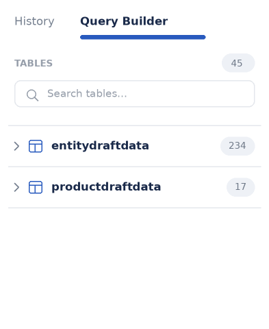
Example Query
If a user wants to see all draft entity data created in the last 7 days, they can join the draft entity table to the journey table on the journey identifier:
SELECT
  entitydraftdata.*,
  journey.id AS journey_id,
  journey.name AS journey_name,
  journey.started AS journey_started
FROM entitydraftdata
LEFT JOIN journey ON journey.id = entitydraftdata.journeyid
WHERE CAST(from_iso8601_timestamp(entitydraftdata.created) AT TIME ZONE 'Europe/Dublin' AS DATE) >= current_date - interval '7' day
ORDER BY entitydraftdata.created DESC