Data Protection
Data Protection supports our customers in regulatory compliance (for example GDPR and CCPA) by allowing tenants to define data retention periods by geography/jurisdiction and to offboard jurisdictions or the client, preparing for their future deletion.
This guide covers:
- Configuring Data Protection Regimes (including conditional retention durations)
- Policy-level Data Protection Jurisdiction tagging
- Offboarding (partial and full) and how jurisdiction selection works
- Automatic offboarding, re-onboarding, automatic re-onboarding, and pausing deletion
- Where users can see policy status and retention dates
- Reporting visibility in Advanced Reporting
For Offboarding of non-client entities please refer to the Entity Check process.
Data Protection Configuration
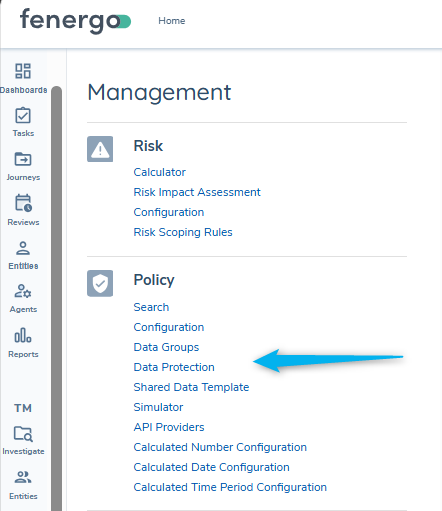
Data Protection sits underneath the Policy domain within the Management menu. This is where users can view or manage Data Protection Regime and Entity Check configuration.
Permissions
There are four permissions for Data Protection Configuration:
- Data Protection Configuration Access: navigate to and view the Data Protection area.
- Data Protection Configuration Create: create new Data Protection Regimes.
- Data Protection Configuration Edit: edit existing Data Protection Regimes.
- Data Protection Configuration Delete: delete existing Data Protection Regimes.
There are additional 'scopes' required to execute data deletion via API and some additional toggles require additional permissions (documented in the relevant sections).
Key concepts
Policy Data Protection Jurisdictions
Data Protection Jurisdictions apply at the individual requirement level. A 'Default Data Protection Jurisdiction' is set at the Policy level and applied to all requirements created after it is set. You can change this value when the policy is in draft and use the 'refresh' icon to apply this default to all current requirements in the policy.
At the individual requirement level you can set/change the Data Protection Jurisdiction if the retention of a specific requirement has different needs to others in the policy - for example set to 'Global' if data should be retained for the life of the entity.
Data Protection Regime
A Data Protection Regime defines the data retention period for a Related Jurisdiction. Offboarding applies the retention periods derived from the selected Data Protection Regime(s), so their configuration is required to Offboard any jurisdiction. At the outset of an Offboarding Journey, the user will select from a list of in-scope 'Jurisdictions' with defined Data Protection Regimes to set the scope (full or partial) for offboarding.
Default Data Retention Duration
Every regime must define a default retention period (in months). This default is always present and acts as the fallback when no conditional retention rule applies.
Conditional Retention Duration
A regime can optionally include one or more conditional retention durations. Conditional durations allow retention to vary based on entity attributes at the point of offboarding - for example an entity with a High Risk Rating may require offboarded data for Norway jurisdiction to be retained for longer than if it has a Low Risk Rating.
Data Deletion Process
At offboarding, a Data Deletion Process is created for each offboarded jurisdiction. This process stores retention details and ultimately schedules deletion of each offboarding jurisdiction's data. The retention details are derived from the Data Protection Regime applicable to the Offboarding Jurisdiction. Data Deletion Processes can be queried via API or Advanced Reporting, otherwise they are only visible in the UI via mousing-over the 'Client Offboarded' status chip on the EPP.
Data Deletion Execution
When the retention date for a jurisdiction is reached, the Data Deletion Process will be read by the Data Deletion Scheduler (runs daily looking for DDP's with past retention periods) and the system will launch a Data Deletion journey for the jurisdiction.
When the Data Deletion Execution task runs within the journey, the system will identify data elements that are aligned with the jurisdiction to be deleted. This is determined by identifying the 'Data Protection Jurisdiction' of the applicable policy requirements for that data key. The system will determine this jurisdiction applies (and the data should be deleted) when data is aligned to this jurisdiction without any alignment to other jurisdictions that are still in-scope or have a longer retention period. The Deleting Data user guide has more detail.
If the entity has an active Legal Hold, the Data Deletion Scheduler will skip it and no Data Deletion journey is launched. The entity is picked up on a subsequent scheduler run once the Legal Hold expires or is removed (provided its retention date has already passed).
Configure Data Protection
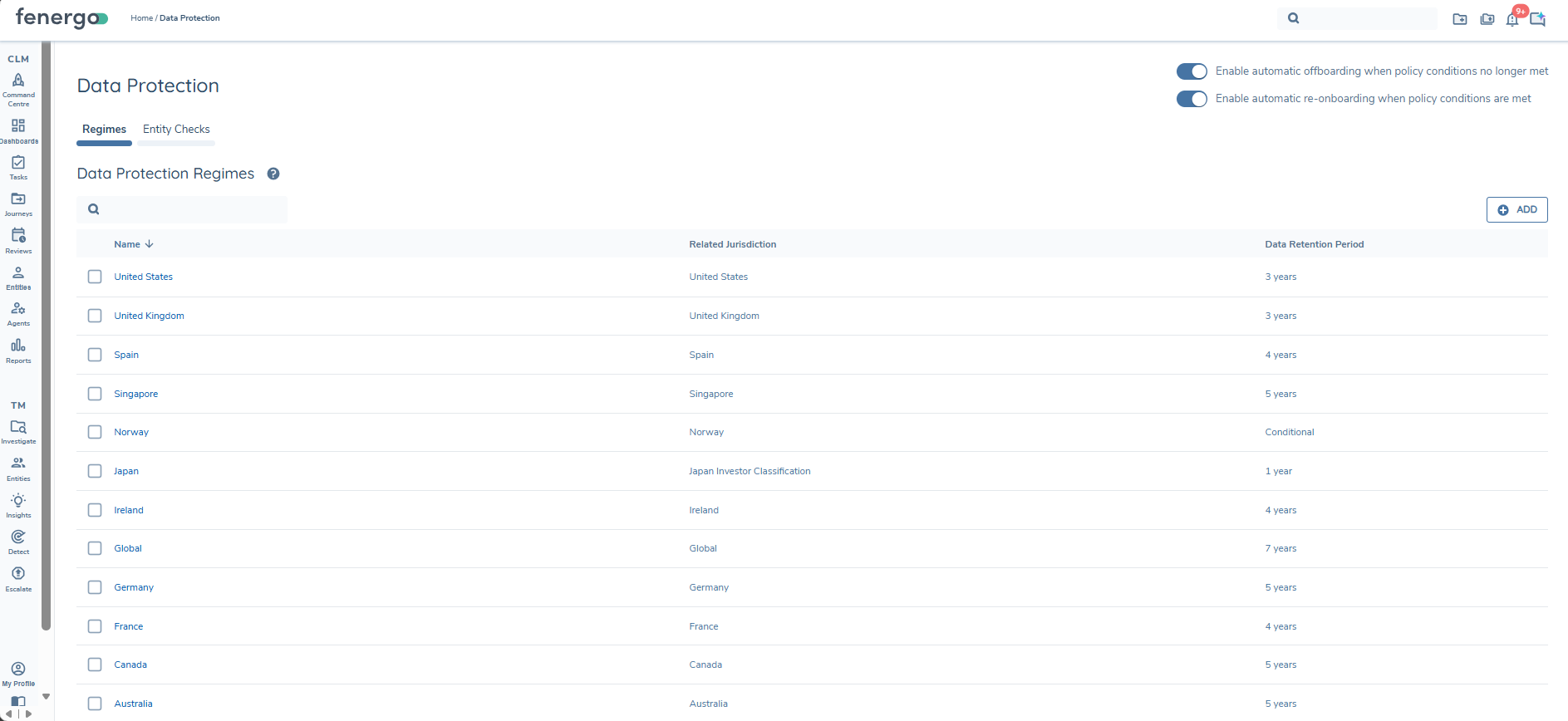
From the Data Protection Regime page, users can view/manage existing regimes and create new regimes.
When viewing the grid, users can see:
- Name: the Data Protection Regime name.
- Related Jurisdiction: the related jurisdiction (policy).
- Data Retention Period:
- when no conditional durations exist, this shows the default retention period (displayed as years and months),
- when conditional durations exist, this shows Conditional.
The user can search for a regime in the grid. Search uses the Name and Related Jurisdiction fields.
Create or edit a Data Protection Regime
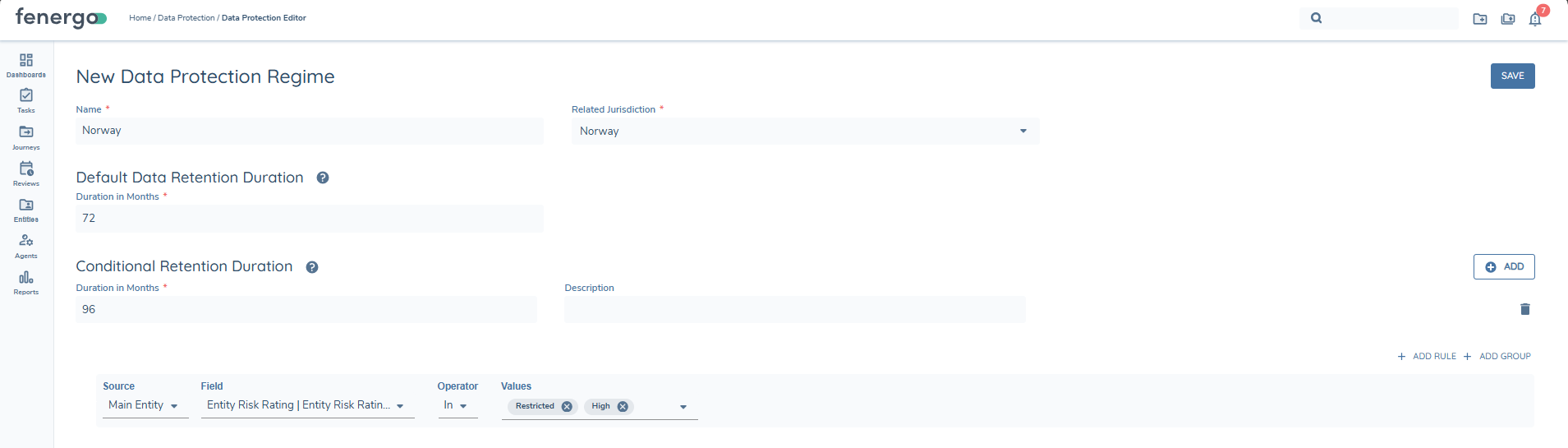
Select + ADD to create a new regime (or navigate into one via the Name to edit an existing regime). The editor contains:
- Data Protection Regime Name (mandatory)
- Related Jurisdiction (mandatory)
- Default Data Retention Duration (mandatory)
- Conditional Retention Durations (optional)
- For proper compliance with Data Protection Regulations, it is strongly recommended that every Policy Jurisdiction either has its own Data Protection Regime, or explicitly references an alternate that does via 'Default Data Protection Regime'. Without this configuration, a jurisdiction's data will be retained until the entity is fully deleted (i.e. the Client is fully offboarded and its retention period has elapsed).
- The Related Jurisdiction dropdown displays all configured policies in the tenant. A policy does not need to be published for a regime to be created against it.
- The retention duration is entered as total months and will render as years and months in the grid (mouse-over to see the original 'months' value).
- 'Global' offboarding = Full Offboarding and should not have a shorter retention period than other jurisdictions. i.e. If you need to retain data for another jurisdiction, the entity cannot be fully deleted before that point. When 'Global' is offboarded with a configured retention period < another offboarded jurisdiction, the Data Deletion Policy for Global will align it's retention period to the longest retention period currently applicable to the entity.
Conditional Retention Durations (optional)
Conditional retention durations allow retention periods to vary by entity attributes at offboarding.
Each conditional retention duration set includes:
- Duration in Months (mandatory)
- Description (optional)
- Logic Engine conditions (mandatory)
Logic Engine conditions: supported sources
Conditions are limited to the following sources:
- Main Entity
- Main Entity Metadata
Rule evaluation behaviour
At client offboarding for a jurisdiction (processed via "Complete Client Offboarding" task within a Client Offboarding journey):
- Conditional retention durations are evaluated in top-to-bottom order.
- The first matching conditional duration set determines the retention period used.
- If no conditional set matches (or none exist), the default retention duration applies.
Policy Data Protection Jurisdictions (tagging)
Policy configuration supports tagging individual attributes with a Data Protection Jurisdiction, as well as defining a default at policy level. Applying a specific jurisdiction at an individual requirement level allows flexibility that requirements can be grouped for scoping purposes (by Policy Jurisdiction), but can be retained according to a different Data Protection Jurisdiction (when required).
This is used to support targeted deletion of data by jurisdiction when the retention date is reached. Where an entity has a field that corresponds to requirements within multiple offboarded jurisdictions, the data will be retained according to the requirement with the longest data retention period. When a data deletion journey is eventually triggered, the system will delete requirements for the targeted jurisdiction when they don't correspond to any still in-scope jurisdictions or any offboarded jurisdictions with a future retention date.
It is possible to create requirements with 'Data Protection Jurisdiction' set to null. This is an optional field at requirement level, so it can be cleared by users, or the 'Default Data Protection Jurisdiction' may have been cleared prior to requirements being created. When this happens, those individual requirements don't have any data protection jurisdiction applied - so no data retention period can apply. Data corresponding to only requirements without a Data Protection Jurisdiction will be retained until 'Global' is offboarded and reaches the end of its retention period - then ALL data, including any that lacks a data protection jurisdiction, will be deleted via the data deletion journey.
Given this is only impactful at deletion (i.e. offboarding is jurisdiction specific, not requirement specific), any requirements with a null DP Jurisdiction value can easily be resolved. The 'refresh icon' described below can be used to apply the default DP jurisdiction to all requirements configured in the policy while it is in draft.
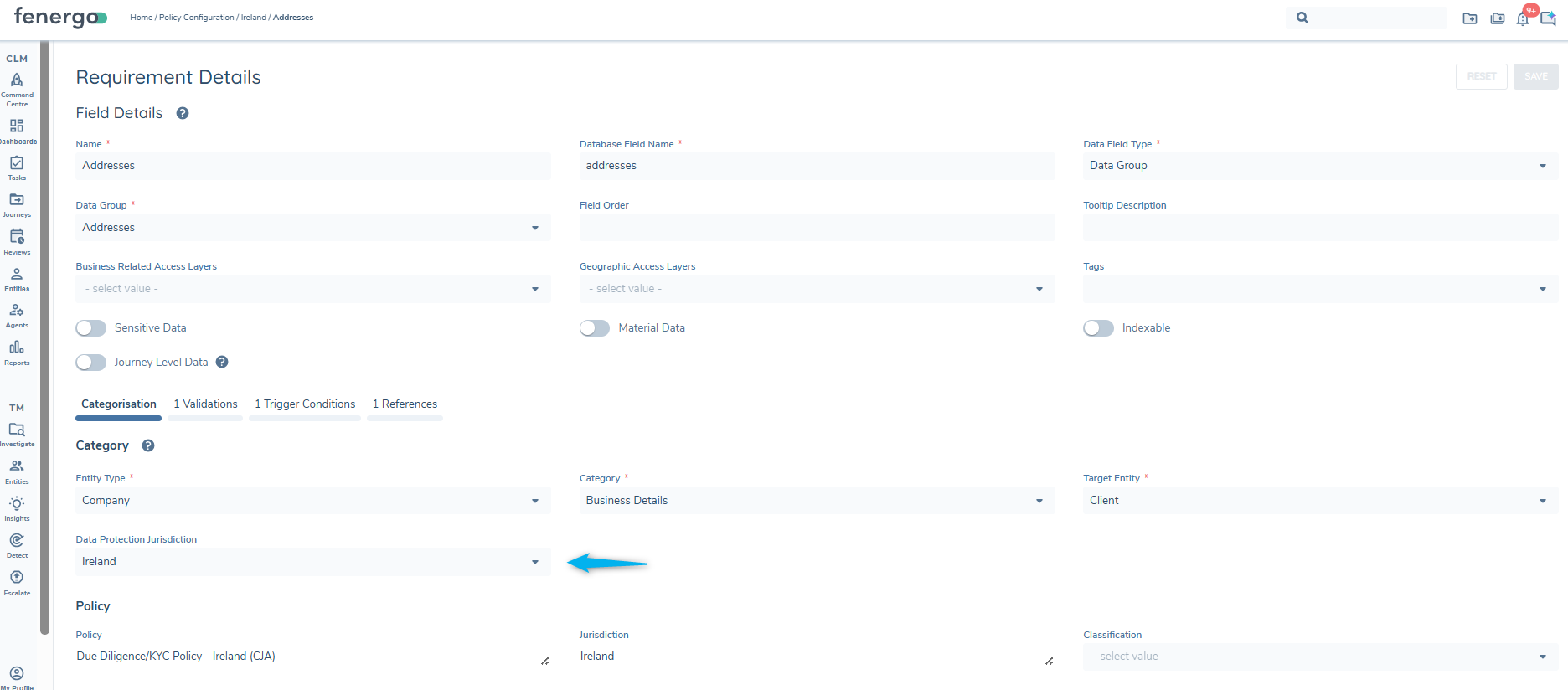
Tag an individual requirement/attribute
In policy configuration, each requirement/attribute can be tagged with a Data Protection Jurisdiction to indicate which jurisdiction’s data retention policy applies.
Set a Default Data Protection Jurisdiction on a policy
A policy can define a Default Data Protection Jurisdiction. When set:
- any new attributes added to the policy will default to the same jurisdiction value,
- this reduces configurator effort and reduces the risk of incorrectly tagged attributes.
When the 'Default Data Protection Jurisdiction' is set (or updated) and saved and there are existing requirements configured for the jurisdiction, a refresh icon will appear in the field that allows the new default to be applied to all existing requirements in the policy.

Client Offboarding journey
Client Offboarding journeys are used to partially or fully offboard in-scope policies from clients to reflect changes in a business relationship (for example products are offboarded or the client exits a region/business unit).
Offboarding:
- is triggered for selected 'In Scope' policies (with configured Data Protection Regimes),
- sets selected policies to Offboarded status on completion (visible in the In Scope Policies card on the EPP by toggling 'In Scope' off).
- ensures offboarded policies are no longer in scope for subsequent journeys,
- schedules deletion based on the retention period for each offboarded jurisdiction (per its Data Protection Regime).
It may be useful to capture a reason for offboarding. This is typically captured as journey-level data (outside the Global policy) for partial offboarding, or as entity-level data for Global policy (full offboarding).
- Offboarding Journeys are not intended to capture broad updates to Entity data or to capture net-new policy requirements. Offboarding journeys don't behave the same as a regular journey, so we recommend completing required maintenance in a separate journey prior to launching offboarding.
- Offboarding joruneys require a specified jurisdiction to Offboard - for this reason, Launchpad tasks cannot successfully launch a Client Offboarding Journey because the Jurisdiction must be provided for each.
Client Offboarding journey configuration
A Client Offboarding journey must have Complete Client Offboarding as the final activity. This system task captures the retention information for the offboarded jurisdictions (stored in a 'Data Deletion Process' per jurisdiction). The task includes 'verify entity' processing; a separate Verify Entity task should not be added to a Client Offboarding journey.
It's recommended to configure a Journey Launch Control rule to prevent Client Offboarding journeys from being launched while any journeys are in-progress. Completing a Partial Offboarding journey will cancel any in-progress journey with that policy 'in-scope' and completing a Full offboarding journey will cancel all in-progress journeys. A typical condition is:
- Current Journeys > In Progress Journey Types > Is defined
'Client Offboarding' journey type
In the Launch New Journey modal, journey types are filtered so that Client Offboarding is available only when the entity has Client Status (shown by the Client chip).
In order for an entity to be recognised as a client, a Client Onboarding journey must be verified and completed, or the entity must be migrated with Client Status
Client Offboarding journey type is configured within the Journey Types lookup list, but is a system controlled value that shouldn't be deviated from or changed. Jurisdictions are required for offboarding journeys to work and will only be presented for selection when launching a journey of type "Client Offboarding".
Launching a Client Offboarding Journey
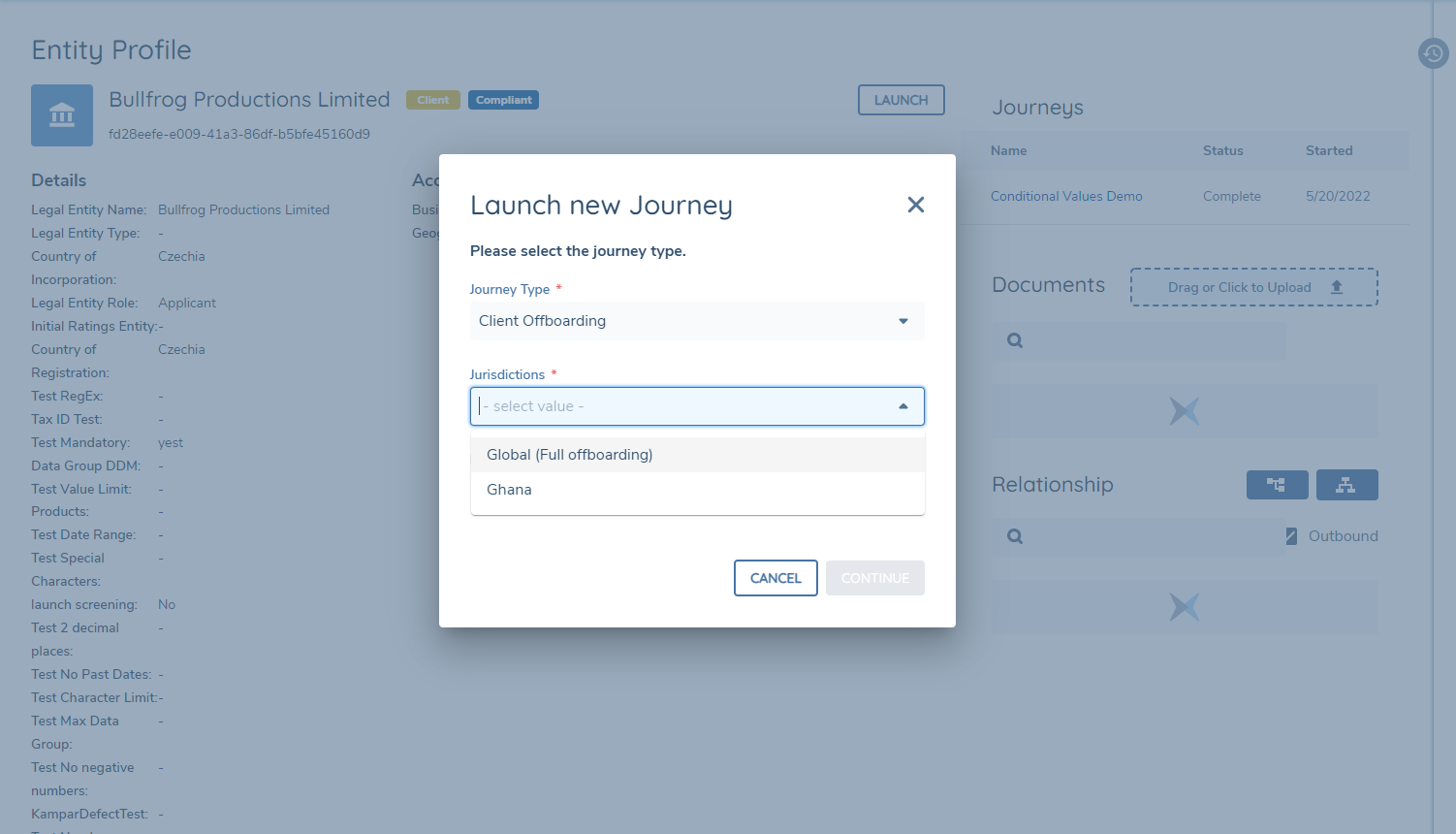
When a user selects the Client Offboarding journey type, a Jurisdictions dropdown appears.
The dropdown displays jurisdictions that meet both criteria:
- the jurisdiction (policy) has a configured Data Protection Regime, and
- the jurisdiction is verified as in scope for that entity.
If the user selects Global, a full offboarding is initiated and all scoped jurisdictions are offboarded in the subsequent Client Offboarding journey.
Partial offboarding
When the user selects one or more non-Global jurisdictions in the Jurisdictions dropdown and completes the offboarding journey:
- the selected jurisdictions are set to Offboarded for the entity,
- offboarded jurisdictions are no longer picked up by policy scoping in future journeys,
- when the client is partially offboarded, any in-flight journeys with the offboarded jurisdiction in-scope will be automatically cancelled. This can be mitigated with Journey Launch Controls.
In partial offboarding, the Client chip remains on the Entity Profile.
Policy Status Visibility on EPP
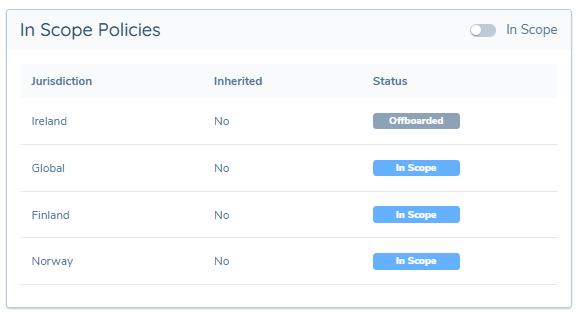
To help users understand what policies are in scope or offboarded for an entity, the Entity Profile's Overview tab displays the In Scope Policies card.
In Scope Policies:
- displays all policies applicable to the verified entity,
- shows policy jurisdictions as In-Scope when they are brought into scope and verified within a journey (or migrated as such),
- shows policy jurisdictions as Offboarded when offboarding completes for that jurisdiction,
- shows the current verified status of each policy jurisdiction as In-Scope or Offboarded,
- to toggle 'In Scope' off to display 'Offboarded',
- policy jurisdictions can only be removed from this component when Offboarded and subsequently Deleted.
Available Jurisdictions
When launching a Client Offboarding journey, selecting specific (non-Global) jurisdictions means you are requesting a partial offboarding.
The jurisdictions available for selection are based on the Data Protection jurisdictions linked to the in-scope policies associated with the entity’s data. A jurisdiction will only appear in the list if a Data Protection Regime has been configured for it. The system needs to reference a retention period when offboarding any jurisdiction, so any data that is exclusively associated to jurisdictions without one will be treated the same as 'Global' (i.e. retained until the fully offboarded entity is deleted).
Automatic offboarding
While Global policy is always in-scope (unless an entity has been fully offboarded); other jurisdictions are brought into scope when their policy scoping conditions are met.
'Automatic Offboarding' can be thought of as an automation of 'Partial Offboarding' - instead of a user manually initiating a Client Offboarding journey, the system will do this automatically when a journey is completed for an entity with an 'In Scope' policy (as shown on the EPP) with scoping conditions that were not met in the completed journey.
In Automatic Offboarding, the system inserts the offboarding jurisdiction into the 'Jurisdiction' of the journey instance. The system is not limited by the 'Available Jurisdictions' concept that applies to the Client Offboarding launcher (as noted above).
At completion of the 'Client Offboarding' journey, the Jurisdiction will show as Offboarded on the Entity Profile. A Data Deletion Process will be created to schedule the retention period of this jurisdiction so long as the Offboard jurisdiction has an associated Data Protection Regime. Without an associated Data Protection Regime no retention date can be determined and no Data Deletion Process is created (meaning it will be retained until the entity is fully deleted). Proper configuration of Data Protection Regimes will ensure that each 'Offboarded' policy has a scheduled retention period.
To enable Automatic Offboarding, on the Data Protection configuration page, toggle on 'Enable Automatic Offboarding When Policy Conditions No Longer Met'. When enabled, during Verify Entity processing, the system initiates an offboarding journey for policies that are currently in scope but whose scoping conditions are no longer met. When disabled, manual Client Offboarding Journeys must be launched.

Configuration Exchange Support for Automatic Offboarding toggle setting
Configuration Exchange supports promoting the automatic offboarding toggle setting across environments.
The setting is located under the domain Feature Settings in Configuration Exchange and can be selected for import.
Full offboarding
A user can select Global in the Jurisdictions dropdown to initiate a full offboarding.
Full offboarding:
- offboards all policies for the entity (Global and all other scoped policies),
- schedules deletion of all data, documents, related parties, and data group information across all policies when the retention date is reached.
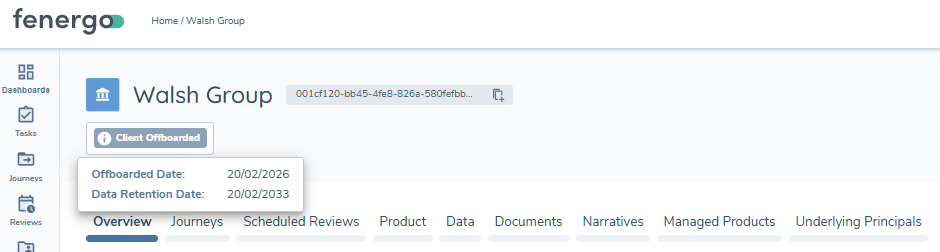
When full offboarding is completed, the Client chip is removed from the Entity Profile and replaced with a Client Offboarded chip. Mousing over this chip will display the Offboarded Date and Data Retention Date (Global) that represents when the Data Deletion Journey will be triggered for the Offboarded Entity.
Offboarded client: related party maintenance
A fully offboarded client may also exist as a related party associated with other entities (for example beneficial owner or CEO). Related party data can be maintained via the Related Parties task.
If a journey is needed to manage related party data in isolation (such as for Ongoing Screening), journeys should use tasks configured with Target Entity: Related Party, due to "Global" policy being out-of-scope for an offboarded client:
- Data and Document tasks (Data, Documents, Data & Documents)
- Data Review task
- OGS: Materiality Assessment
- Use Verify Entity to verify changes to the related party entity (it verifies the data of the journey’s root entity).
When the retention date for offboarded client data is reached and a deletion journey is completed, Related Party Preservation will apply to retain RP data and only delete 'Client' data.
Re-onboarding (Partial and Full)
Once a jurisdiction has been offboarded, it must be re-onboarded before it can apply within a journey. For example, following Full Offboarding, any subsequently launched 'Client' Journeys will fail - without Global Policy 'In Scope', tasks with Target Entity 'Client' will appear empty (no 'in scope' requirements to return).
Re-onboarding is used to bring Offboarded policy jurisdictions back into scope for the Entity, whether Partial Full (Global) or Partial (non-global jurisdictions).
There are two mechanisms to handle Partial Re-Onboarding (non-Global Jurisdictions):
- Manually Re-Onboarding via the launch of a 'Client ReOnboarding' Journey (not limited to former 'Clients')
- Automatic Re-Onboarding (when enabled) will automatically bring offboarded policies back into scope when their scoping conditions are satisfied in a Journey context.
Full Re-Onboarding (Global) can only be achieved through a Manual 'Client ReOnboarding' journey.
Manual Re-Onboarding (via Journey)
From the Entity Profile Page, users can launch a 'Client ReOnboarding' journey type via the Launch button. Although the Journey Type is primarily used for Client and Offboarded-client entities, it can also be safely used for any offboarded entity - the 'Client' chip will only be restored when a 'Client Onboarding' journey has been previously completed.
- For fully offboarded entities:
- Global must be re-onboarded (mandatory and pre-selected).
- Other Offboarded policy jurisdictions can be optionally selected in addition. If Automatic Re-Onboarding is enabled, there's no need to manually select other offboarded jurisdictions to Re-Onboard (this will happen automatically in subsequent journeys).
- For partially offboarded entities, users can select one or more Offboarded policy jurisdictions to re-onboard.
If Automatic Re-Onboarding is disabled, users will need to make a determination of which Offboarded non-global Jurisdictions should be Re-Onboarded, but will be warned if a still Offboarded Policy Jurisdiction has its policy scoping conditions met.

Client Re-Onboarding journey configuration (mandatory task and rules)
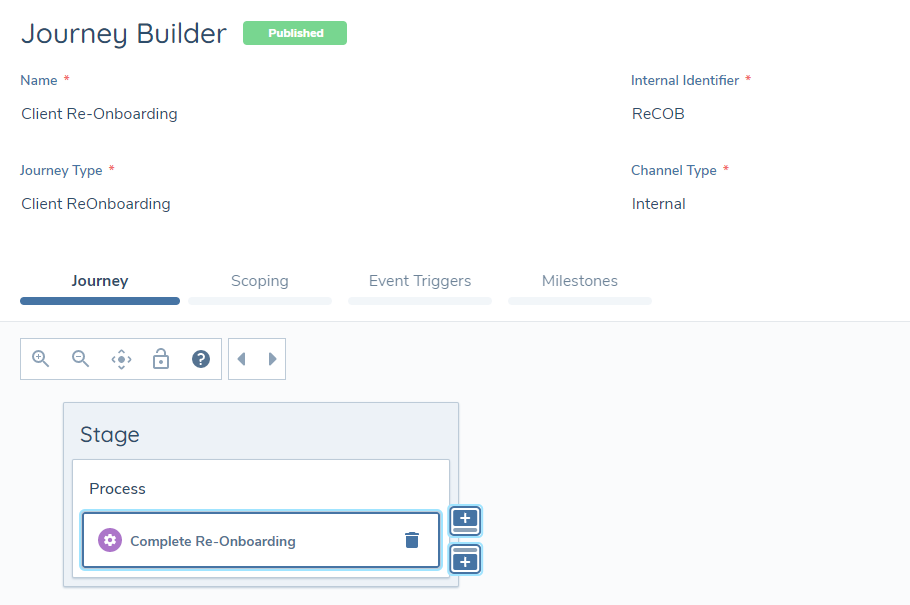
Client Re-Onboarding journeys are configured using Journey Builder.
- The journey name can be customised.
- The journey type must be set to “Client ReOnboarding” (availability of the journey is system controlled, so this exact value must be used).
The only mandatory task required is Complete Client ReOnboarding. This system task transitions selected policies from Offboarded to In-Scope, and verifies this change to entity data. A separate Verify Entity task is not required.
It may be appropriate to configure an approval task prior to Complete Client ReOnboarding.
- No policy-driven input tasks should be configured within a Client ReOnboarding journey (in-scope policies are in flux).
- If further maintenance activities are required, configure a Journey Launchpad task after Complete Client ReOnboarding.
Automatic Re-Onboarding
Automatic Re-Onboarding complements Automatic Offboarding. The feature is disabled by default. When enabled, it ensures that previously offboarded policies are brought back into scope if their trigger conditions are met during a journey. This reduces the risk of completing a journey without required policies due to delays in manual re-onboarding. Manual Client Re-Onboarding journeys are only required to re-onboard global policy for a fully offboarded client (and restore the 'Client' chip) - Automatic Re-Onboarding will handle all other jurisdictions.
Enable this feature using the “Enable automatic re-onboarding when policy conditions are met” toggle on the Data Protection page.
To enable the toggle, the following are required:
- The permission Data Protection Automatic Re-Onboarding Edit
- The “Enable automatic offboarding when policy conditions no longer met” toggle must also be enabled
When Automatic Re-Onboarding Brings a policy back 'in scope'
-
The offboarded policy is 'In Scope' in the Journey context only
-
The Data Deletion Process is retained
-
The Data Deletion Process will be 'Paused' to mitigate the edge-case risk of a data deletion journey being triggered after the policy has come back into scope. A message is displayed on the Entity Profile to inform the user that the deletion process is paused because an active journey is open.
-
The Entity Profile Page will still reflect the jurisdiction as 'Offboarded'
-
If the journey verifies entity data:
- the offboarded jurisdiction is now verified as 'In Scope' (visible on EPP)
- the Data Deletion Process is cancelled
-
If the journey is cancelled before the jurisdiction is verified:
- the Data Deletion Process unpauses, with the retention period unchanged
- the draft with the jurisdiction in-scope is deleted
- the jurisdiction remains Offboarded (visible on EPP)
Behaviour when Automatic Re-Onboarding is Disabled
When disabled, a Client Re-Onboarding journey is required to bring Offboarded Jurisdictions back in to scope. The system will actively warn users when a journey is in-progress with an Offboarded policy jurisdiction that has its scoping conditions met. Within a task or within Journey Hub, warning toast messages will be presented for each Offboarded jurisdiction that could be in-scope. This is to alert users that the journey could be missing key inputs required for full regulatory or operational compliance, prompting them that the jurisdiction needs to be re-onboarded to be applied in a journey. These messages are intentionally persistent to ensure that any user accessing a task is aware.
The user can:
- cancel the journey and launch another re-onboarding journey for the missing jurisdiction, or
- complete the journey and launch another to re-onboard the jurisdiction not selected.

Tracking data retention dates
At completion of an offboarding, the following information is retained against the entity in a separate Data Deletion Process (per offboarded jurisdiction):
- Data Deletion Process ID (
id) - Entity ID (
entityId) - Jurisdiction (
jurisdiction) - Date of Offboarding Completion (
initiatedOn) - Applied retention period (
dataRetentionPeriodMonths) - Pause status (
isPaused) - Data Protection Regime ID (
dataProtectionRegimeId) - When a Conditional Data Retention Period is applied, the below are populated:
- Description from Data Protection Regime Conditions (
conditionalRetentionDescription) - Applied Conditions from Data Protection Regime (
appliedConditions)
- Description from Data Protection Regime Conditions (
Data Deletion Processes are not directly visible in the UI, but can be accessed via two methods: