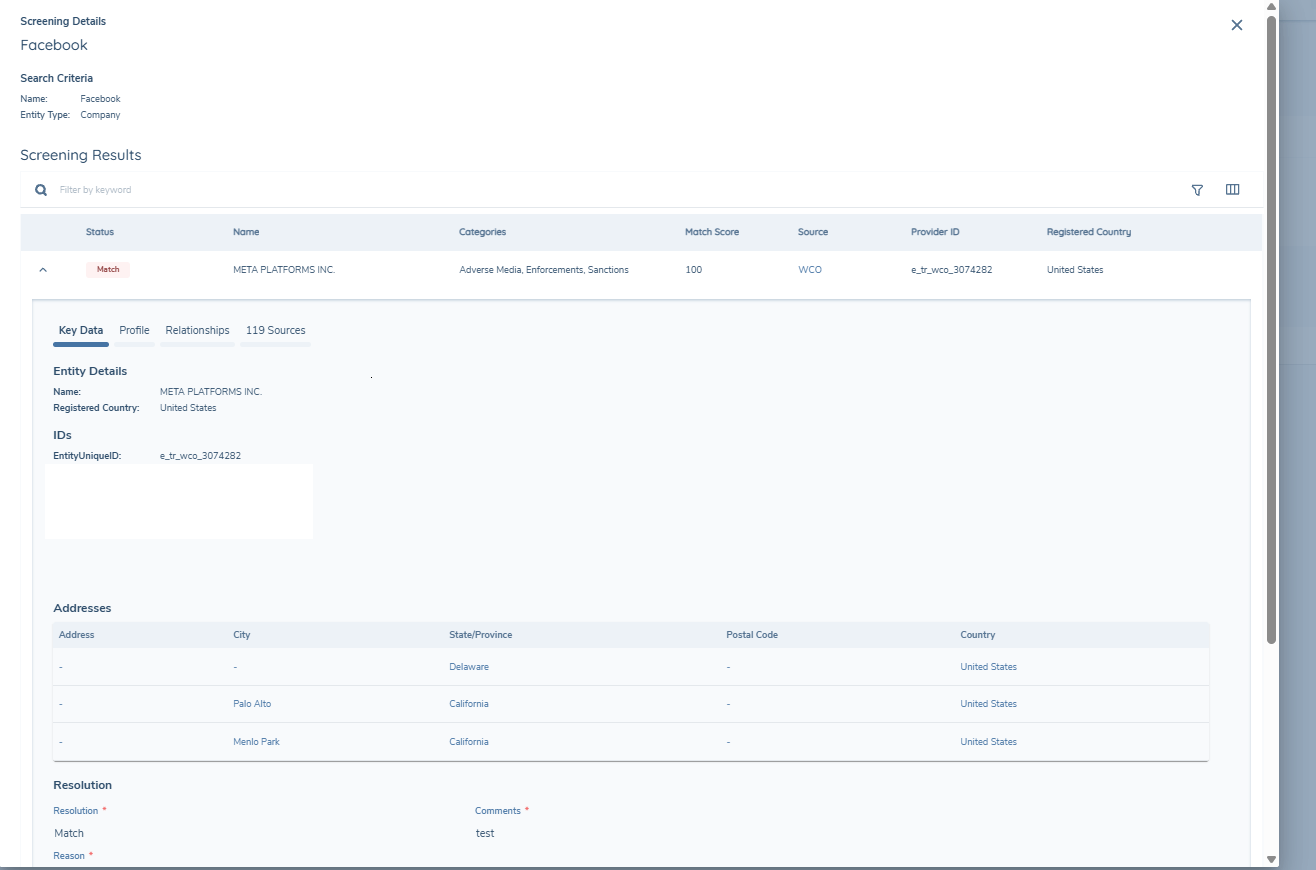
ETL Screening
Clients migrating to Fenergo from a legacy KYC system arrive with years of historic screening activity, runs conducted against providers such as RDC, WorldCheck One and LexisNexis, with adjudicated match decisions and materiality assessments already captured in their source system. Without migrating this data, analysts would be forced to re-screen every entity from scratch and rebuild years of compliance decisions from Day 1.
The ETL Screening Migration addresses this by enabling clients to load their historic screening data directly into the Fenergo Screening domain. The migration is broken down into the following sequence:
- Load Screening Entity
- Load Match Data
Because match data originates directly from a screening provider, ETL applies only field-level validation against the migration policy — no transformation is applied. The client is responsible for ensuring the data is accurate and complete before initiating the migration.
ETL Screening Migration requires Screening V2. Ensure your tenant is on Screening V2 before initiating a migration load.
Screening ETL — Use Cases
The following use cases can be achieved:
- "I want to migrate historic screening data for an existing entity using its FenXID (
LegalEntityId)." - "I want to migrate historic screening data for an entity that was created using an Alternate ID (
Alternate_ID)." - "I want to migrate historic screening records and show the main entity the screening was conducted against (
Main_Entity_LegalEntityId/RootEntityAlternateId)." - "I want to migrate historic match decisions (
Match/NoMatch) and ensure they are available for resolution reuse in future screening runs."
What a Screening Entity Represents
In the ETL tool, the combined Batch and Batch Entity record is referred to as a Screening Entity. Each Screening Entity represents a single screening run for one legal entity against one provider under one configuration set.
The Screening Entity captures two things: the administrative record of the screening event itself, which provider conducted it, which configuration set was used, and the provider's own Case ID reference for that submission, and the legal entity's details within that run, including the search criteria submitted to the provider at the time (name, date of birth, country, entity type) and the historic materiality assessment outcome per screening category (PEP, Sanctions, Adverse Media, Enforcements, Other).
What a Match Record Represents
The Screening Entity does not hold detail about individual watchlist hits that information lives on Match records, which are loaded in the subsequent step. The Screening Entity provides the structure and the verdict; Match records provide the evidence and the decisions. Both are required for a complete migration.
Data Structure
The migration is driven by a single client-supplied CSV file. Each row represents one unique combination Legal Entity + ExternalId_Source + ExternalId_Value = One Batch
If an entity was screened against multiple providers or multiple configuration sets, each combination is a separate row. Each row simultaneously defines both the Batch and the Batch Entity, ETL creates both objects in sequence, first the Batch, then the Batch Entity against the Fenergo-generated BatchId.
Pre-Migration Prerequisites
Before running this step, the following must be in place:
- Entity Data migration is complete, all legal entities must exist in Fenergo.
- Screening Provider configuration is in place, all providers must be configured and verified in the tenant.
- Configuration Set GUIDs have been provided by Fenergo,Fenergo must create the Configuration Sets and provide the GUIDs before the client can populate the CSV. This is a blocking dependency. The Configuration Set ID is also critical for resolution reuse: reuse is driven by the combination of
ConfigurationSetIdandMatchData_EntityUniqueId, and if the ID in the migrated data does not match the one configured on the screening task, resolution reuse will not fire. - Users are created in Fenergo, all users who actioned match decisions in the legacy system must exist in Fenergo before the match data is loaded. The
Match_LastActionedByfield requires the Fenergo user GUID, this is used to display the actioning user in the screening outcomes grid. If a user GUID cannot be resolved, the field will not display correctly in the UI. User GUIDs can be retrieved from the Fenergo user management system.
- Supports create operations only for Screening Entity and Match records. There is no ability to update records post-creation. If incorrect data is loaded, Fenergo support will need to remove the records before a reload can be performed.
- If the same batch is loaded more than once, ETL will continue creating new Batch and Match records on each run, resulting in duplicate screening history for the affected entities. Always verify the reconciliation report before re-running a load.
- Each row is scoped to a single provider and a single configuration set. Multiple providers within a single batch are not supported.
- Entity aliases are not supported in the migration CSV.
- Additional information fields are not supported. Information held in the Profile, Relationships, and Sources tabs is not migrated
Migration Policy
Before running the Screening Entity migration, a dedicated migration policy must be created specifically for ETL screening load. Unlike a standard operational policy, this migration policy is not used to drive journey behaviour it exists solely to define the field requirements that ETL will validate against during the migration process. The policy should mirror the same categories and data keys as your Global policy, but must be scoped to a target entity of Client. This is important because Global is too broad , it pulls in field requirements across all entity types and jurisdictions, many of which will never be satisfied by historic screening data, causing validation to fail unnecessarily.
The policy must include the screening categories. These are the categories against which match classification data is mapped in the map data policy fields during the migration:
- Screening Classification Data PEP — Politically Exposed Persons
- Screening Classification Data Sanctions — Sanctions list designations
- Screening Classification Data Adverse Media — Negative news and adverse media findings
- Screening Classification Data Enforcements — Regulatory enforcement actions
- Screening Classification Data Other — Any additional screening category not covered by the above
If your tenant has separate datasets for related parties and clients, all data requirements must be created under the Client target entity using the correct data keys. Creating datasets under the wrong target entity will result in those fields not appearing in the ETL mapping step, meaning data cannot be correctly mapped and loaded. Once the migration is complete, the migration policy does not need to be maintained, it is only required for the duration of the ETL load.
ETL Project Creation
When creating an ETL project for screening migration, select the entity type — Individual, Company, or Other — that corresponds to the entities whose match records you want to migrate. A single project can include multiple entity types, but each requires its own separate source file and field mapping configuration.
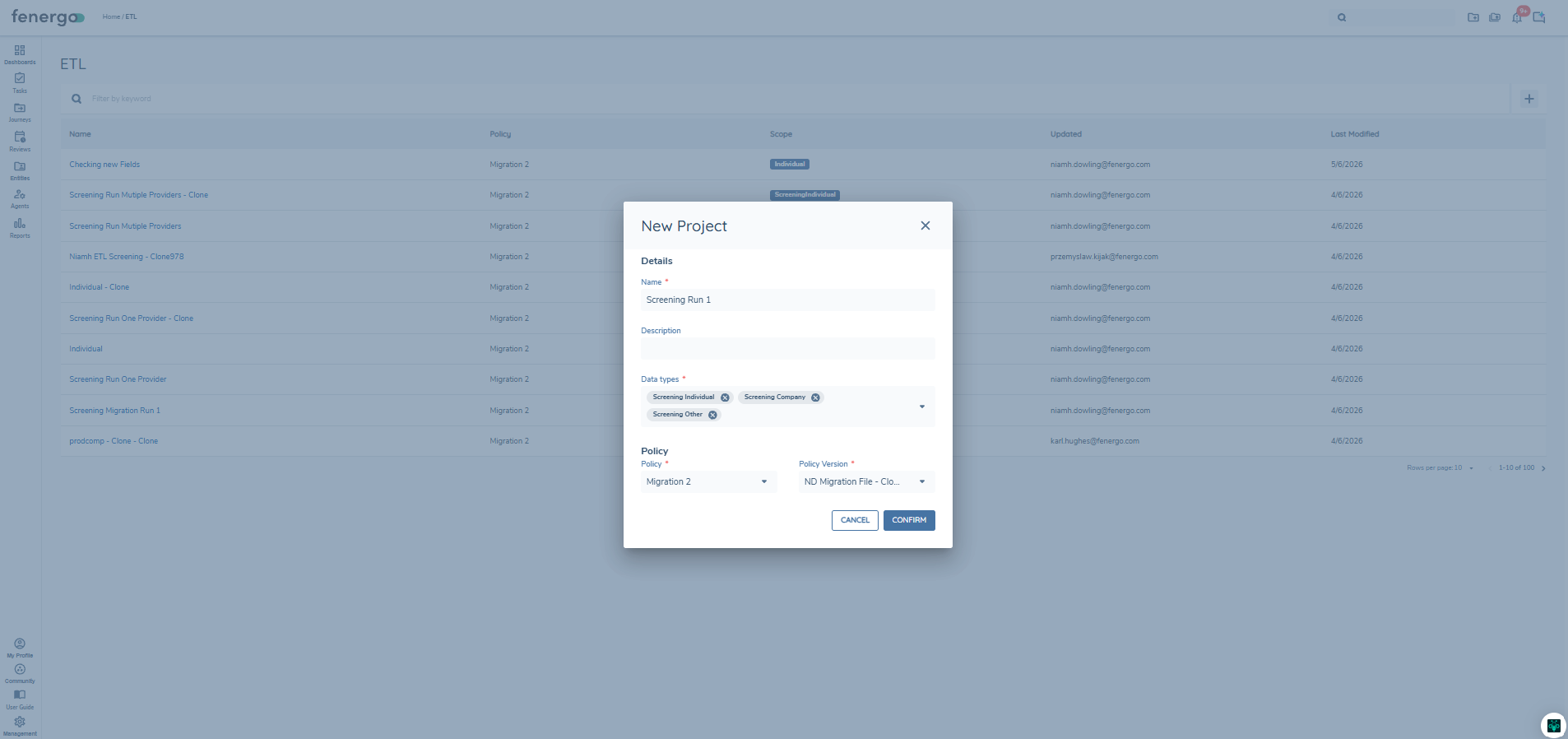
Once the entity type is selected, the project is created with two distinct areas, one for the Screening Entity data and one for the Match Data. Each must be mapped, previewed and validated.
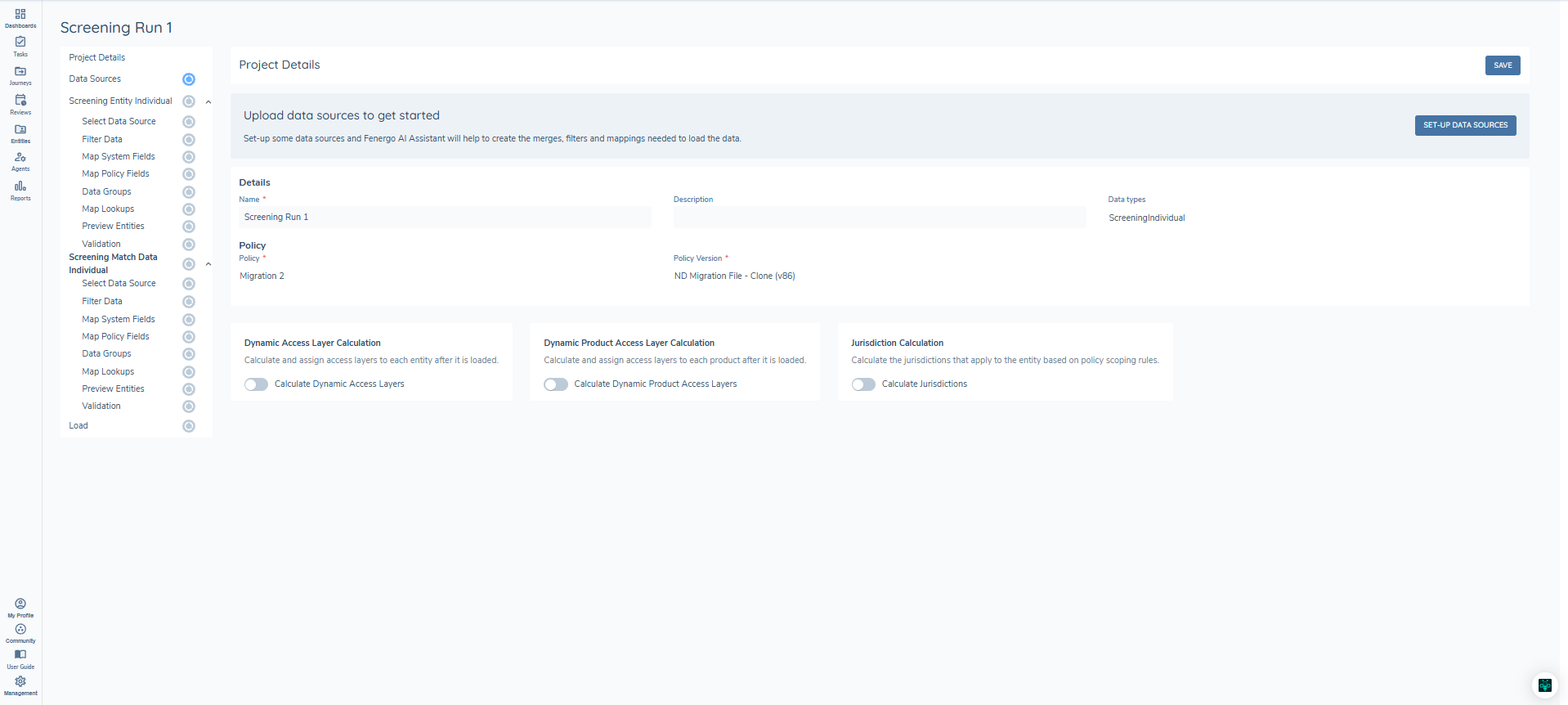
Screening Entity System Fields
Below are the Entity System Fields, any fields required need to be mapped, different fields will display depending on the entity type selected.
| Field | Type | Required | Entity Type | Description |
|---|---|---|---|---|
ReferenceId | text | Yes | Both | A unique reference identifier supplied by the client for each row in the source file. Used solely for reconciliation purposes, errors surfaced during validation and load are reported against this ID to allow the client to locate and remediate the affected row. Must be unique and non-blank within the file. There is no relationship between the Reference ID in the Match file and the Reference ID in the Screening Entity file. This ID is not persisted to the screening domain. |
alternateId* | text | No | Both | An alternate identifier for the entity from the source system. If the entity was originally migrated using ETL, this Alternate ID can be used in the file. *Either the Alternate ID or the FenXID can be provided and must be consistent across the project. |
fenxId* | text | No | Both | The Fenergo legal entity GUID, used to link the screening record to the entity in Fenergo. *Either the Alternate ID or the FenXID can be provided and must be consistent across the project. |
ExternalId_Value | text | Yes | Both | The Case ID assigned by the provider for the screening submission, the primary reconciliation key used to link match records back to this Screening Entity. The Case ID is provider-specific: for RDC this is the InquiryID, for WorldCheck One this is the CaseSystemID, and for LexisNexis this is the ResultID. For custom providers, refer to the equivalent case reference used by that provider. |
ExternalId_Source | text | Yes | Both | The name of the provider that assigned the Case ID — e.g. RDC, WCO, LN. For custom providers, this is the provider ID retrieved from the URL in the Screening Provider configuration section of the tenant. |
ConfigurationSetId | text | Yes | Both | The GUID of the configuration set used for this screening run, provided by Fenergo pre-migration. Critical for resolution reuse. The Configuration Set ID links the screening run to a specific set of screening rules configured in Fenergo for a given provider. It defines how the provider should screen the entity — which watchlists to search, which risk categories are in scope, and how results should be evaluated. When a future live screening run uses the same Configuration Set, Fenergo can look up prior match decisions for the same watchlist record and automatically pre-resolve hits that have been seen and adjudicated before. If the Configuration Set ID in the migrated data does not match the one configured in the live tenant, resolution reuse will not fire correctly. |
RootEntityId | text | No | Both | The Fenergo GUID of the root (parent) entity, where the screened entity is a related party. Only the rootEntityId or the RootEntityAlternateID can be provided in the migration project |
RootEntityAlternateId | text | No | Both | An alternate identifier for the root entity. The Alternate ID can be provided if the entity was created using ETL. |
RootEntityName | text | No | Both | The name of the root (parent) entity against which the related party was screened. This value is displayed in the Screening Outcomes grid. Note: there is no validation that this name corresponds to the RootEntityId or RootEntityAlternateId provided, the client is responsible for ensuring the values are consistent. |
SearchCriteria_EntityType | text | Yes | Both | The type of entity submitted to the provider |
SearchCriteria_OtherInformation | text | No | Both | Any additional search information submitted to the provider at the time of the screening run. |
EntityMaterialityAssessment_PEP | text | No | Both | Historic materiality outcome for PEP — Material, Immaterial, or leave blank. |
EntityMaterialityAssessment_PEP_Jurisdiction | text | No | Both | The jurisdiction associated with the PEP materiality assessment. Must be populated with valid jurisdictions if the materiality is Material, otherwise the record will fail on validation. |
EntityMaterialityAssessment_Sanctions | text | No | Both | Historic materiality outcome for Sanctions — Material, Immaterial, or leave blank. |
EntityMaterialityAssessment_Sanctions_Jurisdictions | text | No | Both | The jurisdiction associated with the Sanctions materiality assessment. Must be populated with valid jurisdictions if the materiality is Material, otherwise the record will fail on validation. |
EntityMaterialityAssessment_AdverseMedia | text | No | Both | Historic materiality outcome for Adverse Media — Material, Immaterial, or leave blank. |
EntityMaterialityAssessment_AdverseMedia_Jurisdictions | text | No | Both | The jurisdiction associated with the Adverse Media materiality assessment. Must be populated with valid jurisdictions if the materiality is Material, otherwise the record will fail on validation. |
EntityMaterialityAssessment_Enforcements | text | No | Both | Historic materiality outcome for Enforcements — Material, Immaterial, or leave blank. |
EntityMaterialityAssessment_Enforcements_Jurisdictions | text | No | Both | The jurisdiction associated with the Enforcements materiality assessment. Must be populated with valid jurisdictions if the materiality is Material, otherwise the record will fail on validation. |
EntityMaterialityAssessment_Other | text | No | Both | Historic materiality outcome for Other — Material, Immaterial, or leave blank. |
EntityMaterialityAssessment_Other_Jurisdictions | text | No | Both | The jurisdiction associated with the Other materiality assessment. Must be populated with valid jurisdictions if the materiality is Material, otherwise the record will fail on validation. |
Overall_Materiality_Rationale | text | No | Both | A free-text rationale summarising the overall materiality outcome as recorded in the legacy system. |
SearchCriteria_FullName | text | Yes | Individual | Full name of the individual as submitted to the provider at the time of the screening run. |
SearchCriteria_FirstName | text | No | Individual | First name of the individual. |
SearchCriteria_MiddleName | text | No | Individual | Middle name of the individual. |
SearchCriteria_LastName | text | No | Individual | Last name of the individual. |
SearchCriteria_DateOfBirth | date | No | Individual | Date of birth in YYYY-MM-DD format. |
SearchCriteria_Gender | text | No | Individual | Gender of the individual as submitted to the provider. |
SearchCriteria_Nationality | text | No | Individual | Nationality of the individual, ISO 2-letter country code or country. |
SearchCriteria_Citizenship | text | No | Individual | Citizenship of the individual — ISO 2-letter country code. |
SearchCriteria_PlaceOfBirth | text | No | Individual | Place of birth of the individual. |
SearchCriteria_Country | text | No | Individual | Country of residence, ISO 2-letter country code. |
SearchCriteria_PassportNumber | text | No | Individual | Passport number as submitted to the provider. |
SearchCriteria_SSN | text | No | Individual | Social Security Number. |
SearchCriteria_DriversLicense | text | No | Individual | Driver's licence number. |
SearchCriteria_LegalEntityName | text | Yes | Company / Other | Full legal name of the company or entity as submitted to the provider. |
SearchCriteria_RegisteredCountry | text | No | Company / Other | Country of registration — ISO 2-letter country code. |
SearchCriteria_UniqueId | text | No | Company / Other | A unique identifier for the company or entity (e.g. company registration number). |
SearchCriteria_EIN | text | No | Company / Other | Employer Identification Number. |
The Search Criteria fields capture the exact details that were submitted to the screening provider at the time of the original screening run. It is important that these values match what is configured at the provider level, mismatches between the submitted search criteria and the provider configuration can result in resolution reuse failing for future screening runs. In addition if this information is not provided load will fail.
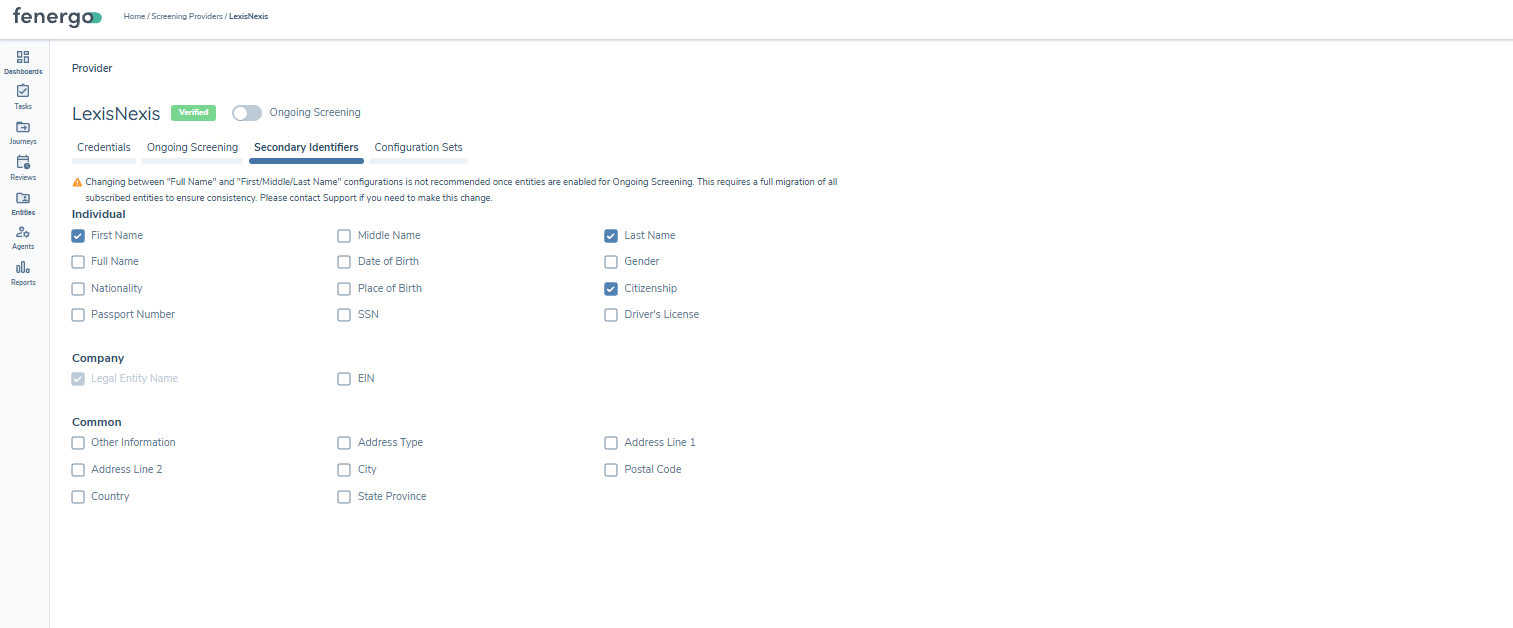
Screening Entity Policy Fields
There are no policy fields for the Screening Entity.
Screening Entity Data Groups
The Screening Entity includes a hardcoded addresses data group. This captures the address search criteria that were submitted to the screening provider at the time of the original screening run. All fields are optional.
| Field | Type | Description |
|---|---|---|
addressLine1 | string | First line of the address as submitted to the provider. |
addressLine2 | string | Second line of the address as submitted to the provider. |
city | string | City as submitted to the provider. |
country | string | Country name as submitted to the provider. |
countryISO2 | string | ISO 2-letter country code as submitted to the provider. |
countryISO3 | string | ISO 3-letter country code as submitted to the provider. |
postalCode | string | Postal or zip code as submitted to the provider. |
stateProvince | string | State or province as submitted to the provider. |
type | string | Address type. |
Screening Entity Preview
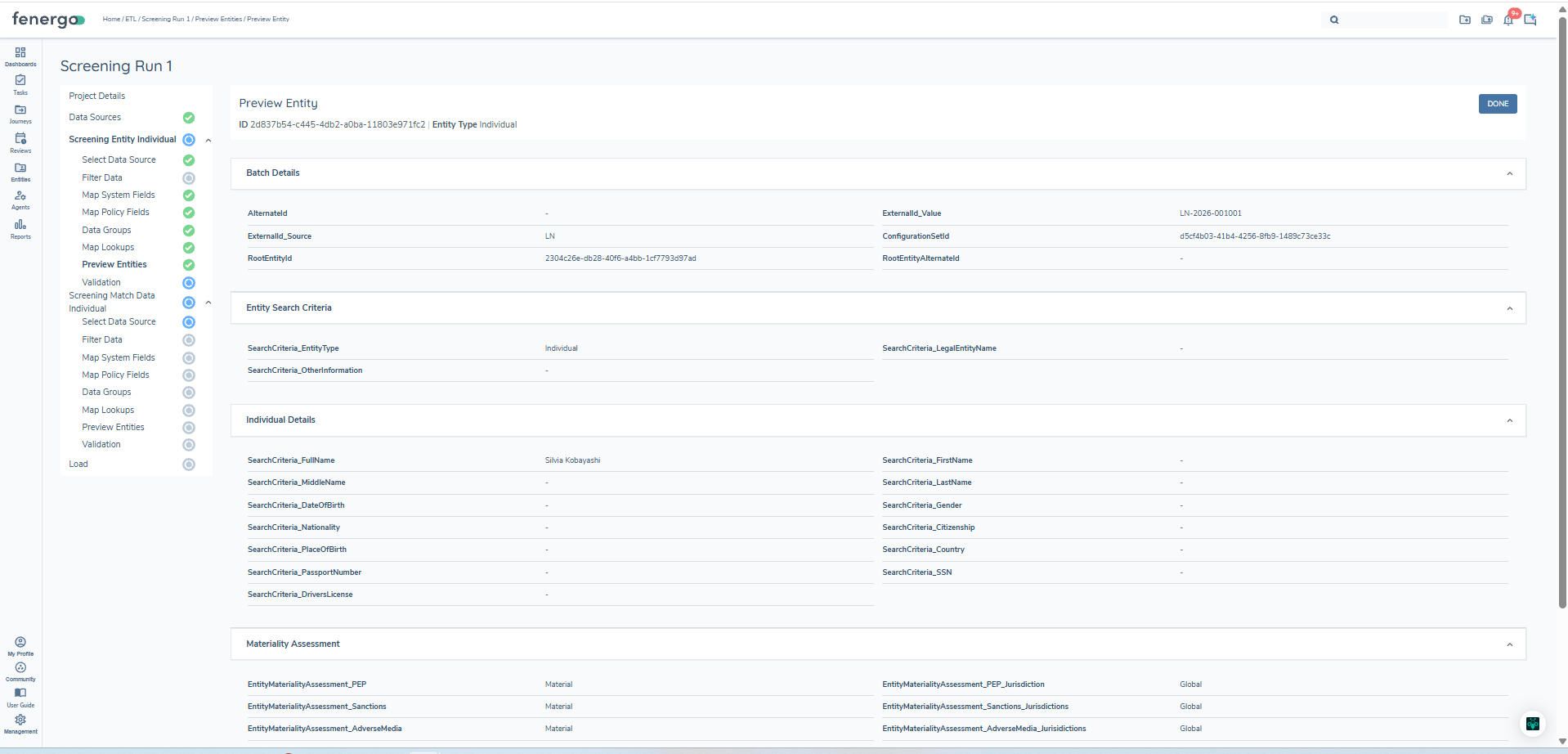
Within the Fenergo ETL tool, once the Preview step has been initiated and data aggregation is complete, you can look up a specific batch rather than browsing the random sample of 10 that the tool returns by default. In the preview panel, enter the Reference ID of the batch into the search field. This performs a targeted lookup and pulls up the detailed mapped data for that exact record, allowing you to verify that the correct transformations, field mappings, and filters have been applied before proceeding to validation and load.
Screening Entity Validation
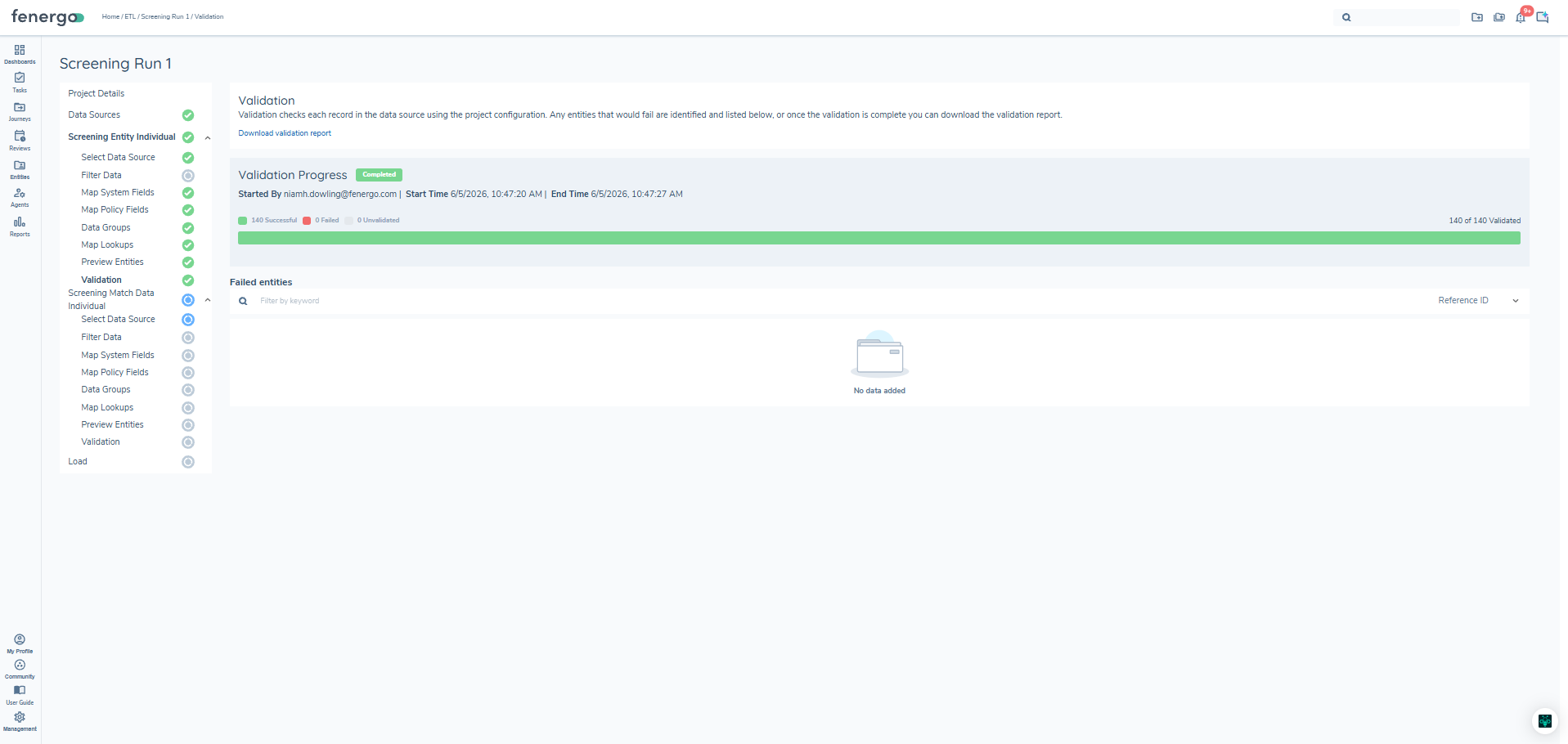
During validation, ETL checks that ExternalId_Source, ExternalId_Value, and FenXID have been provided for every row. It also validates that the ConfigurationSetId provided corresponds to the specified provider.
ETL Screening Match Migration
Once Screening Entities have been created in Fenergo, the final step is to migrate the individual screening hits and their adjudicated outcomes for each entity. A Match is a single result returned by a screening provider for a given entity during a screening run. Each match carries the full provider payload and has been pre-adjudicated in the legacy system as either a confirmed true match (Match) or a dismissed false positive (NoMatch). All matches in scope must have a final decision — Unresolved matches are not supported for migration.
Migrating Match records enables the following in Fenergo from Day 1:
- Resolution reuse — when a batch closes, the
LatestMatchResolutionRepositoryis populated from the migrated Match records. If the same watchlist hit appears again in a future screening run, it will be automatically pre-resolved using the historic decision. - NoMatch suppression — dismissed false positives are stored with their reason and comments, providing evidence that each hit was consciously reviewed and dismissed.
ETL supports create operations only for Match records. There is no ability to update records post-creation. If incorrect data is loaded, Fenergo support will need to remove the records before a reload can be performed.
Linking Match Records to Screening Entities
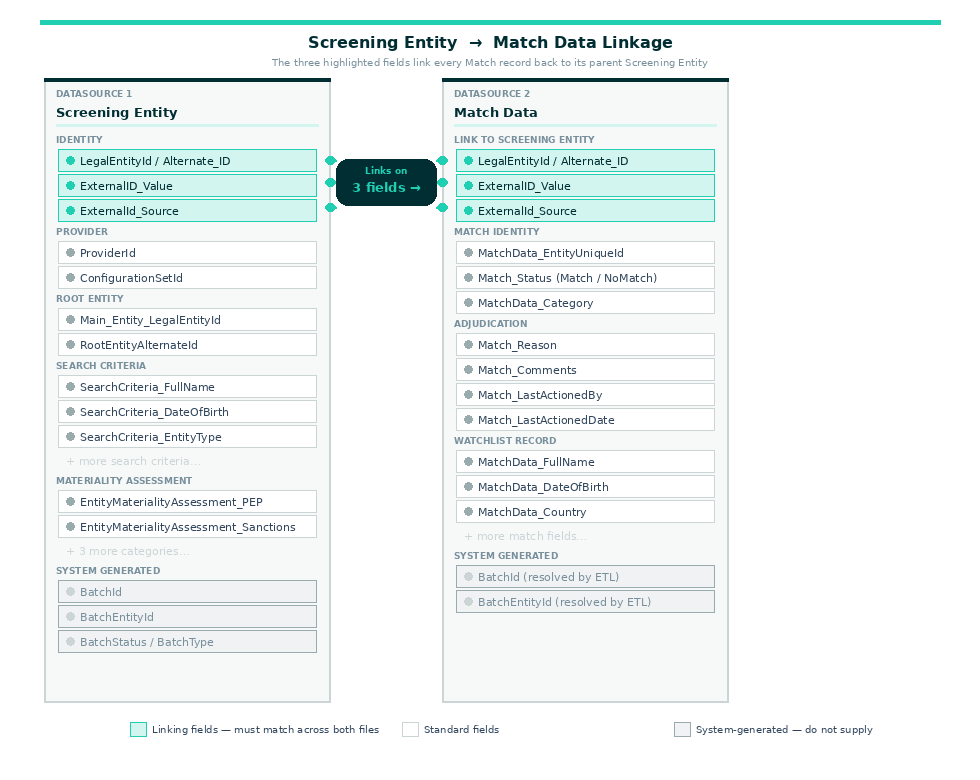
Match records are linked to their parent Screening Entity using three fields. You do not supply BatchId or BatchEntityId directly in the Match CSV — ETL resolves these automatically from the reconciliation report produced during the Screening Entity load step.
| Field | Description |
|---|---|
ExternalID_Value | The unique external identifier assigned to the screening submission. This must match the value provided in the corresponding Screening Entity record and is used as the primary key to associate each match row with the correct screening batch. |
ExternalId_Source | The name of the provider that assigned the external ID (e.g. LN for LexisNexis, WCO for World-Check One). Used in combination with ExternalID_Value to uniquely identify the screening submission across multiple providers. |
LegalEntityId | The Fenergo FenXID of the entity that was screened. This must correspond to a valid entity in the platform and links the match record to the correct legal entity. If an Alternate ID was used in the Screening Entity file, ETL resolves this to a FenXID during the Screening Entity load — the resolved FenXID should be used here. |
Match Record System Fields
| Field | Type | Required | Description |
|---|---|---|---|
ReferenceId | text | Yes | A unique reference identifier supplied by the client for each row in the source file. Used solely for reconciliation purposes — errors surfaced during validation and load are reported against this ID to allow the client to locate and remediate the affected row. Must be unique and non-blank within the file. There is no relationship between the Reference ID in the Match file and the Reference ID in the Screening Entity file. |
alternateId | text | No | An alternate identifier for the legal entity the match record relates to. Use this only if the Alternate ID was used in the Screening Entity records. |
fenxId | text | No | The Fenergo legal entity GUID used to link the match record to the entity in Fenergo. |
ExternalId_Value | text | Yes | The Case ID assigned by the provider for the screening submission — used to link the match back to its parent Screening Entity. |
ExternalId_Source | text | Yes | The name of the provider that assigned the Case ID. |
MatchData_EntityUniqueId | text | Yes | The provider's stable watchlist record identifier — required for resolution reuse in future screening runs. |
Match_Status | text | Yes | The adjudicated outcome for this match — must be Match or NoMatch. Unresolved is not permitted. |
Match_Reason | text | Yes | The reason for the match decision as recorded in the legacy system. |
Match_Comments | text | Yes | Analyst comments captured at the time of adjudication. |
Match_LastActionedBy | text | No | The user or system that actioned the match decision in the legacy system. The user must exist in Fenergo and the GUID of that user must be retrieved from the management system. |
Match_LastActionedDate | date | Yes | The date the match was actioned in the legacy system (YYYY-MM-DD). The client should provide the actual resolution date, not the ETL load date. |
MatchData_FullName | text | No | The full name of the watchlist record as returned by the provider. |
MatchData_DateOfBirth | date | No | Date of birth of the watchlist record as returned by the provider. |
MatchData_EntityType | text | No | The entity type of the watchlist record — e.g. Individual, Company. |
MatchData_Country | text | No | The country associated with the watchlist record. |
MatchData_Category | text | No | The screening category of the match. Must be one or more of: 'PEP,SanctionsList,AdverseMedia,Enforcements,Other'. Where multiple categories apply, separate them with a pipe character) |
Match_Data_Score | text | No | The match score returned by the provider. |
Match_Nationality | text | No | The nationality of the watchlist record as returned by the provider. |
Match_Citizenship | text | No | The citizenship of the watchlist record. Where an individual holds multiple citizenships, separate values with a pipe character. |
Match_PlaceOfBirth | text | No | The place of birth of the watchlist record as returned by the provider. |
Match_RegisteredCountry | text | No | The registered country of the watchlist record,applicable to company entity types. |
Match_Gender | text | No | The gender of the watchlist record as returned by the provider. |
Match_CountryOfResidence | text | No | The country of residence of the watchlist record as returned by the provider. |
The following fields are system-assigned and cannot be mapped: Id, LastActionedBy, BatchId, BatchEntityId.
Match Record Policy Fields
The screening match policy fields are pulled from the migration policy and are mapped across one of five screening categories. At least one screening category must be provided per match record. The five screening categories are:
- Screening Classification Data PEP — Politically Exposed Persons
- Screening Classification Data Sanctions — Sanctions list designations
- Screening Classification Data Adverse Media — Negative news and adverse media findings
- Screening Classification Data Enforcements — Regulatory enforcement actions
- Screening Classification Data Other — Any additional screening category not covered by the above
The screening domain allows up to four additional fields per screening category. These supplementary fields can be configured and mapped in the policy fields section of the migration policy, enabling institutions to capture jurisdiction scope, materiality assessment, and other category-specific attributes alongside each screening result.
Screening entity migration files are separated into Individual, Company, and Other entity types because the policy fields associated with each type are distinct. In Fenergo, policy fields are configured per entity type, meaning the screening classification data fields available for an Individual may differ from those configured for a Company or another entity type. Separating the migration files by entity type ensures that the correct policy is applied during load and that each record pulls in the right set of screening classification fields for that entity.
Related Parties and Multi-Project Migration
If related parties, such as directors, shareholders, or beneficial owners — have a different screening data set from the primary client entities, these differences must be reflected in the policy configuration. Related party screening policy fields should be configured with a target entity of Client, so that the screening classification data is correctly associated with the client relationship rather than the related party in isolation. Where related party screening data differs significantly from the primary entity data, it may be necessary to create a separate ETL migration project to handle these records. Running them in a separate project ensures that the correct policy mapping is applied for each distinct data set and avoids conflicts between client and related party screening field configurations during load.
Match Preview
Within the Fenergo ETL tool, once the Preview step has been initiated and data aggregation is complete, you can look up a specific match record rather than browsing the random sample of 10 that the tool returns by default. In the preview panel, enter the Reference ID of the match row into the search field. This performs a targeted lookup and pulls up the detailed mapped data for that exact record, allowing you to verify that the correct field mappings and policy classifications have been applied before proceeding to validation and load.
Match Validation
Before load is enabled, ETL runs validation against the match data source file and produces a validation report. The following checks are applied:
Statusmust be eitherMatchorNoMatch— a value ofUnresolvedis not permitted and will block the load.EntityUniqueIdmust be present and non-empty on every row.- The combination of
ExternalID_Value,ExternalId_Source, andLegalEntityIdmust resolve to a valid Screening Entity. Note that the Screening Entity preview step must be run before match data validation, as ETL requires the screening entity data to be aggregated before it can validate the match record linkage. ClassificationData_*fields must only be populated on rows whereStatus = Match. These fields should be left empty onNoMatchrows.MatchData_Category, if supplied, must be one of the following valid values:PEP,SanctionsList,AdverseMedia,Enforcements, orOther.
In addition, all match data fields configured in the migration policy for the screening classifications step will be validated during this step. Once validation has passed for both Screening Entity and Match records, the data can be loaded.
Match Load
The load executes in three stages:
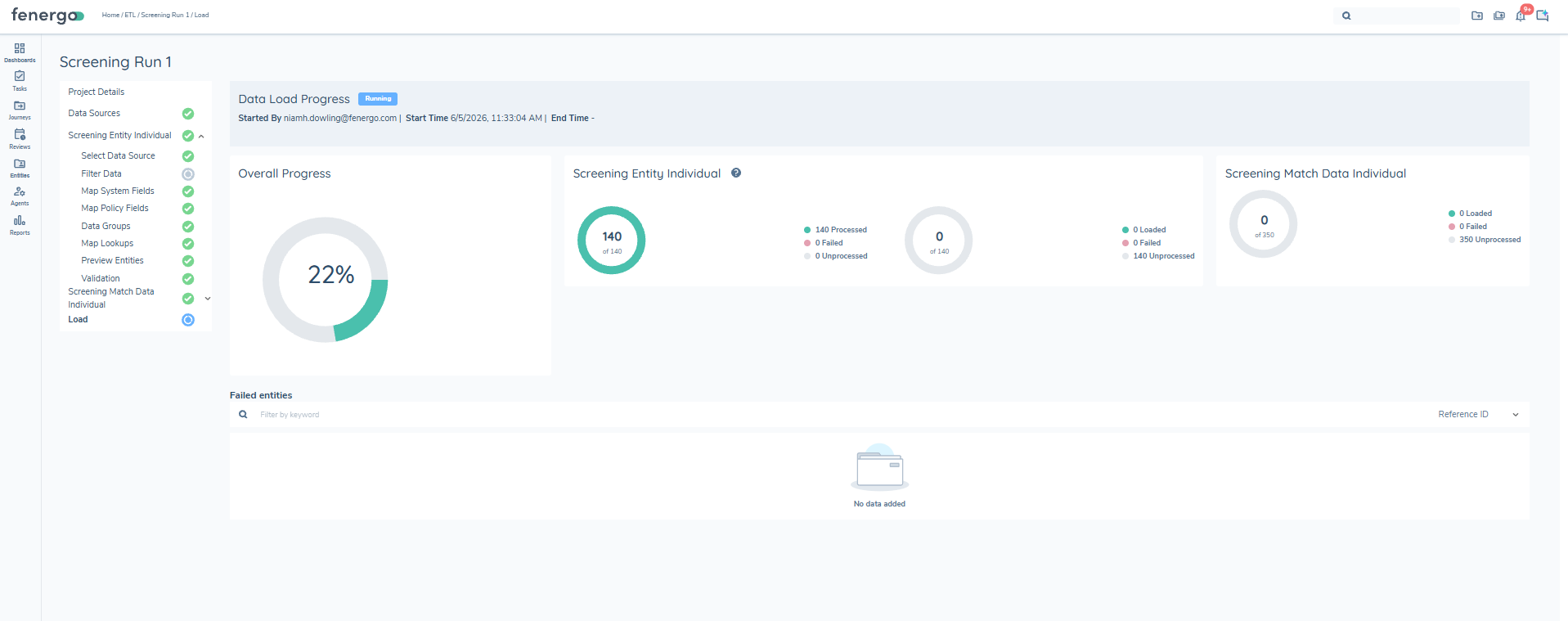
Stage 1 — Data Preparation
Before any records are submitted, ETL performs entity resolution for every row in the source file. The following checks and lookups are carried out:
- The
LegalEntityId(the screened entity) is validated against the entity data domain to confirm it exists in Fenergo. If anAlternate_IDhas been provided instead of a FenXID, ETL looks up the corresponding entity in the entity data domain and resolves it to the correct FenXID before proceeding. - The
Main_Entity_LegalEntityId(the root entity) is validated and resolved in the same way. If aMain_Legal_Entity_AltIDhas been provided, this is similarly resolved to the corresponding FenXID via the entity data domain.
If any row fails resolution, because a FenXID cannot be found, an Alternate ID does not match a known entity, or a root entity cannot be confirmed, the load is stopped entirely. The source file must be corrected and a new migration project created before the load can be retried.
Stage 2 Screening Entity Creation
Once all rows have been successfully resolved, ETL creates the Screening Entity for each record. This establishes the screening batch in Fenergo, including the search criteria, entity materiality assessment, provider and configuration set details, and the link to the root entity. The Screening Entity record must be created successfully before match records can be submitted against it.
Stage 3 Match Creation
With the Screening Entity in place, match records are submitted to the Screening Command API and associated with the correct screening batch. If the number of match records for a single screening entity reaches 5,000, ETL automatically closes the current batch and opens a new one to continue loading the remaining rows. Any failed rows are marked and surfaced in the load report.
Reconciliation Report
After load, ETL produces a reconciliation report — one for the batch and batch entities, and one for the matches. The report includes the following fields:
| Field | Description |
|---|---|
| Reference ID | A system-generated unique identifier automatically assigned to each record by ETL at the point of load. It does not originate from the source system and does not carry over into the Fenergo platform once migration is complete. Its primary purpose is to provide a stable, unambiguous handle for each record during the migration lifecycle, allowing users to locate and inspect a specific record within the ETL preview and reconciliation reports. To look up a specific record, enter the Reference ID into the search field in the ETL Preview step. |
| FenXID | The Fenergo system-generated UUID assigned to the legal entity once it has been successfully created in the Fenergo platform. This is the internal primary key for the entity in Fenergo and is used to reference it across all downstream processes including screening, journeys, and reporting. |
| Alternate ID | The external reference identifier from the source system, used to uniquely identify the entity prior to migration. This acts as the foreign key linking the migrated record back to the originating system. If blank, no alternate ID was mapped or provided in the source file. |
| Status | The outcome of the ETL load operation for that record. Common values include Created (the batch entity was successfully created in Fenergo), Failed (the record could not be loaded), or Updated (an existing record was modified). |
| Error Description | Populated only when the Status is Failed or contains a warning. Describes the specific validation or processing error that prevented the record from loading correctly. When blank, the record loaded without issue. |
| Date Created | The timestamp in ISO 8601 UTC format recording when the record was created in the Fenergo platform. This is system-generated at the point of load and provides an audit trail of when migration activity occurred. |
| Migration ID | A UUID that identifies the specific ETL migration job or batch run that produced this record. All records sharing the same Migration ID were processed as part of the same load execution, making it useful for grouping, filtering, and auditing records from a particular migration run. |
Match history
Following load the match history can be viewed in the match history tab, the root entity provided witll be resolved to the client name. If none provided it will be blank
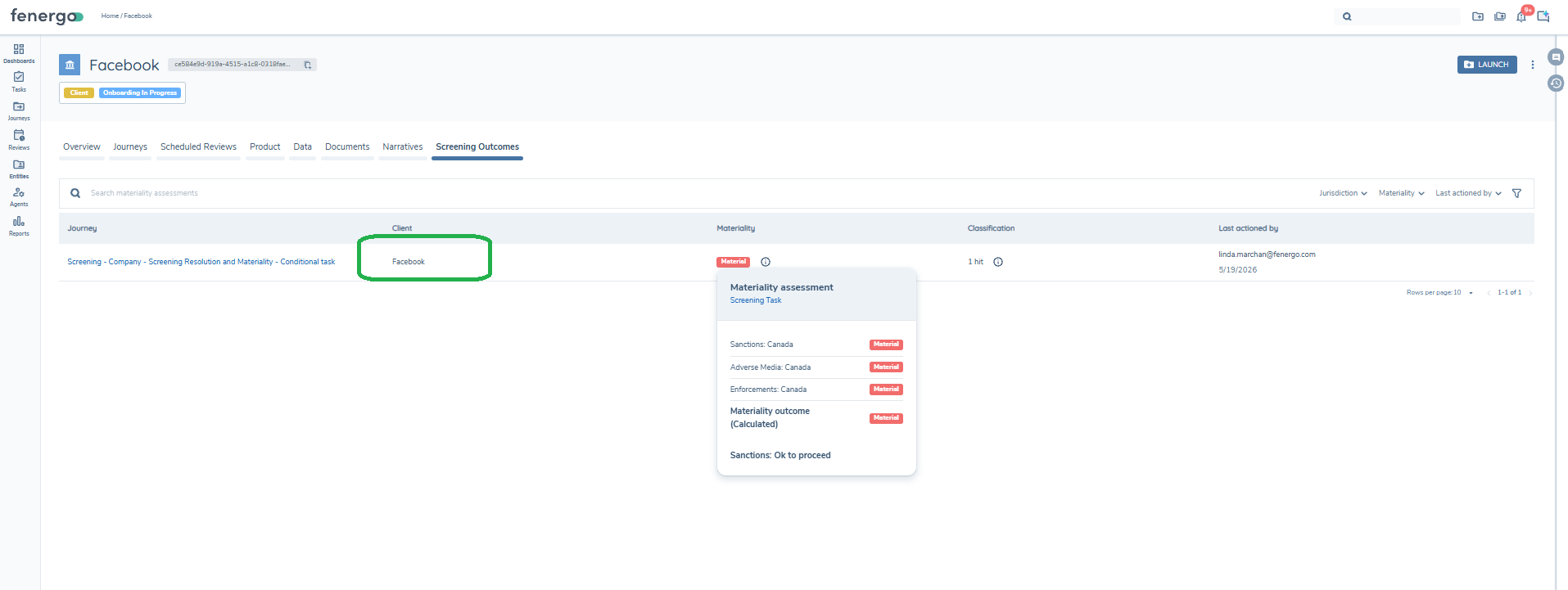
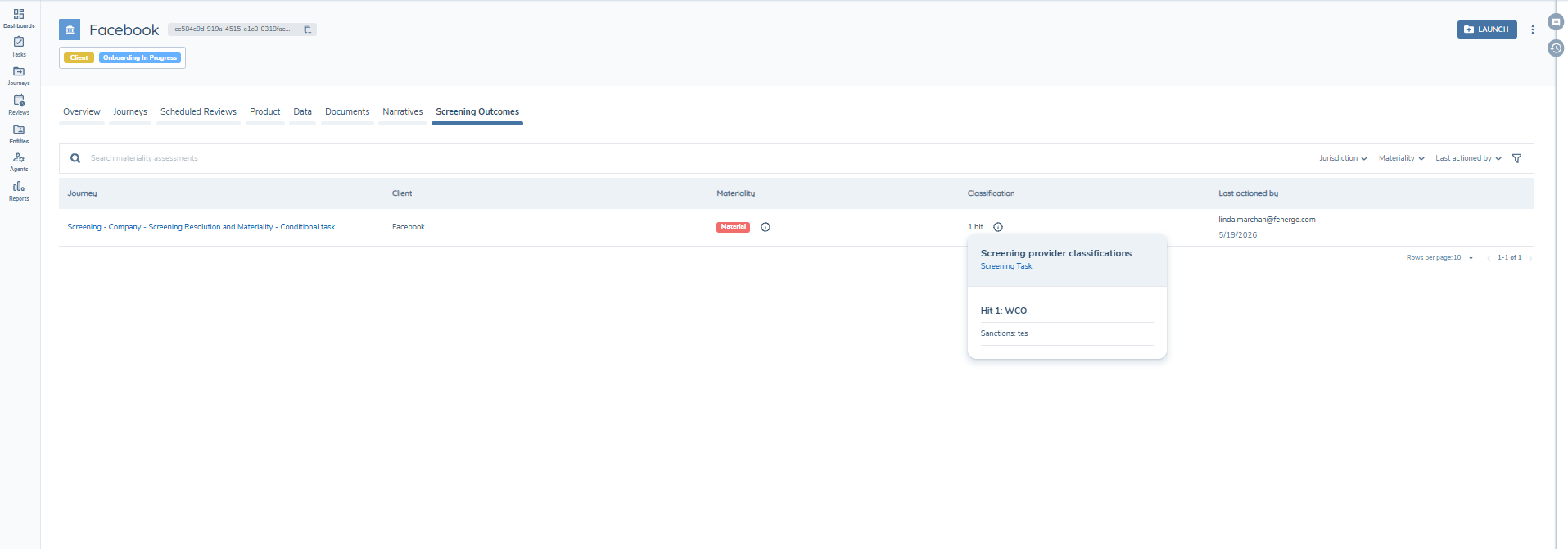
The hits for the batch can also be viewed.
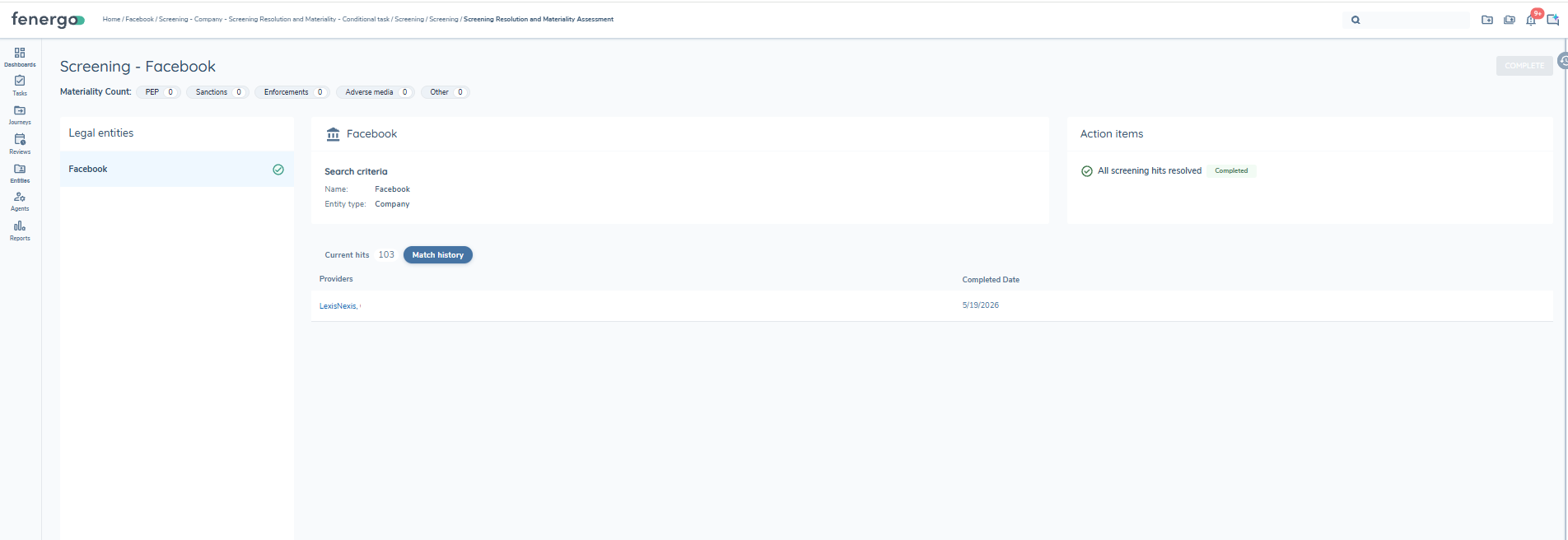
In addition if a screening V2 task is triggered in a subsequent batch you can view the migrated matches in the match history.
This migration covers historic screening data only. Information held in the Profile, Relationships, and Sources tabs is not migrated. Additionally, only one MatchData_EntityUniqueId can be provided per match record.