Product Connected Journeys
Overview
Product Connected Journeys supports the use of parallel child journeys to focus on activities required for 1 or more products. This is optional configuration that can be used to rapidly accelerate the path to revenue for simpler products, while continuing to capture required inputs for more complex products.
Each product connected journey will include a copy of the parent Entity Draft along with its in-scope Product Drafts. Customers can configure these connected journeys to:
- Coordinate Orchestration Activities - Additional Product Information, integrations with downstream systems, approvals
- Activate the in-scope products as soon as their own critical requirements are fulfilled
- Capture Product or Regional specific requirements separately from the parent journey
Key Components
Product Scoping Rules - 'Connected Journey'
'Connected Journey' Product Scoping rules are used to determine which of a Journeys product drafts qualify for a Product Connected Journey. They are called for evaluation by the 'Product Journey Launchpad' task. One or multiple products can match to a Product Scoping Rule, depending on how tightly they are configured - i.e. depending on how specific the conditions are. For example, if I wanted to group all UK products together, I may configure a Product Scoping rule with a 'Booking Entity' condition only. However, if I wanted to separate journeys for UK products by Product Family and or Product Type, I could do that too.
Connected Journey Product Scoping Rules also support an optional configuration to control whether matching products are grouped into a single Connected Journey or launched into separate Connected Journeys.
- Separate journey per matching product (toggle)
- Off (default): All products that match the scoping rule are grouped into a single Connected Journey.
- On: A separate Connected Journey is created for each individual product that matches the scoping rule.
This toggle is available only for Product Scoping Rules of type 'Connected Journey' and does not apply to Product Scoping Rules of type 'Task Display'.
The toggle is Off by default for new rules and for new versions of existing rules. When a new draft version is created from a previously published rule, the toggle is available and defaults to Off. The toggle is also visible on read-only historical versions created before this capability was released.
It is not required that product scoping rules be configured for all possible product combinations, just those that would benefit from a parallel journey. Any product drafts that don't match a scoping rule will remain in-scope of the parent journey and can be verified there.
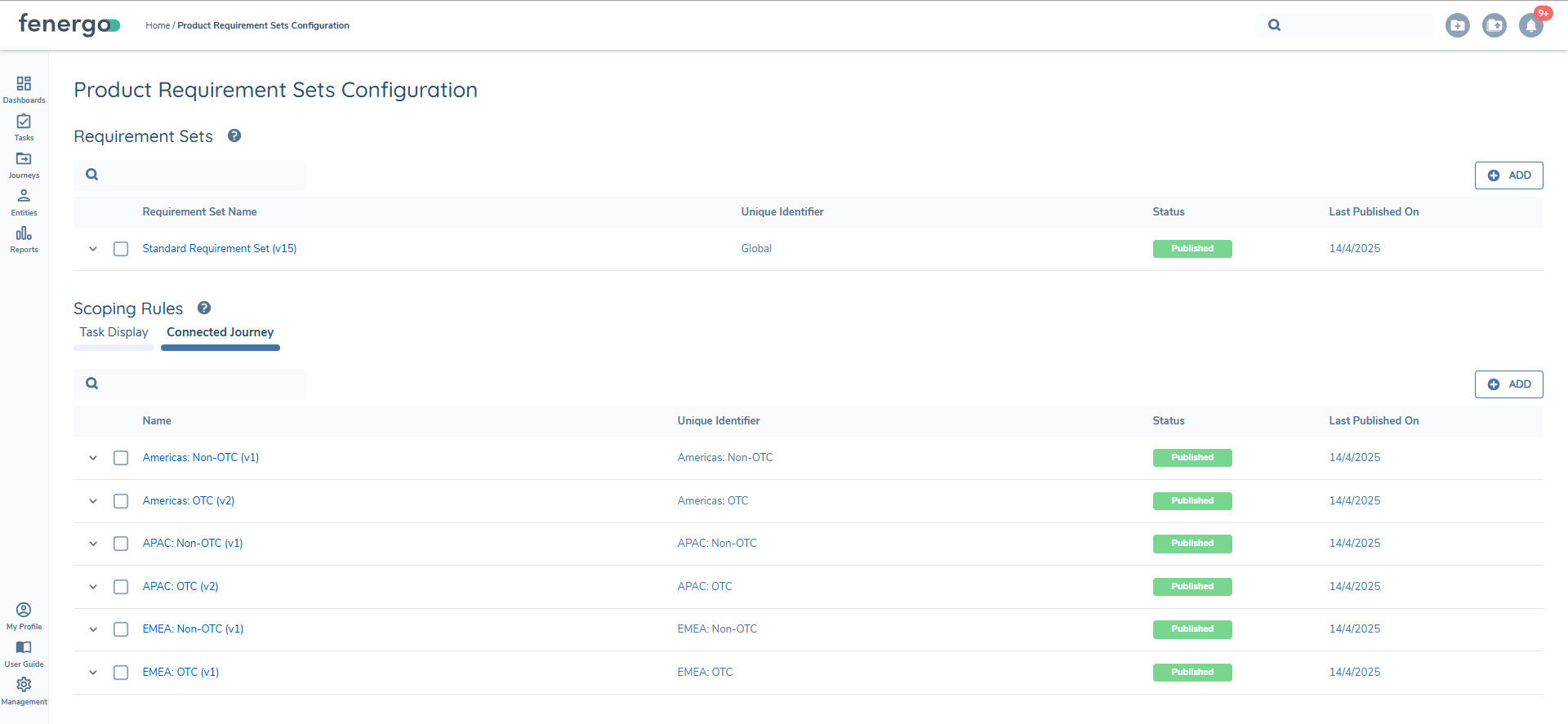
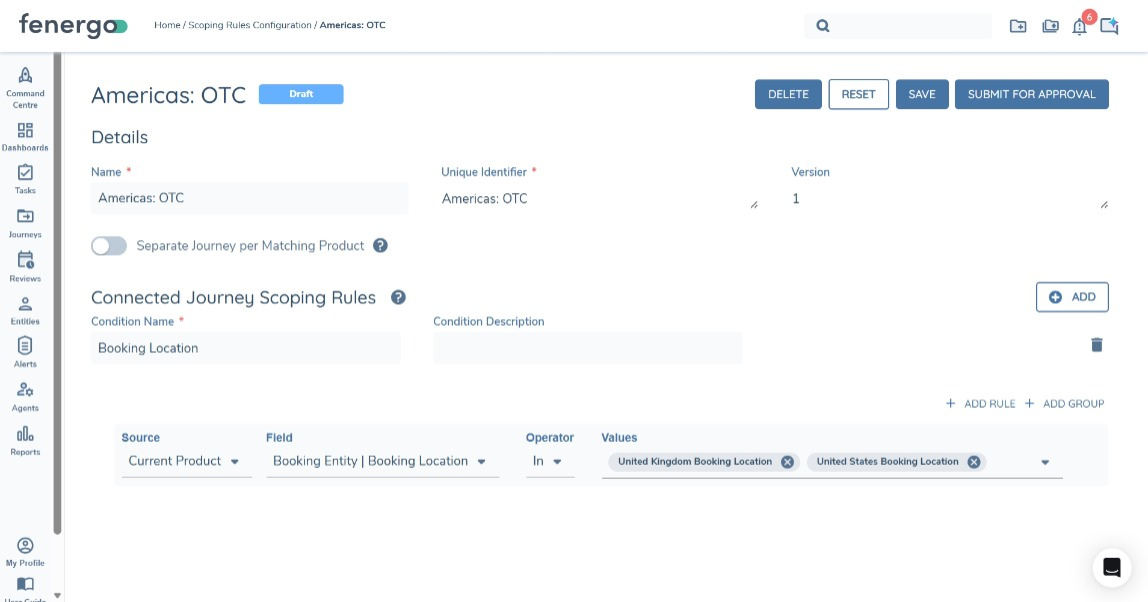
Evaluation of 'Product Scoping Rules' does not currently follow any specific order. When a product is matched to any rule, we will stop evaluating that product. It is important to ensure that a Product can only match to one scoping rule. This will be improved with later enhancements.
Product Journey Launchpad Task
The Product Journey Launchpad task is configured within a journey to evaluate Product Drafts within the journey against Connected Journey Product Scoping Rules. This is used to:
- Identify Product Drafts that require a connected journey and transfer them into that journey
- Launch connected journeys
The task is configured with a Journey Type. This Journey Type determines which Journey Schema will be used to launch a connected journey.
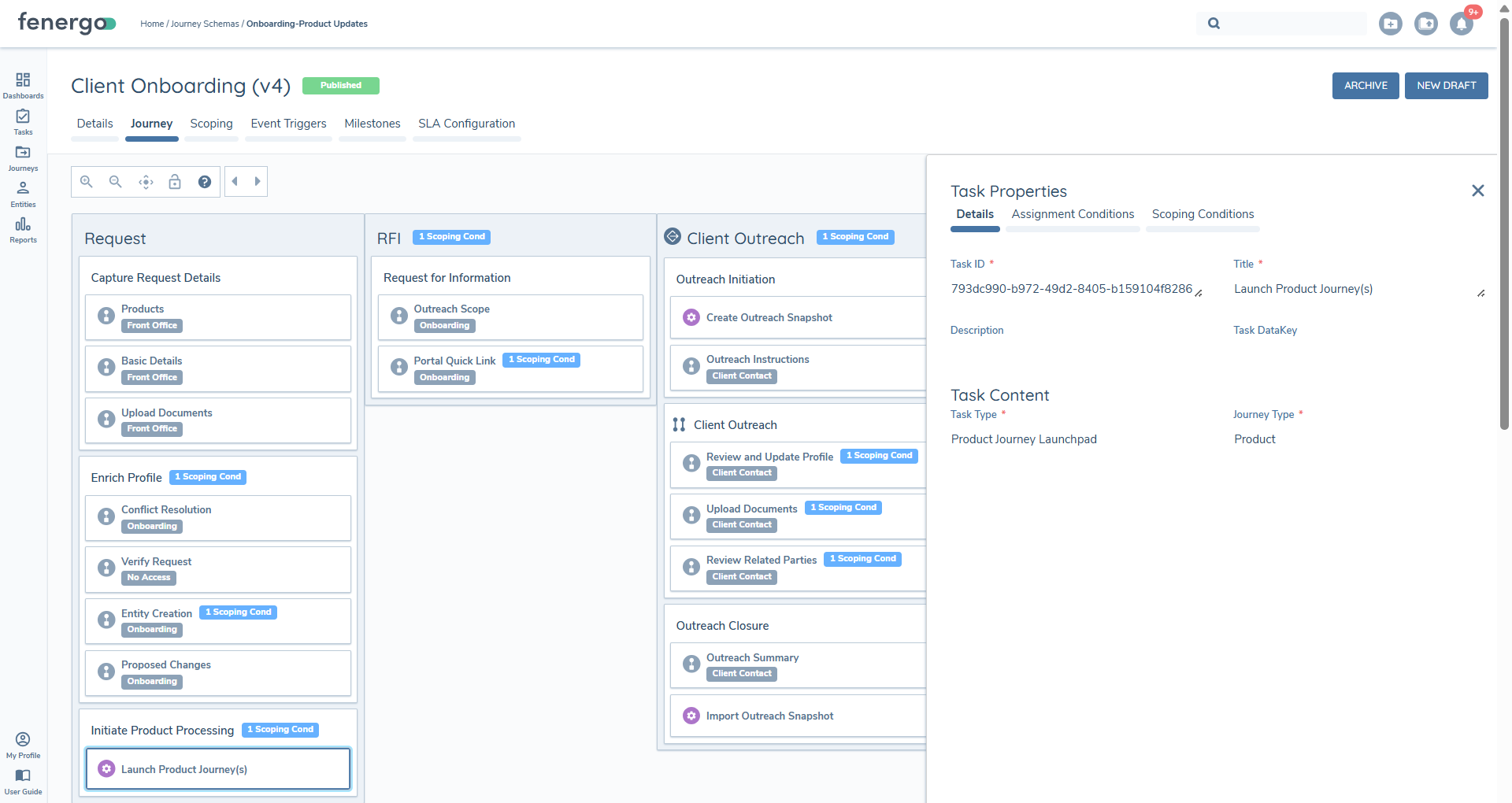
Product Drafts are all eligible to be evaluated under Product Scoping Rules, irrespective of their Lifecycle status ('Onboarding', 'In Review', 'Offboarding'). You can apply scoping conditions to the 'Product Journey Launchpad' task in Maintenance journeys using the 'Related Products' source bring the task into scope when Product Journeys are required.
When we evaulate Journey Schemas (with the configured 'Journey Type' of the Product Journey Launchpad task) there are two key considerations:
- Product Drafts aren't available to evaluate against Journey Schema Scoping Conditions - we evaluate verified data here, so if there are any conditions using the 'Related Products' source, only verified products would be evaluated. This just means that we can't configure different Journey Schemas for different Product scenarios - that conditionality needs to be configured within the Journey Schema.
- Each matched Product Scoping rule will only result in one journey instance for all products that matched the rule. If there are multiple Journey Schemas with matching scoping conditions, the system will pick the first match.
Navigating to Connected Journeys
The Connected Journey View is used to navigate between parent and connected journeys. Each journey will include the name of its source 'Connected Journey' Product Scoping Rule as a prefix to aid in distinguishing between multiple journeys. When 'Separate journey per matching product' is enabled, multiple Connected Journeys can be created from the same scoping rule, and the same rule prefix may appear on more than one journey.
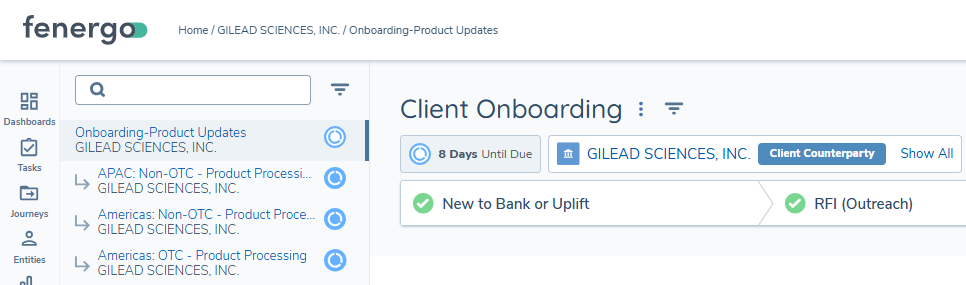
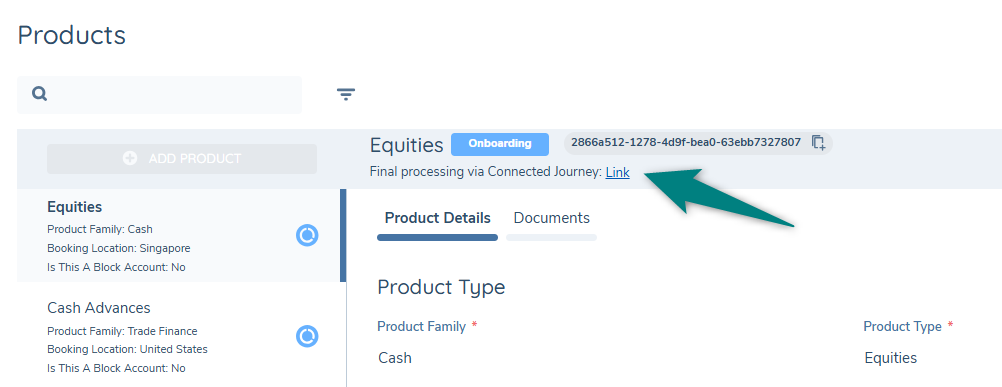
When a Product draft has been transferred, its onward processing is handled in its Connected Journey only. A link will be displayed against each transferred within the Manage Products task to allow easy navigation to their Connected Journey.
'Unblocking' and 'Blocking' Tasks
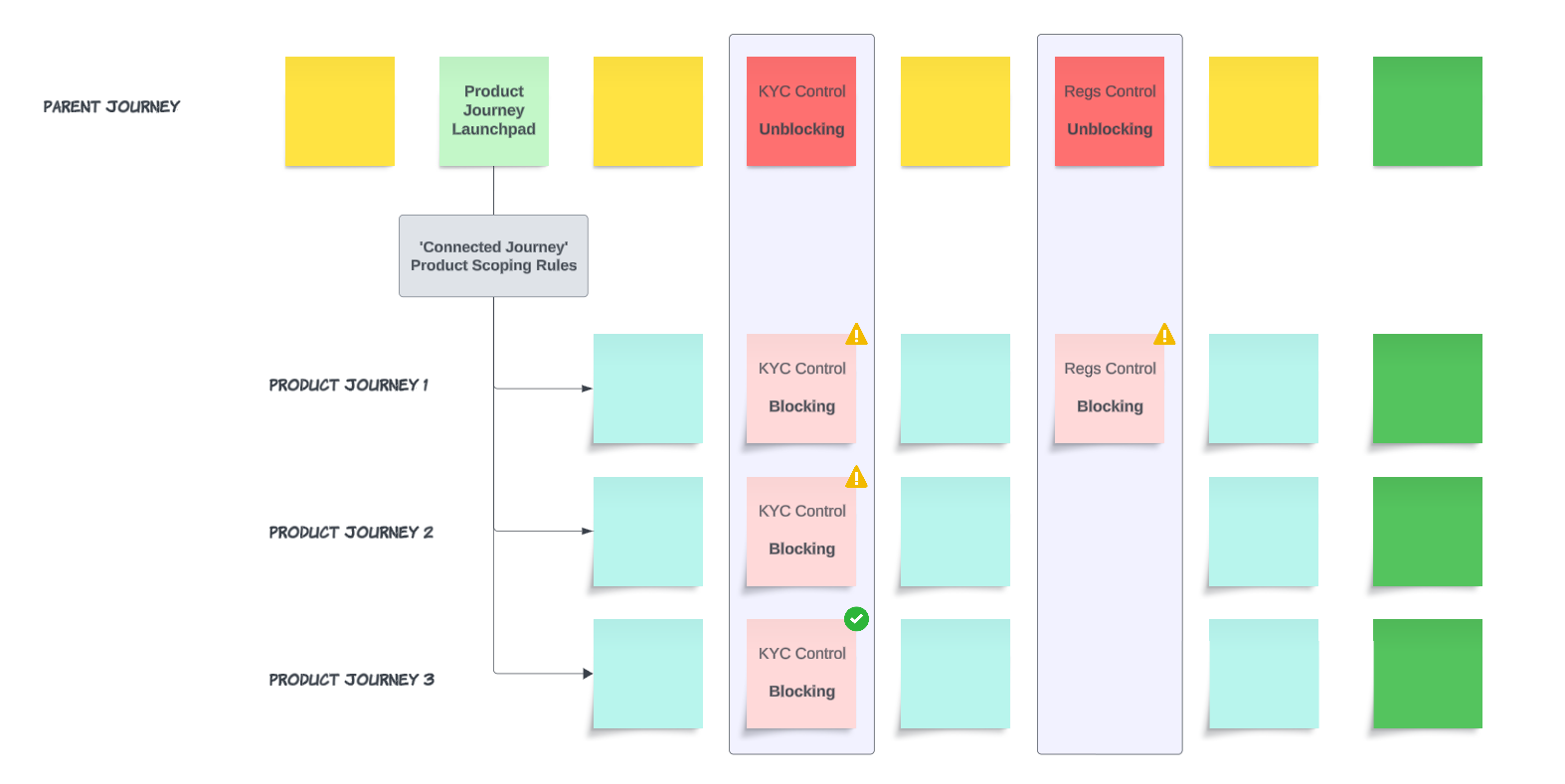
Blocker tasks are used to prevent a connected journey from advancing before the required due-diligence thresholds have been met in the parent journey. This is solved by two tasks that act as a 'pair: The Unblocking task signifies a gate or control within the parent journey and the Blocking Task prevents forward progress in connected journeys unless these gates are cleared (e.g. Tax Complete, Regulations Complete, KYC Complete).
There isn't any limitation on the number of these tasks and they can be configured with scoping conditions to apply in different scenarios. These tasks are automatically completed when they become 'In Progress'.
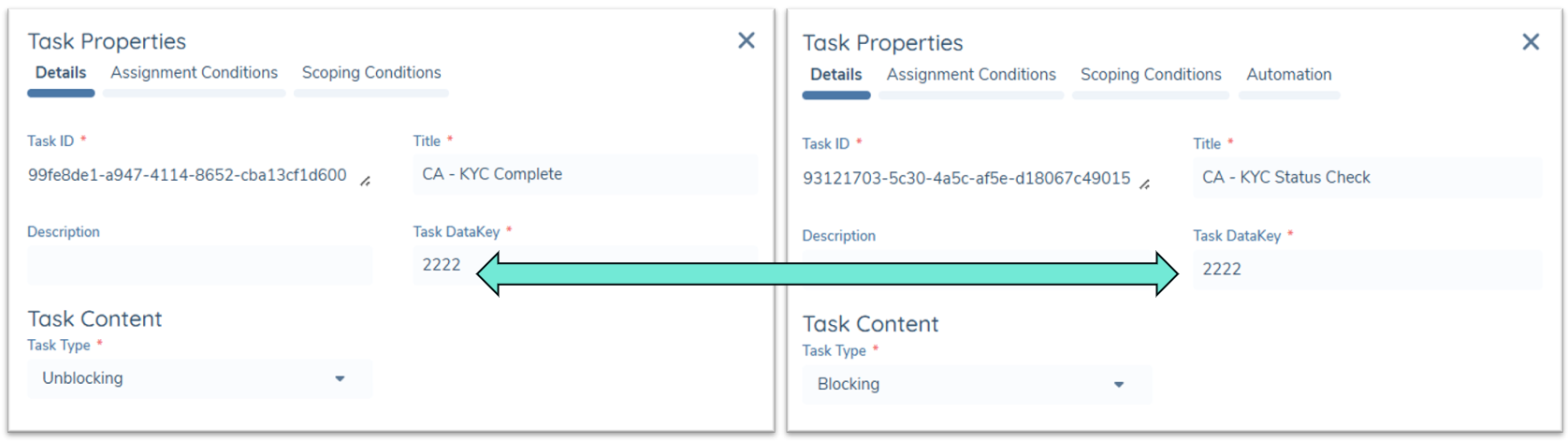
The 'Task Data Key' is used to pair with a 'Blocking' task in a connected journey. When a Blocking task becomes 'In Progress', it will only complete if:
- Its paired 'Unblocking' task has already completed in the direct parent journey
- Or its configured 'Auto Completion' conditions are satisfied Else it will remain 'In Progress' until its paired Unblocking task in the parent journey is completed.
Users can navigate into the 'Blocking' task to understand why they cannot proceed. If the task was configured with a 'Description' this will be displayed to the user. If the Description is blank, default text will display "This task will remain open to prevent this journey from advancing before information required has been collected in a parallel journey. It will complete automatically when requirements are met."
- These tasks can be applied in any Connected Journey scenario (i.e. they are not limited to Product Domain)
- While it's possible to add 'Unblocking' tasks to any stage/process, if triggered 'in any order' 'Unblocking' tasks will automatically complete as soon as they become 'in progress'.
How does it work?
Product Scoping Rules (for 'Connected Journeys') are configured to determine when products require a journey.
When a Product Journey Launchpad task is triggered within a journey, all rules will be evaluated to determine if a Connected Journey is required. A single Connected Journey will be launched for each satisfied scoping rule and one or more products can satisfy the same rule.
Entity and Product Drafts will be transferred to each corresponding connected journey. Any transferred products cannot be edited or verified in the Parent Journey - this can only happen the connected journey.
Unblocking tasks are paired with Blocking tasks. The Unblocking task(s) can be placed within the Parent Journey to signify it has advanced enough that it can release a blocked connected journey. Blocking tasks are placed in the Connected Journey and can either complete with the paired Unblocking task in the parent or using Automation configuration - i.e if they are activated when conditions are met, they will autocomplete. For example, if a Product is added in a jurisdiction that has previously been KYC'd, auto-completion could be used to allow this product to be activated independently of the parent journey.
Configuration Considerations
Correct Order of Operations
| Step | Task | Purpose |
|---|---|---|
| 1 | Manage Products | Capture/modify product draft data |
| 2 | Product Journey Launchpad | Transfer drafts to connected (child) journeys |
| 3 | Product Journey Checkpoint (optional) | Optional checkpoint to block the parent journey until all connected product journeys are finalised (Complete or Cancelled) before proceeding. |
| 4 | Verify Products (within connected journeys) | Verify product data in parallel to parent journeys, using Blocking tasks to ensure due-diligence thresholds are met first. |
| 5 | Verify Products (within parent journey) (optional) | Optionally verify any product drafts that did not require a connected journey and were not transferred |
Regional Onboarding
When clients want to activate a product as soon as due-diligence for it's region has been satisified, it's important to consider the state of Entity Data at that time.
If an Onboarding journey is in-progress with multiple Product Connected Journeys (separated by region based on the product Booking Entity), we can use the combination of Unblocking tasks in the parent journey and Blocking in the Connected Journey to ensure products aren't activated before KYC/due-diligence is met. For simpler products, when their due-diligence threshold is met in the parent journey and the required Unblocking task is completed, they can verify the products in that Journey. In this scenario, we're essentially saying that the client is now 'onboarded' for that region, so we should verify Entity Data. This can be achieved using the Multi-Publish feature, to publish entity data from the Parent Journey. If Entity data has been changed in the connected journey also, then it can be verified there too, but with a Conflict Resolution task preceeding it.
Product Risk Assessment
Product Risk Assessment tasks should come before the 'Product Journey Launchpad' task. The Product Journey Launchpad task will initiate the transfer of products that met the required scoping conditions to their connected journeys. When Product Drafts are transferred, they will no longer be editable in the Parent Journey and will therefore be excluded from any Product Risk Assessment task that runs after the Product Journey Launchpad. If Product Risk is calcualted before the draft is transferred, it will carry into the connected journey and will be verified there.
Agency Request
We don't expect a strong benefit for Product Connected Journeys in Agency Request, because the processing of the whole request has to be completed in a tight timeline. It may be useful in scenarios where a specific process needs to be followed to integrate products with downstream systems.
If using Product Connected Journeys with Agency Request, Agency associations will need to be verified in the Underlying Principal journey (this includes Product associations between the Investment Manager, Owner (UP) and the Managed Relationship), while the each product can be verified in a connected journey.