Fenergo Platform Quick Guide
This document provides a brief overview of the Fenergo Platform. But what does the actual platform look like? What does it do? And how can you familiarize yourself with it? For a more detailed explanation of terms and conventions, refer Glossary and Conventions.
How Can I Use the Fenergo SaaS Platform?
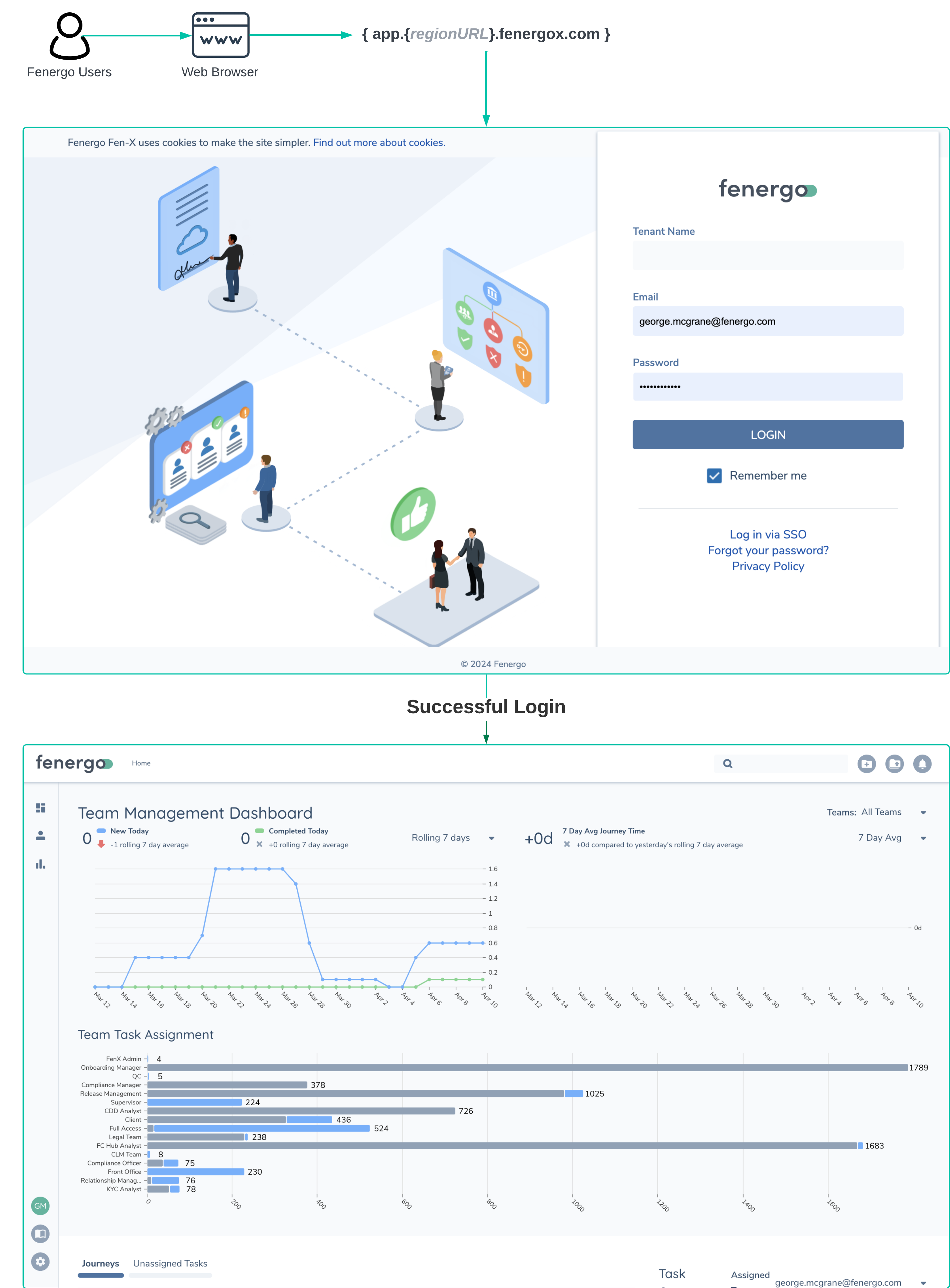
The Fenergo SaaS Platform is a cloud-based service. This means you don't need to install any software or manage any hardware. Fenergo provides the platform as a Managed Service. In other words, we take care of all the deployment and hosting. All you need to access your platform instance is a web browser.
Depending on the Region you choose, we will give you a URL - HTTP Web Address. Your users can enter this address into a standard Chromium-based Web Browser to access the platform. The platform's Login page will appear (as shown below). Your users will need to enter their Tenant Name, Username, and Password (or select SSO for Single Sign-On). Once they're authenticated, they're in.
Entity Journey and Policy
Three key terms that are frequently used in relation to the operation of the Fenergo SaaS Platform are Entity, Journey, and Policy. These three concepts work together to determine a significant part of how the platform can be configured and how it functions. Let's examine each of these terms:
What is an Entity?
An entity is a digital record that is created, managed, and stored on the Fenergo SaaS platform. It represents a real-world company, organization, or individual. These records describe your clients if you are a Fenergo user. When initiating a new relationship with an entity, it is necessary for the service provider to understand as much as possible about the person or company they plan to do business with. This is why there is a need to gather as much information as is legally required by regulatory bodies, as well as to calculate a risk rating for that entity.
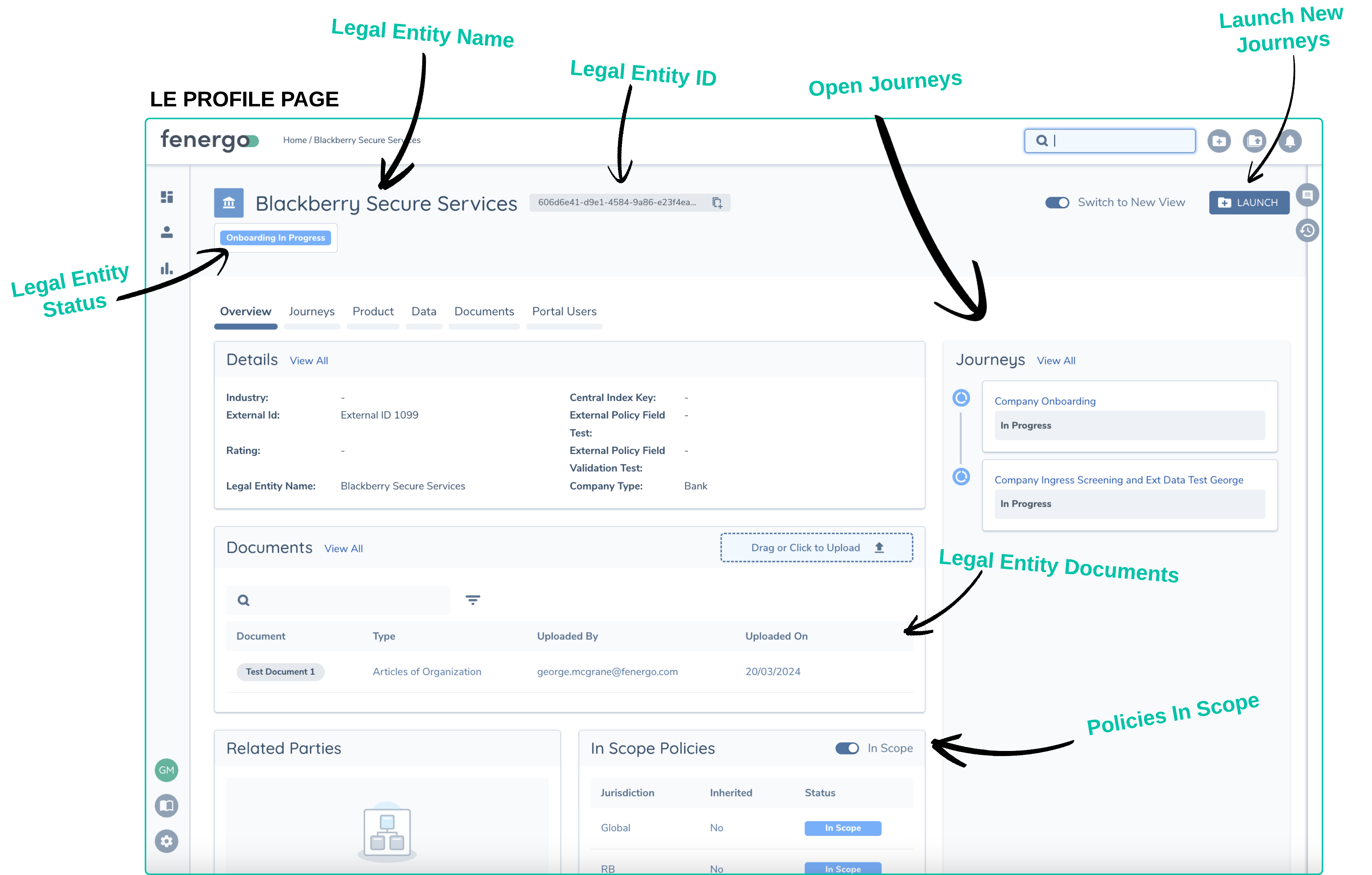
A Legal Entity is shown in Fenergo on a page called the LE Profile page. This page displays all the data captured, relationships, products, and any open or completed Journeys for that Entity, provided the user has the appropriate access to view the record. Below is an example of an LE Profile Page.
What is a Journey?
In the Fenergo SaaS Platform, workflows (or business processes and their steps) are referred to as Journeys. The idea of a Journey is to start at the beginning, work through a series of steps, and reach a destination where the Journey is completed. A common type of Journey is 'Onboarding', which is the process of starting a new relationship with a client. Fenergo clients have their own Business Operating Models for this activity, and our platform allows clients to model this process. This enables their users to carry out the required steps in a consistent and repeatable manner.
- Clients can create as many different Journeys as they need.
- Multiple Journeys can be run at the same time.
- Journeys are used to collect data within tasks.
- In Fenergo, Journeys are made up of Stages, which contain Processes, which in turn contain Tasks.
- The steps and tasks within Journeys can be set up to run in parallel.
- Journeys can include a Maker Checker Functionality, which requires different users to complete different parts.
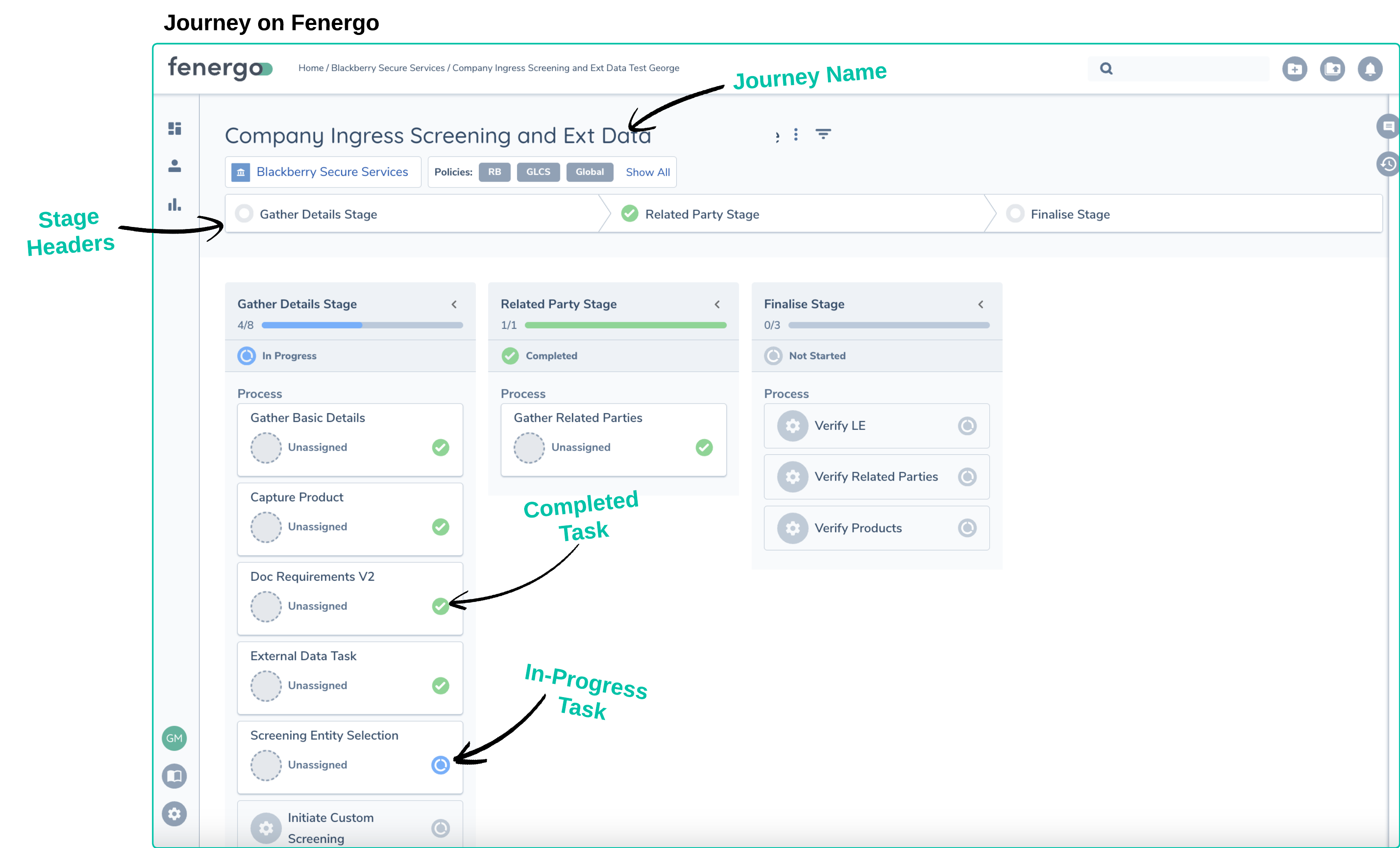
A Journey represents a client's own business processes, which are expressed as a workflow on the Fenergo SaaS Platform.
What is a Policy and How is Data Stored?
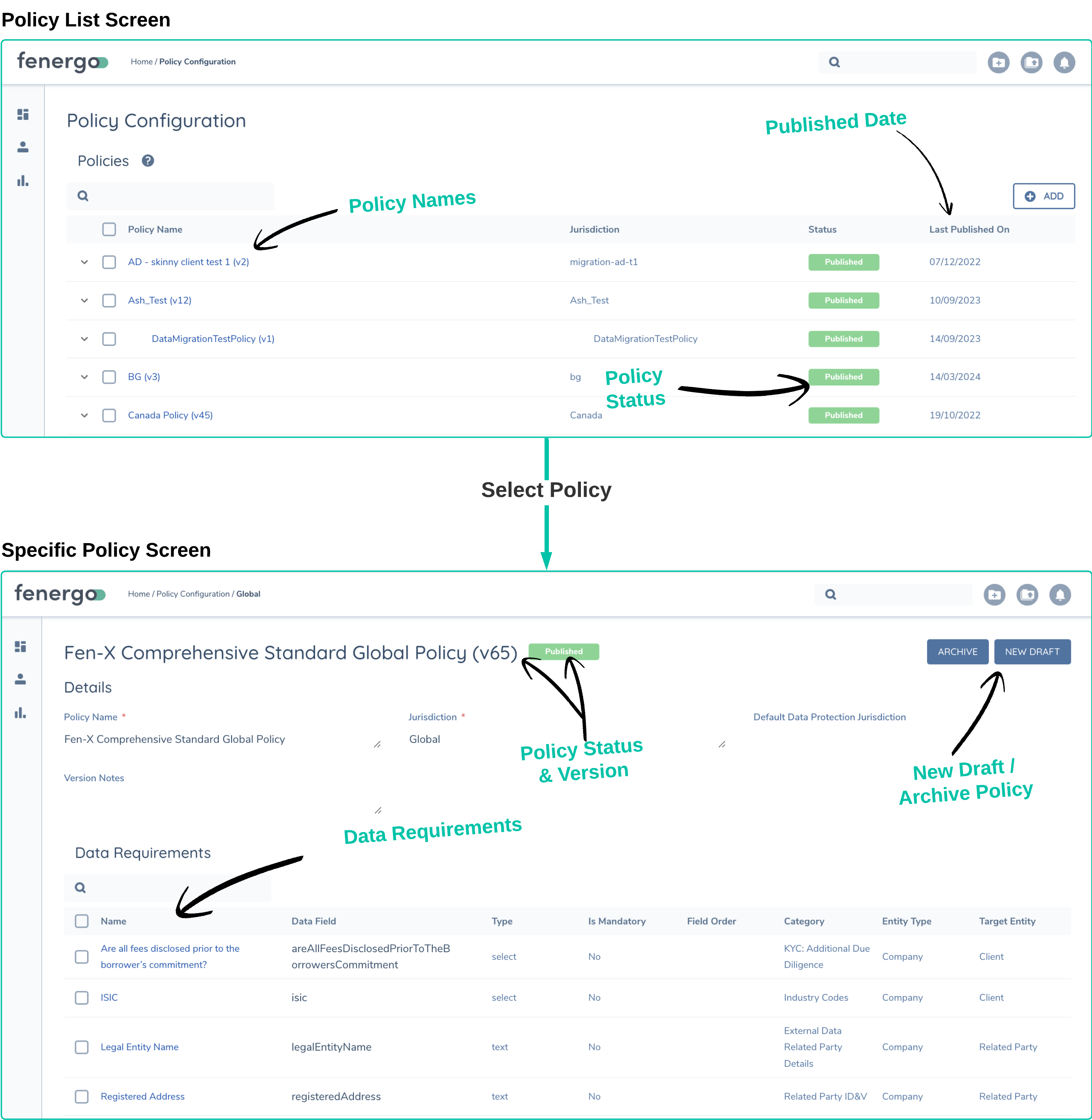
When a user enters data into a task within a Journey (or through an integration, which we'll discuss later), the data is saved in an Entity Record. The type of data that gets saved in the record, including the data fields (like name, address, etc.) and the format of these fields (such as free text, dropdown lists, multi-field substructures), is determined by the configuration inside a Policy.
A Policy in Fenergo consists of:
- Data Requirements: These are data fields such as name, address, identifiers, country, etc.
- Document Requirements: These include Proof of Address, Articles of Incorporation, and so on.
- Ownership and Control Requirements: These pertain to Entity Structure, Shareholders, etc.
Each of these components is tailored to a specific Entity Type (Company/Individual) and has configurable Scoping Conditions. These conditions determine whether a policy is in scope to be collected or not, based on specific factors.
There is a Global Policy that applies to all Legal Entities for whom data is captured. This can be thought of as a common table that applies to all. Additionally, there are Jurisdictionally or Data Dependant Policies that can be configured to come into scope based on specific jurisdictional or other factors that might apply to a given Legal Entity.
Policy Configuration is very specific to each Fenergo client's operating model requirements. However, the platform offers great flexibility in configuring Policies. So, no matter the scenario under which specific data needs to be gathered, the system can reflect those scenarios within Policy Config and scoping rules.
A Policy is not the actual data itself. It's helpful to think of a policy like a Database Table definition. It's like the list of columns that describe the data that can be stored within the table. The actual data (which would be rows in a Database) is stored as JSON documents in a NoSQL database on the AWS Platform.
Summary of Entity, Journey, and Policy
Hopefully, the above information clarifies how Entity, Journey, and Policy function on the platform. If we were to summarize the relationship between these areas in a simple sentence, it would be as follows:
A Policy determines WHAT data is captured, a Journey provides the mechanism to capture this data, and a Legal Entity Record is a collection of the actual data that has been captured.
- Policies can be copied, duplicated, and transferred from one tenant to another.
- Newly published or updated Policies DO NOT affect ongoing Journeys. New Policies are only applied when a new Journey is started (based on the currently published policy).
- Newly published or updated Journeys DO NOT affect ongoing Journeys.
Additional Features of the Fenergo Platform
Fenergo provides a wide array of features that support the entire Client Lifecycle Management process. Here are brief descriptions of some of these features:
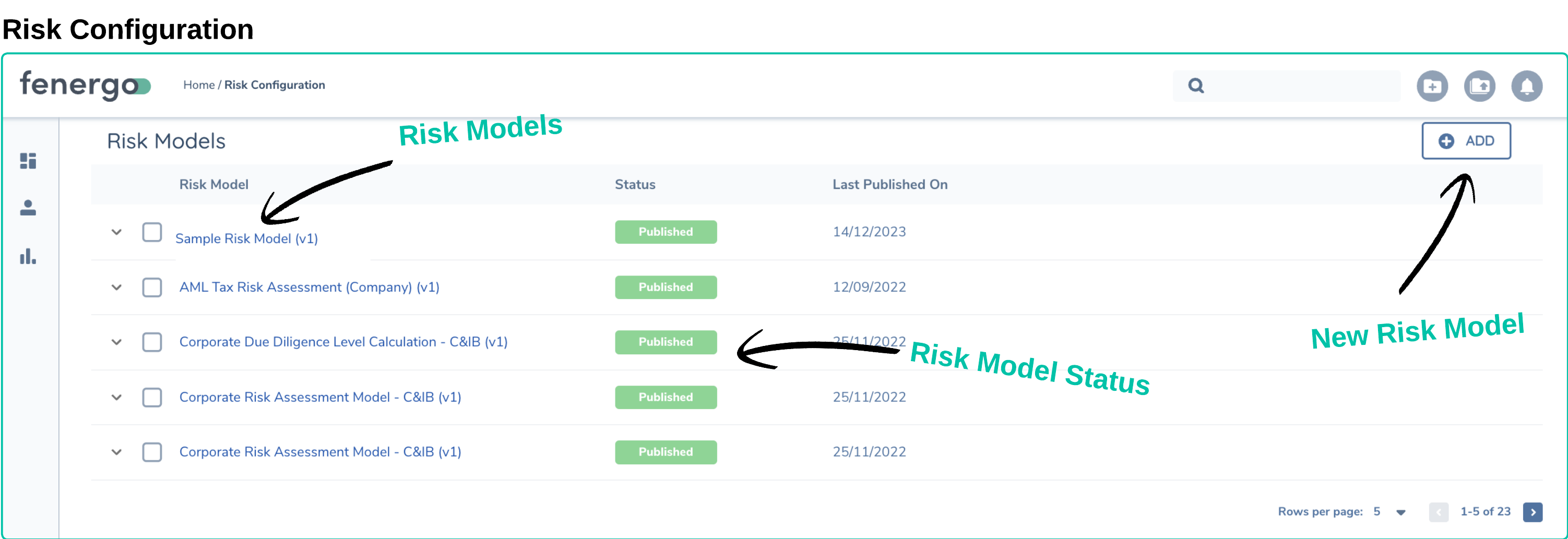
Risk Engine
Fenergo includes a fully customizable risk engine. This allows clients to specify which data points (or risk factors) they want to use to measure risk. This risk calculation can be seamlessly integrated into a Journey as a task. The result of this calculation can then be used to guide the flow of the Journey, triggering conditional tasks and new policy requirements based on the risk outcome.
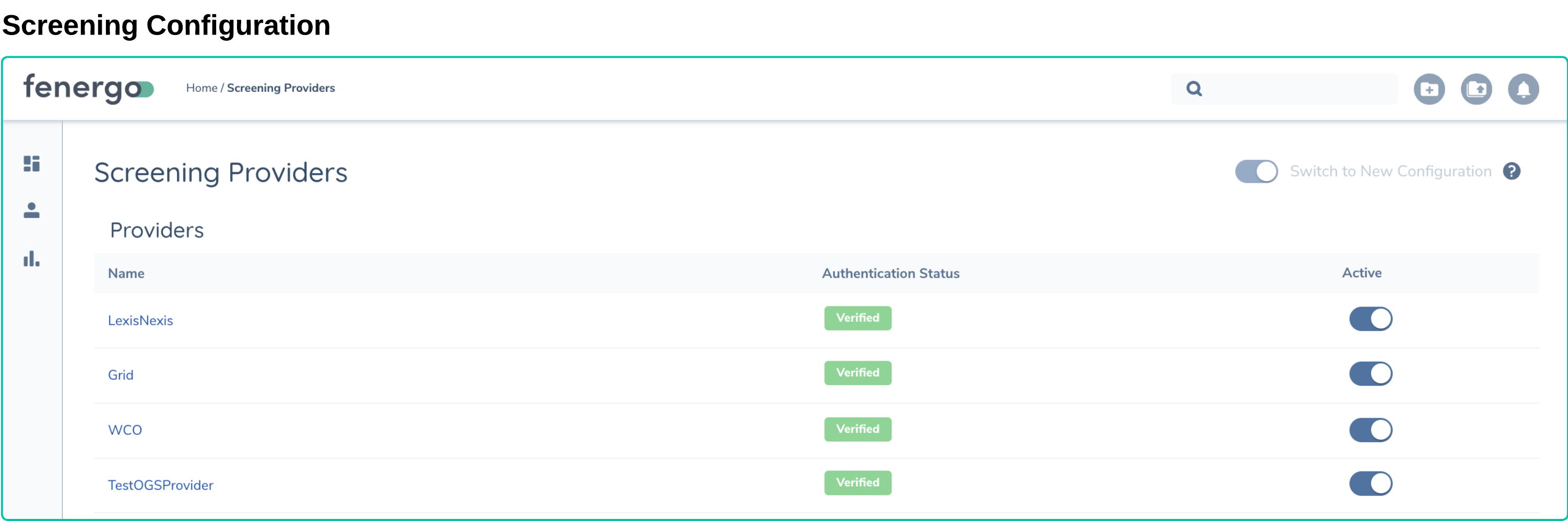
Legal Entity Screening
As part of the Know Your Customer (KYC) process, clients often need to verify if there are any significant KNOWN issues with any of the Legal Entities associated with the relationship they are looking to establish. Screening providers, such as Lexis Nexis or Orbis, offer a service where a search can be conducted against their data sources.
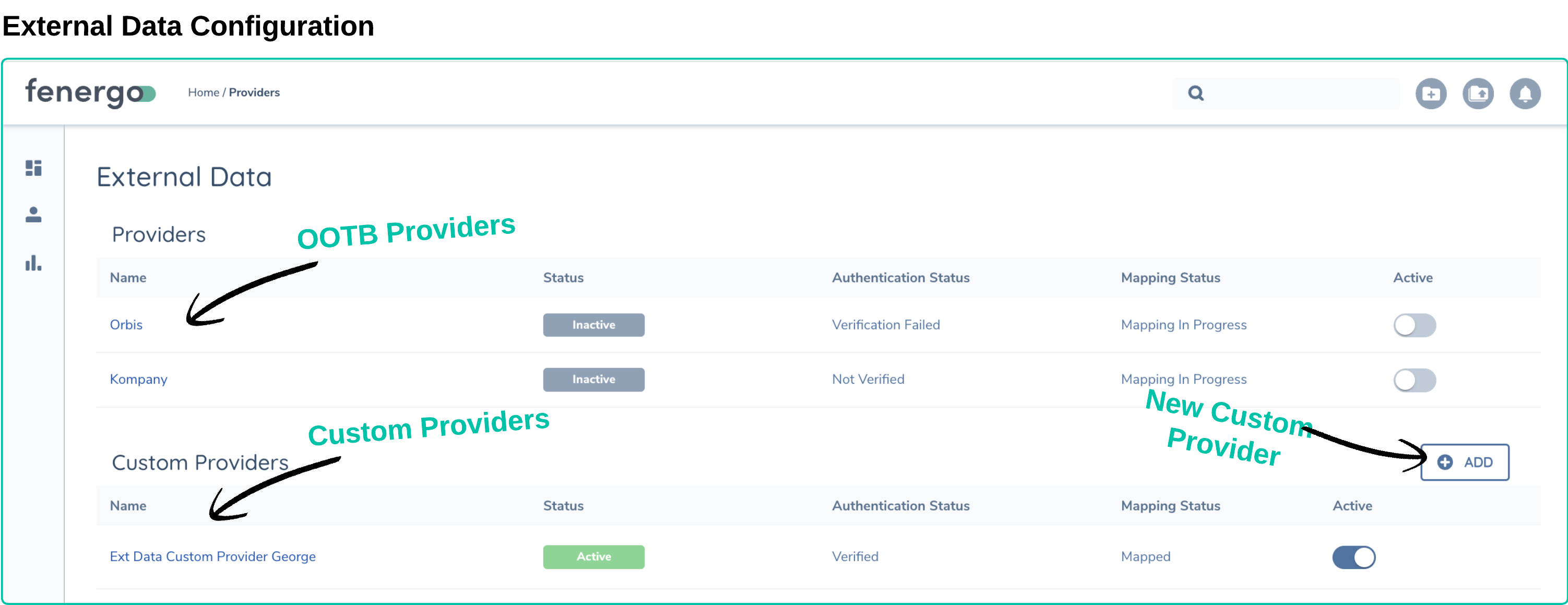
External Data Sources
The Fenergo SaaS platform is designed to interact with external data sources. These could be dedicated external data providers like Kompany, or even an internal data authority, such as a Master Data Management (MDM) platform. Fenergo supports some external data providers right out of the box. Additionally, it offers clients the ability to use an Adapter to connect to their own data sources or other third-party providers.
Integrations, Technical Topics and Cloud
Integrations
Fenergo's platform and solutions do not exist in isolation. There are always other systems that need to share information with Fenergo or retrieve information from Fenergo. These system-to-system interactions are known as Integrations, and they can vary greatly. Some typical integration scenarios to consider include:
- Where and how is new data created?
- Under what circumstances might new Journeys be created or updated?
- An action on Fenergo might serve as a trigger for an action on another system.
- An action on another system might serve as a trigger for an action on Fenergo.
Fenergo operates as an Event Driven platform. This means that when any action is taken on the Fenergo platform, such as the creation of an Entity Record or Journey, or the completion of a Task, that Event can be sent to a client so they can React to that event. When a solution to an integration requirement is described as solvable using events, this is the pattern being referred to.
Action Occurs -> Notification is Sent -> Other System can React
Data Migration
Data Migration involves sourcing data and then transferring it from one computer storage system to another. This typically becomes relevant for Fenergo Clients when:
-
An existing system is being retired or replaced with the Fenergo SaaS platform, and the data on that system is needed to support ongoing operations. and/or
-
The Fenergo SaaS Platform needs to start on Day 1 of its operations with an initial set of data to support operations.
Data Migration is not required if the SaaS Platform is being introduced in a Green Field scenario or if a client wishes to focus on only creating new data on the new platform.
- Fenergo provides native APIs that allow clients to perform data migration independently.
- Data is uploaded as CSV files.
- Fenergo offers migration tools to help clients speed up their efforts.
- Data migration is more about ensuring the continuity of operations.
SaaS Software
Clients use software to carry out a business operation and achieve an outcome. The main difference between Traditional Software and SaaS is that the actual software is provided by a vendor (Fenergo) to clients as a Service, rather than as a technical asset (code) that needs to be installed on client-managed servers and infrastructure.
The two biggest advantages for clients adopting SaaS solutions over traditional software are:
- Speed of Delivery / Deployment - SaaS software can be made available almost instantly for clients to start working with. There is no lead time to provision and manage infrastructure, allowing clients to focus on the outcome of using the software.
- Reduced TCO - A reduction in the Total Cost of Ownership is often presented as a key benefit of cloud adoption, and for good reason. As the responsibility for provisioning, managing, deploying, and securing shifts from the client to the vendor, a lot of activity traditionally carried out by client employees is eliminated. This allows clients to focus on the outcomes of using a software product, rather than on how to switch it on.
Multi Tenanted
Fenergo describes our platform as a Multi-Tenanted SaaS Platform. We have designed our software to allow multiple clients to operate on the same code base. This ensures that Fenergo gets the best benefit from the provisioned resources and in turn passes those benefits onto our clients in terms of both cost and performance. With the immense real-time scalability available from AWS, high resource consumption from one client does not impact the experience (Service Level) of other clients.
Having the same code base does not mean data is co-mingled. All personally identifiable information (Pii) data on a client's production tenant is allocated its own data store. All data is fully encrypted at rest using a key that can only be accessed by the client. This strategy is known as Tenant Isolation. No two tenants can access each other's data.