API Authentication
Transaction Monitoring APIs authentication is described in Fenergo API Authentication guide. Existing CLM credentials are compatible with TM services, and advanced options such as mTLS are also available. This page covers the TM-specific steps for obtaining an access token and calling TM APIs.
If you already have credentials set up for CLM or another Fenergo SaaS API, the same flow applies — refer to the Fenergo API Authentication guide for the full reference including mTLS options and regional endpoints.
Before you begin
You will need the following values from your Fenergo Customer Success contact:
| Value | Description |
|---|---|
CLIENT_ID | Your application's unique identifier |
CLIENT_SECRET | Your application's secret key — treat this like a password |
TOKEN_URL | The token endpoint for your tenant |
TENANT_SCOPE | Your tenant scope, in the format tenant/<tenant-id> — provided by the Customer Success Team |
How it works
Fenergo uses the OAuth 2.0 Client Credentials flow. Instead of sending your credentials on every request, you exchange them once for a short-lived access token, then use that token for all subsequent API calls.
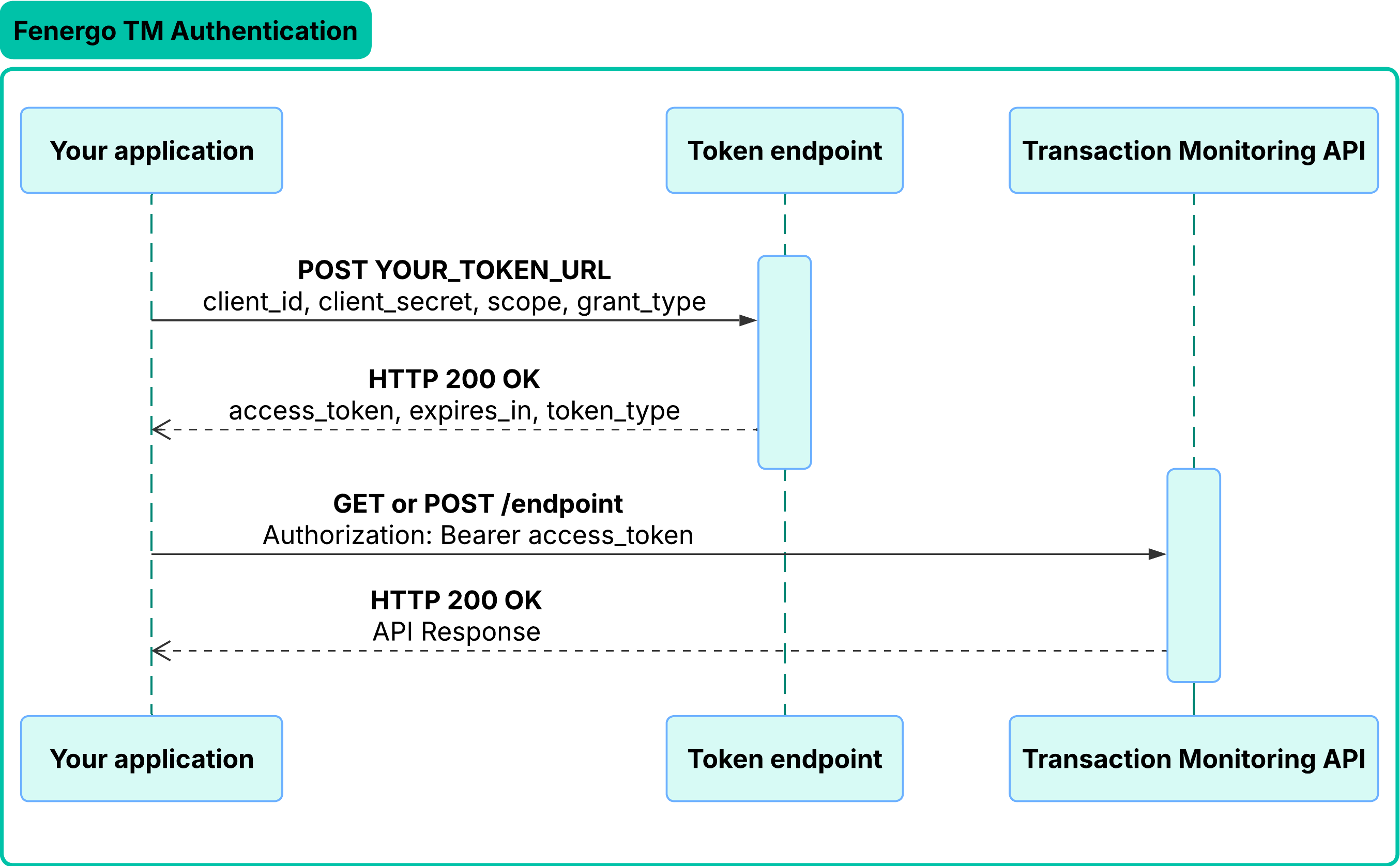
The examples below use curl, a command-line tool available on macOS, Linux, and Windows. You can use any HTTP client (such as Postman, Python requests, or Node.js fetch) to make the same requests.
Step 1 — Request an access token
Run the following command, replacing the placeholders with your values:
curl -X POST 'https://YOUR_TOKEN_URL' \
  -H 'Content-Type: application/x-www-form-urlencoded' \
  -d 'grant_type=client_credentials' \
  -d 'client_id=YOUR_CLIENT_ID' \
  -d 'client_secret=YOUR_CLIENT_SECRET' \
  -d 'scope=YOUR_TENANT_SCOPE'
A successful response looks like this:
{
    "access_token": "eyJhbGciOiJSUzI1NiIsImtpZCI6IkVYQU1QTEVSRVBMQUNFRCJ9.eyJzdWIiOiJFWEFNUExFUkVQTEFDRUQiLCJ0b2tlbl91c2UiOiJhY2Nlc3MiLCJzY29wZSI6InRlbmFudC9leGFtcGxlLXRlbmFudCIsImV4cCI6OTk5OTk5OTk5OSwiaWF0IjoxNzAwMDAwMDAwLCJjbGllbnRfaWQiOiJFWEFNUExFQ0xJRU5USUQifQ.EXAMPLE_SIGNATURE",
    "expires_in": 3600,
    "token_type": "Bearer"
}
| Field | What it means |
|---|---|
access_token | The token to include in all API requests |
expires_in | How long the token is valid, in seconds — 3600 means 1 hour |
token_type | Always Bearer for Fenergo APIs |
Your token expires after 1 hour (expires_in: 3600). After that, any API call will return 401 Unauthorized. Request a new token using the same command above.
Requesting a token is rate limited per IP address — see API Rate Limits for the current limit. Cache your access token for its full lifetime instead of requesting a new one on every API call. Once you're calling the APIs, see TM API Rate Limits for the per-endpoint limits that apply to Transaction Monitoring.
Step 2 — Call a Transaction Monitoring API
Include the access token in the Authorization header of every API request:
curl -X GET 'https://YOUR_API_ENDPOINT' \
  -H 'Authorization: Bearer YOUR_ACCESS_TOKEN' \
  -H 'Content-Type: application/json'
Replace YOUR_ACCESS_TOKEN with the full value of access_token from Step 1.
Troubleshooting
| Error | Most likely cause |
|---|---|
401 Unauthorized | Token has expired — request a new one using Step 1 |
400 Bad Request on token request | Incorrect client_id, client_secret, or scope format |
403 Forbidden | Token is valid but the client credentials lack permission for this resource |