Using the Investment Account Risk Assessment Task
Each Investment Account associated with an Investor entity carries its own risk. Understanding that risk is essential for effectively evaluating and managing the overall risk exposure of both the client and the institution.
The Investment Account Risk Assessment task provides the capability to evaluate the Investment Accounts associated with an Investor entity. It calculates a risk score for each Investment Account and an overall aggregated Investment Account risk that can then be written to the entity, which may then be used in calculating the overall entity risk.
The following document details the user interaction and configuration of the Investment Account Risk Assessment task.
Task Overview
The Investment Account Risk Assessment task offers a comprehensive visualisation of an Investor entity's Investment Accounts and their risk assessment results.
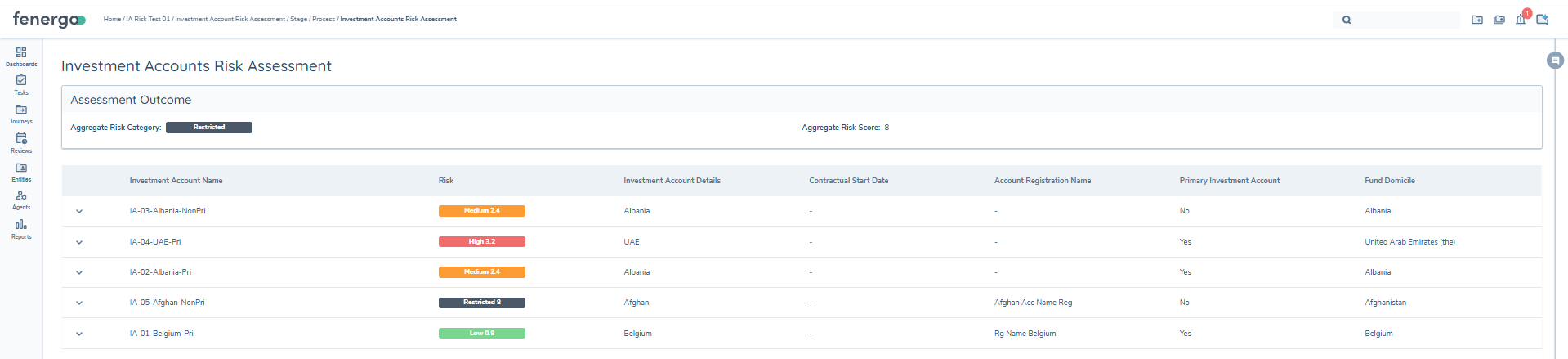
The task is a system task and will automatically run the calculations once started and when successful will automatically be completed. When completed, a user may click into the task to view the results.
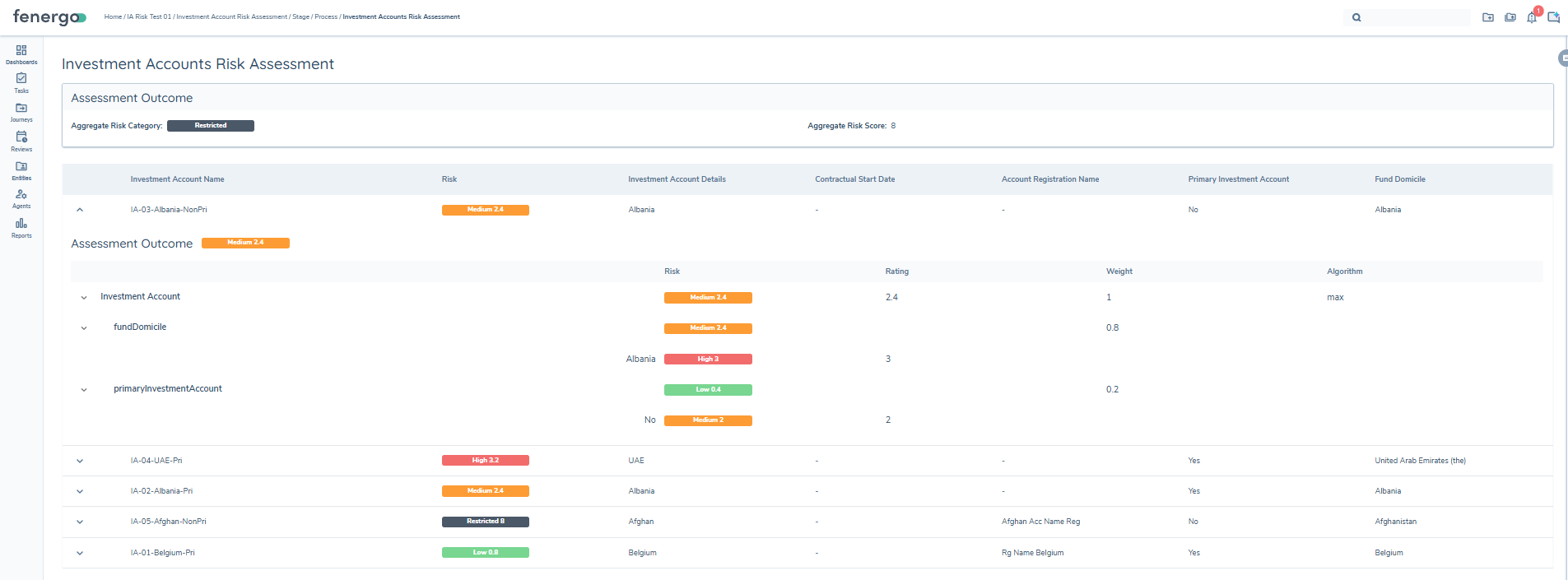
Each Investment Account that was assessed in the current journey is displayed as a row and may be expanded to view the assessment outcome for that Investment Account. The Investment Account Name and Risk rating are always displayed. Additional columns are policy-driven: they are derived from Data Requirements configured in the Investment Account Basic Details category in Policy.
The expanded assessment outcome displays the following:
- Risk Factor Group (for example, Investment Account).
- The database field name of each risk factor included in the risk factor group and its calculated value.
- The columns under the assessment outcome provide the rating of each value, the weight of the risk factor, and the algorithm calculation for that Risk Factor Group.
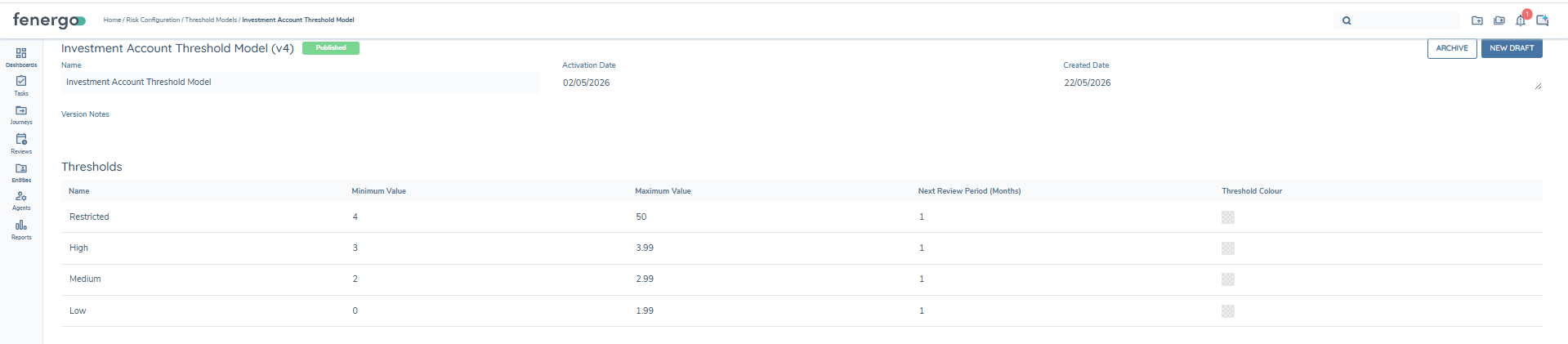
The completed task has an aggregate risk score of 8 which is translated to a value of Restricted. This translation is derived from the threshold model, which states that any aggregate score between 4 and 50 is Restricted.
Assessment Outcome Banner: At the top of a completed Investment Account Risk Assessment task, a read-only Assessment Outcome banner displays the Aggregate Risk Category and Aggregate Risk Score. The banner reflects the true aggregated value calculated by the task — no recalculation or re-filtering occurs in the UI. The same banner is also displayed on completed Bank Account Risk Assessment tasks.
Access Layer: Additionally, the completed task respects Access Layer configuration. Users will only see Investment Accounts that they are permitted to view based on their Access Layer settings. Risk calculation, however, runs for all in-scope Investment Accounts regardless of user visibility.
Investment Account Risk Calculation
Investment Account risk is calculated in accordance with the following.
1. In-scope Investment Accounts are identified.
The Investment Account Risk Assessment task identifies the Investment Accounts linked to the current Investor entity and applies scoping rules to determine which accounts are assessed.
Investment Accounts in Pending Offboarding or Offboarded status are always excluded from the assessment, regardless of how the task is configured. For all other Investment Accounts, scoping is determined by the Only Assess Investment Accounts Created/Updated Within Journey toggle:
- When the toggle is enabled, only Investment Accounts that have a draft in the current journey (newly added or edited accounts) are assessed.
- When the toggle is disabled, verified Investment Accounts without a draft in the current journey have their existing stored risk values reused in the aggregation alongside any newly assessed accounts. If a verified Investment Account has no previously stored risk score, it is not assessed and no values are written.
The task does not create drafts or force Investment Accounts into draft in order to perform assessment.
2. Risk assessment is run for each in-scope Investment Account.
For each applicable Investment Account, the risk assessment model as defined in the task configuration is run. The risk assessment model is based on the following:
- A risk model: the risk factors to be evaluated.
- A configuration collection: the values and scores assigned to every possible input of the risk factors.
- A threshold model: a model that translates a numerical score to a descriptive value, for example High, Medium, or Low.
The model set works together to evaluate data and output a risk score. For a comprehensive explanation of risk model configuration, please refer to the risk user guide.
3. The results are combined into a single value.
The numeric score for each assessed Investment Account is combined into one value. Users can configure whether that combination is calculated using:
- max: chooses the highest
- min: chooses the lowest
- sum: adds all values together
- avg: calculates the average ([sum of values]/[number of values])
4. A final number is produced.
This is the overall aggregated risk score across all in-scope Investment Accounts. This value is saved to a datakey as defined in the task configuration and, where entity-level datakeys are configured, is persisted to the entity.
5. The number is translated into a descriptive label.
The Investment Account risk threshold model is used to translate the numerical score to a descriptive value, for example High, Medium, or Low.
Entity-Level Aggregation
Where the task is configured with entity-level Risk Score and Risk Rating datakeys, the aggregated Investment Account risk outcome is persisted to the entity. These aggregated values are available for use in entity risk models, policy conditions, journey routing rules, and document requirements.
Aggregation does not automatically affect the overall Entity Risk unless the aggregated Investment Account risk datakeys are explicitly referenced in an Entity Risk Model.